Hands On
Key Takeaways
Amazon Bedrock provides a centralized graphical playground to discover, test, and benchmark foundation models without writing a single line of application code.
Through the Model Catalog, you can filter across providers (Amazon, Anthropic, DeepSeek,Moonshot AI, Qwen). Inside the Playgrounds, Bedrock provides real-time telemetry—Input Tokens, Output Tokens, and Latency—which directly drive pricing and model selection strategy for production workloads.
Hands-On Workflow: Model Exploration & Testing
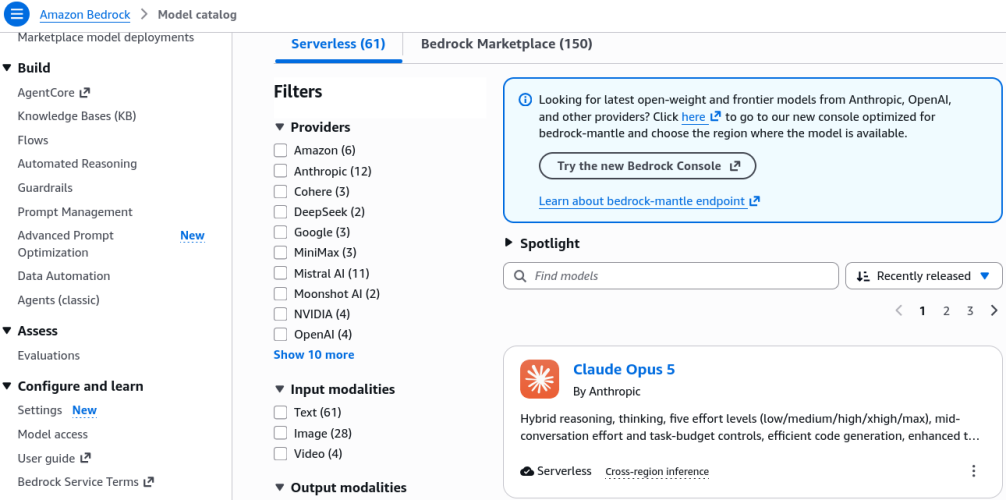
- Explore the Model Catalog:
Navigate to the Amazon Bedrock Console and select Model Catalog from the left-hand navigation pane.
- Filter by Provider: Filter models by creator (e.g., Amazon, Anthropic, Meta, Stability AI).
- Filter by Modality: Filter by output capability (e.g., Text, Multimodal, Image, Video).
- Inspect Model Details: Click on a specific model card (or provider overview) to review input/output modalities, supported features, context window limits, and token pricing dimensions.
- Test Text Models in the Chat / Single-Prompt Playground:
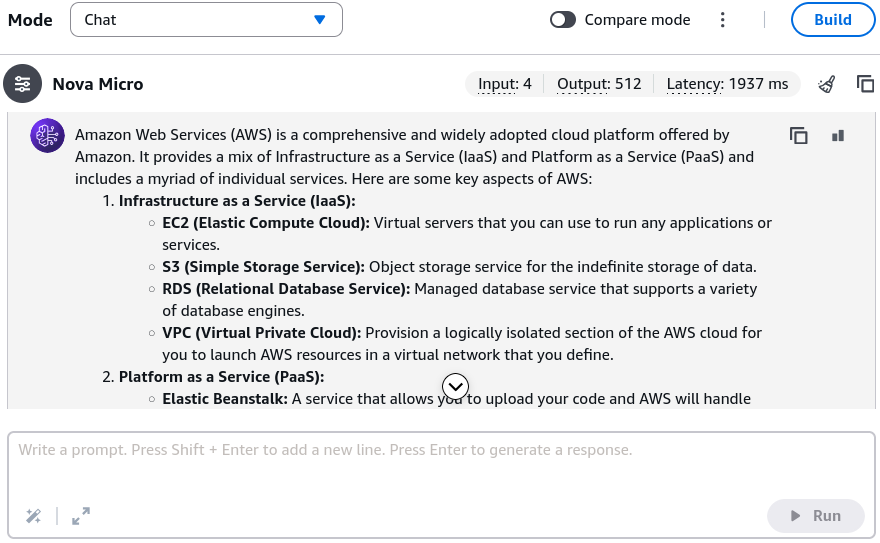
Under the Playgrounds section in the left navigation, select Chat (or toggle to Single Prompt mode).
- Click Select Model and choose an entry-tier model (e.g., Amazon Nova Micro for low-latency, cost-optimized text generation).
- Enter a baseline prompt:
What is AWS?and click Run. - Observe the response output alongside the execution metrics:
- Input Tokens: Number of processed tokens in the prompt.
- Output Tokens: Number of newly generated completion tokens.
- Latency: Total turnaround time (in milliseconds/seconds) to complete generation.
- Benchmark Across Model Providers & Capabilities:
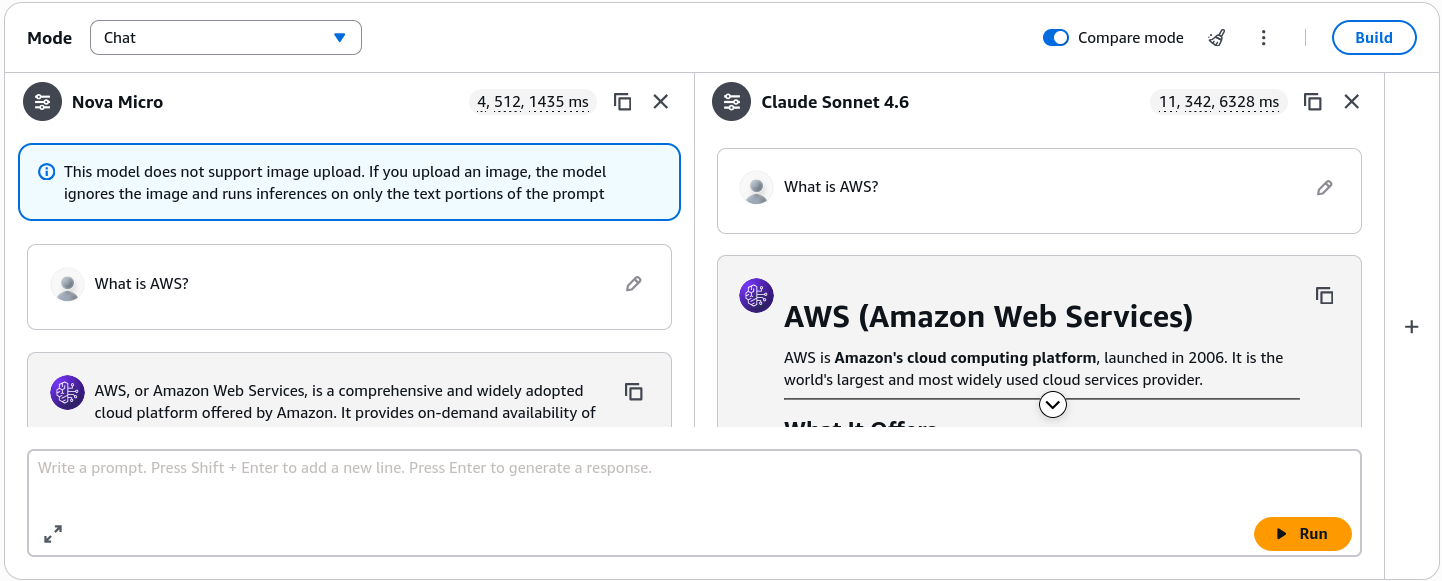
Toggle the compare mode in the playground to evaluate different performance profiles:
- Compare the current model to an advanced reasoning or multimodal model (e.g., Anthropic Claude Sonnet 4.6).
- Submit the identical prompt:
What is AWS?and click Run. - Compare output depth, formatting style (e.g., structured markdown, headers), token consumption differences, and response latency.
- Multimodal Attachments: Note that models supporting multimodal capabilities allow uploading documents or image attachments directly into the prompt context for analysis.
- Generate Visuals in the Image & Video Playground:
Navigate to the Image / Video Playground on the left-hand menu.
- Select an image generation foundation model (e.g., Amazon Nova Canvas or Stability AI SDXL).
- Adjust generation parameters:
- Image Dimensions / Aspect Ratio (e.g., 1024x1024, 16:9).
- Number of Images to generate per batch.
- Color Palette / Style Presets (optional seed image guidance).
- Enter a descriptive generation prompt:
Show me a person wearing an AWS backpackand click Run. - Evaluate the generated image variations for prompt adherence and visual fidelity.
Exam Guide
Exam Tips
- Cost & Performance Benchmarking Metrics: The exam tests your ability to choose the right model tier for a business requirement. Know what the playground telemetry tells you:
- Input Tokens vs. Output Tokens: AWS Bedrock bills on-demand inference separately for input tokens and output tokens (output tokens typically cost more per thousand/million tokens).
- Latency Trade-offs: Smaller, specialized text models (like Amazon Nova Micro) deliver ultra-fast latency at rock-bottom cost, whereas high-parameter reasoning models (like Claude Sonnet or Nova Pro) trade higher latency and cost for complex multi-step reasoning.
- Multimodal Model Support: When a scenario requires analyzing an image, PDF invoice, or video file alongside a prompt, you must select a Multimodal foundation model rather than a pure text-only LLM.
- Amazon Nova Model Family Lineup:
- Nova Micro: Text-only, ultra-low latency, lowest cost.
- Nova Lite / Nova Pro: Multimodal (text, image, video understanding) with varying reasoning depth.
- Nova Canvas: Dedicated text-to-image synthesis with editing and watermarking features.
- Nova Reel: Video generation from text/image prompts.
Practice Test
Question 1
A retail company wants to build an automated product catalog assistant. The application must process customer photos of clothing items and generate descriptive marketing text. Which model selection strategy in Amazon Bedrock meets this requirement?
- A. A text-only model like Amazon Nova Micro
- B. A multimodal foundation model that supports image input and text output
- C. An image-only generation model like Amazon Nova Canvas configured for text responses
- D. A rule-based expert system running inside Amazon EC2
Correct Answer
- B. A multimodal foundation model that supports image input and text output
- Explanation: Ingesting an image and returning natural language descriptions requires a multimodal foundation model (such as Amazon Nova Lite/Pro or Anthropic Claude). Text-only models cannot parse visual pixel inputs, and image generation models synthesize images rather than text completions.
Question 2
An AI developer is testing two models in the Amazon Bedrock Chat Playground for a high-volume, cost-sensitive text summarization pipeline. Model A returns responses with 450 output tokens in 400ms at low cost, while Model B returns responses in 2,500ms at 5x the cost per token. Which factor should primary guide the selection for real-time high-throughput chat?
- A. Selecting Model B because higher token counts always yield better compliance
- B. Selecting Model A to optimize for low latency and minimal token consumption costs
- C. Enabling multi-region replication before testing playground tokens
- D. Switching from the unified API to single-tenant EC2 instances
Correct Answer
- B. Selecting Model A to optimize for low latency and minimal token consumption costs
- Explanation: For high-volume, real-time interactive workloads, selecting a lightweight, cost-optimized model (Model A) that minimizes latency and token consumption delivers the optimal price-performance ratio.