Foundation Model (FM) - Hands On
Key Takeaways
Amazon Bedrock provides native tooling to compare foundation models side-by-side and adapt them to enterprise requirements using three distinct Customization Techniques:
Bedrock Model Customization Techniques
| Technique | Core Mechanism & Best-Fit Scenario |
|---|---|
| Supervised Fine-Tuning | Adapts models to specialized domains using labeled I/O data |
| Reinforcement Fine-Tuning | Iteratively optimizes model behavior using a reward function |
| Model Distillation | Trains a small, fast "student" model using a larger "teacher" |
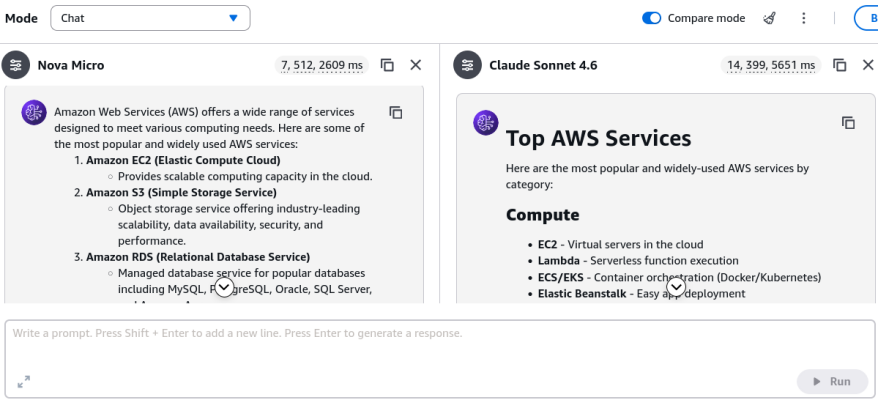
Using the Compare Mode in the Chat Playground, you can evaluate model capabilities (such as text-only vs. multimodal vision support), token consumption, output quality, and latency before committing to customization workflows.
Hands-On Workflow: Model Benchmarking & Customization Setup
- Launch Compare Mode in Chat Playground:
Navigate to the Amazon Bedrock Console, select Playgrounds on the left menu, and open the Select Model menu.
- Select a lightweight model on the left pane (e.g., Amazon Nova Micro).
- In the top-right corner, click Compare Mode to split the interface into a dual-model view.
- Select a multimodal reasoning model on the right pane (e.g., Anthropic Claude Sonnet 4.6).
- Benchmark Modality & Multi-Model Inferences:
Inspect the input capabilities of both panes:
- Notice that text-only models (e.g., Nova Micro) disable or ignore image/document attachments, whereas multimodal models support file uploads.
- Enter a sample prompt across both panes (e.g.,
What are the top AWS services?) and click Run. - Compare the telemetry side-by-side:
- Token Consumption: Input tokens vs. Output tokens generated.
- Response Latency: Execution duration (e.g., fast short-form answers vs. comprehensive long-form answers).
- Formatting & Structure: Tone, bulleted structure, and depth of explanation.
- Navigate to Bedrock Custom Models:
On the left-hand navigation pane under Foundation models, select Custom models.
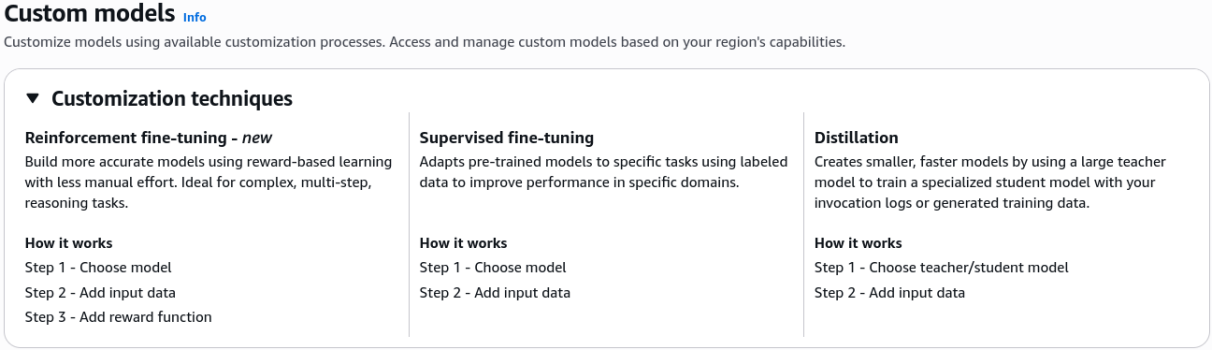
- Review the three available customization methods:
- Supervised Fine-Tuning (SFT): Uses paired, labeled input-output datasets.
- Reinforcement Fine-Tuning (RFT): Uses input datasets paired with an evaluation Reward Function (e.g., AWS Lambda or LLM-as-a-judge) to steer multi-step reasoning.
- Model Distillation: Compresses the intelligence of a large Teacher Model into a compact, low-latency Student Model.
- Review the three available customization methods:
- Configure a Supervised Fine-Tuning Job:
Click Create and select Create Supervised fine-tuning job:
- Model Selection: Choose an eligible base foundation model (e.g., Amazon Nova 2 Lite / Amazon Titan Text).
- Hyperparameter Configuration: Define training hyperparameters (e.g., Epoch count, Learning rate multiplier, Warmup steps).
- Data Storage Paths (Amazon S3):
- Specify the S3 Input Data URI pointing to your labeled JSONL dataset.
- Specify the S3 Output Data URI to store training metrics, validation logs, and output checkpoints.
- IAM Service Role: Select or create an AWS IAM role granting Bedrock
s3:GetObjecton the training bucket ands3:PutObjecton the output bucket. - Click Create Job to start managed training.
Exam Guide
Exam Tips
- Model Customization Method Scenarios:
- Supervised Fine-Tuning (SFT): Choose when you possess high-quality labeled input-output pairs to train a model on specific domain vocabulary, corporate jargon, or exact response schemas.
- Reinforcement Fine-Tuning (RFT): Choose when output correctness can be scored programmatically (e.g., math proofs, unit tests, code execution) using a Reward Function.
- Model Distillation: Choose when you need a smaller, cheaper, and faster model to match the reasoning quality of an expensive flagship model for edge or high-throughput deployments.
- Storage & Access Architecture: Training data for custom models must reside in Amazon S3, and Bedrock requires an IAM Service Role with explicit read/write permissions to execute the job.
- Security & Isolation: A custom fine-tuned model is encrypted and stored exclusively in your AWS account; it is never shared back to public foundation models or external model providers.
Practice Test
Question 1
A development team wants to deploy a low-latency, cost-effective customer support model. They want the lightweight model to mimic the complex reasoning and answer quality of a much larger, flagship model like Anthropic Claude 3.5 Sonnet. Which model customization technique in Amazon Bedrock directly satisfies this requirement?
- A. Supervised Fine-Tuning (SFT)
- B. Model Distillation
- C. Retrieval-Augmented Generation (RAG)
- D. Continued Pre-training on unlabeled data
Correct Answer
- B. Model Distillation
- Explanation: Model Distillation transfers knowledge and reasoning capabilities from a larger "teacher" model into a smaller, faster, and more cost-effective "student" model, optimizing latency and inference expense without sacrificing high-tier response quality.
Question 2
An AI engineer needs to launch a fine-tuning job on Amazon Bedrock to customize an Amazon Nova model for specialized legal document extraction. Where must the training dataset be hosted, and what AWS component grants Bedrock permission to access it?
- A. Amazon Elastic File System (EFS) with an EC2 Instance Profile
- B. Amazon S3 with an IAM Service Role
- C. Amazon DynamoDB with a Resource-based Access Policy
- D. AWS Secrets Manager with an KMS Encryption Key
Correct Answer
- B. Amazon S3 with an IAM Service Role
- Explanation: In Amazon Bedrock, training and validation datasets for model customization must be stored in an Amazon S3 bucket. Amazon Bedrock uses an IAM Service Role to securely assume permissions to read the input data and write validation artifacts.
Further Learning
- For an architectural deep-dive into advanced training methods, check out Unlock Advanced Model Training: Reinforcement Fine-tuning on Bedrock. This session breaks down reinforcement learning with verifiable rewards and real-world implementation workflows on Amazon Bedrock.