Amazon Q Business Architecture, Connectors & Enterprise Security
Key Takeaways
Amazon Q Business is a fully managed, generative AI assistant designed specifically for enterprise employees. Built on foundation models orchestrated via Amazon Bedrock, it indexes internal corporate data across 40+ connectors to answer questions, synthesize reports, and automate workplace tasks while strictly maintaining source document permissions.
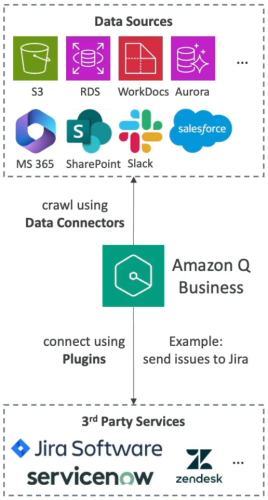
Unlike low-level Bedrock APIs, Amazon Q Business is an out-of-the-box application layer. It abstracts embeddings, vector storage, and chunking into a turnkey workflow featuring Data Connectors (read-only RAG ingestion), Plugins (read/write action execution), and IAM Identity Center integration.
Main Discussion
The Two Interaction Engines: Data Connectors vs. Plugins
Amazon Q Business divides workplace integration into knowledge retrieval (connectors) and task execution (plugins):
CONNECTORS VS. PLUGINS MATRIX
| Feature | Data Connectors (Read / RAG) | Plugins (Action / Read-Write) |
|---|---|---|
| Primary Purpose | Indexes data to answer questions | Executes tasks and mutates state |
| Supported Systems | Amazon S3, RDS, SharePoint, Confluence, Salesforce, M365 | Jira, ServiceNow, Zendesk, Salesforce, Custom REST APIs |
| Access Model | Crawls text, files, and ACLs | OAuth 2.0 / API Keys per user |
| Typical Interaction | "Summarize our health plan out-of-pocket maximum" | "Create a high-priority Jira ticket for the login error" |
Identity Federation & Access Control List (ACL) Inheritance
To prevent data leaks between departments (e.g., HR payroll vs. engineering roadmaps), Amazon Q Business enforces User-Level Document Access Control:
- IAM Identity Center Integration: Serves as the identity broker connecting Amazon Q Business to external identity providers (Microsoft Entra ID, Okta, Ping Identity, Google Workspace).
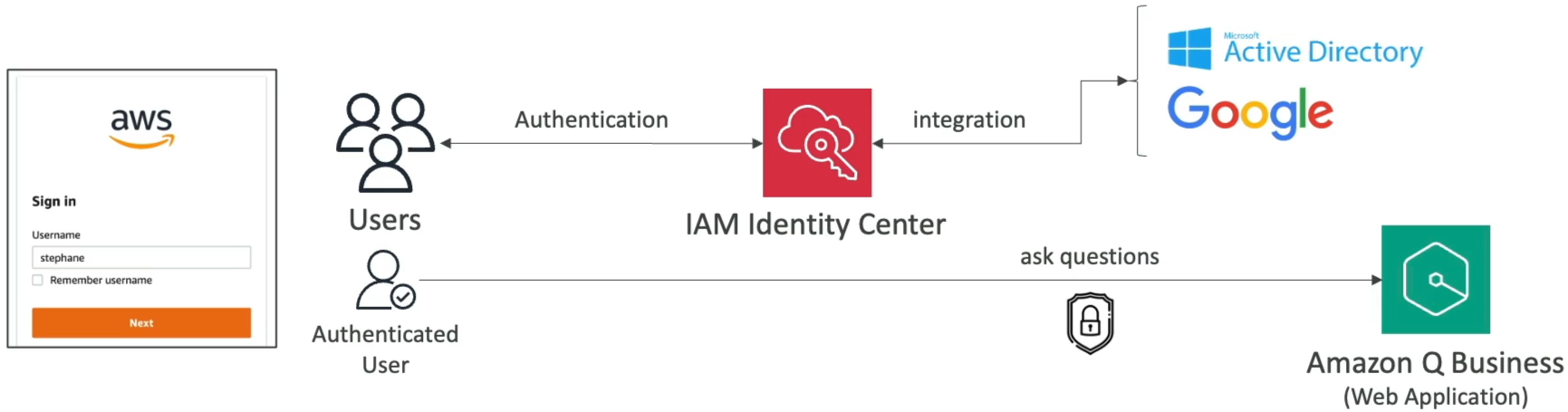
- ACL Crawling: When crawling supported repositories (such as SharePoint or Google Drive), Q Business indexes document ACLs alongside file contents. A user only receives answers generated from documents they have direct permissions to read.
Governance & Admin Controls
Amazon Q Business provides administrative safety controls equivalent to Bedrock Guardrails:
- Denied Topics & Blocked Words: Configure enterprise boundaries (e.g., blocking gaming discussions, non-work topics, or profanity) at the global application level or per-topic level.

- Internal Knowledge Restriction: Toggle whether Amazon Q Business answers queries strictly using verified internal documents or supplements answers with the underlying foundation model's broader parametric knowledge.
Exam Guide
Exam Tips
- Amazon Q Business vs. Amazon Q Developer:
- Amazon Q Business: For business employees querying enterprise repositories, synthesizing documents, and executing workplace workflows (Jira tickets, time-off requests).
- Amazon Q Developer: For developers and DevOps engineers writing code, debugging applications, refactoring legacy runtimes, and troubleshooting AWS console errors.
- Data Connectors vs. Plugins:
- Use Data Connectors when the objective is reading, indexing, and querying unstructured company data (Amazon S3, SharePoint, Confluence).
- Use Plugins when the objective is taking action or updating records in third-party systems (creating Jira issues, updating ServiceNow tickets).
- Security & Permission Model: Amazon Q Business uses AWS IAM Identity Center to map corporate SSO identities and natively enforce source document Access Control Lists (ACLs).
- Underlying Engine: Amazon Q Business runs on top of Amazon Bedrock, but AWS manages the model selection, orchestration, and embeddings under the hood.
Practice Test
Question 1
An enterprise wants to deploy an AI-powered workplace assistant that allows customer service managers to query company knowledge bases in Confluence and automatically log service escalation tickets in ServiceNow from natural language prompts. Which configuration in Amazon Q Business supports these capabilities?
- A. Use Amazon SageMaker Canvas connected to AWS CloudTrail
- B. Configure a Confluence Data Connector for knowledge retrieval and a ServiceNow Plugin for ticket creation
- C. Deploy an Amazon Bedrock custom model import with an S3 Lifecycle rule
- D. Configure Amazon Rekognition Custom Labels with Amazon SNS alerts
Correct Answer
- B. Configure a Confluence Data Connector for knowledge retrieval and a ServiceNow Plugin for ticket creation
- Explanation: In Amazon Q Business, Data Connectors crawl and index unstructured document sources (like Confluence) for RAG querying, while Plugins enable the assistant to interact with external business applications (like ServiceNow) to perform actions like ticket creation.
Question 2
A human resources department is concerned that deploying Amazon Q Business across the organization will expose confidential salary spreadsheets stored in Microsoft SharePoint to unauthorized junior employees. How does Amazon Q Business prevent this data exposure?
- A. It automatically encrypts all documents with a single public KMS key
- B. It crawls and indexes source document Access Control Lists (ACLs) via IAM Identity Center, restricting search results to authorized users only
- C. It deletes all numerical spreadsheets during the ingestion sync job
- D. It forces all queries to run through Amazon SageMaker Clarify
Correct Answer
- B. It crawls and indexes source document Access Control Lists (ACLs) via IAM Identity Center, restricting search results to authorized users only
- Explanation: In Amazon Q Business, Data Connectors crawl and index unstructured document sources (like Confluence) for RAG querying, while Plugins enable the assistant to interact with external business applications (like ServiceNow) to perform actions like ticket creation.
Question 3
A financial services firm is adopting Amazon Q Business to streamline its data-driven decision-making processes. As part of the implementation, the company needs a robust solution for managing user access, ensuring that employees across various departments have appropriate permissions to interact with dashboards and reports. The team is evaluating options for user management that offer secure, scalable, and easy-to-administer controls within Amazon Q Business.
Which of the following would you recommend for user management in Amazon Q Business?
- A. AWS Account
- B. IAM user
- C. IAM Identity Center
- D. AWS IAM service
Correct Answer
- C. IAM Identity Center
- Explanation: With IAM Identity Center, you can create or connect workforce users and centrally manage their access across all their AWS accounts and applications. You configure an IAM Identity Center instance for your Amazon Q Business application environment with users and groups added, making it the recommended approach for workforce user management.
Incorrect Answers
- A. AWS Account
- Explanation: An AWS account acts as a resource container and billing boundary rather than a granular workforce user management mechanism for applications like Amazon Q Business.
- B. IAM user
- Explanation: IAM users represent individual human users or workloads interacting directly with AWS infrastructure management, rather than managing enterprise workforce identities for end-user business applications.
- D. AWS IAM service
- Explanation: While IAM provides backend access permissions and policies for AWS resources, user management and single sign-on for workforce applications are handled via IAM Identity Center.
Reference: