Hands-On Lab: Amazon Q Business Application Deployment & S3 Ingestion
Key Takeaways
Amazon Q Business delivers a turnkey enterprise generative AI assistant that indexes company data without requiring manual vector database coding or prompt scaffolding.
A complete deployment consists of an Application, an Index (Starter vs. Enterprise tier), and one or more Data Sources (such as Amazon S3). By default, fallback to general foundation model knowledge is disabled, ensuring the assistant answers exclusively from verified internal documents and declines out-of-scope queries (like cooking recipes).
Hands-On Workflow: End-to-End Q Business Setup
- Create the Amazon Q Business Application:
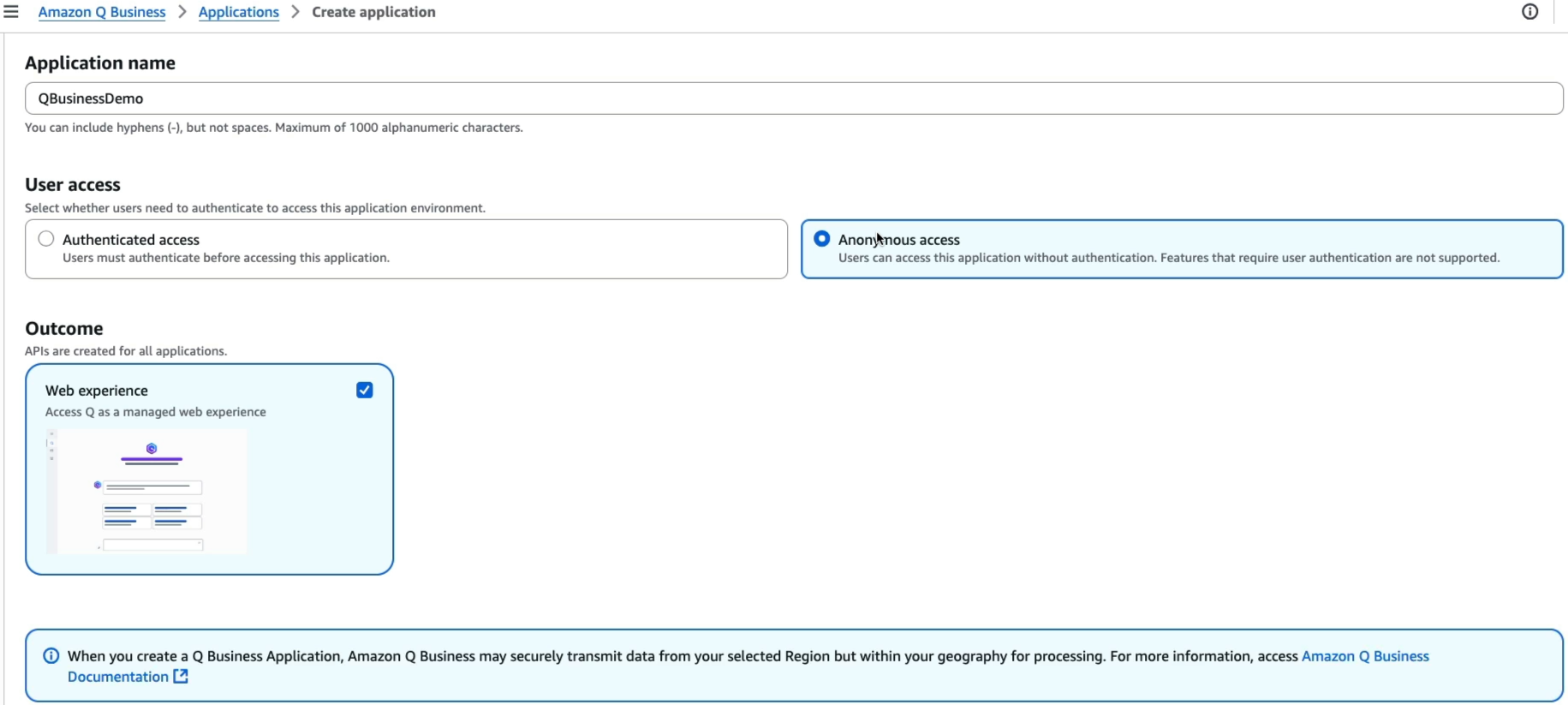
- Open the Amazon Q Business Console in a supported region (e.g.,
ap-southeast-2Sydney). - Click Get started and select Create application.
- Application name:
QBusinessDemo. - User Access: Select Anonymous access (for rapid demonstration/PoC testing without full IAM Identity Center user provisioning).
warning
Q Business Anonymous Access costs $200/month
- Click Create to deploy the base application environment.
- Open the Amazon Q Business Console in a supported region (e.g.,
- Provision the Document Index:
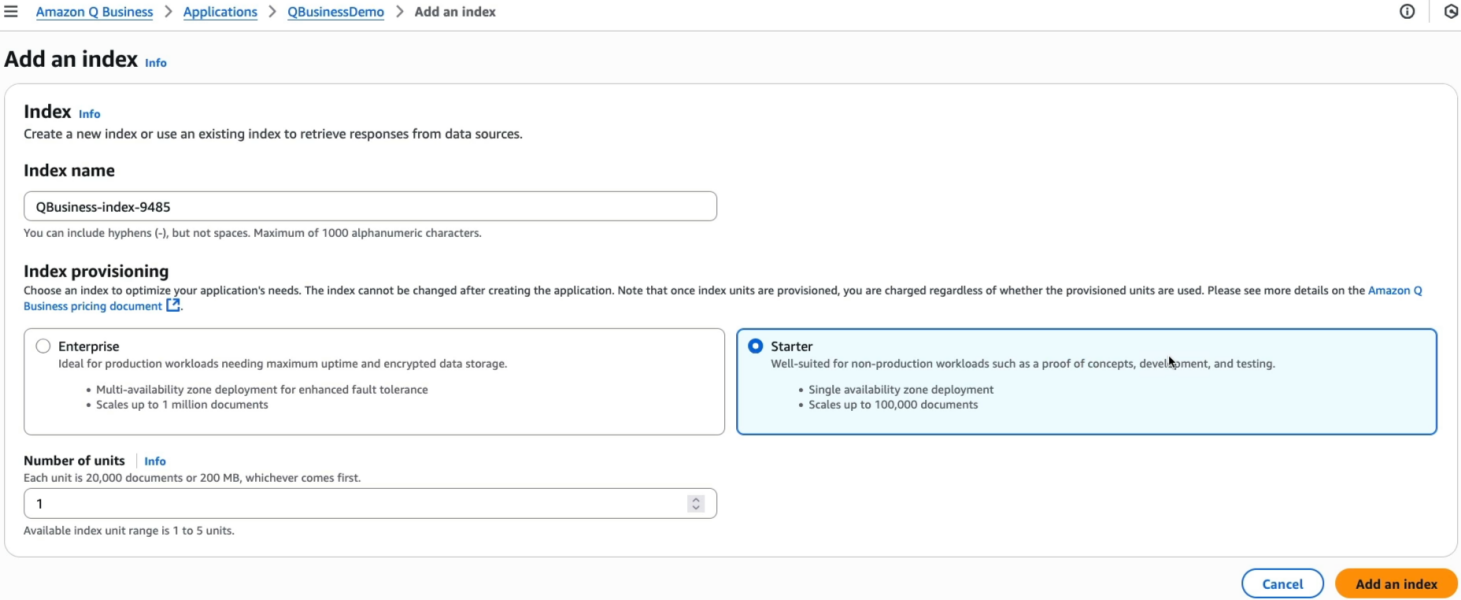
- Navigate to Data sources > Index within the newly created application:
- Click Add index.
- Index Tier: Select Starter index (optimized for PoCs and developer workloads).
- Capacity Units: Select 1 unit (supports up to 20,000 documents or 200 MB of extracted text, plus 100 hours of connector runtime per month).
- Click Create index (provisioning takes several minutes).
- Configure Amazon S3 Data Source Connector:
- In the target region (
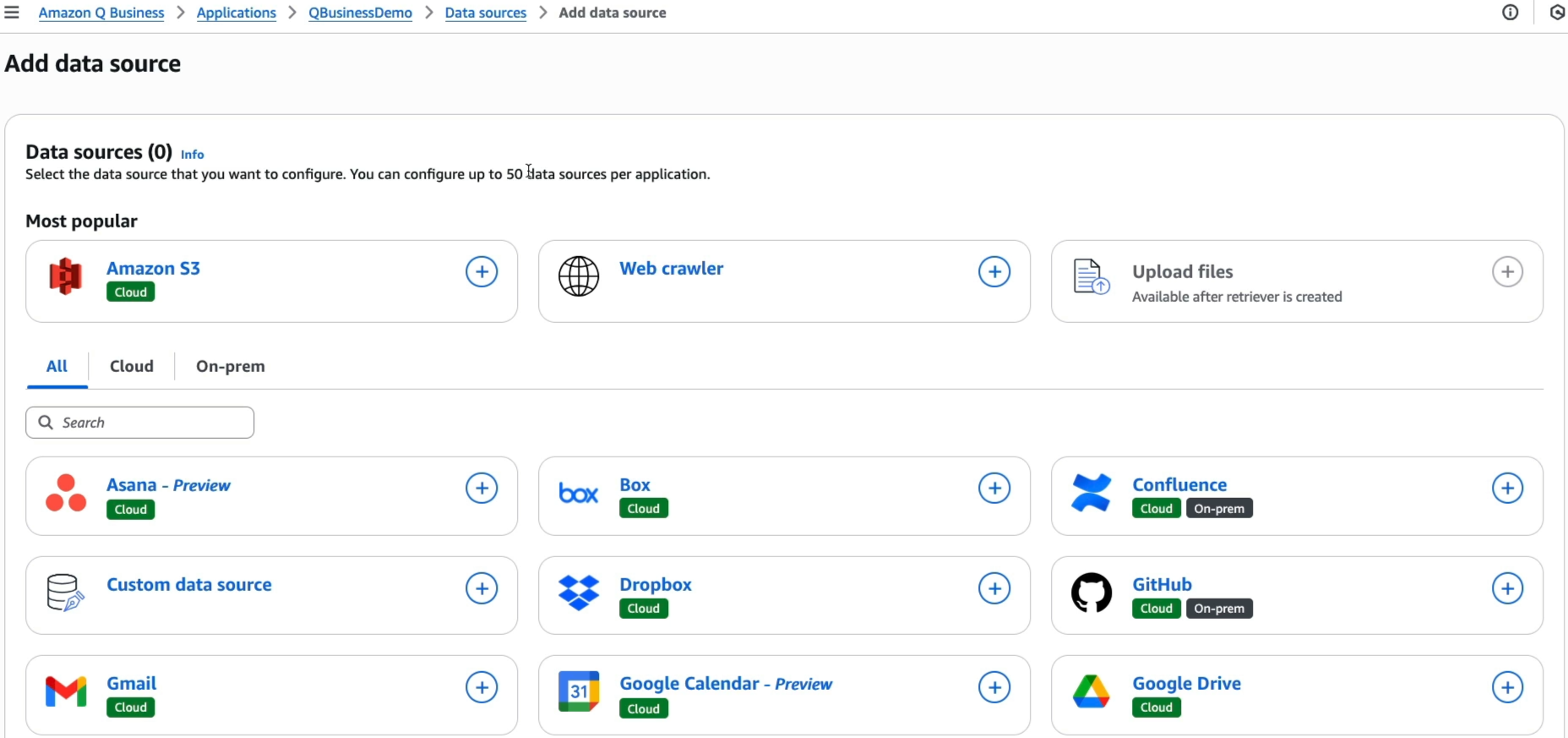
ap-southeast-2), create an S3 bucket (e.g.,my-qbusiness-kb-ap-southeast-2) and upload the sample reference file (Evolution of the Internet Detailed.pdf). - Return to Amazon Q Business and select Add data source > Amazon S3.
- Data source name:
MyS3KnowledgeBase. - IAM Role: Select Create and use a new service role.
- Sync Scope: Browse and select your S3 bucket URI.
- Sync Mode & Schedule: Select Full sync on an On-demand schedule.
- Click Add data source.
- In the target region (
- Execute Document Synchronization & Ingestion:
- Open the newly provisioned data source:
- Click Sync now to crawl the S3 bucket, extract text, chunk content, and generate index entries.
- Wait for the sync status to transition from Syncing to Idle (verifying
1 item scanned and indexed).
- Validate Conversational Retrieval & Source Citations:
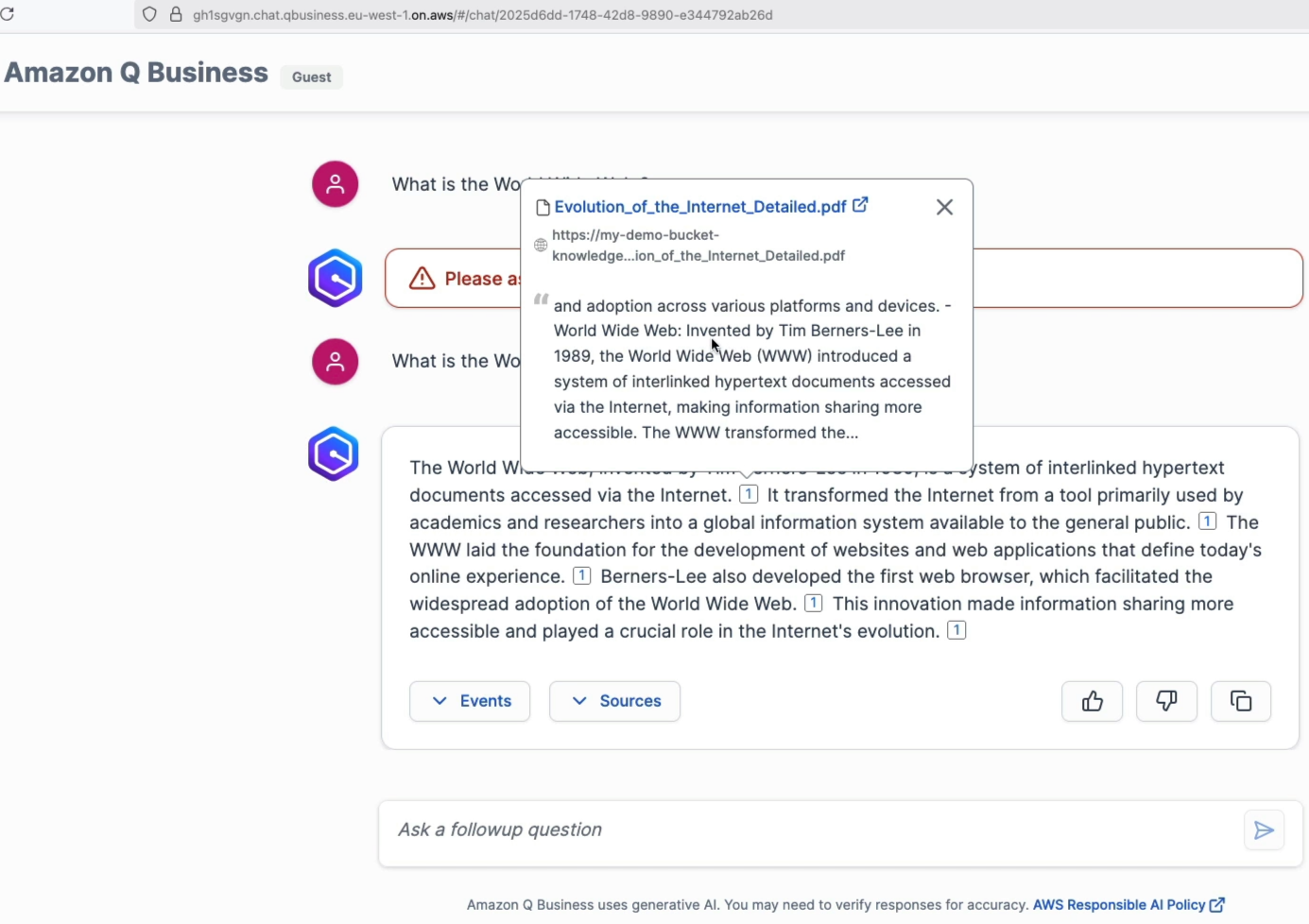
- Open the Preview web experience chat window:
- Submit an in-scope question:
What is the World Wide Web? - Review the generated answer (identifying Tim Berners-Lee in 1989).
- Expand Sources to view the exact linked PDF object in Amazon S3, along with the precise excerpt and timeline events.
- Test Admin Controls & Domain Grounding:
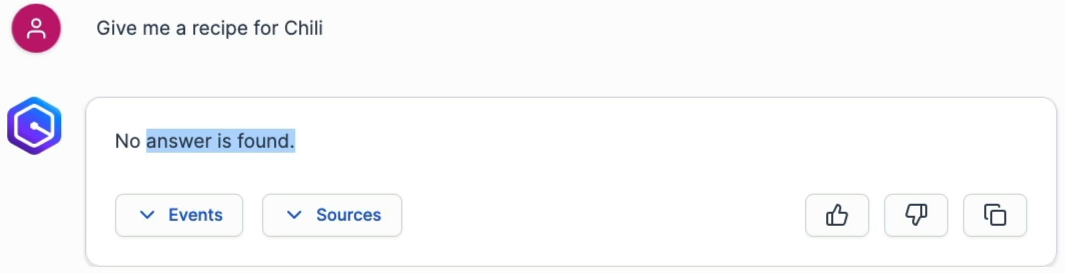
- Submit an out-of-domain query:
Give me a recipe for Mi Goreng? - Verify that Amazon Q Business explicitly states no relevant answer was found in the internal knowledge base.
- Confirm that with LLM Knowledge Fallback turned OFF, the assistant refuses to hallucinate external internet answers.
- Submit an out-of-domain query:
- Perform Critical Teardown & Resource Deletion:
- To avoid ongoing hourly index and consumption charges:
- In Amazon Q Business, delete the Data Source Connector.
- Delete the Starter Index and the Q Business Application.
- (Optional) Empty and delete the regional Amazon S3 bucket.
Pricing & Architectural Comparison
| Dimension | Starter Index | Enterprise Index |
|---|---|---|
| Target Workload | Proof-of-Concept (PoC) & Development | Enterprise Production Workloads |
| Availability | Single Availability Zone (1 AZ) | Multi-AZ High Availability (3 AZs) |
| Base Capacity per Unit | 20,000 documents or 200 MB text | 20,000 documents or 200 MB text |
| Connector Allowance | 100 connector hours/month | 100 connector hours/month |
| Encryption Support | AWS-managed default keys | AWS KMS Customer Managed Keys (CMK) |
| Capacity Limit | Up to 5 units per application | Scalable enterprise multi-unit capacity |
User Access / Tier Pricing
| Access / Tier Type | Pricing Model | Key Features & Constraints |
|---|---|---|
| Anonymous Access | Consumption ($200/month flat base) | Quick evaluation without user directories; non-production |
| Q Business Lite | $3 / user / month | Basic permission-aware Q&A, chat web app, S3/SaaS RAG |
| Q Business Pro | $20 / user / month | Full suite: Q Apps builder, QuickSight Reader Pro, plugins |
Exam Guide
Exam Tips
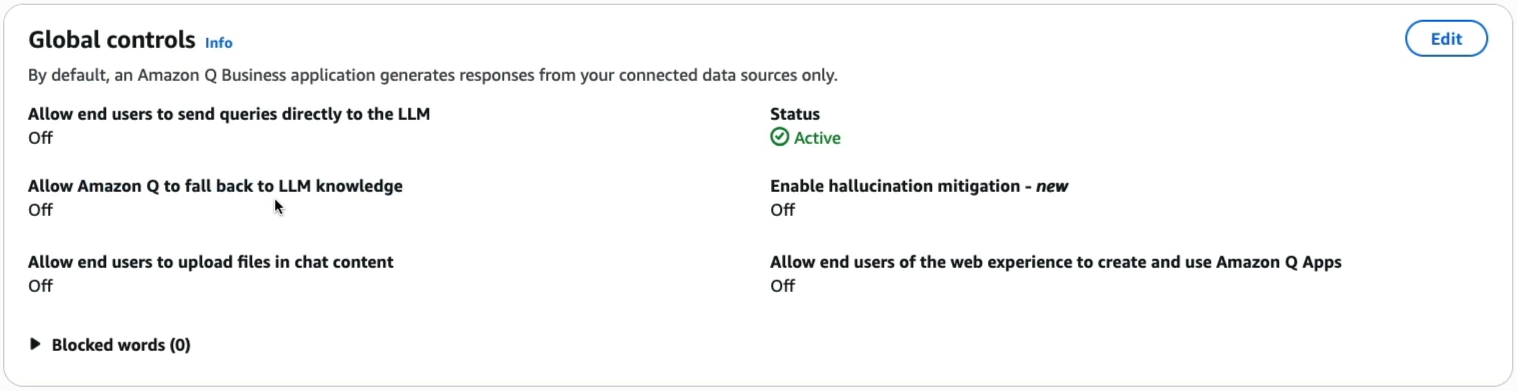
- Grounding & Fallback Behavior: By default, Amazon Q Business restricts its answers strictly to ingested data sources. To allow general web/LLM Q&A alongside private documents, administrators must explicitly toggle Fallback to LLM knowledge to ON in Admin Controls.
- Starter vs. Enterprise Index:
- Starter Index: Single AZ deployment; best for testing and development.
- Enterprise Index: Deployed across 3 Availability Zones; supports KMS Customer Managed Keys (CMK) for production compliance.
- Sync Modes:
- Full Sync: Re-scans and re-indexes all documents in the source repository.
- New, Modified, or Deleted (Delta Sync): Cost- and compute-optimized mode that syncs only incremental file changes on an automated schedule (e.g., hourly/daily).
- Source Attribution: Every response generated from connected data sources includes interactive source citations and event traces linking directly back to the original file in Amazon S3 or SaaS repositories.
Practice Test
Question 1
A proof-of-concept team wants to deploy Amazon Q Business to test indexing 15,000 PDF documents stored in Amazon S3. The solution is for testing only, does not require multi-AZ redundancy or customer-managed KMS encryption, and must minimize hourly index capacity charges. Which index configuration should the team select?
- A. Enterprise Index with 5 units
- B. Starter Index with 1 unit
- C. Amazon OpenSearch Service Managed Cluster
- D. Amazon Bedrock Provisioned Throughput
Correct Answer
- B. Starter Index with 1 unit
- Explanation: A Starter Index is deployed in a single AZ, is designed for PoCs and developer testing, and 1 unit provides capacity for up to 20,000 documents or 200 MB of extracted text at the lowest base index cost.
Question 2
An enterprise security policy requires that an internal AI assistant must never answer questions using public internet information or unverified external foundation model pre-training knowledge. The assistant should strictly state that no answer was found if the query cannot be answered from corporate documents. Which configuration enforces this requirement in Amazon Q Business?
- A. Set the Foundation Model Temperature to 1.0
- B. Disable the "Fallback to LLM knowledge" setting in Amazon Q Business Admin Controls
- C. Configure an AWS Lambda Action Group with an OpenAPI schema
- D. Enable Amazon Rekognition Custom Labels
Correct Answer
- B. Disable the "Fallback to LLM knowledge" setting in Amazon Q Business Admin Controls
- Explanation: Turning off Fallback to LLM knowledge in Amazon Q Business Admin Controls ensures the model generates answers derived strictly from connected enterprise data sources and returns a "no answer found" refusal when queried about external or out-of-scope topics.