Hands-On Lab: Amazon Comprehend Medical & Amazon Transcribe Medical in the AWS Console
Key Takeaways
Amazon Comprehend Medical and Amazon Transcribe Medical provide interactive evaluation consoles within AWS to demonstrate how specialized healthcare AI processes complex clinical shorthand, anatomical references, pharmacology, and speech dictation without manual feature engineering.
The hands-on walkthrough illustrates:
- Decoding Medical Shorthand: Comprehend Medical parses compressed clinical jargon (e.g.,
PTPatient,87 YOAge: 87,POPer Os / Oral Route,QHSEvery night at bedtime). - Entity-Relationship Binding: Comprehend Medical does not extract terms in isolation; it establishes relational bindings connecting dosages, administration routes, and frequencies to specific drug names.
- Integrated Console Architecture: Amazon Transcribe Medical is accessed directly within the standard Amazon Transcribe console under its dedicated left navigation menu.
Hands-On Workflow: Testing Comprehend Medical & Transcribe Medical
- Launch Real-Time Analysis in Amazon Comprehend Medical:
- Open the Amazon Comprehend Medical Console in a supported AWS Region.
- In the left navigation pane, select Real-time analysis (or click Launch real-time analysis from the service dashboard).
- Locate the sample clinical input text editor containing unstructured physician notes.
- Analyze Unstructured Clinical Shorthand:
- Review the sample doctor's note containing clinical abbreviations and acronyms:
- Notice compressed clinical phrases such as:
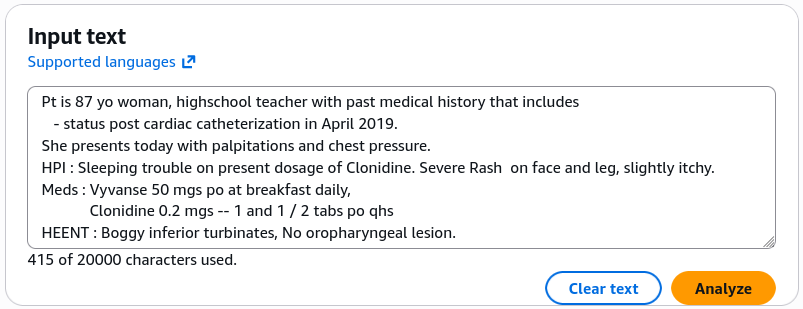
- Click Analyze to submit the raw text payload to the clinical NLP engine.
- Inspect Clinical Entities, Attributes & Relationship Mappings:
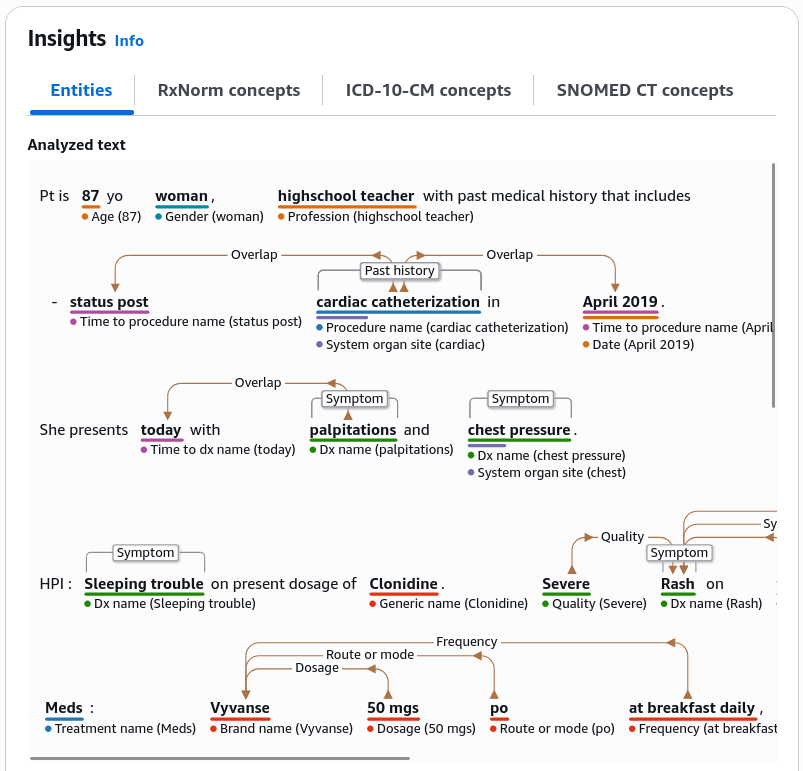
- Review the extracted structured entities and their visual relationship connectors:
- Demographics & PHI: Observe
87classified asAGE,womanclassified asGENDER, andhigh school teacheridentified asPROFESSION. - Relationship Extraction: Inspect how the dosage (
20mg) and the administration route (PO/ oral) are visually and relationally linked to the medication name (Atorvastatin). - Temporal & Acuity Traits: Notice how symptoms (e.g.,
chest pressure) are mapped with acuity and linked temporally totoday.
!
- Navigate to Amazon Transcribe Medical in the Console:
- Switch to the Amazon Transcribe Console:
- In the left navigation pane, scroll down to the Amazon Transcribe Medical section.
- Select Real-time transcription.
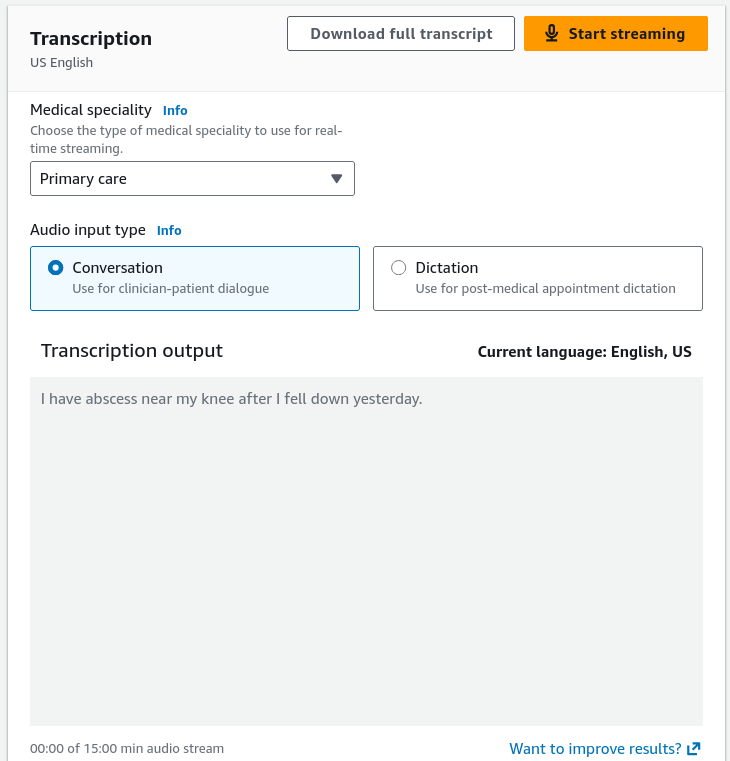
- Select the transcription mode (Dictation for single-clinician notes or Conversation for doctor-patient discussions).
- Execute Live Medical Speech Transcription:
- Test real-time medical Automatic Speech Recognition (ASR):
- Click Start streaming and grant browser microphone permissions.
- Speak a medical sentence into the microphone: "I have abscess near my knee after I fell down yesterday."
- Observe the transcription output pane rendering medical pathology and pharmacology terms accurately without phonetic misinterpretations.
- Click Stop streaming.
Shorthand Decoding & Entity Relationship Mapping
| Clinical Shorthand / Term | Latin / Clinical Meaning | Comprehend Medical Extracted Type | Associated Relationship / Target Entity |
|---|---|---|---|
PT | Patient | PROTECTED_HEALTH_INFORMATION | Anchors clinical record context |
87 YO | 87 Years Old | AGE (PHI category) | Binds to demographic profile |
PO (per os) | Orally / By mouth | ROUTE_OR_MODE | Linked directly to target MEDICATION |
QHS (quaque hora somni) | Every night at bedtime | FREQUENCY | Linked directly to target MEDICATION |
PRN (pro re nata) | As needed | FREQUENCY / TRAIT | Linked directly to target MEDICATION |
BID / TID / QID | Twice / 3 times / 4 times daily | FREQUENCY | Linked directly to target MEDICATION |
Exam Guide
Exam Tips
- Console Location of Transcribe Medical: Amazon Transcribe Medical is hosted within the Amazon Transcribe console interface under a dedicated navigation header.
- Relationship Extraction: A primary differentiator of Amazon Comprehend Medical is its ability to perform relationship extraction—linking attributes like dosage, route (
PO), frequency (QHS), and duration directly to their respective medication entities rather than treating them as disconnected tokens. - Clinical Shorthand Support: Pre-trained medical NLP models natively recognize standardized medical acronyms, Latin prescription notations (
PO,QHS,PRN), and clinical shorthand (PT,YO,Dx,Rx). - HIPAA Eligibility: Both Transcribe Medical and Comprehend Medical are HIPAA-eligible out of the box for handling Protected Health Information (PHI).
Practice Test
Question 1
A clinical software developer tests an electronic medical record ingestion tool using Amazon Comprehend Medical. The input clinical note contains the line: "Rx: Lisinopril 10mg PO QD for hypertension." How does Amazon Comprehend Medical parse and structure this data?
- A. It outputs an unlinked list of keywords: Lisinopril, 10mg, PO, QD, hypertension
- B. It identifies Lisinopril as a
MEDICATIONand establishes directional relationships linking10mgas Strength,POas Route,QDas Frequency, andhypertensionas the linkedMEDICAL_CONDITION - C. It translates the Latin acronyms into French using Amazon Translate
- D. It routes the note to Amazon Mechanical Turk for manual transcription
Correct Answer
- B. It identifies Lisinopril as a
MEDICATIONand establishes directional relationships linking10mgas Strength,POas Route,QDas Frequency, andhypertensionas the linkedMEDICAL_CONDITION- Explanation: Amazon Comprehend Medical performs advanced entity and relationship extraction, binding medication attributes (strength, route, frequency) and diagnoses directly to the target medication entity within a structured JSON output.
Question 2
Where in the AWS Management Console can a developer access and configure real-time streaming sessions for Amazon Transcribe Medical?
- A. Inside the Amazon Rekognition console
- B. Under the Amazon Transcribe console in the dedicated Amazon Transcribe Medical navigation section
- C. Exclusively via the AWS Systems Manager console
- D. Inside the Amazon Comprehend Custom Classifier builder
Correct Answer
- B. Under the Amazon Transcribe console in the dedicated Amazon Transcribe Medical navigation section
- Explanation: Amazon Transcribe Medical is integrated directly into the Amazon Transcribe Console under the left navigation section labeled Amazon Transcribe Medical.