Hands-On Lab: Amazon EC2 Instance Selection, AI Accelerators & Cost Awareness
Key Takeaways
The Amazon EC2 Launch Instance Console provides automated recommendations and manual selection tools to provision compute infrastructure tailored for machine learning workloads.
The console interface provides:
- Workload-Based Guidance: The Get advice advisor suggests instance families (such as
G5gorC7gn) based on workload categories (e.g., deep learning inference). - Instance Filtering: Quick filtering by prefix reveals specialized hardware like
trn1(AWS Trainium for training) andinf2(AWS Inferentia for inference). - Cost Visibility: Specialized multi-accelerator nodes (such as
trn1.32xlargeorinf2.48xlarge) carry high hourly costs, highlighting the importance of cost optimization and governance in cloud ML architecture.
Hands-On Workflow: Navigating EC2 Instance Types for AI
- Access the EC2 Launch Instance Console:
- Open the Amazon EC2 Console in your target AWS Region.
- In the dashboard, click Launch instance.
- Scroll down past the AMI (Amazon Machine Image) selection section to locate the Instance type configuration block.
- Utilize the Workload Instance Advisor:
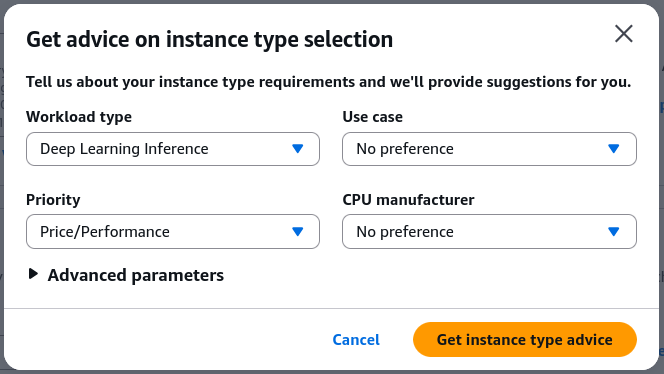
- Test AWS automated instance recommendations:
- Click the Get advice link next to the instance type selector.
- Choose a target workload profile (e.g., Deep learning inference or Machine learning training).
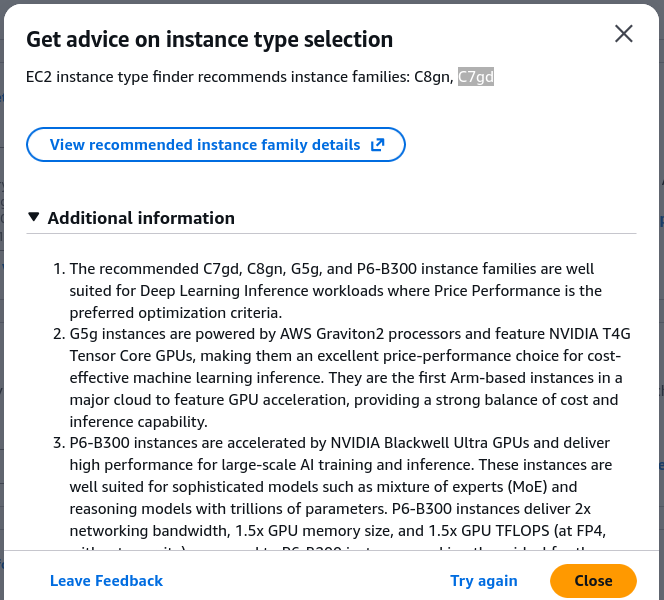
- Review the generated recommendations (e.g.,
C8gn,C7gd) and inspect the comparative breakdown of vCPUs, memory, network bandwidth, and architectural rationale.
- Inspect AWS Trainium (trn1) for Distributed Training:
- Search for purpose-built training accelerators:
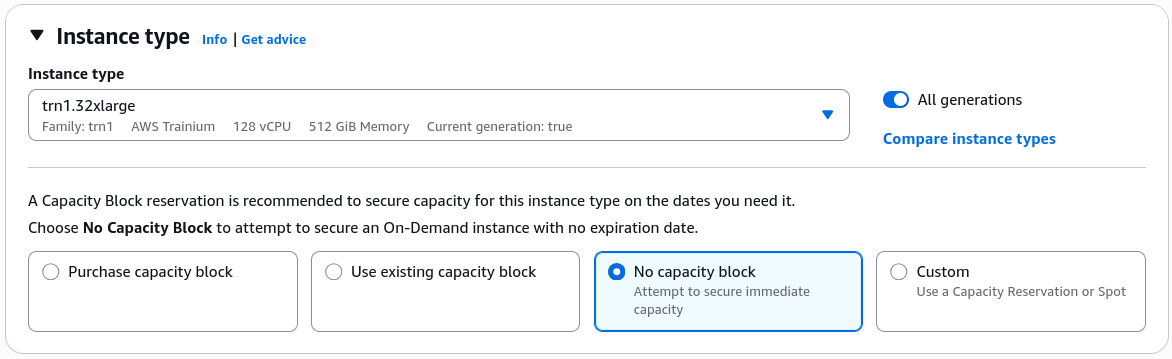
- In the instance type search bar, type
trn1. - Select
trn1.32xlarge(powered by 16 AWS Trainium accelerators). - Observe the hardware specifications and the highlighted hourly rate (e.g., ~$21/hour for full 32xlarge instances).
- Note the role of Trainium in reducing large-scale model pre-training and fine-tuning costs.
- Inspect AWS Inferentia (inf2) for Low-Latency Serving:
- Search for purpose-built inference accelerators:
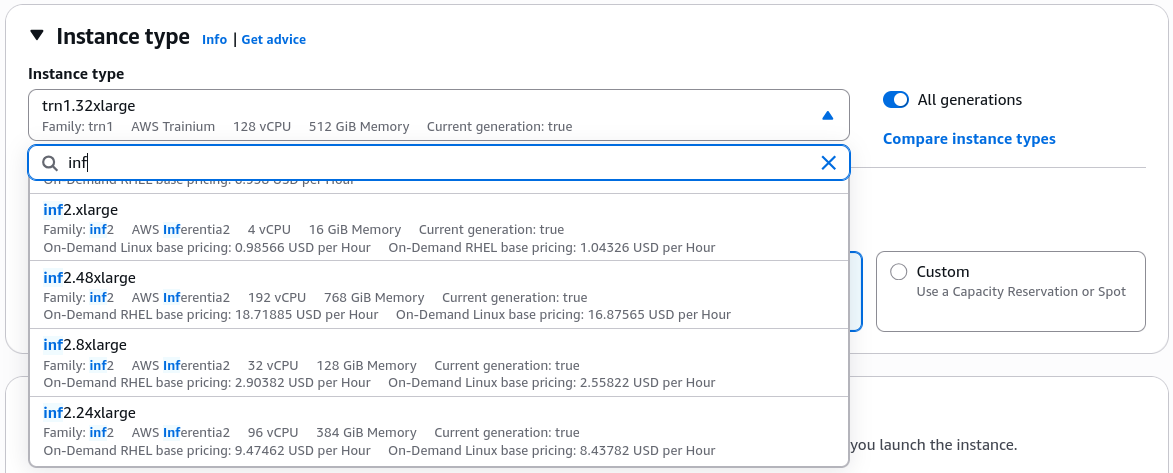
- In the search bar, type
inf2. - Select an instance such as
inf2.48xlarge(powered by AWS Inferentia2 accelerators). - Observe the high memory bandwidth, multi-chip configuration, and pricing metrics (e.g., ~$14/hour for top-tier instances).
- Confirm that these instances are optimized for high queries per second (QPS) and low cost-per-inference.
- Apply Cost Safety & Governance Rules:
- Practice cloud financial management (FinOps):
- Do not launch large specialized accelerator instances unless running active, approved training or benchmarking jobs.
- Use AWS Budgets, CloudWatch billing alarms, and Auto Scaling Groups (ASGs) to prevent runaway compute costs on unmanaged EC2 nodes.
EC2 Instance Families for Machine Learning
| Family Prefix | Underlying Hardware | Target AI/ML Phase | Typical Sizing & Characteristics |
|---|---|---|---|
Trn1 / Trn1n | AWS Trainium custom silicon | Model Training | 16 Trainium chips (32 NeuronCores), up to 512 GB HBM memory, 800 Gbps network bandwidth. Built for 100B+ parameter models. |
Inf1 / Inf2 | AWS Inferentia custom silicon | Model Inference | Up to 12 Inferentia2 chips, optimized for low latency, high throughput token generation, and lowest cost per inference. |
G4 / G5 / G6 | NVIDIA GPUs (T4, A10G, L4) | Inference & Vision | Balanced graphics and machine learning inference; widely supported by standard CUDA / TensorRT libraries. |
P3 / P4 / P5 | NVIDIA GPUs (V100, A100, H100) | Heavy Training & HPC | Clustered multi-GPU architectures for intensive deep learning training, scientific simulation, and distributed jobs. |
Exam Guide
Exam Tips
- Instance Family Naming Mappings (Essential for AIF-C01):
Trn1AWS Trainium Training.Inf1/Inf2AWS Inferentia Inference.P-Family(P4,P5) NVIDIA GPUs Heavy training and HPC compute.G-Family(G4,G5,G6) NVIDIA GPUs GPU inference, graphics rendering, and video processing.
- Instance Advisor: The EC2 console includes an interactive advisor that recommends instance families based on workload requirements (e.g., compute-optimized, GPU inference, memory-intensive).
- Cost Awareness & Governance: Dedicated GPU and custom accelerator instances carry higher hourly prices than standard burstable general-purpose instances (
t4g,m6i). For foundational AI practitioner questions, recognize that choosing the right instance family (e.g.,Inf2over oversizedP5for basic inference) is a primary driver of cloud cost optimization.
Practice Test
Question 1
A machine learning engineer needs to deploy a custom text classification model for high-volume, real-time prediction serving on Amazon EC2. The company wants to minimize compute costs per inference while maximizing throughput. Which EC2 instance family should the engineer select in the launch console?
- A. Amazon EC2
Trn1instances - B. Amazon EC2
Inf2instances - C. Amazon EC2
P5instances - D. Amazon EC2
R6iinstances
Correct Answer
- B. Amazon EC2
Inf2instances- Explanation: Amazon EC2
Inf2instances are purpose-built for inference workloads, providing high throughput and low latency at the lowest cost per inference. In contrast,Trn1is optimized for training, andP5is designed for heavy training and HPC workloads, which would be overkill for real-time inference.
- Explanation: Amazon EC2
Question 2
During a cloud architecture review, an AI practitioner is asked to explain the primary difference between Amazon EC2 Trn1 instances and Amazon EC2 P4de instances. Which statement accurately describes both?
- A.
Trn1instances are powered by custom AWS Trainium accelerators, whereasP4deinstances are powered by NVIDIA A100 GPUs - B.
Trn1instances are designed for inference, whereasP4deinstances are designed for training - C.
Trn1instances cannot run PyTorch workloads, whereasP4deinstances can - D.
Trn1instances are serverless, whereasP4deinstances are managed via Amazon SageMaker Canvas only
Correct Answer
- A.
Trn1instances are powered by custom AWS Trainium accelerators, whereasP4deinstances are powered by NVIDIA A100 GPUs- Explanation:
Trn1instances use AWS's custom AWS Trainium silicon, whileP4deinstances use NVIDIA A100 Tensor Core GPUs. Both support distributed deep learning training through standard ML frameworks (via AWS Neuron SDK and CUDA respectively).
- Explanation: