Hands-On Lab: Amazon Polly Voice Synthesis, Engine Selection & SSML Markup
Key Takeaways
Amazon Polly converts arbitrary text input into high-fidelity synthetic audio directly within the AWS Management Console using deep learning and generative foundation models.
The interactive console provides immediate hands-on controls for testing Engine Tiers (Generative, Long-form, Neural, Standard), selecting diverse regional voices/personas (such as Ruth or Gregory), wrapping phrases in SSML (Speech Synthesis Markup Language) tags like <speak> and <break time="..."/> to introduce custom pauses, and adjusting pronunciation lexicons and audio export formats.
Hands-On Workflow: Voice Synthesis, Engine Selection & SSML Pacing
-
Open the Amazon Polly Text-to-Speech Console:
- Navigate to the Amazon Polly Console in your target AWS Region.
- In the left navigation menu, click Text-to-Speech (or click Try Polly from the landing dashboard).
- Locate the interactive input text area and the engine configuration panel on the right.
-
Select and Compare Synthesis Engines & Voices:
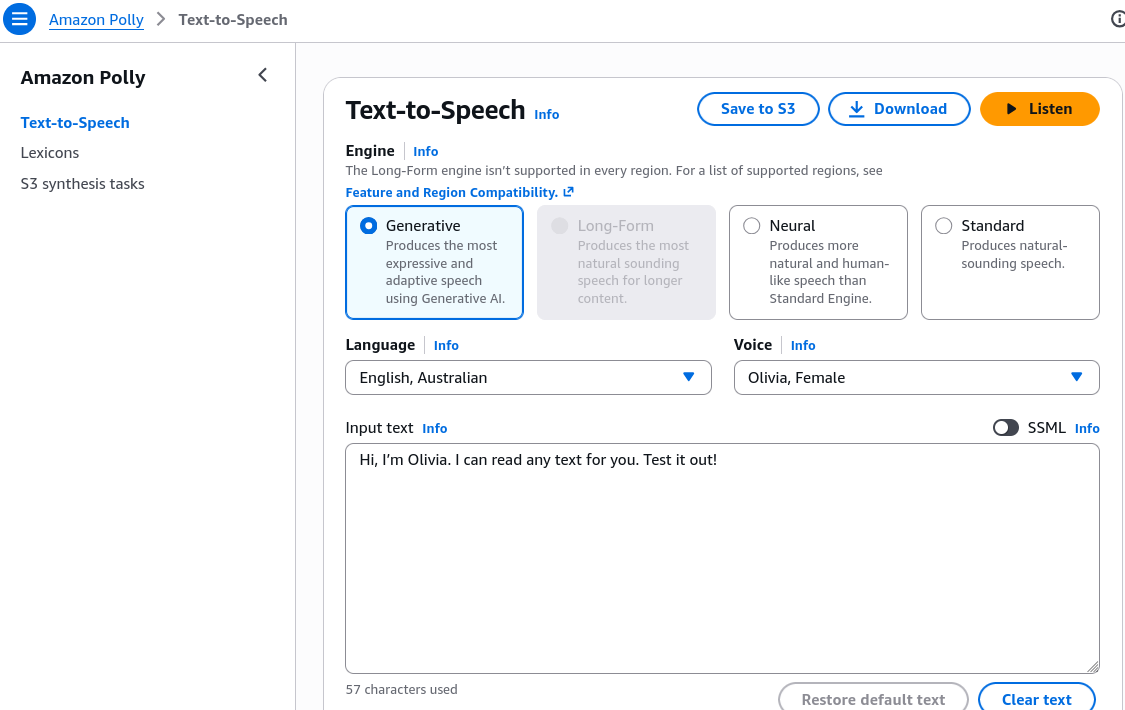
- Evaluate different voice personalities and engine capabilities:
- Select an Engine:
- Generative: Highly expressive, adaptive tone driven by foundation model architectures.
- Long-form: Optimized for natural breathing rhythm and pacing across multi-sentence text.
- Neural (NTTS): Natural, conversational prosody.
- Standard: Cost-effective parametric synthesis.
- Choose a Language and Voice persona (e.g., English, Australian Olivia or Russell).
- Enter a test string:
Hi, I'm Olivia. I can read any text for you. Test it out! - Click Listen to audition the voice in real time.
-
Enable Speech Synthesis Markup Language (SSML):
- Add fine-grained timing and cadence control to the synthesized voice:
- Under the input editor, switch from Plain text mode to SSML mode.
- Wrap the entire text payload inside opening and closing
<speak>tags. - Insert an explicit break element (
<break time="..."/>or self-closing<break/>) between words where a natural pause is required:
<speak>Hi, I'm Rendy and I'm learning <break time="1s"/> AWS, it's awesome!</speak>- Click Listen and verify that the synthesis engine inserts an audible silence between "learning" and "AWS".
-
Explore Additional Settings & Output Formats:
- Inspect production export and customization parameters:
- Open Additional settings to adjust the output format (MP3, OGG Vorbis, or PCM).
- Under Custom pronunciation, attach a configured Pronunciation Lexicon (PLS XML) to enforce custom brand or name pronunciations.
- Click Download to save the generated audio file locally, or select Synthesize to S3 for asynchronous long-form generation.
Polly Synthesis Engines: Console Feature Matrix
| Engine Option | Latency & Expressiveness Profile | SSML Support | Target Workload Demonstrated |
|---|---|---|---|
| Generative | Maximum emotional range, conversational adaptation, and inflection. | Full SSML support | Virtual assistants, dynamic character voiceovers, customer support. |
| Long-form | Natural pacing, paragraph pauses, and consistent tone across extended text. | Full SSML support | Audiobooks, long-form articles, training lectures, news summaries. |
| Neural (NTTS) | High prosody and human-like naturalness. | Extensive SSML support | IVR call centers, mobile applications, notifications. |
| Standard | Basic concatenative synthesis, lowest cost per character. | Standard SSML tags | Legacy alerts, high-volume automated status messaging. |
Exam Guide
Exam Tips
- SSML Syntax Rules: Every SSML payload sent to Amazon Polly must start with
<speak>and end with</speak>. Individual modifier tags like<break/>,<emphasis>, or<whisper>reside within this root block. - Pause Insertion: The tag to introduce explicit pauses or silences in Amazon Polly speech is
<break time="..."/>(e.g.,<break time="2s"/>or<break strength="medium"/>). - Long Content Generation: For synthesizing large text documents that exceed synchronous API payload limits, use the
StartSpeechSynthesisTaskAPI to render speech asynchronously directly to an Amazon S3 bucket. - Audio Format Types: Amazon Polly can export audio in MP3, OGG Vorbis, and raw uncompressed PCM format for telephony/WAV encoding.
Practice Test
Question 1
A developer is testing Amazon Polly in the AWS Management Console to create an automated prompt for a contact center. The prompt must pause for 1.5 seconds between reciting two separate instructions. Which configuration should the developer apply?
- A. Upload a Custom Language Model (CLM) with pause annotations
- B. Switch the console editor to SSML mode, wrap the text in
<speak>tags, and insert<break time="1.5s"/>between the instructions - C. Enable Automatic Multi-Language Identification
- D. Apply an Amazon Translate parallel data glossary
Correct Answer
- B. Switch the console editor to SSML mode, wrap the text in
<speak>tags, and insert<break time="1.5s"/>between the instructions- Explanation: In Amazon Polly, Speech Synthesis Markup Language (SSML) is used to adjust speech pacing and timing. The
<break time="1.5s"/>tag inside a<speak>block instructs the synthesizer to pause for 1.5 seconds at that exact position.
- Explanation: In Amazon Polly, Speech Synthesis Markup Language (SSML) is used to adjust speech pacing and timing. The
Question 2
An online media publisher wants to automatically convert multi-page editorial articles and blog posts (averaging 3,000 words each) into high-quality spoken audio with natural breathing rhythms and conversational pacing. Which Amazon Polly engine is specifically tailored for this use case?
- A. Standard Engine
- B. Long-form Engine
- C. Amazon Transcribe ASR Engine
- D. Amazon Comprehend Syntax Engine
Correct Answer
- B. Long-form Engine
- Explanation: The Amazon Polly Long-form Engine is specifically designed for multi-paragraph articles, editorial content, and audiobooks, providing natural breathing rhythms and engaging pacing across long passages of text.