Hands-On Lab: Amazon Translate Console, Document Translation & Customization
Key Takeaways
Amazon Translate provides real-time, document-level, and asynchronous batch translation powered by context-aware Neural Machine Translation (NMT).
The service supports translation across dozens of languages with automatic source language detection. Workloads can be customized using Custom Terminology (dictionaries in CSV, TSV, or TMX format to preserve brand and character names) and Parallel Data (Active Custom Translation via example translation pairs to enforce domain-specific tone, such as formal vs. informal phrasing).
Hands-On Workflow: Translation Console, Batch Jobs & Customization
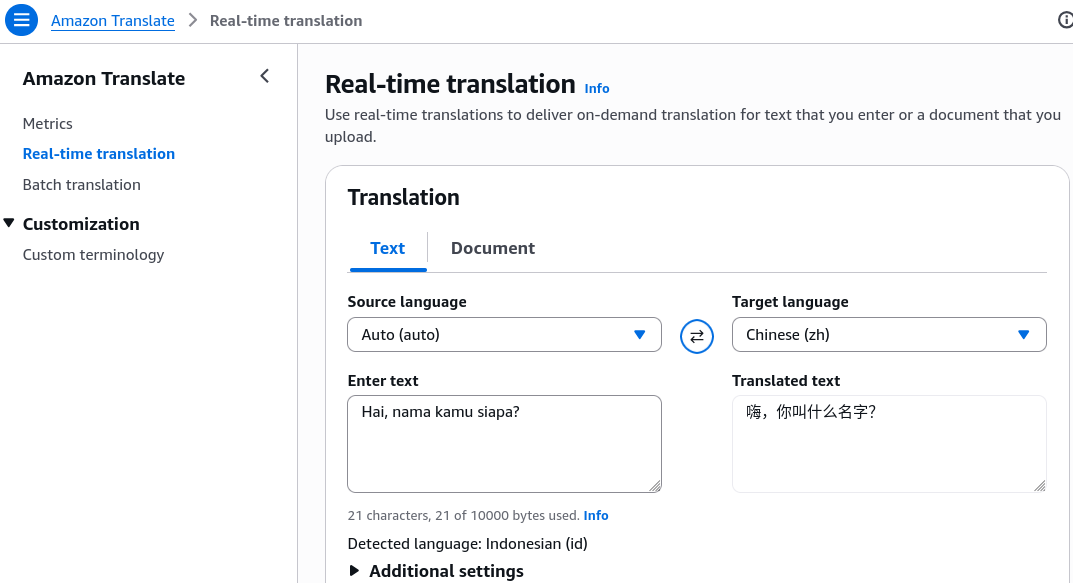
- Access Real-Time Text Translation in the Console:
- Open the Amazon Translate Console in your target AWS Region.
- Select Real-time translation from the left navigation panel.
- Set the Source language (e.g., English or choose Auto (auto-detect)).
- Choose the Target language (e.g., Mandarin).
- Enter your text in the input box to view the real-time neural translation output.
- Execute Document Translation with Layout Preservation:
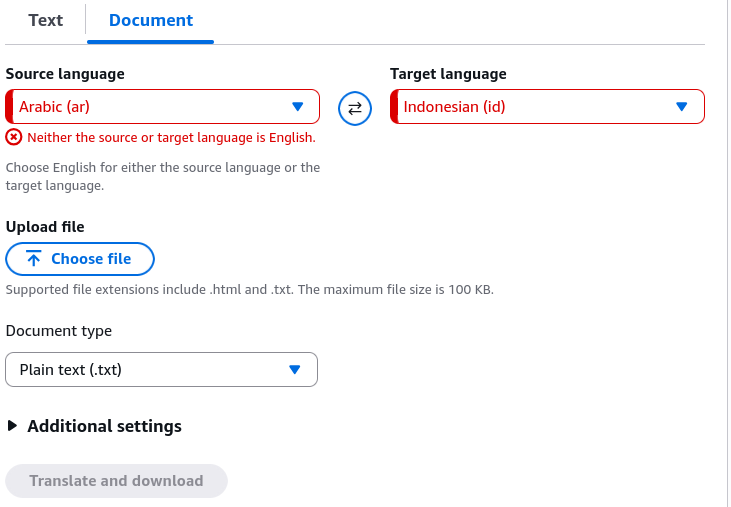
- Translate formatted files directly without losing formatting:
- Select the Document translation tab.
- Choose the Source language and Target language.
- Upload a local file (
.docx,.html, or.txt). - Run the translation and download the translated document with its structural layout and formatting preserved.
- Configure an Asynchronous Batch Translation Job:
- For large-scale or multi-file workloads:
- Navigate to Batch translation and click Create job.
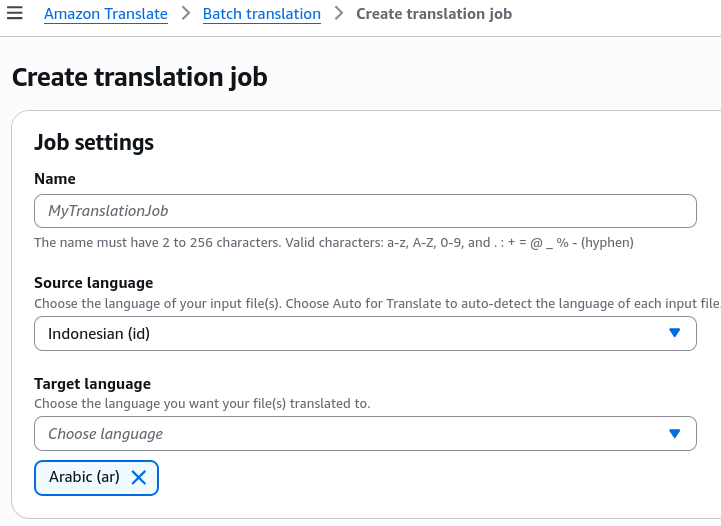
- Specify the translation parameters, including the Source language and Target language.
- Set the Input S3 location pointing to the bucket containing the raw document corpus.
- Define the Output S3 location where Amazon Translate writes the completed files.
- Assign an IAM role with read/write permissions to the target S3 buckets.
- Configure Custom Terminology for Brand Protection:
- To ensure proprietary names and domain terms do not get translated literally:
- Navigate to Custom terminology under Customization.
- Click Create terminology.
- Upload a glossary file in CSV, TSV, or TMX format.
- Define exact mappings (e.g., mapping source term
"Amazon Aurora"to target"Amazon Aurora"so the database name is not translated as a mythical dawn). - Attach this terminology file to your real-time or batch translation requests.
- Apply Parallel Data for Active Custom Translation (ACT):
- To adjust translation tone and domain-specific phrasing:
- Navigate to Parallel data under Customization.
- Click Create parallel data and upload bilingual translation examples in TMX, CSV, or TSV format from Amazon S3.
- Supply paired examples demonstrating preferred tone (e.g., casual
"Comment ça va ?"vs. formal legal/office"Comment allez-vous ?"). - Apply the parallel data resource to your batch translation jobs to adapt the output style dynamically.
Custom Terminology vs. Parallel Data (Active Custom Translation)
| Feature | Primary Purpose | Supported File Formats | Scope & Application |
|---|---|---|---|
| Custom Terminology | Ensures specific words, brand names, model IDs, or acronyms are translated to designated target terms or left untouched. | CSV, TSV, TMX | Real-time text translation, document translation, and batch translation. |
| Parallel Data (ACT) | Adapts the overall style, phrasing, tone (formal vs. informal), and domain context of the neural model using sample bilingual sentence pairs. | TMX (1.4b), CSV, TSV | Batch translation jobs (provides dynamic runtime model adaptation). |
Exam Guide
Exam Tips
- Console Capabilities: Amazon Translate provides real-time single-string translation, single-document translation (
.docx,.html,.txt), and asynchronous batch jobs for large collections in S3. - Format Requirements for Custom Glossaries: Both Custom Terminology and Parallel Data accept CSV, TSV, and TMX (Translation Memory eXchange) file formats.
- Tone & Style Customization: When an exam scenario describes adjusting the output to a specific tone (e.g., casual customer support vs. formal legal filings) without retraining a base model, the correct answer is Parallel Data (Active Custom Translation).
- Brand Name Integrity: When an exam scenario asks how to prevent proprietary product names or trademarks from being translated into generic foreign words, the correct answer is Custom Terminology.
Practice Test
Question 1
A multinational law firm wants to use Amazon Translate to batch-translate confidential contracts from English to French. The legal team requires the output to strictly reflect formal corporate phrasing (e.g., using "Comment allez-vous ?" rather than informal phrasing) based on historical firm translation archives. Which feature should the firm use?
- A. Amazon Translate Custom Terminology
- B. Amazon Translate Parallel Data (Active Custom Translation)
- C. Amazon Comprehend Syntax Parsing
- D. Amazon Rekognition Custom Labels
Correct Answer
- B. Amazon Translate Parallel Data (Active Custom Translation)
- Explanation: Parallel Data (Active Custom Translation) allows you to provide bilingual sentence pairs in CSV, TSV, or TMX format to customize the style, tone, and domain phrasing of machine translation output during batch translation jobs.
Question 2
An e-commerce company uses Amazon Translate to localize its product catalog into multiple languages. The company needs to upload a dictionary file that prevents the proprietary brand name "CloudPulse" from being translated into other languages. Which file formats are supported for uploading this Custom Terminology file?
- A. JSON, YAML, and XML
- B. CSV, TSV, and TMX
- C. PDF, DOCX, and XLSX
- D. PNG, JPEG, and TIFF
Correct Answer
- B. CSV, TSV, and TMX - Explanation: Amazon Translate supports CSV, TSV, and TMX (Translation Memory eXchange) file formats for Custom Terminology glossaries.