Amazon SageMaker AI Consoles: SageMaker JumpStart, SageMaker Canvas & MLflow Integration
Key Takeaways
Amazon SageMaker AI provides specialized interfaces and hubs tailored to distinct user personas and technical requirements: SageMaker JumpStart (a curated model hub and pre-built ML solutions), SageMaker Canvas (a visual, no-code ML studio for business analysts), and Managed MLflow (open-source experiment tracking and lifecycle management).
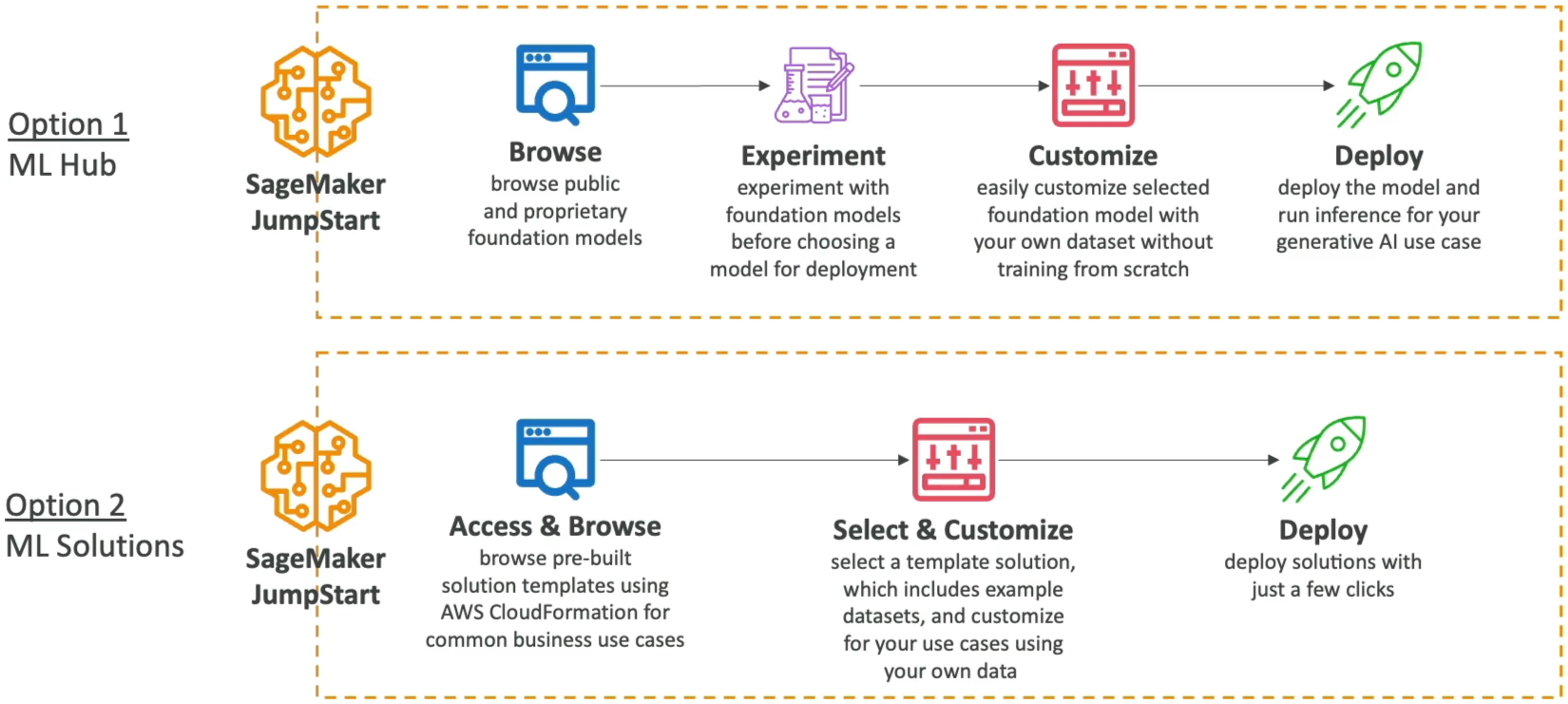
- SageMaker JumpStart: A broad machine learning hub providing access to pre-trained foundation models (from Meta, Mistral, Stability AI, and Hugging Face) and pre-built end-to-end ML solutions with full deployment and fine-tuning infrastructure control.
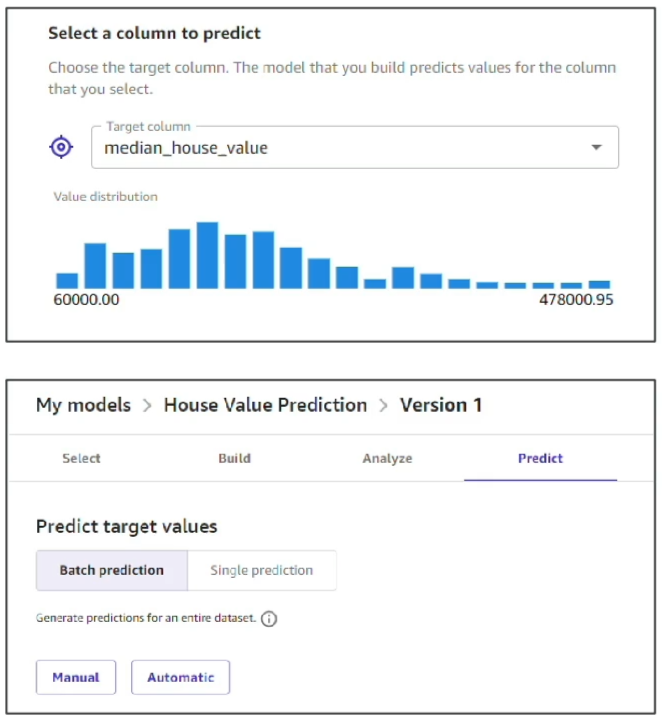
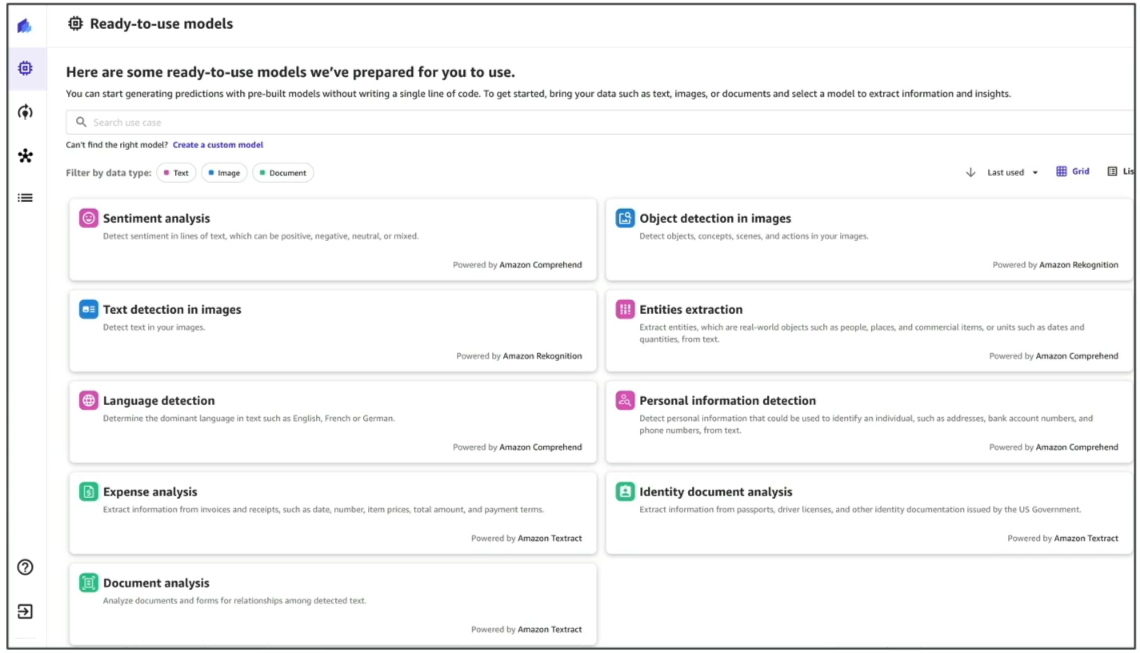
- SageMaker Canvas: A visual, no-code environment designed for business analysts to build predictive models, run automated ML via SageMaker Autopilot, prepare data via integrated Data Wrangler, and leverage ready-to-use AI services (Amazon Comprehend, Amazon Rekognition, Amazon Textract).
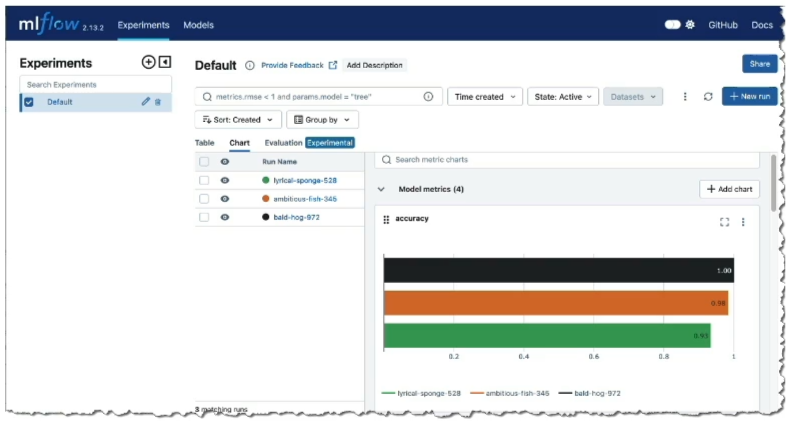
- Managed MLflow: Simplifies launching and maintaining open-source MLflow tracking servers directly within SageMaker Studio to manage experiment tracking and artifact lineage.
Main Discussion
Amazon SageMaker JumpStart: Hub & Pre-Built Solutions
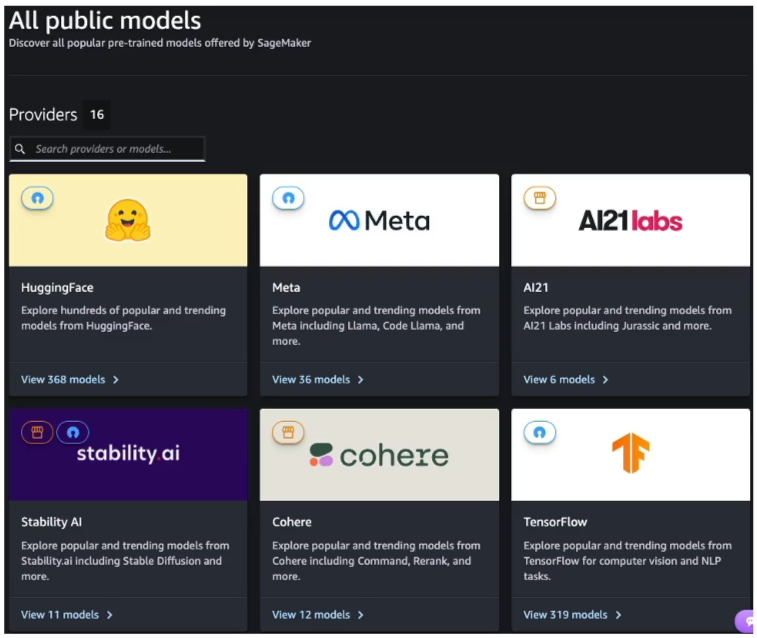
| Feature | JumpStart Machine Learning Hub | JumpStart Pre-Built Solutions |
|---|---|---|
| Primary Artifact | Pre-trained model checkpoints (LLMs, Computer Vision, NLP). | Fully assembled, multi-service CloudFormation templates. |
| Customization | Fine-tune weights on private S3 datasets with custom hyperparameter controls. | Customize boilerplate data pipelines, feature logic, and evaluation thresholds. |
| Deployment Model | Deploys directly to dedicated Amazon SageMaker Real-Time or Async endpoints. | Deploys associated AWS infrastructure (Lambda, S3, Step Functions, SageMaker Endpoints). |
| Catalog Comparison | Broader collection of open-source and proprietary weights than Bedrock's serverless API model, giving full infrastructure and container customization. | Addresses standard business problems (churn, credit risk, fraud) without manual architectural wiring. |
Amazon SageMaker Canvas: Visual No-Code Predictive ML
SageMaker Canvas enables business users and analysts to create ML models and generate predictions through a point-and-click graphical workflow:
Open-Source MLOps: Managed MLflow in SageMaker
- Zero-Management Infrastructure: Provision and maintain scalable MLflow tracking servers directly from the SageMaker console or CLI without configuring underlying EC2 instances or databases.
- Unified Experimentation: Data science teams can continue using familiar open-source MLflow APIs while benefiting from AWS IAM security, encryption, and seamless integration with SageMaker Studio assets.
Persona & Feature Comparison Matrix
| Service / Tool | Target Persona | Code Requirement | Core Use Case |
|---|---|---|---|
| SageMaker Canvas | Business Analysts, Citizen Data Scientists | Zero Code (No-Code UI) | Building tabular predictive models, time-series forecasting, testing pre-built AI services, and chatting with LLMs. |
| SageMaker JumpStart | ML Engineers, Full-Stack Developers | Low-Code to Full-Code | Discovering, fine-tuning, and deploying pre-trained foundation models and complete reference solutions. |
| Managed MLflow | Data Scientists, MLOps Engineers | Code-First (Python / R) | Tracking machine learning experiments, hyperparameter runs, metric comparisons, and artifact lineage across teams. |
| SageMaker Autopilot | Developers, Data Scientists | Low-Code / Code-Visible | Automated ML (AutoML) that produces fully transparent, editable Python code notebooks. |
Exam Guide
Exam Tips
- No-Code Persona Trigger: Whenever an exam question describes a business analyst, citizen data scientist, or non-technical user who needs to train predictive models, predict target columns, or test computer vision/NLP without writing code, select Amazon SageMaker Canvas.
- Pre-Trained Model Hub Trigger: If a scenario asks to browse, fine-tune, or deploy open-source foundation models (such as Meta Llama or Mistral) or deploy pre-built ML solutions (such as demand forecasting) with complete container/endpoint control, choose Amazon SageMaker JumpStart.
- Ready-to-Use Models in Canvas: SageMaker Canvas integrates directly with Amazon Comprehend (sentiment), Amazon Rekognition (image analysis), and Amazon Textract (document extraction) to provide out-of-the-box AI tasks inside its visual interface.
- Open-Source Experiment Tracking: If an exam question asks how to run and manage MLflow tracking servers natively within AWS without managing the underlying hosting servers, select Amazon SageMaker Managed MLflow.
Sample AIF-C01 Questions
Question 1
A business operations analyst with no coding background wants to analyze customer survey feedback stored in a CSV file to determine whether customer sentiment is positive, neutral, or negative. The analyst needs a visual, web-based tool that integrates pre-built natural language processing capabilities without requiring manual model training or programming. Which AWS tool should the analyst use?
- A. Amazon EC2
Trn1instances - B. Amazon SageMaker Canvas using ready-to-use models
- C. Amazon SageMaker Pipelines visual step editor
- D. AWS HealthScribe
Correct Answer
- B. Amazon SageMaker Canvas using ready-to-use models
- Explanation: Amazon SageMaker Canvas offers a visual, no-code interface with ready-to-use models (powered by services like Amazon Comprehend) that allows business analysts to perform tasks like sentiment analysis and entity detection directly without writing code.
Question 2
A machine learning team wants to deploy an open-source large language model (LLM) for an internal enterprise assistant. The team requires access to a curated repository of pre-trained open-source foundation models that can be fine-tuned on company data and hosted on dedicated SageMaker managed endpoints with full infrastructure control. Which SageMaker feature should they use?
- A. Amazon SageMaker JumpStart
- B. Amazon SageMaker Model Cards
- C. Amazon Polly Custom Lexicons
- D. Amazon Comprehend Medical
Correct Answer
- A. Amazon SageMaker JumpStart
- Explanation: Amazon SageMaker JumpStart provides a centralized hub to discover, evaluate, fine-tune, and deploy pre-trained open-source and proprietary foundation models directly onto managed SageMaker compute infrastructure.