Three Tier Architecture
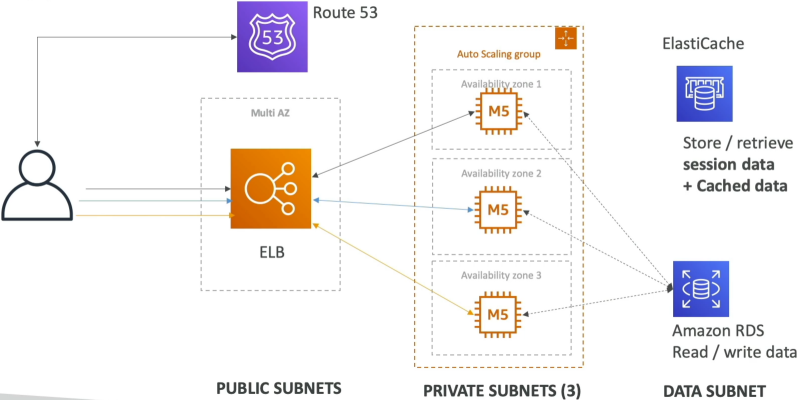
Think of these of three separate security zones. If a hacker breaks into Tier 1, they aren't "inside" your database because of the firewall boundaries we built.
Key Takeaways
🏛️ Tier 1: The Web/Presentation Tier (Public Subnet)
- The Component: Application Load Balancer (ALB).
- The Logic: This is your "Front Desk". It sits in the Public Subnet because it needs a direct route to the Internet Gateway (IGW) to talk to users.
- Security: It only accepts traffic on Port 80/443. It acts as a shield for your servers.
⚙️ Tier 2: The Application/Logic Tier (Private Subnet)
- The Component: EC2 instances in an Auto Scaling Group (ASG).
- The Logic: This is the "Kitchen". It sits in a Private Subnet. It has no public IP and no direct route to the IGW.
- Security: These instances only accept traffic from te Security Group of the ALB. If someone tries to ping these instances from the internet, they simply won't respond.
🗄️ Tier 3: The Data Tier (Deep Private Subnet)
- The Component: Amazon RDS (Database) and Amazon ElastiCache (Caching).
- The Logic: This is the "Vault". It sits in its own dedicated Data Subnet (a private subnet even deeper in the VPC).
- Security: It only accepts traffic from the Security Group of the Application Tier.
The Classic "Developer Stacks"
- The LAMP Stack: Linux (EC2 OS) + Apache (Web Server) + MySQL (RDS) + PHP (Code logic).
- The WordPress Pattern (shared storage): WordPress is famous for letting users upload images (media). Since your ASG might terminate one instance and launch another, you can't store those images on local EBS drive. You use Amazon EFS (Elastic File System) so severy instance in every AZ can "see" and "edit" the exact same image folder simultaneously.
Reading WordPress Best Practice Architecture Diagrams
Stephane recommends you to read the official WordPress architecture diagram and we should have understand 90% of the components shown in the diagram:
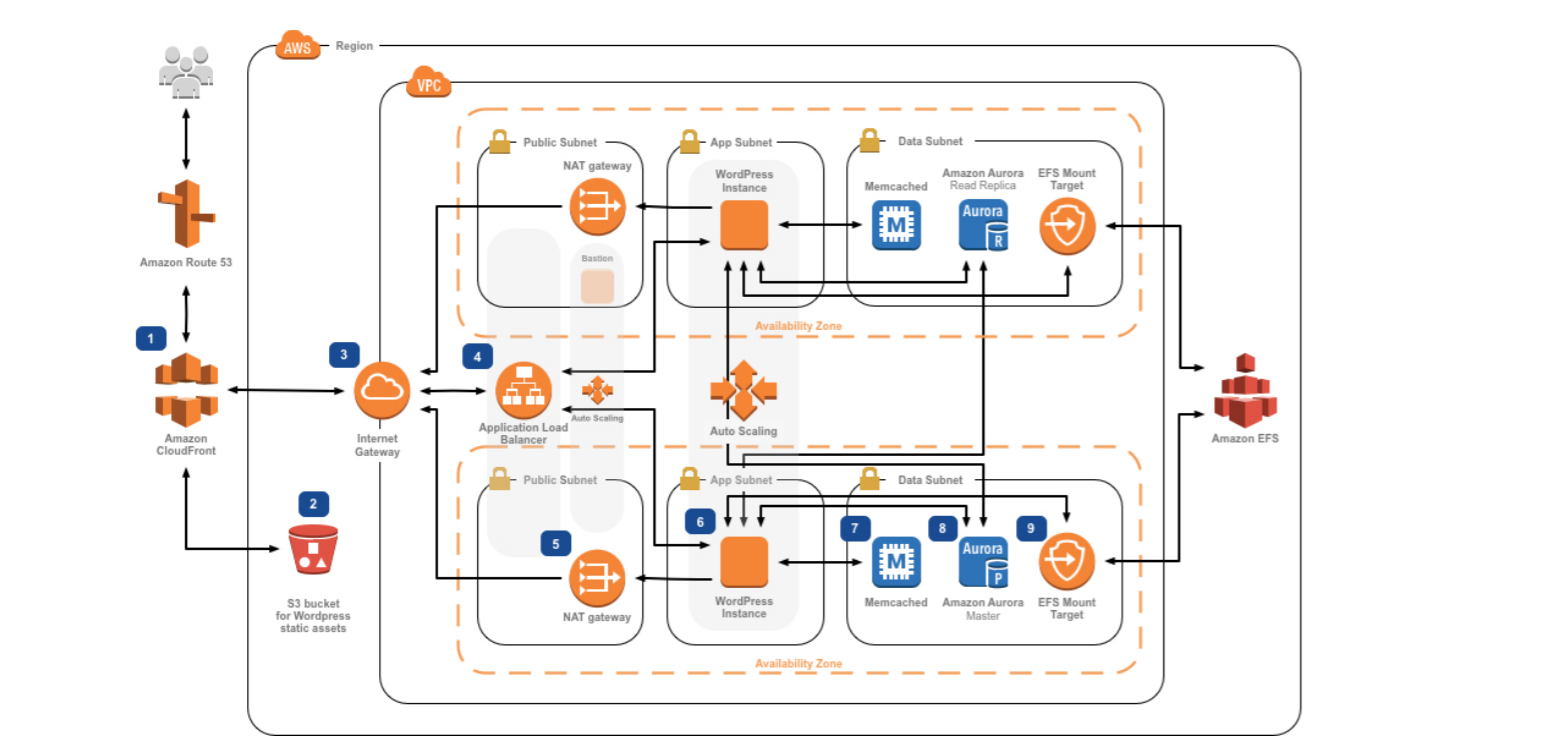
- User hits Route 53: They get the DNS record.
- Traffic hits the ALB: Sitting in the public subnet
- ALB sends traffic to EC2: Sitting in the private subnet (Application Tier).
- EC2 needs an update: It talks out through the NAT Gateway (Public Subnet) to get to the internet.
- EC2 needs a post: It reads from RDS Aurora (Data Tier).
- EC2 needs an image: It pulls from EFS (Shared Storage).
- EC2 wants to go fast: It checks ElastiCache (Redis) for session data.
Exam Tips
The "Public IP" Red Flag": If an exam question says, "You are deploying a 3-tier app. To save costs, you want your EC2 instances to be able to download patches from the internet without a NAT Gateway. How should you configure them?".
The answer is a Trap. To do this, you'd have to put the EC2 instances in a Public Subnet and give them Public IPs. While this is cheaper (no NAT Gateway cost), it is a Security Failure because those instances are now directly "reachable" by the whole internet. For a Developer Associate, always prioritize the NAT Gateway + Private Subnet pattern for backend logic.
Practice Test
Question 1: A company's e-commerce application becomes slow when traffic spikes. The application has a three-tier architecture (web, application and database tier) that uses synchronous transactions. The development team at the company has identified certain bottlenecks in the application tier and it is looking for a long term solution to improve the application's performance.
As a developer associate, which of the following solutions would you suggest to meet the required application response times while accounting for any traffic spikes?
- Leverage horizontal scaling for the web and application tiers by using Auto Scaling groups and Application Load Balancer
- Leverage vertical scaling for the application instance by provisioning a larger Amazon EC2 instance size
- Leverage horizontal scaling for the application's persistence layer by adding Oracle RAC on AWS
- Leverage SQS with asynchronous AWS Lambda calls to decouple the application and data tiers
Correct Answer
- Leverage horizontal scaling for the web and application tiers by using Auto Scaling groups and Application Load Balancer
- Explanation: Horizontally scaling web and application tiers using Auto Scaling groups (ASGs) and Application Load Balancers (ALBs) allows the application to automatically scale out or in based on incoming traffic spikes. This preserves synchronous application processing while eliminating bottlenecks without requiring an architecture overhaul.
- Leverage vertical scaling for the application instance by provisioning a larger Amazon EC2 instance size
- Explanation: Vertical scaling (scaling up instance size) has a hard upper limit and requires downtime during resize operations. It acts as a temporary band-aid rather than a viable long-term solution for traffic spikes.
- Leverage horizontal scaling for the application's persistence layer by adding Oracle RAC on AWS
- Explanation: The performance bottleneck was specifically identified in the application tier, not the database/persistence layer.
- Leverage SQS with asynchronous AWS Lambda calls to decouple the application and data tiers
- Explanation: This is incorrect as it uses asynchronous AWS Lambda calls and the application uses synchronous transactions. The question says there should be no change in the application architecture.