VPC Peering, Endpoints, VPN and DX
AWS networking provides distinct pathways for structural expansion: VPC Peering forms a non-transitive, private mesh network between independent VPC containers. VPC Endpoints (Interface and Gateway styles) eliminate the need for an internet ramp entirely, cutting private access straight to public AWS resources. For hybrid-cloud data-center linkages, Site-to-Site VPN stands up a rapid encrypted tunnel across the public web, while Direct Connect (DX) installs a high-speed, dedicated physical line.
Key Takeaways
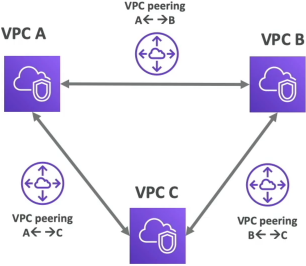
VPC Peering: Connecting the Networks
Imagine you have Frontend-VPC running in your developer account, and a Data-Warehouse-VPC running in completely separate corporate accounting space. You can bridge them instantly using VPC peering.
- The Local Feel: Peering links use AWS's own global network backplane. Instances talk to each other directly using their private internal IPs (
10.x.x.x). Traffic never touches te public internet. - ⚠️ The Overlapping CIDR Guardrail: You can only establish a peering link if your two VPCs operate on completely distinct, non-overlapping IP address pools. If VPC A is
10.0.0.0/16, VPC B is also10.0.0.0/16, the routes will have no idea where to direct packets, and AWS will drop the creation request immediately. - ❌ The Non-Transitive Rule: Peering is strictly a 1-to-1 connection wrapper. If VPC A is peered to VPC B, and VPC A is also peerted to VPC C, VPC B and VPC C cannot talk to each other through VPC A. To let B and C communicate, you must explicitly construct a brand-new independent peering pipe directly between them.
VPC Endpoints: Bypassing the Public Web
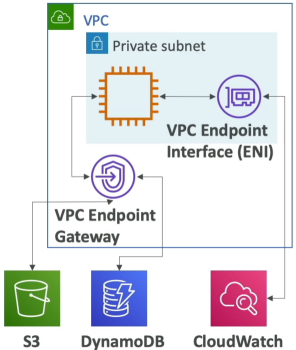
By default, services like Amazon S3, DynamoDB, SQS, and CloudWatch live outside your custom VPC on the public web.
Normally, an instance needs an Internet Gateway or A NAT Gateway just to upload a file to S3. VPC Endpoints (powered by AWS PrivateLink) eliminates this design dependency by letting your private instances communicate with AWS services over a secure private pipeline.
| Endpoint Archetype | Supported Target Services | Implementation Mechanics |
|---|---|---|
| 1. Gateway Endpoints | Strictly Amazon S3 and Amazon DynamoDB | Acts as a virtual router target inside your Route Table. It intercepts traffic heading to S3/DynamoDB and rewrites the path internally. 100% Free to use! |
| 2. Interface Endpoints | The rest of AWS (SQS, SNS, CloudWatch, Secrets Manager, etc.) | Provisions a physical Elastic Network Interface (ENI) with a local private IP address straight inside your private subnet. Charges a small hourly usage fee. |
Hybrid Core Connectivity: VPN vs. Direct Connect (DX)
When you need to hook your physical office building or corporate data center server racks up to your AWS cloud playground, you select a strategy based on cost and time.
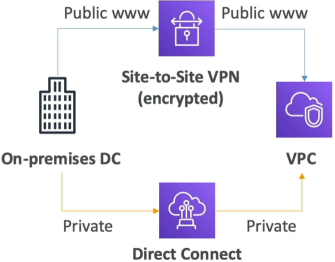
💻 Option A: Site-to-Site VPN (Fast & Cheap)
- The Transit Medium: Your data moves over the raw public internet.
- The Security Profile: Fully wrapped inside an encrypted IPsec cryptographic tunnel.
- The Setup Velocity: Blazing fast. You can provision the AWS virtual private gateway properties and configure your office router appliance in under an hour.
🎛️ Option B: Direct Connect (DX) (Premium & Physical)
- The Transit Medium: An absolute dedicated, physical network line run from your telecom cage straight into an AWS data center facility patch panel.
- The Security Profile: 100% private. Your data never touches the open public web space, dropping your latency and jitter down to absolute zero.
- The Setup Velocity: Slow. Because telecom provider physically have to lay copper/fiber cross-connect lines, it typically takes anywhere from a few weeks to over a month to go live.
Exam Tips
The Isolated Lambda Secrets Fetch: If an exam scenario says, "You have written a serverless AWS Lambda function running inside a locked-down private custom VPC subnet to securely process database changes. The code needs to fetch a database password string from AWS Secrets Manager. The code needs to fetch a database password string from AWS Secrets Manager. However, company security compliance rules strictly forbids this private subnet from containing a route to a NAT Gateway or having any public internet access. How do you resolve this connection issue?"
The definitive cloud answer is to provision an Interface VPC Endpoint for Secrets Manager inside that specific private subnet. This drops a local, private network interface card (10.0.x.x) straight into your subnet block. Your Lambda function can now execute standard AWS SDK fetch commands against Secret Manager securely using the internal AWS fiber network, keeping your configuration 100% complaint and fully air-gapped from the public web!
Scenario Practice
Scenario: A CRM application is hosted on Amazon EC2 instances with the database tier using DynamoDB. The customers have raised privacy and security concerns regarding sending and receiving data across the public internet.
As a developer associate, which of the following would you suggest as an optimal solution for providing communication between EC2 instances and DynamoDB without using the public internet?
- Create an Internet Gateway to provide the necessary communication channel between EC2 instances and DynamoDB
- Configure VPC endpoints for DynamoDB that will provide required internal access without using public internet
- The firm can use a virtual private network (VPN) to route all DynamoDB network traffic through their own corporate network infrastructure
- Create a NAT Gateway to provide the necessary communication channel between EC2 instances and DynamoDB
Correct Answer
- Configure VPC endpoints for DynamoDB that will provide required internal access without using public internet
- When you create a VPC endpoint for DynamoDB, any requests to a DynamoDB endpoint within the Region (for example, dynamodb.us-west-2.amazonaws.com) are routed to a private DynamoDB endpoint within the Amazon network. You don't need to modify your applications running on EC2 instances in your VPC. The endpoint name remains the same, but the route to DynamoDB stays entirely within the Amazon network, and does not access the public internet. You use endpoint policies to control access to DynamoDB. Traffic between your VPC and the AWS service does not leave the Amazon network.
Using Amazon VPC Endpoints to Access DynamoDB:
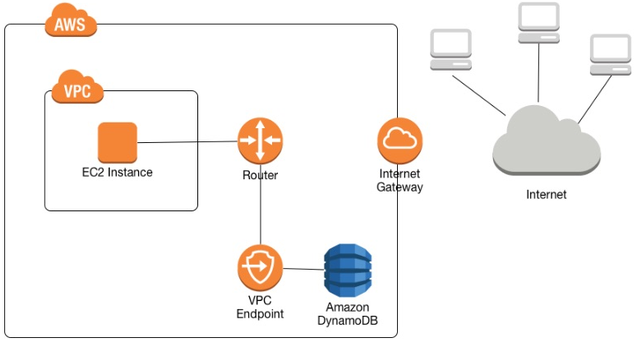
- When you create a VPC endpoint for DynamoDB, any requests to a DynamoDB endpoint within the Region (for example, dynamodb.us-west-2.amazonaws.com) are routed to a private DynamoDB endpoint within the Amazon network. You don't need to modify your applications running on EC2 instances in your VPC. The endpoint name remains the same, but the route to DynamoDB stays entirely within the Amazon network, and does not access the public internet. You use endpoint policies to control access to DynamoDB. Traffic between your VPC and the AWS service does not leave the Amazon network.
Using Amazon VPC Endpoints to Access DynamoDB: