VPC, Subnets, IGW and NAT
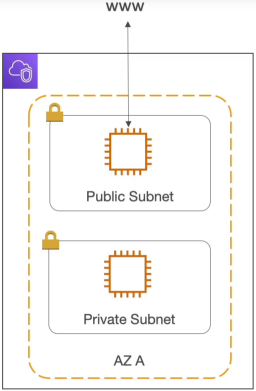
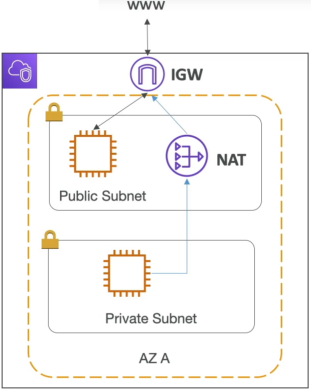
A VPC is your regional network perimeter. Inside it, you split your IP space into Subnets defined at the AZ level. To let traffic pass in and out of the VPC, you attach an Internet Gateway (IGW). Public subnets route directly to the IGW. Private subnets stay isolated but use a NAT Gateway parked in the public subnet as a secure, one-way proxy to fetch internet resources without exposing themselves to inbound web attacks.
Key Takeaways
The Architectural Components
🌐 Subnets: The Compute Segregators:
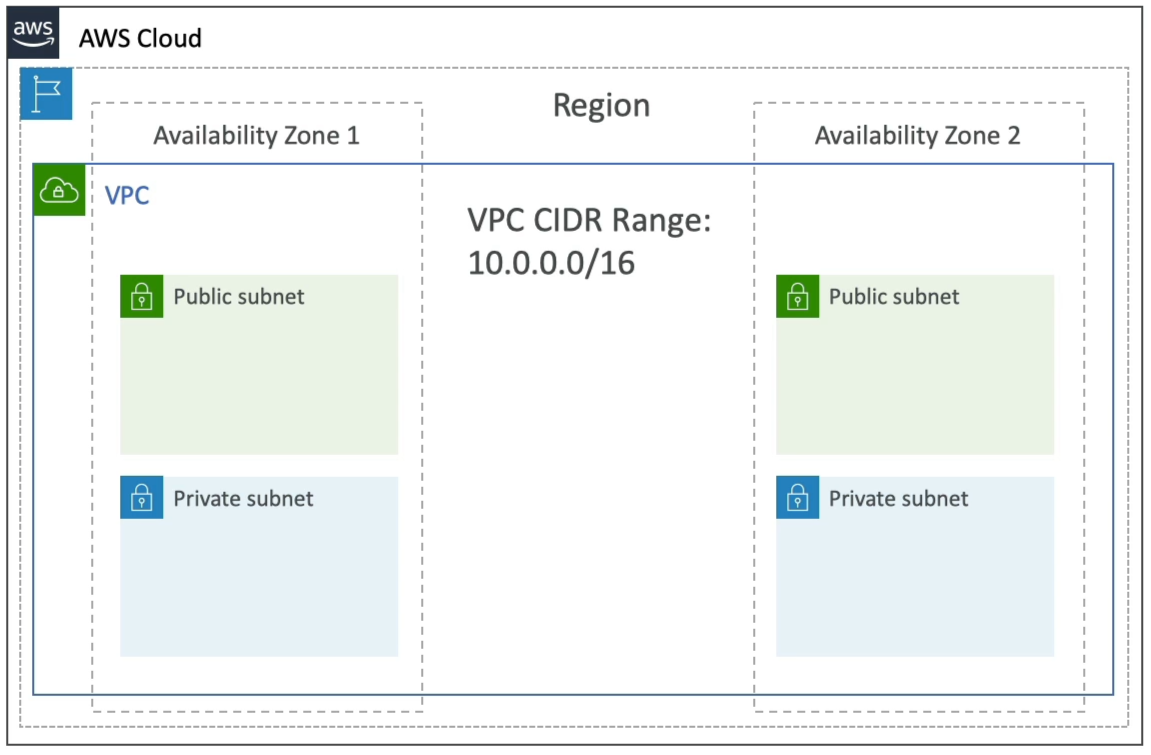
You slice up your VPC's primary IP range (CIDR BLOCK) into smaller, localized subnets.
- Scope Constraint: A VPC spans an entire Region, but a single Subnet can never cross AZs. It is strictly pinned to one AZ.
- The Default VPC Reality: Every single AWS account comes with a pre-configured Default VPC out of the box.
note
The default VPC only provisions Public Subnets (one per AZ) with a pre-attached Internet Gateway (IGW) so you can spin up resources quickly. You have to build a custom VPC to get private subnets.
🔌 Internet Gateway (IGW): The Bidirectional Door
The IGW is a highly available, horizontally scaled VPC component. It performs Network Address Translation (NAT) for your public instances, mapping their private VPC IPs to their public AWS IPs. It allows bidirectional (two-way) communication: your instances can talk to the web, and the web can initiate a connection straight back to your public instances.
🛡️ NAT Gateway: The One-Way Proxy
When your secure instances (like an RDS database or an internal payment API processing container) sit in a private subnet, they have no public IP and zero direct access to the outside world. But what happens when that private OS needs to pull a security patch or hit a third-party API? You deploy a NAT Gateway:
- The Location Rule: A NAT Gateway must be physically deployed inside a Public Subnet because it requires a public Elastic IP (EIP) and a direct line to the IGW.
- The Security Profile: It allows unidirectional (one-way) outbound traffic only. Your private instances can securely push requests out to the web, but hackers on the public internet cannot initiate a connection back inside to hit your private endpoints.
- Managed vs. Self-Managed: AWS heavily pushes NAT Gateways (fully managed by AWS, scales automatically up to 45 Gbps). You can deploy a NAT Instance (a single EC2 instance running a custom script), but it's a massive anti-pattern because it introduces a single point of failure and requires you to manually manage patching and instant sizing.
The Traffic Routing Matrix (How Routes Actually Flow)
How does a subnet actually become "Public" or "Private"? It all comes down to Route Tables. Every subnet must be associated with a route table that dictates exactly where its network packets are thrown.
[ Public Subnet Route Table ]
Destination       │ Target
──────────────────┼───────────────────────────────────────
10.0.0.0/16       │ Local (Internal VPC Routing)
0.0.0.0/0 (Web)   │ igw-xxxxxxxx (Internet Gateway) <─── Makes it PUBLIC!

[ Private Subnet Route Table ]
Destination       │ Target
──────────────────┼───────────────────────────────────────
10.0.0.0/16       │ Local (Internal VPC Routing)
0.0.0.0/0 (Web)   │ nat-xxxxxxxx (NAT Gateway)      <─── Keeps it PRIVATE!
Exam Tips
The Lambda Internet Isolation Trap: By default when you write a standard AWS Lambda Function, it executes inside an internal,AWS-managed secure network. Out of the box, it has 100% free access to the public internet (so it can call public endpoints, third-party APIs, or download libraries), but it cannot touch resources inside your private custom VPC (like Amazon ElastiCache cluster or an RDS Postgres DB).
To fix this, you must explicitly configure the Lambda function to run inside your custom VPC, assigning it your private Subnets and a SG. The moment you do this, the Lambda function loses its default public internet access! If your VPC-bound Lambda function needs to process private database records and hit a public API provider, your private subnets must contain a route pointing to an active NAT Gateway running in a public subnet. If you forget the NAT Gateway, your Lambda function will throw connection timeouts the second it tries to speak to the outside web!