S3 Replication
Amazon S3 Replication is a a bucket-level feature that handles the asynchronous background copying of objects from a source bucket to a destination bucket. To unlock this feature, Versioning must be explicitly turned ON in both the source and target buckets. S3 relies on an attached IAM Service Role to securely assume the permission required to read assets from the origin and write them into the destination layout.
Key Takeaways
AWS splits replication into two distinct flavors based on your structural geographical targets:
🌐 Cross-Region Replication (CRR)
- The Environment Matrix: Your source bucket and target bucket reside in different geographic AWS Regions (e.g., source in Sydney
ap-southeast-2replicating over a target in Singaporeap-southeast-1). - The Use Cases:
- Compliance & Compliance Laws: Enterprise industries require data to be physically mirrored at least 400 km away from the primary DC to satisfy legal disaster-recovery audits.
- Low-Latency Global Access: If you have an engineering team or a pool of users based in the US, pulling large media assets from a local US bucket is significantly faster than routing cross-oceanic queries back to Australia.
📍 Same-Region Replication (SRR)
- The Environment Matrix: Both your source and destination buckets are located within the exact same AWS Region (e.g., both bucket sit inside
ap-southeast-2). - The Use Cases:
- Log Aggregation: If you have 50 different microservices throwing logs into 50 separate localized buckets, you can use SRR to automatically pipe them into a single, centralized master security audit bucket in real-time.
- Environment Isolation (Prod to Test): You can safely shadow live production uploads directly into a test/QA environment bucket within the same region so your staging apps can run integration tests against real data payloads.
The Core Replication Rules
To pass a design review or an AWS exam, you must remember the four absolute architectural mandates that make replication function:
- The Versioning Law: If you forget to enable Versioning on either the source buckets or the destination bucket, the replication configuration pipeline will fail to initialize.
- The Asynchronous Rule: Replication is not synchronous. When a user execute a
PUTrequest to uploadfile.jpgto the source bucket, the APi returns a successful200 OKinstantly. S3 then duplicates the object over to the target bucket in the background. It can take anywhere from a few seconds to several minutes depending on file scale. - The IAM Service Role Handshake: S3 cannot look inside your bucket or write to to other accounts by default. You must create an IAM Role with a trust policy that allows the
s3.amazonaws.comservice principal to assume it. This role must pack explicit permissions:
- Cross-Account Mechanics: Yes, you can replicate completely different AWS Accounts! if Account A owns the source and Account B owns the target, Account B must modify its S3 Bucket Policy to explicitly allow the replication IAM role coming from Account A to drop object payloads inside it.
Replication Notes
🔄 The Legacy File Fix: S3 Batch Replication
If you activate a replication rule on a live production bucket that already contains data, S3 ignores that existing footprint.
- The Rule: Only newly created objects trigger the background replication engine.
- The Solution: To mirror your historical inventory or to retry objects that failed to sync during a network blip, you must spin up an S3 Batch Replication operation job. It scans the bucket metadata and retroactively forces a sync of the legacy file array.
No Replication "Chaining"
Imagine you want to design a multi-region distribution chain where Bucket 1 syncs to Bucket 2, and Bucket 2 syncs to Bucket 3. Then objects created in bucket 1 are not replicated to bucket 3. Because S3 replication is an identity-vetted service role trigger, it will never chain or forward events. An object dropped into Bucket 1 will arrive safely in Bucket 2, but it will stop right there. It will never trigger the replication rule on Bucket 2 to push the file into Bucket 3. If you want data in Bucket 3, you must configure a direct secondary rule mapping from Bucket 1 to Bucket 3 explicitly.
DELETE operations
The exam will test your understanding of the blast radius when files are removed from a replicated cluster.
🗑️ Tactic A: Syncing Soft Deletes (Delete Markers)
If you configure your rule with Delete Marker Replication enabled, running a standard aws s3 rm command on the source bucket will place a delete market on the source and automatically mirror that exact same delete market layer onto the destination bucket.
🔒 Tactic B: Blocking Permanent Deletes
If a rogue script or compromised IAM user targets an explicit Version ID to permanently destroy a file layer from the source bucket. S3 won't replicate this action. The Targeted version layer is wiped out of the source bucket, but the destination bucket completely ignores this delete event, leaving the backup copy of that exact file version totally intact and safe in the target bucket.
Hands On
This hands-on lab lab layout walks through creating an S3 lifecycle baseline for Cross-Region Replication (CRR).
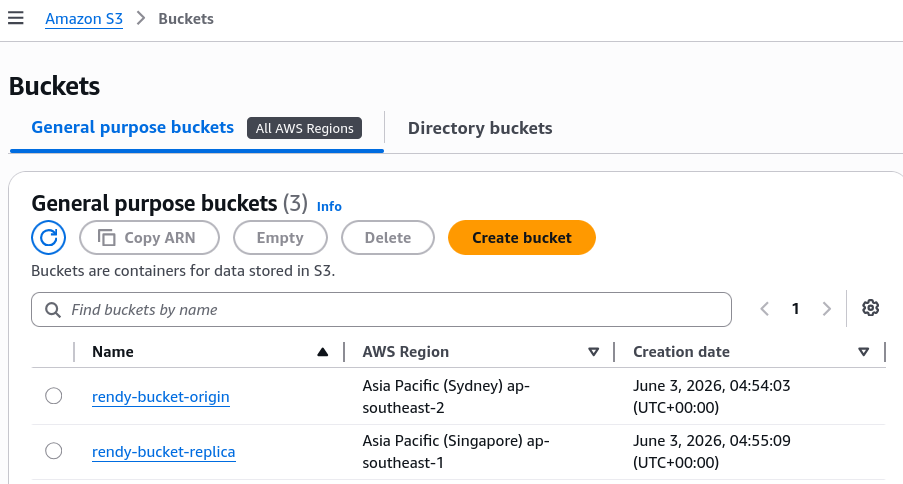
Phase 1: Provision the Source and Destination Buckets
- Create the Source Bucket
- Select the
ap-southeast-2Sydney region - Click Create Bucket
- Name it
rendy-bucket-origin - Scroll down and explicitly Enable Bucket Versioning
- Complete the creation and open this bucket in a new browser tab
- Select the
- Create the Destination Bucket
- Select the
ap-southeast-1Singapore region - click Create Bucket
- Name it
rendy-bucket-replica - Scroll down and explicitly Enable Bucket Versioning
- Click create
- Select the
Phase 2: The Pre-Rule Upload
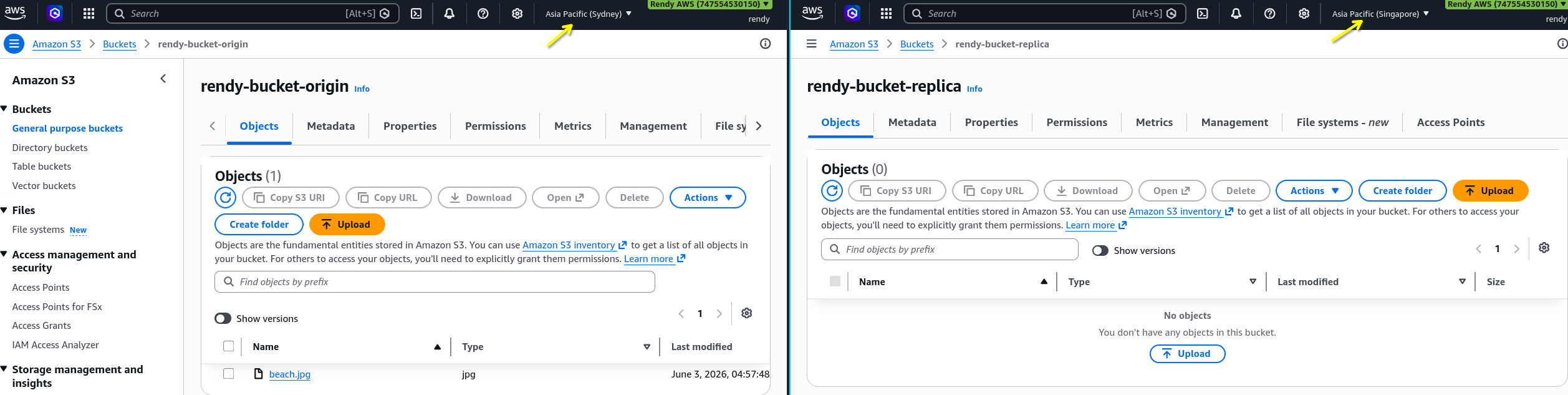
- Go inside your Origin Bucket upload a placeholder asset file named
beach.jpg. - Note: No replication schema exist yet, this object stays entirely local to Sydney
Phase 3: Wire Up the Automation Grid
- Inside the Origin Bucket, navigate to the Management tab.
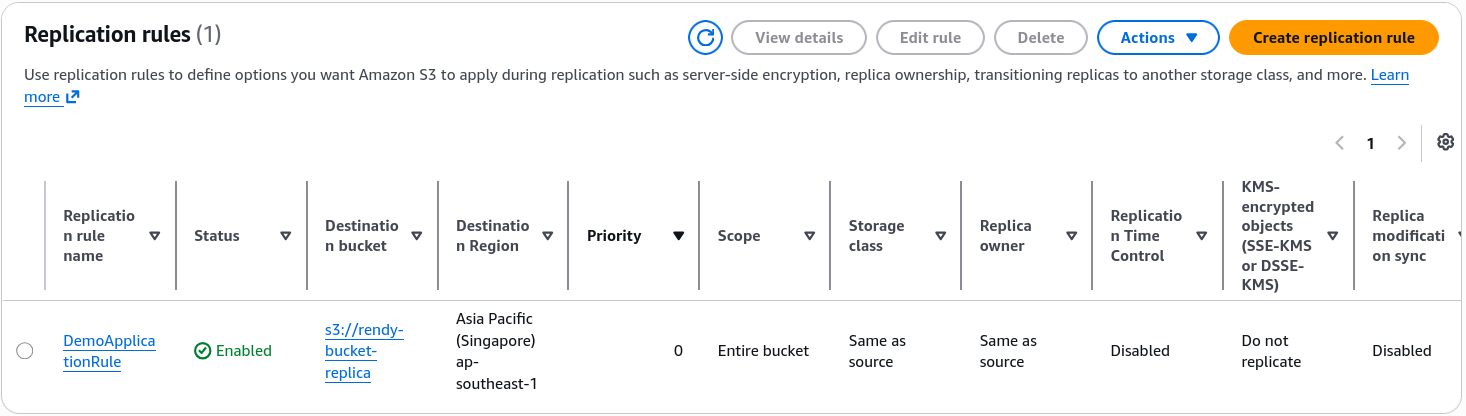
- Scroll down to the Replication rules section and click Create replication rule.
- Configure the rule parameters:
- Replication rule name:
DemoReplicationRule - Status: Enabled
- Source bucket scope: Choose "Apply to all objects in the bucket"
- Destination: Select Specify a bucket in this account, then copy and paste the name of your target bucket (
rendy-bucket-replica). S3 will automaticaly flag the target region code asap-southeast-1. - IAM Role: Select Create new role from the dropdown menu to let S3 automatically write your resource access permissions.
- Click Save.
- Replication rule name:
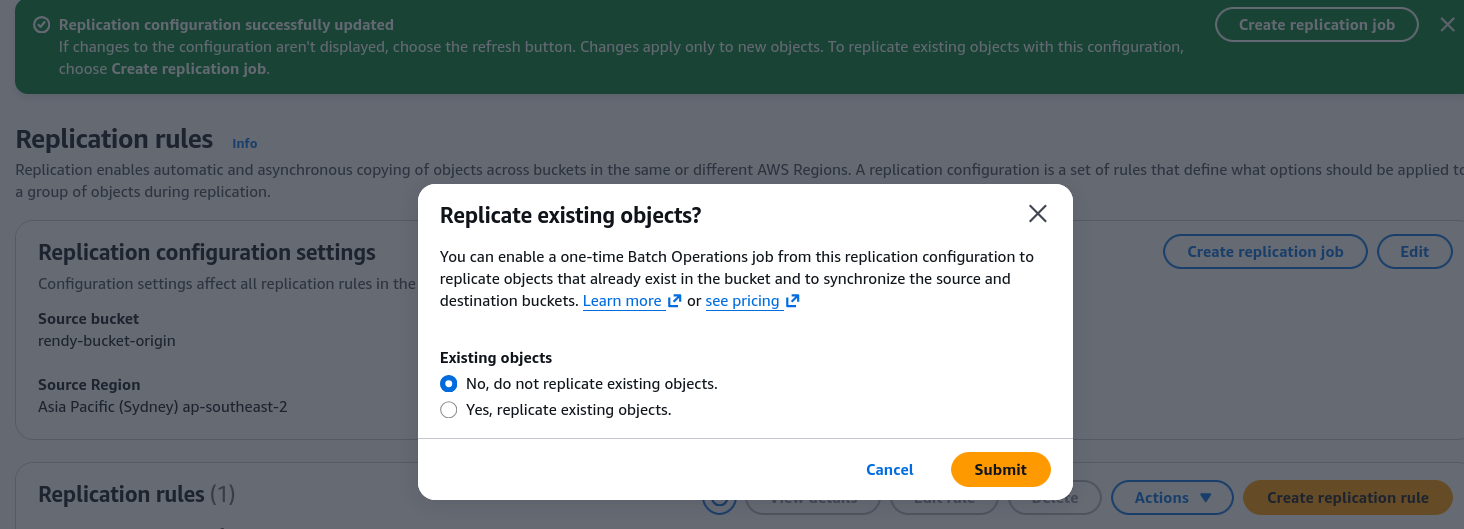
- The Batch Operation job Prompt: When AWS asks if you want to retroactively sync historical data, select No, do not replicate existing objects.. Click submit.
Phase 4: Validating New Upload Streams
- Check your Replica Bucket - confirm it is still blank (the original
beach.jpgcopy was safely ignored). - Go to your Origin Bucket and upload a brand-new asset named
coffee.jpg. - Toggle Show versions on the origin bucket to view its distinct cryptographic identifier string.
- Navigate back to your replica Bucket and refresh the dashboard view (expect 5-10 seconds delay until the file replicated).
- Verify that
coffee.jpgarrived safely in the Singapore and matches your origin version metadata signature exactly.
- To fix your initial legacy asset, re-upload
beach.jpginto the origin pool to generate a brand-new current version layer - watch it immediately execute the sync to the replica pool.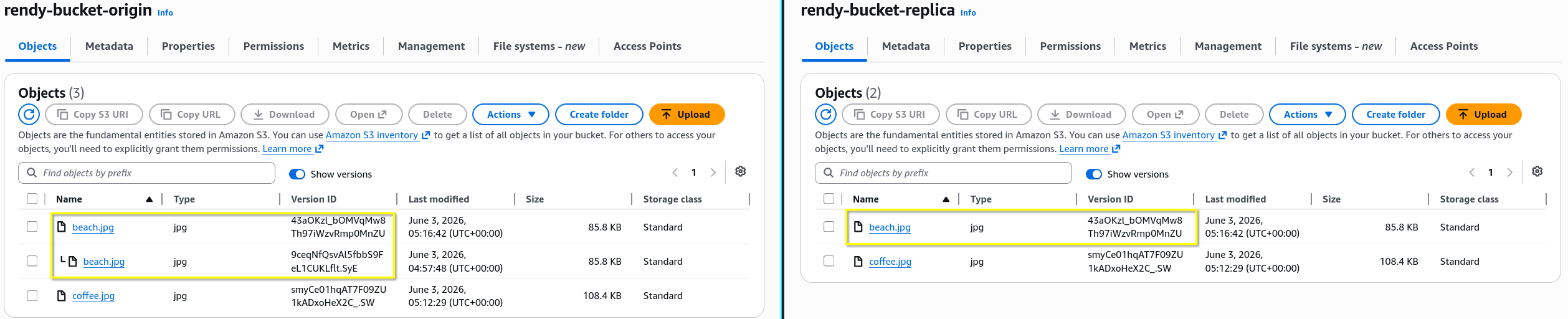
Phase 5: The Deletion Scenario
- Go to your Origin Bucket → Management tab → Edit your replication rule
- Scroll to additional settings, check the box to Enable Delete Marker Replication, and save your configuration adjustments.
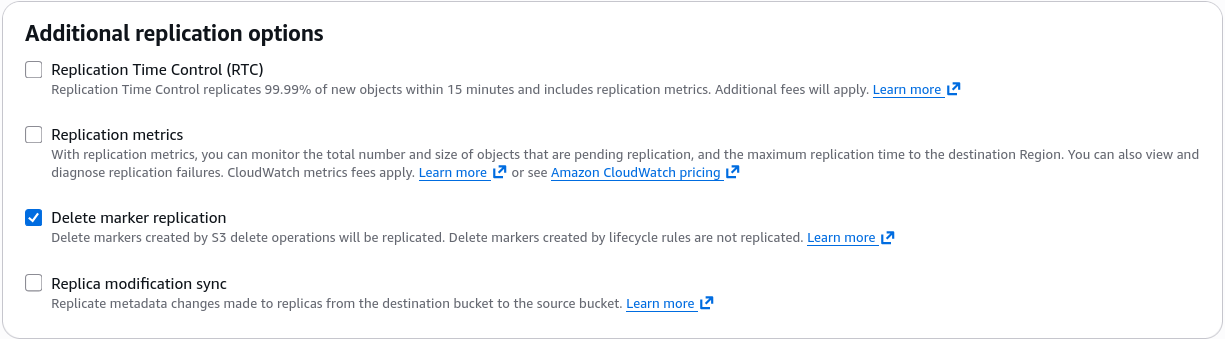
- Test a Soft Delete: Turn Show versions OFF inside your origin bucket
- Select
coffee.jpgand execute a standard delete by typing"delete". - S3 stamps a Delete Marker locally. Check your replica bucket after a few moments - confirm that a matching Delete Marker was safely mirrored to the US stack, hiding the file on both ends.

- Select
- Test a Permanent Delete:
- Turn Show versions ON inside your origin bucket.
- Select a specific, explicit Version ID layer for
beach.jpgand execute a permanent delete by typing"permanent delete". - Review your replica bucket - notice that the version layer remains completely intact and safe the destination pool. S3 successfully barricaded the permanent destruction instruction at the origin boundary!

Practice Test
Question: To meet compliance guidelines, a company needs to ensure replication of any data stored in its S3 buckets.
Which of the following characteristics are correct while configuring an S3 bucket for replication? (Select two)
- Replicated objects do not retain metadata
- Object tags cannot be replicated across AWS Regions using Cross-Region Replication
- Once replication is enabled on a bucket, all old and new objects will be replicated
- S3 lifecycle actions are not replicated with S3 replication
- Same-Region Replication (SRR) and Cross-Region Replication (CRR) can be configured at the S3 bucket level, a shared prefix level, or an object level using S3 object tags
Correct Answers
- Replicated objects do not retain metadata
- Explanation: You can use replication to make copies of your objects that retain all metadata, such as the original object creation time and version IDs. This capability is important if you need to ensure that your replica is identical to the source object.
- Object tags cannot be replicated across AWS Regions using Cross-Region Replication
- Explanation: Object tags can be replicated across AWS Regions using Cross-Region Replication. For customers with Cross-Region Replication already enabled, new permissions are required for tags to replicate.
- Once replication is enabled on a bucket, all old and new objects will be replicated
- Explanation: Replication only replicates the objects added to the bucket after replication is enabled on the bucket. Any objects present in the bucket before enabling replication are not replicated.
- S3 lifecycle actions are not replicated with S3 replication
- Explanation: With S3 Replication (CRR and SRR), you can establish replication rules to make copies of your objects into another storage class, in the same or a different region. Lifecycle actions are not replicated, and if you want the same lifecycle configuration applied to both source and destination buckets, enable the same lifecycle configuration on both.
- Same-Region Replication (SRR) and Cross-Region Replication (CRR) can be configured at the S3 bucket level, a shared prefix level, or an object level using S3 object tags
- Explanation: Amazon S3 Replication (CRR and SRR) is configured at the S3 bucket level, a shared prefix level, or an object level using S3 object tags. You add a replication configuration on your source bucket by specifying a destination bucket in the same or different AWS region for replication.