S3 Pre-Signed URL Hands On
This hands-on lab covers verifying an S3 bucket's default private isolation boundary, generating time-restricted read pathways using the visual Share with a pre-signed URL console manager, and compiling automated background signature strings using the AWS CLI presign engine core loop to distribute data securely to anonymous external clients.
Hands On
Phase 1: Establish the Baseline Boundary Fault
- Open the Amazon S3 Console and click into an active private deployment bucket.
- Select a standard target testing asset (e.g.,
coffee.jpg). - The Access Audit Control Pass:
- Locate the object's public Object URL string path metadata row under the Object overview panel and click it directly.
- The Result: The web browser browser-cop immediately halts execution and returns a raw, plaintext
403 Forbidden / Access Deniederror xml block. This explicitly validates that your bucket's security state is hard-locked against public internet traffic.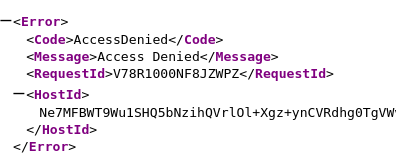
Phase 2: Generate a Pre-Signed Link via the Console GUI
- Return to your object configuration view screen inside the S3 dashboard.
- Click the top-level Object actions dropdown toggle button menu.
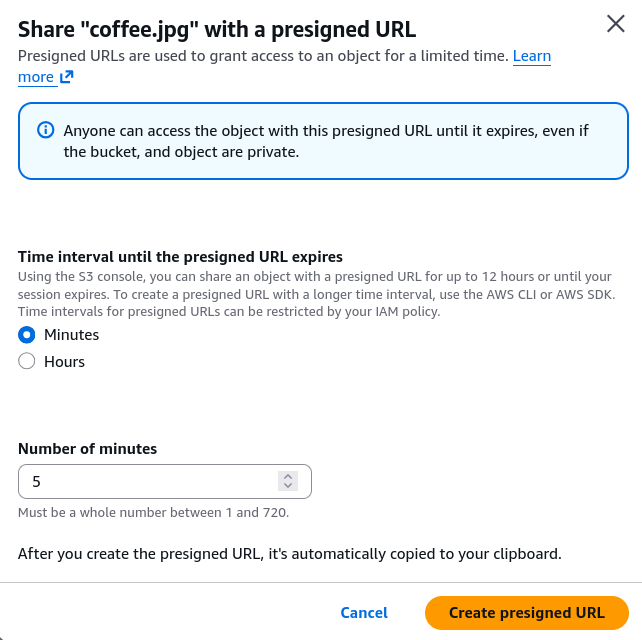
- Select the option marked Share with a pre-signed URL.
- Define the Expiration Constraints:
- In the duration allocation field, choose your timeframe envelope bounds (e.g., set the timer to expire after exactly
5minutes). - Console Limits: The web UI lets you quickly scale this manual share countdown timer window up to a maximum hard boundary cap of 12 hours.
- In the duration allocation field, choose your timeframe envelope bounds (e.g., set the timer to expire after exactly
- Click Create pre-signed URL.
- The Success Output: S3 drops a custom confirmation layout toast tracking your link. Click Copy pre-signed URL.
Phase 3: Execute the Signed Client Download
- Open an completely separate, isolated browser tab (or jump into an Incognito/Private window session).
- Paste your copied link directly into the navigation URL address bar wrapper and hit Enter.
- The Result: The secure binary image file renders cleanly on the client's monitor! S3 verified the temporary URL query string tokens and authorized the download payload instantly.
- Anatomy of the Copied String: If you dump that generated link into a text file editor, you can clearly trace how the AWS console programmatically injected the active SigV4 authentication credentials directly into the URL query sequence:
https://my-bucket.s3.amazonaws.com/coffee.jpg?X-Amz-Algorithm=AWS4-HMAC-SHA256&X-Amz-Credential=AKIAIOSFODNN7EXAMPLE...&X-Amz-Date=20260608T235837Z&X-Amz-Expires=300&X-Amz-Signature=8f39a4...
Phase 4: Generate Pre-Signed URLs via the AWS CLI Terminal
- In production microservices, you won't be manually clicking console dashboards to share files. Open your system's shell terminal to execute this programmatically using the core
s3utility engine profile hook. - To instantly compile a secure
GETdownload string pointing straight to your object path, fire the standardpresignAPI verb command:
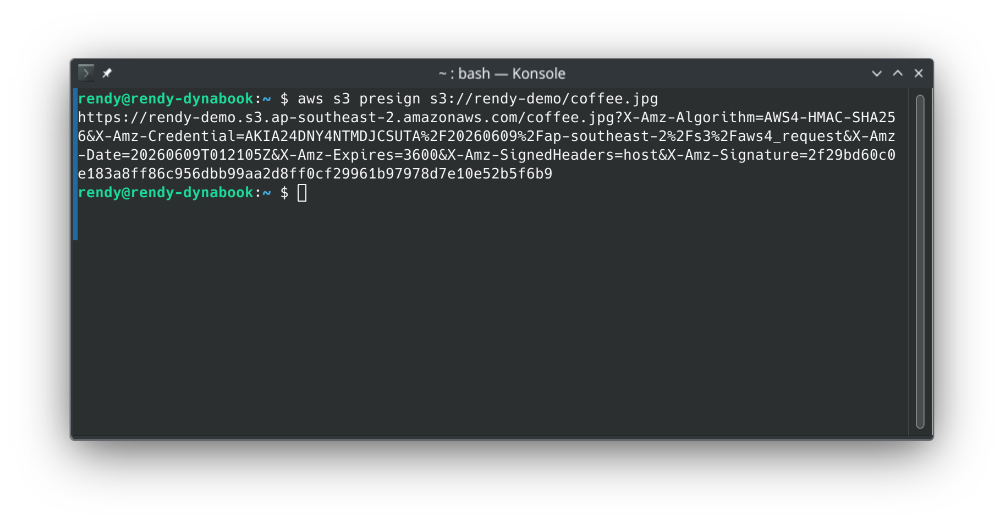
aws s3 presign s3://rendy-demo/coffee.jpg
- The Default Lifespan: Firing the naked command without flags will compile an absolute secure signature link that automatically runs an internal countdown expiration clock set to a default baseline duration of 3600 seconds (1 hour).
Phase 5: Implement Custom Expiration Lifespans
- To customize your retention window bounds to fit dynamic system designs (e.g., granting an external user a short 5-minute access pass), append the explicit
--expires-inflag modifier containing your time parameter integer calculated in seconds:
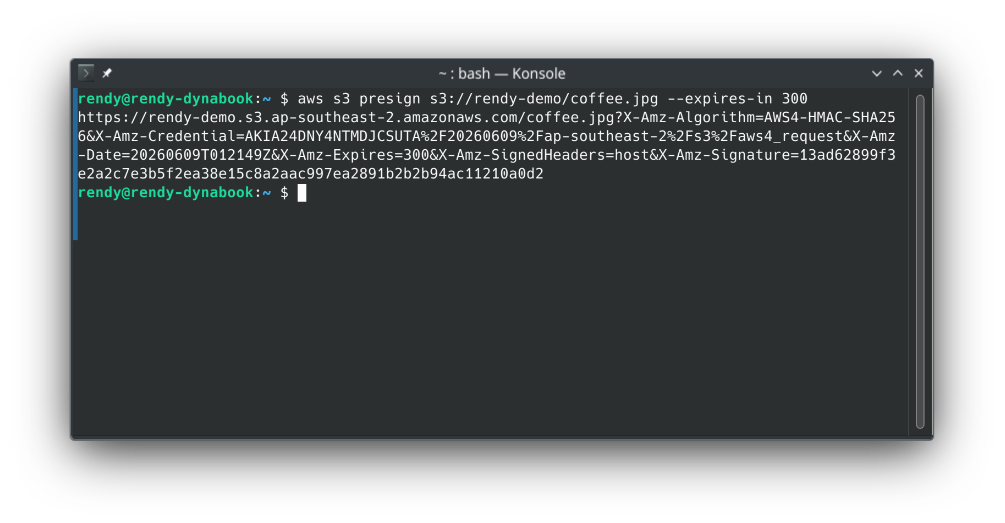
aws s3 presign s3://rendy-demo/coffee.jpg --expires-in 300
- The Output String: The CLI instantly returns a clean, plain text URL carrying your authentication parameters. You can text, email, or script-route this string out to any anonymous global client device—granting them full read access to that targeted private key until the 300-second window ticks down to absolute zero!
Exam Tips
The Pre-Signed Upload CLI Trap: Imagine an exam scenario states, "You need to write an automated terminal bash deployment script that provides external vendors with a temporary pre-signed URL. The vendors must be able to use this link to UPLOAD raw analytics logs straight into your private S3 bucket. Your team attempts to compile this link by executing the aws s3 presign command, but vendors report receiving an MethodNotAllowed error when trying to push files. How do you resolve this?"
The textbook diagnostic answer is that the high-level aws s3 presign command is hard-coded by AWS engineers to ONLY support HTTP GET download signatures. >
If you attempt to use that returned link wrapper to execute an inbound HTTP PUT upload stream, the S3 endpoint security routers will drop the packet immediately.
To generate a secure, functional pre-signed upload link, you must bypass the standard high-level S3 terminal utilities completely. Your development team must write an explicit script leveraging an **** client library layer (such as Python's boto3 utilizing the generate_presigned_url(ClientMethod='put_object') method function blocks) to force the signature protocol to authorize inbound write modifications!