Real-Time Logs
CloudFront Real-Time Logs provide real-time, event-driven monitoring of all HTTP/HTTPS requests intercepted across the global edge network. Instead of batching data into flat files, this feature streams log records directly into an Amazon Kinesis Data Stream with sub-second delivery latency. Developers can tune data volume using a configurable Sampling Rate, select precise log dimensions, and filter streams by specific Cache Behaviors to power near-instantaneous security forensics or performance analytics pipelines.
Key Takeaways
The Real-Time Streaming Pipeline (How Traffic Flows)
The most critical architectural rule to memorize for CloudFront Real-Time Logs is the destination target constraint: CloudFront cannot send real-time logs directly to Amazon S3. They must be delivered into an active streaming bus framework.
⚙️ The Two Core Downstream Execution Tracks:
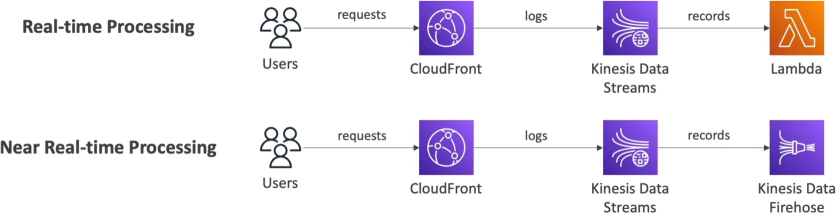
- The Instant Serverless Track (True Real-Time):
- The Pipeline:
CloudFront EdgeKinesis Data StreamAWS Lambda. - The Logic: An active AWS Lambda function continuously polls the Kinesis shards. The moment an anomaly occurs (like an IP address executing 500 requests a second), Lambda triggers an automated script to update your AWS WAF rules and block the attacker instantly.
- The Pipeline:
-
The Analytical Batch Delivery Track (Near Real-Time)
- The Pipeline:
CloudFront EdgeKinesis Data StreamKinesis Data FirehoseAmazon S3 / Amazon OpenSearch. - The Logic: Kinesis Data Firehose acts as a managed data buffer. It ingests the real-time stream, groups the records into micro-batches (e.g., every 60 seconds or 5 MB), and flushes them cleanly into OpenSearch dashboards for live log parsing or an S3 warehouse for long-term audit storage.
- The Pipeline:
Optimization and Fine-Grained Controls
Because high-traffic platforms process billions of requests a day, streaming every single transaction line can quickly lead to massive Kinesis shard billing overhead. S3 provides three major dials to keep costs and data footprints optimized:
- The Sampling Rate Percentage: You don't have to capture everything. You can configure a precise integer value from to specifying the exact percentage of total random traffic queries you want pushed down the stream. For example, setting a sampling rate on a massive e-commerce storefront still yields excellent statistical telemetry data while cutting of your logging execution bills!
- Cache Behavior Isolation: You can isolate your real-time logging configurations to target explicit path patterns. If you only care about monitoring performance bottlenecks on your active backend API, you attach the real-time log configuration purely to your
/api/*cache behavior, leaving your static public images (/images/*) completely out of the pipeline. - Custom Field Selectors: You can strip out unnecessary data blocks. CloudFront exposes over 30 distinct field options (such as
time-to-first-byte,sc-bytes,c-ip, andcs-user-agent). You select only the specific metrics your dashboard needs to maintain tight, clean log line footprints.
Exam Tips
| Metric Vector | Standard S3 Access Logs | Real-Time Logs |
|---|---|---|
| Immediate Delivery Destination | Amazon S3 Buckets | Amazon Kinesis Data Streams |
| Latency SLA Window | Batch delivery (Up to several hours) | Sub-second streaming (Within milliseconds) |
| Additional Base Costs | Free, native feature (Pay only for S3 storage) | Additional charges apply per log line generated |
| Granular Path Filtering | ❌ Applies globally across the entire bucket layout | ✅ Supported (Can bind to specific Cache Behaviors) |
| Primary Architectural Role | Historical compliance audits, cold-data analysis | Live security forensics, real-time alerting |
The Compliance Storage Trap: Imagine an exam scenario states, "You are architecting a real-time security dashboard for a global application using CloudFront. Your compliance officer mandates that all edge logs must be analyzed within seconds of generation to catch active fraud vectors. Furthermore, an exact long-term raw copy of every single log record must be safely archived inside an Amazon S3 bucket for a 7-year retention period. How do you implement this cost-effectively?"
The textbook, multi-step answer on test day relies on chaining streaming data services:
- You enable CloudFront Real-Time Logs and configure them to stream of data events directly into an Amazon Kinesis Data Stream.
- You attach an Amazon Kinesis Data Firehose delivery stream directly to that Kinesis stream instance.
- Inside Kinesis Firehose, you split the execution loop: you set the main delivery target path to feed directly into your Amazon OpenSearch Service cluster for your real-time analytical dashboards, and simultaneously configure Firehose's native Backup/S3 Destination parameter to automatically drop an un-mutated copy of the raw compressed records straight down to your long-term S3 archive bucket!