ECS Rolling Updates
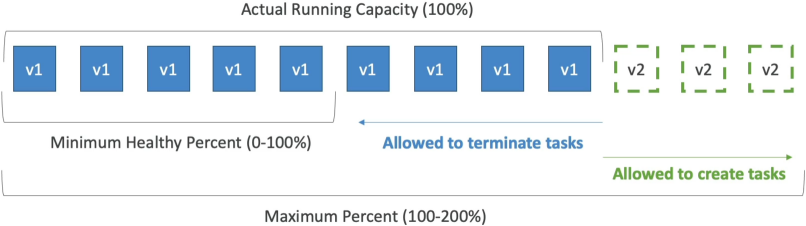
An ECS Rolling Update orchestrates a zero-downtime transition when a Service updates its task definition from v1 to v2. The rolling cadence is strictly controlled by two capacity parameters: minimumHealthyPercent (the lower-bound safety floor of active tasks required to maintain user traffic) and maximumPercent (the upper-bound surge ceiling of concurrent tasks allowed during the build phase).
Key Takeaways
The Two Core Levers (The Rules of the Game)
To master these calculations for the exam, you must look at your Desired Task Count (e.g., 4 tasks) as your baseline 100% capacity mark.
- Minimum Healthy Percent: The absolute floor of healthy tasks that ECS must keep running at any given second during the deployment.
- Example: If your desired count is 4, and your minimum is set to 50%, ECS is allowed to instantly terminate 2 old tasks before it even begins building new ones. If it's set to 100%, ECS is forbidden from killing any old containers until new ones are healthy.
- Maximum Percent: The absolute ceiling of concurrent tasks that can exist during the deployment surge window.
- Example: If your desired count is 4, and your maximum is set to 200%, ECS can spin up 4 brand-new v2 tasks right alongside your 4 old v1 tasks simultaneously, surging up to 8 total tasks.
Scenario Walkthroughs (Exam Math Demystified)
Let's look at the exact step-by-step dance for the two classic scenarios Stephane outlines. Assume our Desired Task Count = 4 (100% capacity).
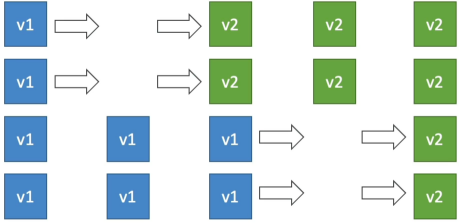
📉 Scenario A: Min = 50% | Max = 100% (The Cost-Saver Mode)
This configuration is ideal when you have strict host infrastructure limits or a tight sandbox budget because you never exceed your original footprint count.
- The Starting Line: 4 Old Tasks (
v1) are running. - The Cut: Because Min is 50%, ECS calculates it only needs 2 healthy tasks online. It instantly terminates 2 old
v1tasks → Fleet drops to 2 tasks. - The Surge: ECS spins up 2 brand-new
v2tasks → Fleet scales back up to 4 tasks. - The Second Wave: Once those 2 new tasks pass their load balancer health checks, the remaining 2 old
v1tasks are terminated → Fleet drops to 2 tasks. - The Finish Line: ECS provisions the final 2 new
v2tasks → Fleet stabilizes at 4 cleanv2tasks.
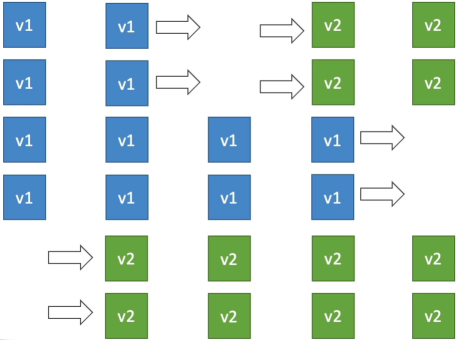
⚡ Scenario B: Min = 100% | Max = 150% (The High-Availability Standard)
This is the gold standard for production web apps. It guarantees that your user-facing processing capacity never dips below your baseline requirements.
- The Starting Line: 4 Old Tasks (
v1) are running. - The Block: Because Min is 100%, ECS is not allowed to kill anything yet.
- The Surge: Because Max is 150%, ECS calculates it can temporarily run up to 6 total tasks (4×1.5). It instantly provisions 2 brand-new
v2tasks → Fleet surges up to 6 tasks. - The Shift: The moment those 2 new
v2tasks are healthy, ECS realizes it is sitting at 150% capacity. It safely terminates 2 oldv1tasks → Fleet drops back down to 4 tasks. - The Second Wave: ECS provisions the final 2 new
v2tasks → Fleet surges back up to 6 tasks. - The Finish Line: The new tasks pass health checks, and ECS terminates the last 2 old
v1tasks → Fleet stabilizes at 4 cleanv2tasks.
Exam Tips
The Frozen Update Diagnostic: Imagine an exam scenario states, "You manage a critical backend API service deployed via Amazon ECS on AWS Fargate. The service configuration specifies a Desired Task Count of 1. You push a new code revision to production. However, you notice the deployment immediately stalls, and CloudWatch logs reveal a scheduling error: ECS is unable to provision the new container task. You check your deployment configurations and see: minimumHealthyPercent = 100 and maximumPercent = 100. How do you fix this stuck deployment?"
The textbook diagnostic answer relies on breaking down the impossible math bounds. Let's analyze what you told ECS to do:
- With a desired count of 1 and a Minimum of 100%, ECS cannot terminate the single existing v1 task to make room. It must keep it alive.
- With a Maximum of 100%, ECS cannot spin up a new v2 task alongside the old one, because that would bring the total task count to 2 (which is 200% of your desired count).
You have effectively locked ECS in an architectural paradox! To break the deadlock, you must update the service's deployment configuration to increase the Maximum Percent to at least 200% (allowing the new task to surge alongside the old one) or drop the Minimum Healthy Percent to 0% (allowing the old task to die first before the new one boots up)!