Beanstalk Deployment Modes
When you update an app on Elastic Beanstalk, you have six distinct ways to push the new code. They range from the reckless but blazing-fast All at Once (which pulls your entire app offline to update) to sophisticated production methods like Immutable, Traffic Splitting, and Blue/Green that orchestrate multiple instance sets or environments to ensure zero downtime. Mastering these is all about balancing three trade-offs: Deployment Speed, Infrastructure Cost, and Downtime/Rollback Risk.
Key Takeaways
Method 1: In-Place (Upgrading Existing Fleet)
- All at Once
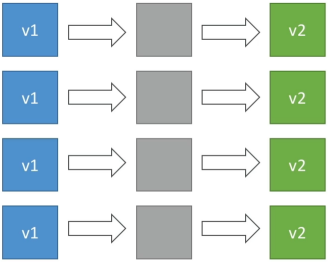
- Mechanics: Beanstalk nukes the version 1 (
v1) application on all existing instances simultaneously and flashes version 2 (v2). - Downtime: Yes. The app goes dark during the installation gap.
- Cost: Zero extra cost.
- Best For: Dev/Test environments where you just need to iterate fast and nobody cares if the server drops for a minute.
- Mechanics: Beanstalk nukes the version 1 (
- Rolling
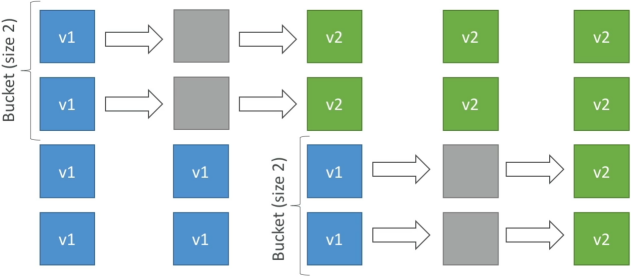
- Mechanics: Modifies instances in small subsets called buckets or batches. While bucket A is offline upgrading to
v2, bucket B is still online servingv1traffic. Once bucket A passes health checks, Beanstalk moves to bucket B. - Downtime: No downtime, but your application runs below full capacity during the rollout because active instances are temporarily offline.
- Cost: Zero extra cost.
- Risk: Users will experience a mixed-version state (
v1andv2running simultaneously). If a buggy deployment hits, rolling back requires re-deploying the old version across the buckets, which takes a long time.
- Mechanics: Modifies instances in small subsets called buckets or batches. While bucket A is offline upgrading to
Method 2:Capacity-Guaranteed Methods (Zero Performance Impact)
- Rolling with Additional Batch
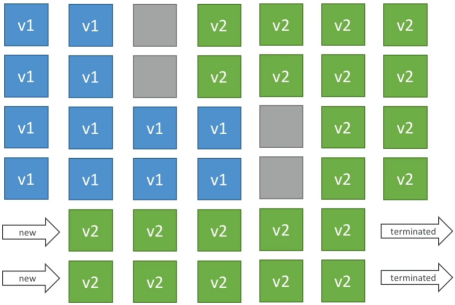
- Mechanics: Like standard Rolling, but avoids running under capacity. Beanstalk spins up a brand-new batch of temporary EC2 instances running
v2first. Then, it upgrades the older instances bucket-by-bucket. - Downtime: Zero downtime. The fleet always stays at or above 100% target performance capacity.
- Cost: Small additional cost for the temporary instances, which are terminated at the end of the lifecycle.
- Mechanics: Like standard Rolling, but avoids running under capacity. Beanstalk spins up a brand-new batch of temporary EC2 instances running
- Immutable
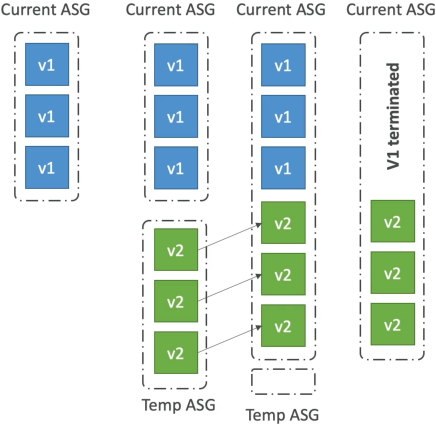
- Mechanics: Beanstalk leaves your original Auto Scaling Group (ASG) completely alone. It provisions a parallel temporary ASG and deploys a single
v2instance to test the waters (canary testing). If that instance passes health checks, Beanstalk scales up the temporary ASG to match full capacity, merges the instances into the main ASG, and terminates the oldv1instances. - Downtime: Zero downtime.
- Cost: High temporary cost (doubles your instance footprint during deployment).
- Rollback: Blazing fast. If
v2fails, Beanstalk just deletes the temporary ASG. Your original fleet was never touched.
- Mechanics: Beanstalk leaves your original Auto Scaling Group (ASG) completely alone. It provisions a parallel temporary ASG and deploys a single
Method 3: Traffic Routing Environments (Advanced Control)
- Blue/Green
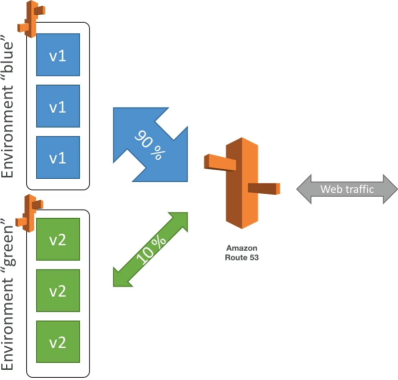
- Mechanics: A completely external/manual architecture pattern relative to the standard Beanstalk engine. You spin up an entirely separate, distinct Beanstalk environment (Green) running
v2alongside your live environment (Blue) runningv1. - Routing Control: You manually use Route 53 weighted routing policies or the Beanstalk Swap Environment URLs feature to cut traffic over.
- Cost: High (dual environments running together), but provides long-term isolation for extensive staging tests.
- Mechanics: A completely external/manual architecture pattern relative to the standard Beanstalk engine. You spin up an entirely separate, distinct Beanstalk environment (Green) running
- Traffic Splitting (Canary Testing)
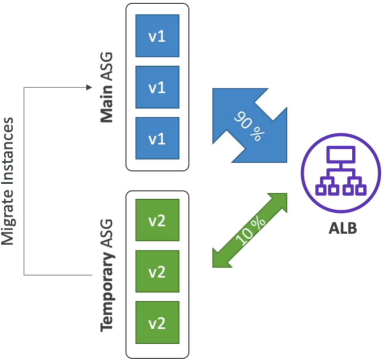
- Mechanics: Fully automated within a single environment. Beanstalk launches a temporary ASG with matching capacity running
v2. It instructs the Application Load Balancer (ALB) to route a precise, small percentage of live production traffic (e.g., 10%) to the new code. - Evaluation: Beanstalk monitors the health metrics of the split traffic for a configured duration. If errors spike, it triggers an automated rollback instantly by shifting ALB weights back to 100% on the original fleet. If healthy,
v2instances migrate to the main ASG and old instances are cleared.
- Mechanics: Fully automated within a single environment. Beanstalk launches a temporary ASG with matching capacity running
Traffic Splitting Canary Flow
                        [ Live Public User Traffic ]
                                      │
                                      ▼
                        ┌───────────────────────────┐
                        │ Application Load Balancer │
                        └──────┬─────────────┬──────┘
                               │             │
                    (90% Traffic)             (10% Canary Traffic)
                               │             │
                               ▼             ▼
               ┌─────────────────┐         ┌──────────────────────┐
               │    Main ASG     │         │    Temporary ASG     │
               │  (Active Fleet) │         │  (Canary Evaluation) │
               │                 │         │                      │
               │   Instances:    │         │      Instances:      │
               │   Running v1    │         │      Running v2      │
               └─────────────────┘         └──────────┬───────────┘
                                                      │
                                                      ▼
                                           ┌──────────────────────┐
                                           │ Beanstalk Health     │
                                           │ Engine Monitoring    │
                                           └──────────┬───────────┘
                                                      │
                            ┌─────────────────────────┴─────────────────────────┐
                            ▼                                                   ▼
                [ Metrics Pass: 200 OK ]                            [ Metrics Fail: 5xx Errors ]
                            │                                                   │
                            ▼                                                   ▼
   Scale up v2 / Migrate to Main ASG / Purge v1                       Automated Rollback (ALB -> 100% Main)
Exam Tips
- Spotting Keywords:
- If the prompt says: "Minimize costs, deployment speed is critical, and downtime is acceptable" → All at Once.
- If it says: "Zero downtime, no extra cost, performance degradation during deployment is acceptable" → Rolling.
- If it says: "Zero downtime, maintaining full application capacity at all times with minimal cost" → Rolling with Additional Batch.
- If it says: "Zero downtime, fastest and cleanest rollback mechanism with no modification to existing instances" → Immutable.
- If it says: "Automated canary testing by sending a small percentage of real production traffic to a temporary group" → Traffic Splitting.
- The Manual Blue/Green Trick: If an exam question mentions swapping environment CNAME URLs or utilizing Route 53 weights across two separate Beanstalk environments, it is pointing specifically to Blue/Green, not an internal deployment setting.
Practice Test
Question 1: A company runs a critical web application on AWS Elastic Beanstalk. A developer needs to push a new software version to production. The business requirements state that the application must maintain full operational performance capacity during the rollout, and if the new version contains code bugs, the system must support an immediate, low-risk rollback without affecting the running fleet. Which deployment method should be selected?
- All at Once
- Rolling
- Rolling with Additional Batch
- Immutable
Correct Answer
- Immutable
- Explanation: It leaves the original instances entirely pristine and spins up a separate temporary fleet. This guarantees full performance capacity is maintained and allows for an instant rollback (just delete the new temporary ASG) if things break. While Rolling with Additional Batch protects capacity, its rollback requires an in-place reverse deployment, making it higher risk than Immutable.
Question: A retail company manages its IT infrastructure on AWS Cloud via Elastic Beanstalk. The development team at the company is planning to deploy the next version with MINIMUM application downtime and the ability to rollback quickly in case deployment goes wrong.
As a Developer Associate, which of the following options would you recommend to the development team?
- Deploy the new application version using 'Rolling with additional batch' deployment policy
- Deploy the new version to a separate environment via Blue/Green Deployment, and then swap Route 53 records of the two environments to redirect traffic to the new version
- Deploy the new application version using 'Rolling' deployment policy
- Deploy the new application version using 'All at once' deployment policy
Correct Answer
- Deploy the new application version using 'Rolling with additional batch' deployment policy
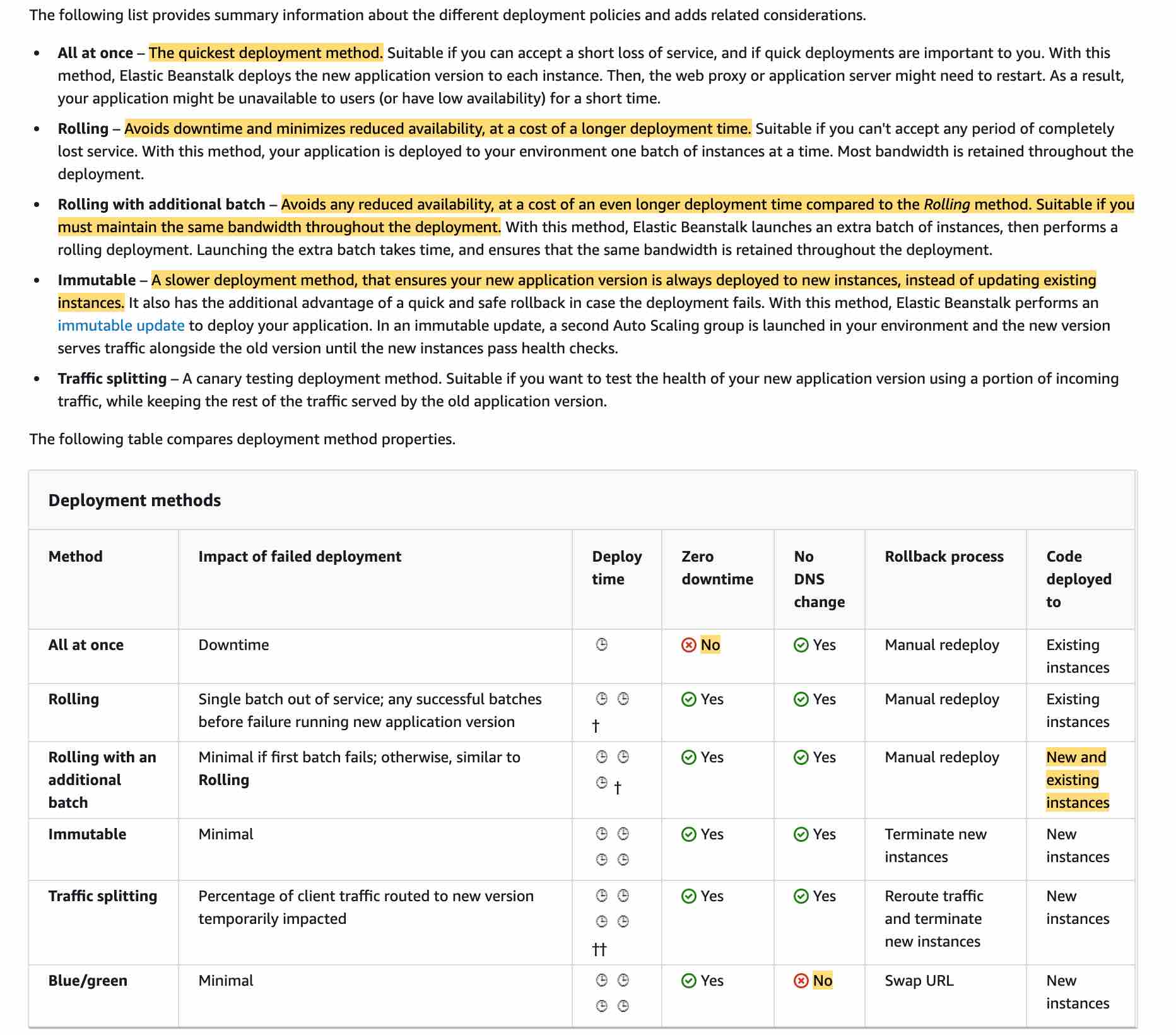
- Explanation: This policy avoids any reduced availability, at a cost of an even longer deployment time compared to the Rolling method. Suitable if you must maintain the same bandwidth throughout the deployment. However rollback process is via manual redeploy, so it's not as quick as the Blue/Green deployment.
- Deploy the new version to a separate environment via Blue/Green Deployment, and then swap Route 53 records of the two environments to redirect traffic to the new version
- Explanation: With deployment policies such as 'All at once', AWS Elastic Beanstalk performs an in-place update when you update your application versions and your application can become unavailable to users for a short period of time. You can avoid this downtime by performing a blue/green deployment, where you deploy the new version to a separate environment, and then swap CNAMEs (via Route 53) of the two environments to redirect traffic to the new version instantly. In case of any deployment issues, the rollback process is very quick via swapping the URLs for the two environments.
- Explanation: With deployment policies such as 'All at once', AWS Elastic Beanstalk performs an in-place update when you update your application versions and your application can become unavailable to users for a short period of time. You can avoid this downtime by performing a blue/green deployment, where you deploy the new version to a separate environment, and then swap CNAMEs (via Route 53) of the two environments to redirect traffic to the new version instantly. In case of any deployment issues, the rollback process is very quick via swapping the URLs for the two environments.
- Deploy the new application version using 'Rolling' deployment policy
- Explanation: This policy avoids downtime and minimizes reduced availability, at a cost of a longer deployment time. However rollback process is via manual redeploy, so it's not as quick as the Blue/Green deployment.
- Deploy the new application version using 'All at once' deployment policy
- Explanation: Although 'All at once' is the quickest deployment method, but the application may become unavailable to users (or have low availability) for a short time. So this option is not correct.