CloudFormation Overview
AWS CloudFormation is a native Infrastructure as Code (IaC) engine that lets you declare exactly what you want your entire AWS environment to look like using a single text file written in YAML or JSON. Instead of clicking through dashboards to build EC2 instances, link security groups, and attach databases, you declare them as components in a static file. CloudFormation reads your code, maps out the structural dependencies, and automatically provisions everything in the exact sequence required.
Key Takeaways
Structural Mechanics & Core Lifecycles
- The Declarative Paradigm: CloudFormation uses declarative programming. This means you only specify the final target state of what you want built (e.g., "I need an S3 bucket and a DynamoDB table"). You do not have to write a script detailing the steps or the ordering; CloudFormation handles the backend orchestration and dependency chain mapping entirely on its own.
- The Deployment Pipeline:
- You write a template locally as a text file (
.yamlor.json). - The file is uploaded to an Amazon S3 bucket (either manually or automated through the CLI/Console).
- CloudFormation references that S3 file path and builds a Stack.
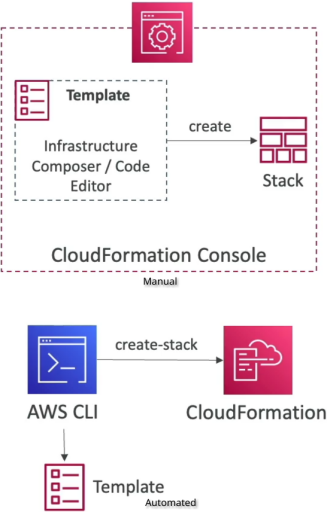
- You write a template locally as a text file (
- The Concept of a Stack: A Stack is a single management unit representing a collection of real AWS resources. If you push a template containing an ALB, 3 instances, and an RDS database, that collective whole is treated as a single stack. If you hit "Delete Stack", CloudFormation automatically cleans up every single associated resource safely, preventing orphaned resource costs.
- Updating Infrastructure Infrastructure Changes: You cannot edit a running infrastructure stack inline. To change a setting (e.g., upgrading an instance size), you modify your local source code template, save a new version, upload it, and issue a Stack Update.
Structural Block Hierarchy & Layout Specifications
A CloudFormation text document contains up to seven structural configuration zones. Out of all these segments, the Resources block is the only absolute mandatory element required to form a valid deployment template.
Local-to-Cloud Workflow

  ┌──────────────────────────────────┐
  │ Local Text Editor / IDE Workspace│ ──► Writes declarative YAML/JSON code
  │ (Defines Resources, Parameters)  │
  └───────────────┬──────────────────┘
                  │
                  │ (Console Upload / CLI Push)
                  ▼
  ┌─────────────────────────────────┐
  │      Amazon S3 Staging Storage  │ ──► Template template file is staged (.yaml)
  └───────────────┬─────────────────┘
                  │
                  │ (CloudFormation Stack Engine Read)
                  ▼
  ┌─────────────────────────────────────────────────────────────────┐
  │                    AWS CloudFormation Stack Engine              │
  │                     [ Status: CREATE_IN_PROGRESS ]              │
  └─────┬───────────────────────┬──────────────────────────────┬────┘
        │                       │                              │
        │ (Dependency Order 1)  │ (Dependency Order 2)         │ (Dependency Order 3)
        ▼                       ▼                              ▼
┌───────────────────────┐ ┌──────────────────────────┐ ┌────────────────────┐
│  EC2 Security Group   │ │   EC2 Compute Clusters   │ │  Amazon S3 Storage │
│ (Built first for net) │ │ (References Sec Group)   │ │  Bucket Resource   │
└───────────────────────┘ └──────────────────────────┘ └────────────────────┘
Exam Tips
- The Mandatory Section Trap: This is a free point if you spot it on the exam. AWS loves to ask: "Which of the following blocks is the only absolutely required section inside an AWS CloudFormation template?" The answer is Resources. Everything else—including parameters, mappings, outputs, and descriptions—is completely optional.
- Separation of Concerns Strategy: When designing microservices or scaling cloud operations, do not place every single corporate resource inside a massive single file. The recommended AWS best practice is to separate stacks by concern (e.g., map a Networking Stack for VPCs/subnets, an Application Stack for compute nodes, and a Storage Stack for DynamoDB databases).
Practice Test
Question: A cloud software associate wants to build a repeatable deployment solution to spin up testing environments on demand. The architecture pattern requires creating a Amazon DynamoDB table, an Amazon S3 bucket, and an EC2 instance. The developer wants to ensure the setup can be fully version-controlled using Git and completely torn down without leaving behind rogue, unmanaged resource charges. What should the developer use?
A. Write a Python bash script that issues manual, sequence-dependent aws ec2 and aws s3api CLI creation parameters.
B. Construct a single declarative AWS CloudFormation template defining all three target structures inside the Resources section, then manage the fleet via CloudFormation Stacks.
C. Deploy an AWS Systems Manager (SSM) agent inside a pre-existing golden image baseline snapshot.
D. Manually click through the AWS Management Console and apply custom project tags to each resource tier.
Correct Answer: B. CloudFormation is the premier native solution for Infrastructure as Code (IaC). Defining your components inside the Resources block of a template allows you to version-control your systems through Git and manage the entire lifecycle holistically as a single stack unit.