SNS & SQS - Fan Out Pattern
The Fan-Out Pattern involves a producer publishing a single message to an Amazon SNS topic, which instantly pushes and clones that payload into multiple subscribing Amazon SQS queues concurrently. This pattern ensures absolute decoupling; you can scale out, add new downstream services, or take workers offline without risking message loss or impacting upstream performance.
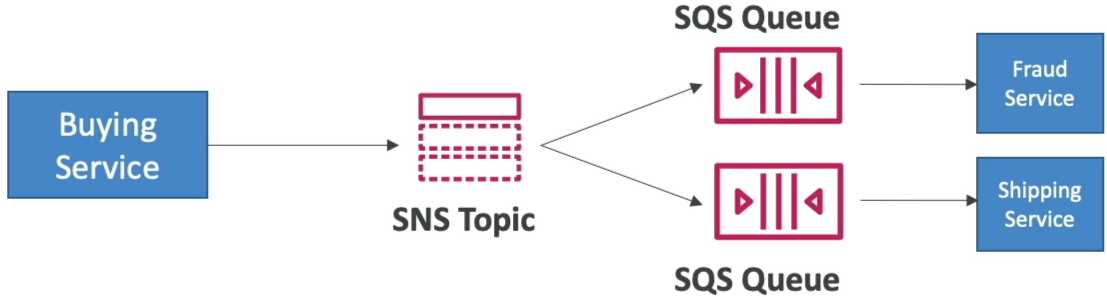
Key Takeaways
The Fan-Out Variations
AWS loves to test your ability to apply the fan-out pattern to solve specific architectural bottlenecks. Here are the three main implementation patterns you need to memorize:
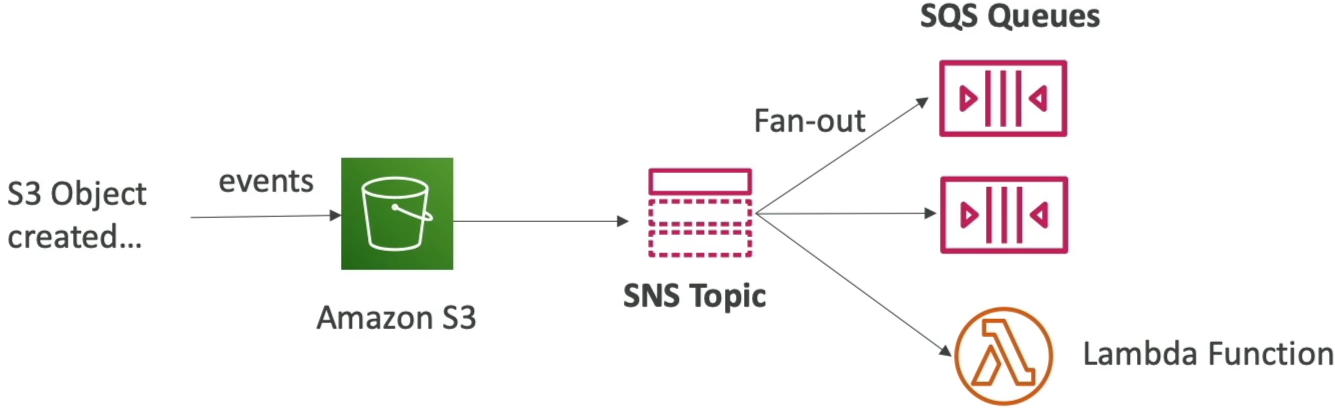
Pattern A: Standard S3 Event Fan-Out (Bypassing S3 Limits)
- The Problem: Amazon S3 bucket notification rules have a strict limitation—you can only map one unique event type + prefix combination (e.g.,
s3:ObjectCreated:*onimages/) to a single destination. If your security audit tool and your image processing engine both need that exact event alert, S3 natively can't send it to both. - The Fan-Out Fix: Route the S3 Event Notification directly to a single SNS Topic. Then, subscribe as many SQS queues, Lambda functions, or HTTPS webhooks to that topic as your architecture requires.
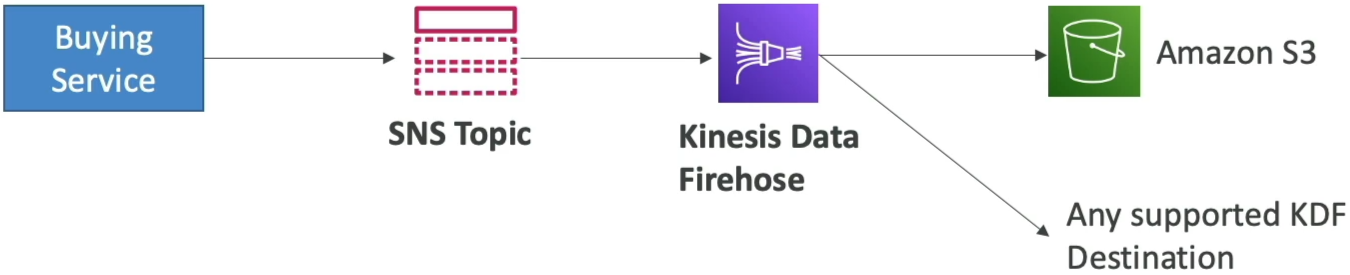
Pattern B: The Analytics Stream Pipeline (SNS ➔ KDF ➔ S3)
- The Flow: If your transactional buying service needs to alert microservices but also back up a raw historical stream of every message for analytics auditing, you hook Amazon Kinesis Data Firehose (KDF) directly to the SNS Topic.
- The Advantage: SNS pushes the payload to KDF, and KDF handles the automated buffering, compression, and delivery straight into an Amazon S3 Bucket, Amazon Redshift cluster, or OpenSearch domain without you writing a single line of streaming code.
Pattern C: The Strict Sequential Fan-Out (SNS FIFO ➔ SQS FIFO)
- The Rules: If your fan-out pipeline demands strict chronological ordering and absolute zero duplicates, you use SNS FIFO Topics.
- The Constraint Trap: This is a major exam trap, chief: An SNS FIFO topic can only have SQS FIFO queues as its subscribers. You cannot subscribe standard SQS queues, raw Lambda functions, or email endpoints directly to an SNS FIFO topic.

Advanced Message Filtering (JSON Polices)
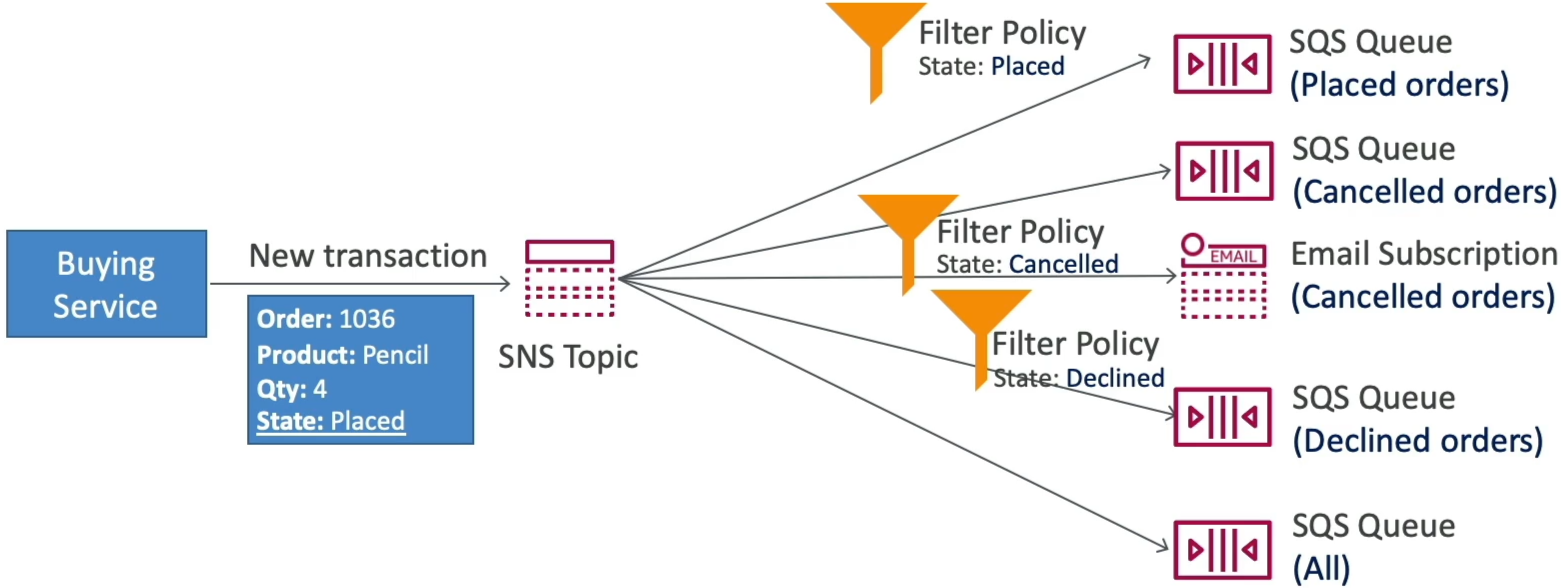
By default, every subscriber queue attached to an SNS topic receives an identical copy of every single message. If your downstream queues only care about a subset of those events, you implement an SNS Subscription Filter Policy.
- How it works: The publisher passes metadata parameters known as Message Attributes along with the payload. SNS parses these attributes against a JSON filter document attached to the subscription.
- The Ingestion Gate Logic: If the attributes match your JSON rules, SNS pushes the message into the queue. If they don't match, SNS drops the message inline for that specific subscription, saving you massive amounts of processing waste.
// Example: Filter policy attached to the 'Placed-Orders-Queue' subscription
{
  "State": ["Placed"]
}
🛠️ Critical Cross-Service Security Configuration
To make the Fan-Out pattern work, you can't just link the services and pray. You must configure the SQS Queue Access Policy (Resource-Based IAM Policy) on each destination queue. If you omit this, SNS will fail to deliver the messages due to access denied errors.
{
  "Version": "2012-10-17",
  "Statement": [
    {
      "Sid": "Allow-SNS-To-Publish-To-SQS",
      "Effect": "Allow",
      "Principal": {
        "Service": "sns.amazonaws.com"
      },
      "Action": "sqs:SendMessage",
      "Resource": "arn:aws:sqs:ap-southeast-2:123456789012:MyDestinationQueue",
      "Condition": {
        "ArnEquals": {
          "aws:SourceArn": "arn:aws:sns:ap-southeast-2:123456789012:MyCentralTopic"
        }
      }
    }
  ]
}
Exam Tips
- The S3 Multi-Destination Notification Trap: Look for questions where an application needs to run an image-resizing Lambda function and log an audit entry in a separate SQS queue whenever a file hits S3. The distractors will suggest creating two separate S3 notification rules. The right answer is to send the S3 notification to an SNS Topic, then subscribe both the Lambda function and the SQS queue to that topic.
- The FIFO Compatibility Boundary: If a scenario states that messages across a fan-out topology must maintain ordering per client session, make sure you pick the option where an SNS FIFO Topic routes exclusively to SQS FIFO Queues. Any option pairing an SNS FIFO topic with standard components is wrong.
Practice Test
Scenario 1: A cloud developer is configuring an Amazon S3 bucket to trigger automated processing workflows. When a customer uploads a new document, a data-extraction microservice must ingest the file, and an archival backup microservice must simultaneously index the metadata. Both systems use independent Amazon SQS standard queues. The developer discovers that Amazon S3 cannot natively send the same object creation event to two different SQS queues. What is the recommended architectural pattern to resolve this restriction?
- Update the S3 bucket configuration to execute a
PurgeQueueAPI call sequence across both clusters. - Route the S3 object creation event directly to an Amazon SNS topic, and subscribe both SQS queues to that topic using appropriate queue access policies.
- Build a CloudFormation StackSet template to execute a centralized script via .ebextensions.
- Migrate the SQS infrastructure over to an external JSON policy schema running on an EC2-backed database instance.
Correct Answer
- Route the S3 object creation event directly to an Amazon SNS topic, and subscribe both SQS queues to that topic using appropriate queue access policies.
- This is the textbook definition of the Fan-Out Pattern. By dropping an SNS topic between S3 and your SQS queues, you gracefully bypass the single-destination notification limit of S3, cloning the event block out to both queues flawlessly without any data drops.
Scenario 2: An e-commerce company manages a microservices application that receives orders from various partners through a customized API for each partner exposed via Amazon API Gateway. The orders are processed by a shared Lambda function.
How can the company notify each partner regarding the status of their respective orders in the most efficient manner, without affecting other partners' orders? Also, the solution should be scalable to accommodate new partners with minimal code changes required.
- Set up a separate SNS topic for each partner. Modify the Lambda function to publish messages for each partner to the partner's SNS topic
- Set up a separate SNS topic for each partner and subscribe each partner to the respective SNS topic. Modify the Lambda function to publish messages with specific attributes to the partner's SNS topic and apply the appropriate filter policy to the topic subscriptions
- Set up an SNS topic and subscribe each partner to the SNS topic. Modify the Lambda function to publish messages with specific attributes to the SNS topic and apply the appropriate filter policy to the topic subscriptions
- Set up a separate Lambda function for each partner. Set up an SNS topic and subscribe each partner to the SNS topic. Modify each partner's Lambda function to publish messages with specific attributes to the SNS topic and apply the appropriate filter policy to the topic subscriptions
Correct Answer
- Set up an SNS topic and subscribe each partner to the SNS topic. Modify the Lambda function to publish messages with specific attributes to the SNS topic and apply the appropriate filter policy to the topic subscriptions
-
By default, an Amazon SNS topic subscriber receives every message that's published to the topic. To receive only a subset of the messages, a subscriber must assign a filter policy to the topic subscription. A filter policy is a JSON object containing properties that define which messages the subscriber receives. Amazon SNS supports policies that act on the message attributes or the message body, according to the filter policy scope that you set for the subscription. Filter policies for the message body assume that the message payload is a well-formed JSON object.
For the given use case, you can change the Lambda function to publish messages with specific attributes to the single SNS topic and apply the appropriate filter policy to the topic subscriptions for each of the partners. This is also easily scalable for new partners since only the filter policy needs to be set up for the new partner.
-