CloudTrail
When an infrastructure piece vanishes or a configuration setting changes at 2:00 AM, you don't guess. You open AWS CloudTrail to find out exactly who fired the API command, what machine they used, and when the disruption went down. If CloudWatch is the pulse monitor of your resources, CloudTrail is the immutable forensic ledger of your control plane.
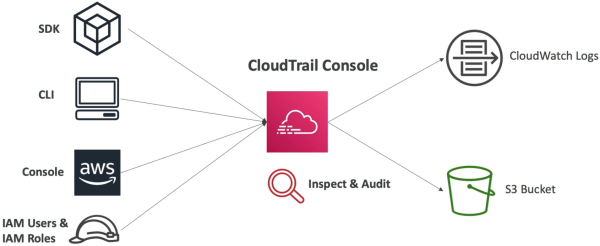
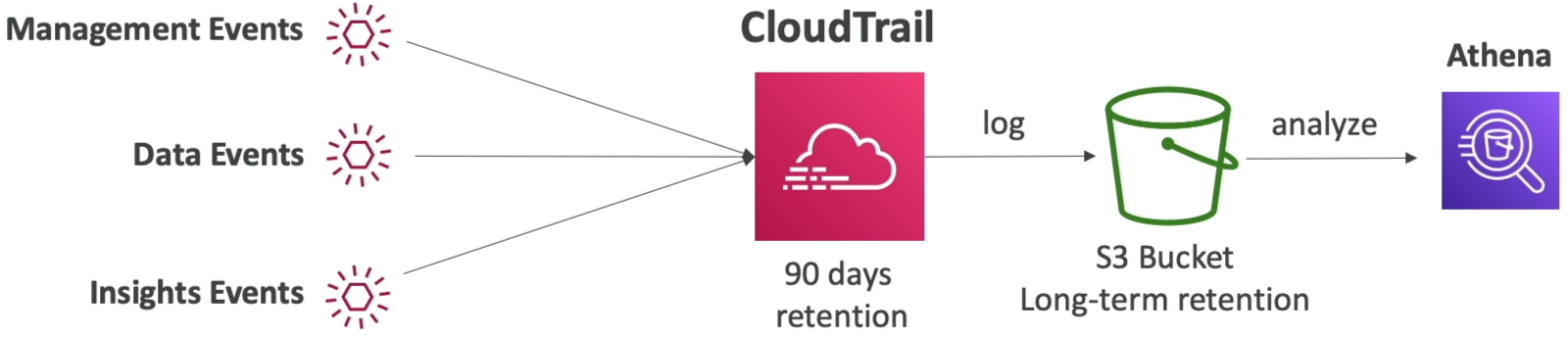
AWS CloudTrail is a service enabled by default that records a permanent chronological audit history of control-plane API calls and operational actions executed across your AWS account. It logs requests originating from the AWS Management Console, SDKs, CLI, and internal AWS services. For long-term compliance storage past its baseline retention window, CloudTrail can drop log bundles into an Amazon S3 bucket, where developers use Amazon Athena (Serverless Log Parser) to run serverless SQL queries across historical data.
Key Takeaways
Infrastructure Blueprint: The 3 Event Categories
CloudTrail segregates its tracking data into three distinct event classifications. Memorizing these is a mandatory requirement for the exam:
-
Management Events (Control Plane - On by Default):
- Logs operations performed directly on the structure of your AWS resources (e.g.,
ec2:RunInstances,iam:AttachRolePolicy, ordynamodb:DeleteTable). - CloudTrail breaks these down into Read Events (non-destructive inspection loops like listing resources) and Write Events (mutations that create, alter, or delete components).
- Logs operations performed directly on the structure of your AWS resources (e.g.,
-
Data Events (Data Plane - Off by Default ⚠️):
- Tracks high-volume, structural data transactions happening inside your resources (e.g., S3 object mutations like
GetObject/PutObject, or AWS Lambda execution triggers via theInvokeAPI). - The Cost Variable: Because data plane events can scale to billions of transactions per second, they are disabled by default to prevent logging cost explosions. You must explicitly opt-in to track them.
- Tracks high-volume, structural data transactions happening inside your resources (e.g., S3 object mutations like
-
Insights Events (Anomalous Activity - Off by Default):
- An AI-driven evaluation layer. When enabled, CloudTrail establishes a baseline of your typical daily admin management activities. If it spots a massive, uncharacteristic burst of IAM actions or resource terminations, it flags the variance instantly as an Insights Event.

- An AI-driven evaluation layer. When enabled, CloudTrail establishes a baseline of your typical daily admin management activities. If it spots a massive, uncharacteristic burst of IAM actions or resource terminations, it flags the variance instantly as an Insights Event.
Long-Term Storage & Serverless Auditing Matrix
Out-of-the-box, the CloudTrail Event History dashboard gives you a rolling lookup window:
Once a log entry crosses that 90-day boundary, the console drops it from the history table. To maintain permanent compliance trails, you build this enterprise storage and query loop pipeline:
Operational Ingestion Logic Notation
The detection patterns and automated response pipelines of CloudTrail actions hook into EventBridge using these clear routing expressions:
Exam Tips
- The S3 Objects Forensic Trap: If an exam scenario says: "A company needs to audit exactly which specific IAM user downloaded a highly confidential file named
salary.pdffrom an S3 bucket three days ago," the distractor choices will suggest checking standard CloudTrail history. Reject them. Standard history only captures bucket-level management modifications. To track down object downloads, you must explicitly enable CloudTrail Data Events for that S3 bucket. - Querying Historical Log Dumps: Whenever the prompt describes a scenario where an auditor needs to search through two years of archived CloudTrail logs sitting inside an S3 bucket using standard SQL expressions without provisioning database compute clusters, the textbook answer is to Use Amazon Athena to query the S3 bucket directly.
Practice Test
Scenario: A development lead discovers that a mission-critical Amazon DynamoDB production table was accidentally deleted over the weekend. The team needs to immediately identify the specific IAM user or execution role that initiated the DeleteTable API interaction. The event occurred less than 48 hours ago. What is the fastest and most efficient way to retrieve this information?
- A. Install the CloudWatch Unified Agent inside the database instances to search through local kernel memory trace strings.
- B. Check the AWS CloudTrail Event History console dashboard, filtering the lookup parameters by the
DeleteTableEvent Name within the last 90 days. - C. Fire a continuous
PurgeQueueAPI string sequence inside an SQS FIFO queue using an external CloudFormation script layout. - D. Request a retroactive data backfill using an inline X-Ray Sampling Rule optimization pass.
Correct Answer: B. Because this is an administrative resource modification (Management Event) that occurred within the 90-day native retention window, you can instantly track down the exact culprit, their source IP address, and timestamp directly from the CloudTrail Event History panel without spinning up any complex secondary storage pipelines.