CloudWatch Logs
Amazon CloudWatch Logs is a fully managed service designed to store, monitor, and analyze system, OS, and application text log files. The service uses a strict structural hierarchy, organizing individual data streams into unified log groups. Developers can analyze historical log blocks using CloudWatch Logs Insights (a dedicated query engine) or stream data out instantly to destinations like S3, Lambda, or Kinesis using Subscription Filters for massive multi-account aggregation networks.
Key Takeaways
The Architectural Log Tree
To design bulletproof log streaming systems, you must memorize how CloudWatch structures its storage nodes:
- Log Stream: The core file lane. It represents a continuous sequence of log events originating from a single source instance, such as a specific EC2 virtual server node, a single ECS Docker container instance, or one active AWS Lambda execution environment execution block.
- Log Group: A collection of multiple log streams that share the same configuration parameters, retention windows, and access control shields. For example, all 50 separate EC2 containers running your
auth-microservicewill stream into a single/aws/lambda/auth-serviceLog Group. - Retention Window: You have full control over the lifespan of your text files. You can choose to retain them indefinitely (never expire) or set an expiration policy anywhere from 1 day up to 10 years.
Historic Queries vs. Real-Time Streaming
The exam loves to pit historical query engines against real-time streaming pipelines. You need to know exactly which weapon to pull out:
🔍 Historical Analysis: CloudWatch Logs Insights
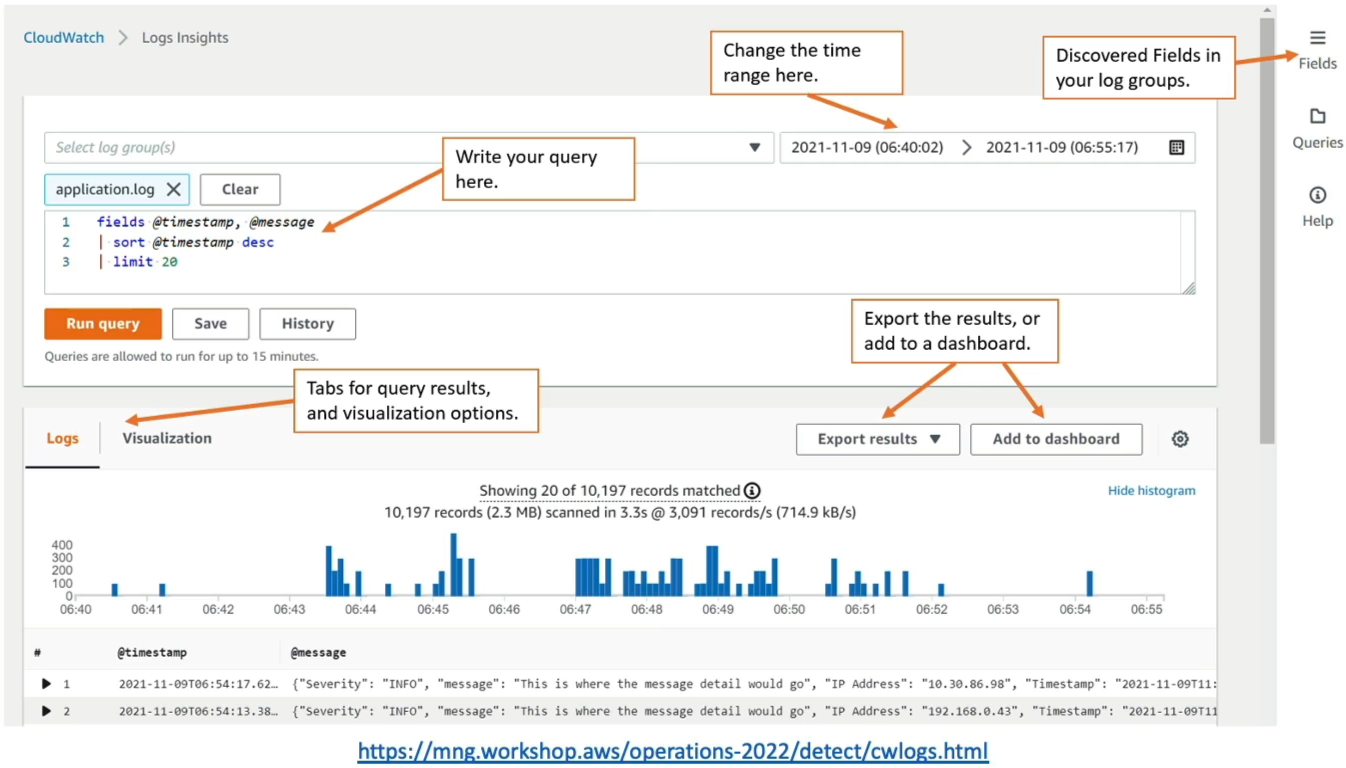
- The Concept: A purpose-built query tool that lets you search and analyze massive log depths using a specialized query language.
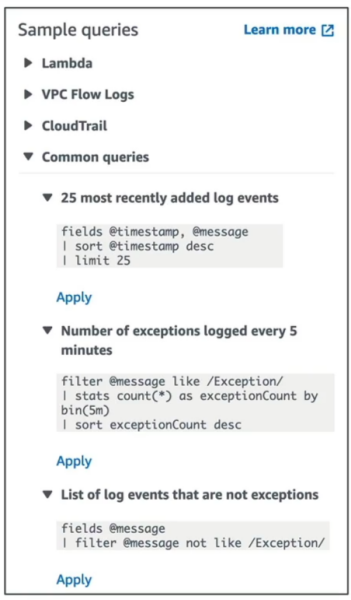
- The Commands: Natively supports commands like
filter,stats,sort, andlimitto instantly find exceptions, extract specific IP addresses, or calculate runtime performance metrics. - Operational Mode: It is strictly a historical query engine. It does not process data in real time; it only sweeps across existing logs when you manually trigger a search thread.
⚡ Continuous Ingestion: Batch Exports vs. Subscription Filters
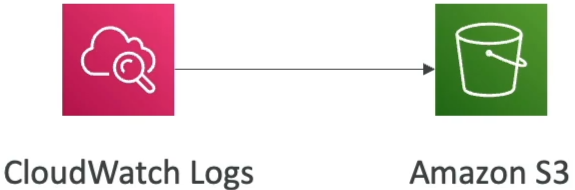
- Batch Export (CreateExportTask): Used to dump logs into an Amazon S3 bucket for long-term archiving.
- The Bottleneck: This is not real-time. An export task can take up to 12 hours to fully compile and write out.
- The Bottleneck: This is not real-time. An export task can take up to 12 hours to fully compile and write out.
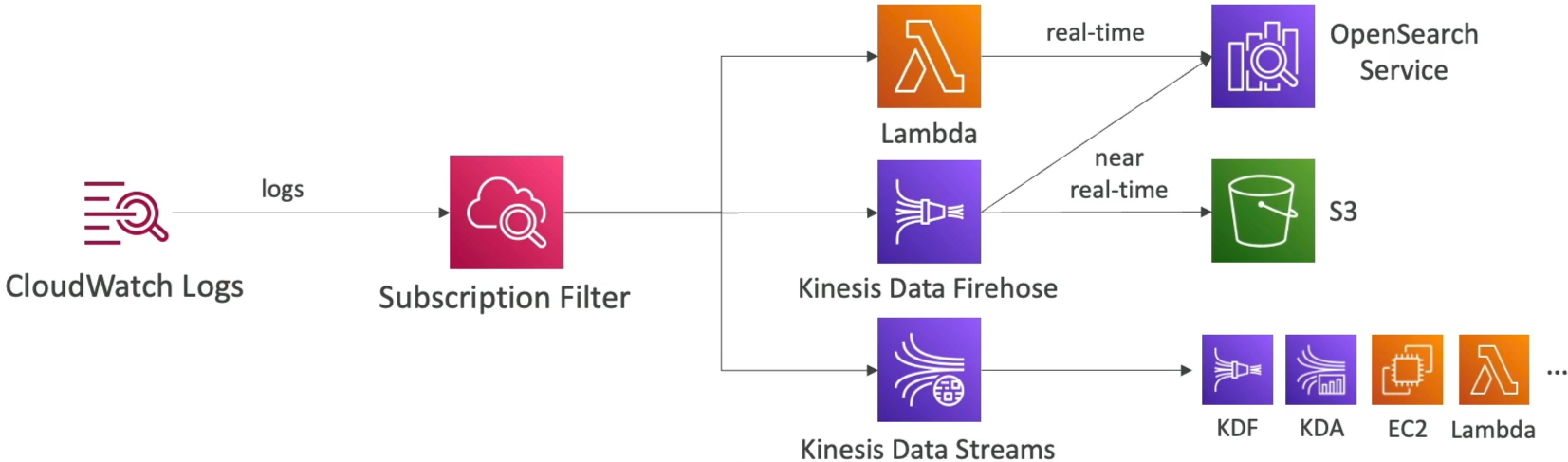
- Subscription Filters (Real-Time Push): If you need real-time alerting or immediate downstream processing, you attach a Subscription Filter to the log group. It screens incoming logs via patterns and instantly pushes matching payloads out to:
- AWS Lambda: To run custom parsing scripts instantly.
- Amazon Kinesis Data Firehose: To load data near real-time into OpenSearch or S3.
- Amazon Kinesis Data Streams: The heavy-duty big data pipeline choice.
Cross-Account Multi-Region Log Aggregation
A primary architecture pattern frequently tested on the DVA-C02 is consolidating logs from hundreds of separate AWS accounts into a single, centralized security auditing account.
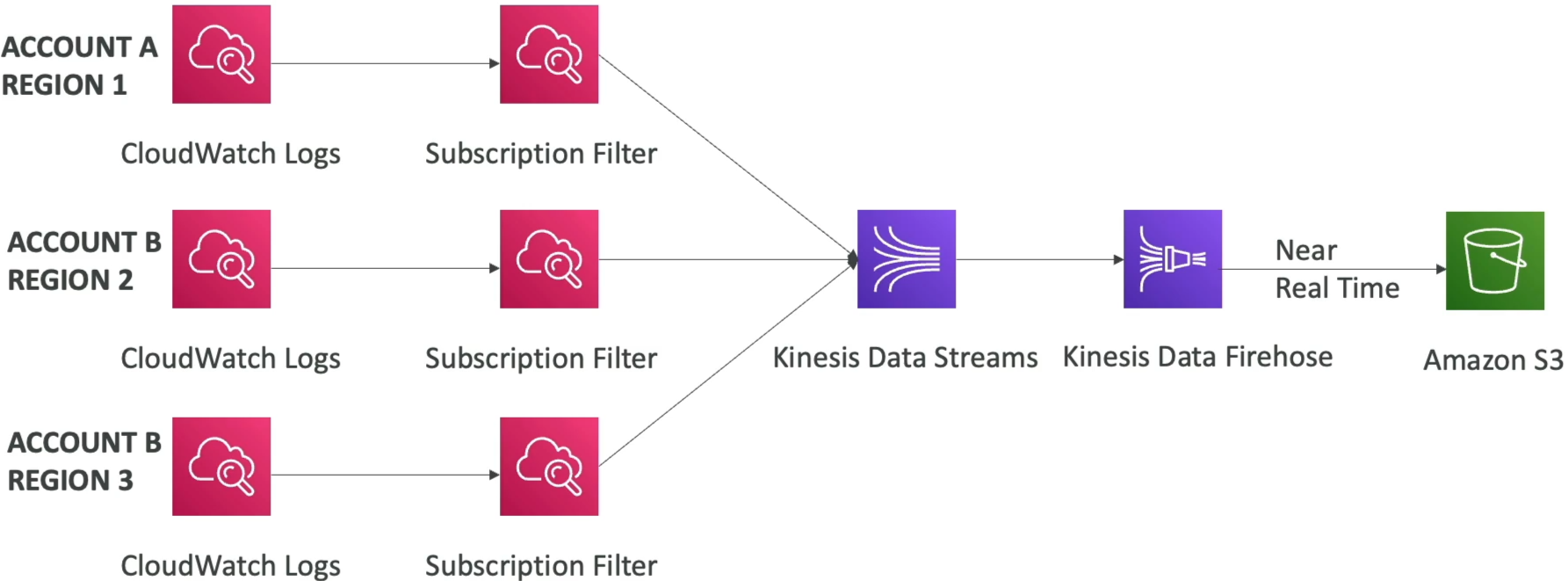
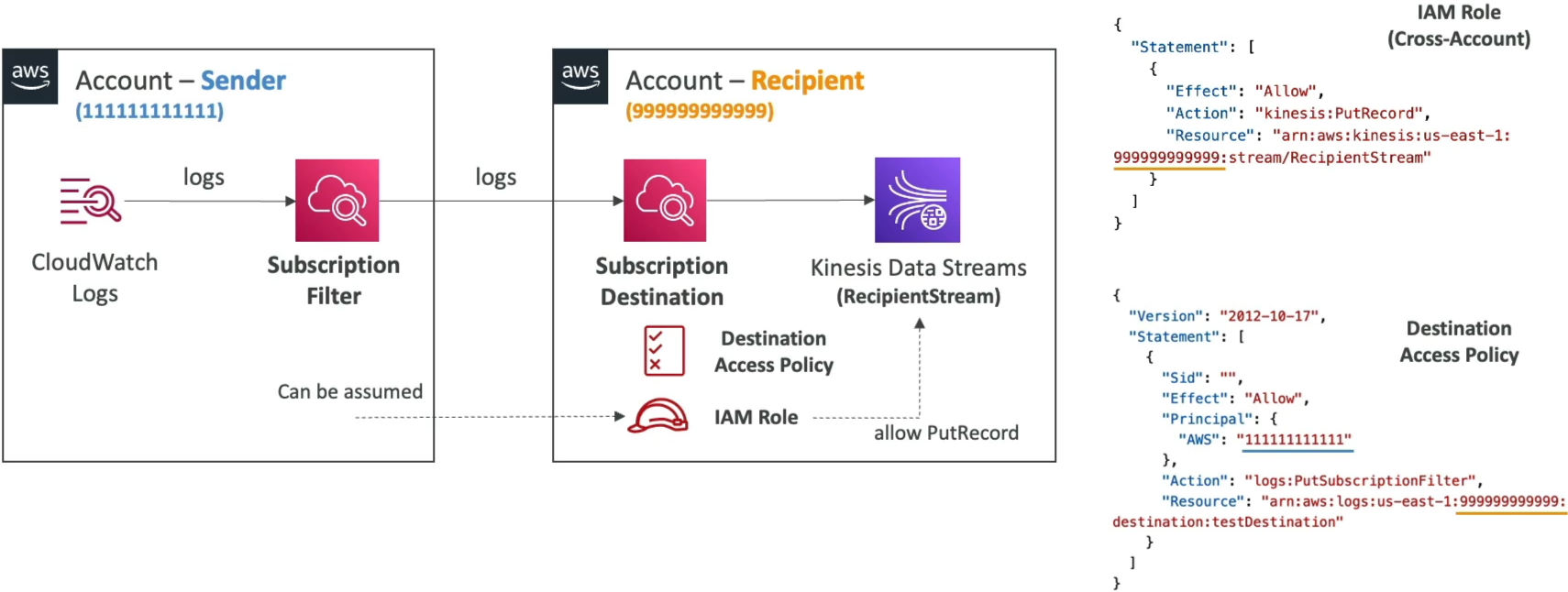
Here is the exact security and integration checklist you need to follow to build this pipeline successfully without cross-account permission blocks:
Exam Tips
- The Real-Time / S3 Audit Trap: If a question says: "A compliance mandate requires all application error logs to be streamed into an S3 bucket immediately within a sub-minute timeframe for analysis" the distractor choice will suggest using
CreateExportTaskdaily. That is wrong. To dump logs into S3 in near real-time, you must attach a Subscription Filter pointing to an Amazon Data Firehose pipeline, which then buffers and flushes the data straight into S3. - Identifying the Aggregation Failure: If cross-account log forwarding fails, double-check your security components. Make sure the recipient account has both a Resource-Based Destination Policy explicitly authorizing the sender's account ID, and an IAM Role with write access to the Kinesis stream that the sender account is explicitly allowed to assume.
Practice Test
Question: A software engineer is configuring log monitoring for a high-security banking microservice running on AWS Lambda. The application logs are currently written to a standard CloudWatch Log Group. The security operations team requires these logs to be parsed, analyzed, and indexed inside an Amazon OpenSearch Service domain in real time to trigger instant security alerts if an anomaly occurs. What is the most operationally efficient architectural solution to build this?
- A. Execute a recurring
CreateExportTaskscript loop string every 10 minutes to sync log directories. - B. Configure an
.ebextensionsconfiguration shell script inside an SQS standard queue. - C. Set up a CloudWatch Logs Subscription Filter on the log group that routes log events directly to Amazon Data Firehose, with the OpenSearch Service domain configured as the destination target.
- D. Re-upload the microservice definitions inside an external JSON policy wrapper via CloudFormation
StackSets.
Correct Answer: C. Subscription Filters are the native, zero-downtime mechanism to stream incoming log events out in real time. Coupling the filter with Amazon Data Firehose provides a serverless pipeline that handles the data loading into OpenSearch instantly, fulfilling the sub-minute security mandate flawlessly.