X-Ray: Instrumentation and Concepts
Instrumentation is the intentional process of modifying an application's code structure using the AWS X-Ray SDK to emit telemetry metrics and segment tracking blocks. While segments partition independent microservice execution phases, Subsegments profile detailed internal actions (like an isolated SQL query or a distinct HTTP client payload call). Tracing verbosity and AWS service costs are dynamically throttled at runtime without application restarts using Sampling Rules, which balance a guaranteed baseline (Reservoir) against a fractional traffic threshold (Rate).
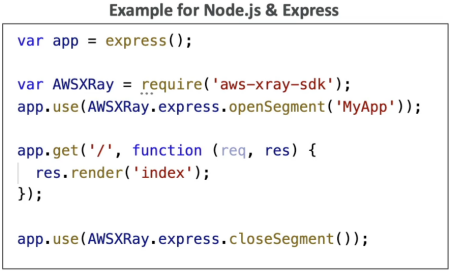
Key Takeaways
The Definitive Core Concept Showdown
Lock these explicit architectural behaviors down so you don't get tripped up by tricky wording choices on the exam:
| Feature Flag | Annotations | Metadata |
|---|---|---|
| Data Structure | Key-Value Pairs (String, Integer, Boolean, etc.) | Key-Value Pairs (Can hold complex JSON objects/arrays) |
| Indexed by AWS? | YES 🟢 | NO 🔴 |
| Search Engine Compatibility | Fully Searchable via Filter Expressions in the console UI. | View-Only when analyzing a specific, individual trace breakdown timeline. |
| Primary Use Case | Tagging business segments to isolate metrics (e.g., UserTier = 'Premium', Region = 'APAC'). | Storing verbose debugging payloads (e.g., raw API request bodies or granular error stacks). |
Deconstructing Sampling Rules (The Cost Knobs)
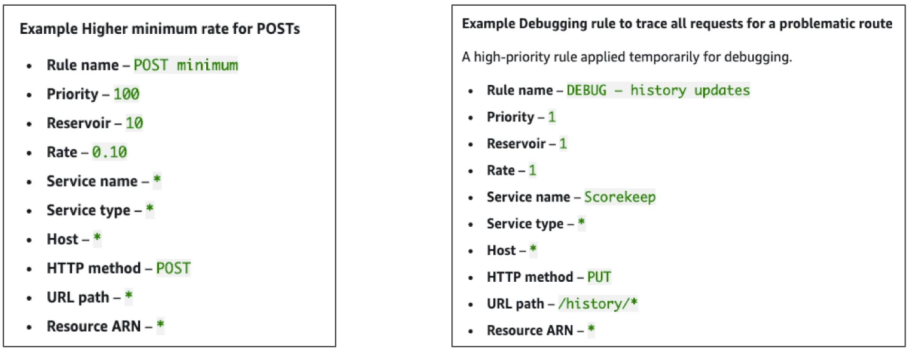
To prevent a high-volume microservice from firing millions of traces per second and absolutely blowing up your AWS bill, X-Ray uses Sampling Rules. By default, the native rule balances two parameters using this mathematical structure:
- The Reservoir (The Floor): The fixed minimum number of traces captured per second per instance. This ensures you have at least a baseline heartbeat of telemetry data flowing into your dashboard, as long as traffic is hitting the gateway.
- The Rate (The Ceiling): The percentage multiplier applied to any additional ambient traffic passing through the node after the reservoir ceiling is fully exhausted.
- ⚡ Zero-Downtime Rule Engine: If you adjust your Sampling Rules inside the X-Ray/CloudWatch Console, the local X-Ray Daemon automatically polls the changes in the background and applies them on the fly. You do not need to patch your application code, push a git commit, or restart your EC2/ECS tasks!
Cross-Account Aggregation Topology
When building enterprise applications, you can configure the X-Ray Daemon to assume a cross-account IAM role, allowing hundreds of distinct AWS workloads to securely offload their UDP packet bundles into a single, centralized Security and Operations tracking account.
 SATELLITE ACCOUNT (Dev/Prod App Environment)
   ┌────────────────────────────────────────────────────────┐
   │ 💻 Local App Threads (Instrumented with X-Ray SDK)     │
   └──────────┬─────────────────────────────────────────────┘
              │ (Fires Local UDP Port 2000 Packets)
              ▼
   ┌────────────────────────────────────────────────────────┐
   │ ⚙️ Local X-Ray Daemon Client                            │
   └──────────┬─────────────────────────────────────────────┘
              │ (Automatically assumes cross-account IAM execution role)
  ============│=== Cross-Account IAM Boundary Gate ===================================
              │ (Batches HTTPS payload egress out every 1 second)
              ▼
 CENTRAL LOGGING ACCOUNT (Security Dashboard Hub)
   ┌────────────────────────────────────────────────────────┐
   │ 📥 AWS X-Ray Central Ingestion Engine                  │ ──► Generates cross-boundary
   └────────────────────────────────────────────────────────┘     Topology Service Maps instantly!
Exam Tips
- Searchable Filter Criteria: Look for keywords where a development team needs the ability to index and search through traces for specific execution characteristics (like tracking down a specific payment ID or customer type). If the option says "add the parameters to the X-Ray trace metadata," reject it. You must add the indicators to Annotations to support indexed string filtering.
- Dynamic Debugging Configurations: If a scenario says an active production application is throwing errors and developers temporarily need to capture 100% of all traces across the checkout route without forcing a code build or causing service downtime, select "Update the custom X-Ray sampling rule in the console to set the Reservoir to 1 and Rate to 100%."
🚀 Practice Test
Question 1: You have been collecting AWS X-Ray traces across multiple applications and you would now like to index your X-Ray traces to search and filter through them efficiently.
What should you use in your instrumentation?
- Metadata
- Sampling
- Segments
- Annotations
Correct Answer
- Metadata
- Explanation: Metadata consists of key-value pairs of any type (including complex objects and lists), but it is not indexed. Use metadata to store arbitrary diagnostic data in the trace when you do not need to search or filter by it.
- Sampling
- Explanation: Sampling defines the algorithm/rules used by the X-Ray SDK to control the percentage of requests that get traced to minimize overhead, rather than indexing key-value data for trace searches.
- Segments
- Explanation: A segment contains the fundamental JSON payload sent by a resource running application logic, detailing the request, response, and work performed. It is the core trace unit, not the specific mechanism used to index key-value pairs for filtering.
- Annotations
- Explanation: Annotations are simple key-value pairs that are indexed for use with filter expressions in AWS X-Ray. You can use annotations to record business data or execution context that you want to search on, group by in the X-Ray console, or filter using the
GetTraceSummariesAPI. X-Ray indexes up to 50 annotations per trace.
- Explanation: Annotations are simple key-value pairs that are indexed for use with filter expressions in AWS X-Ray. You can use annotations to record business data or execution context that you want to search on, group by in the X-Ray console, or filter using the