Lambda & Application Load Balancer - Hands On
🛠️ Step-by-Step ALB-Lambda Integration Hands On
1. Wiring the Load Balancing Pipeline
-
Step 1: Create the Target Container (Lambda)
- Spin up a fresh function named
Lambda-albusing the Node.js 24.x runtime template.
- Spin up a fresh function named
-
Step 2: Provision the Front Firewall (Security Group)
- Head over to the EC2 Dashboard and create a new Security Group named
DemoLambdaALBSG. - Add an Inbound Rule authorizing standard HTTP (Port 80) from anywhere (
0.0.0.0/0) so traffic can reach the cluster gateway.
- Head over to the EC2 Dashboard and create a new Security Group named
-
Step 3: Establish the Serverless Target Group
- Under the Load Balancing sidebar column, click Target Groups ──► Create target group.
- Target Type Selection: Explicitly choose
Lambda functionand name itdemo-tg-lambda. Click next. - Select your newly built
Lambda-albfunction from the dropdown asset selector list, and hit create!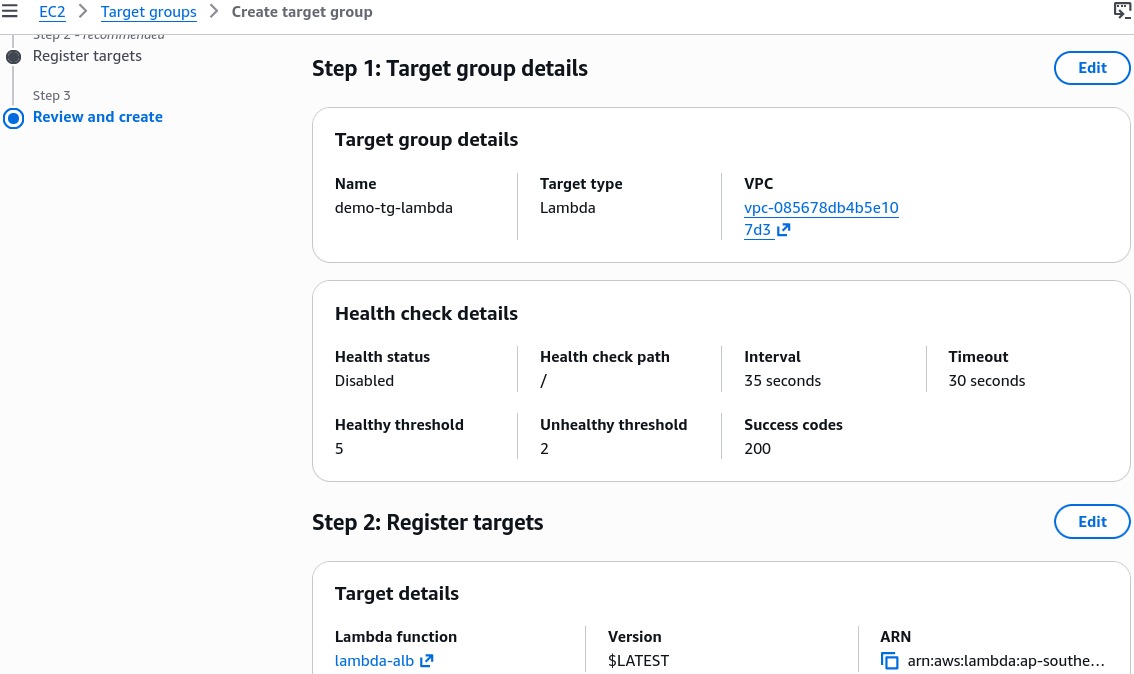
-
Step 4: Launch the Entry Application Load Balancer
- Click Load Balancers ──► Create Load Balancer ──► Application Load Balancer.
- Name it
demo-Lambda-alb, bind it to 3 separate Availability Zones, assign yourDemoLambdaALBSGfirewall, and configure the HTTP Port 80 Listener to forward incoming connection requests directly to yourdemo-tg-lambdatarget group block.
2. Crafting the Compliant Code Vector (Node.js)
If your function returns a simple naked string payload like "Hello from Lambda", the ALB fails to interpret the assets, leading the web client browser to download it as an unformatted raw data stream chunk. To tell the browser to actively render your code output as a JSON object, update your deployment blueprint to look like this:
export const handler = async (event) => {
  console.debug(event);
  const response = {
    statusCode: 200,
    statusDescription: '200 OK',
    headers: {
      'Content-Type': 'application/json',
    },
    body: JSON.stringify({ text: 'Hello From Lambda' }),
    isBase64Encoded: false,
  };
  return response;
};
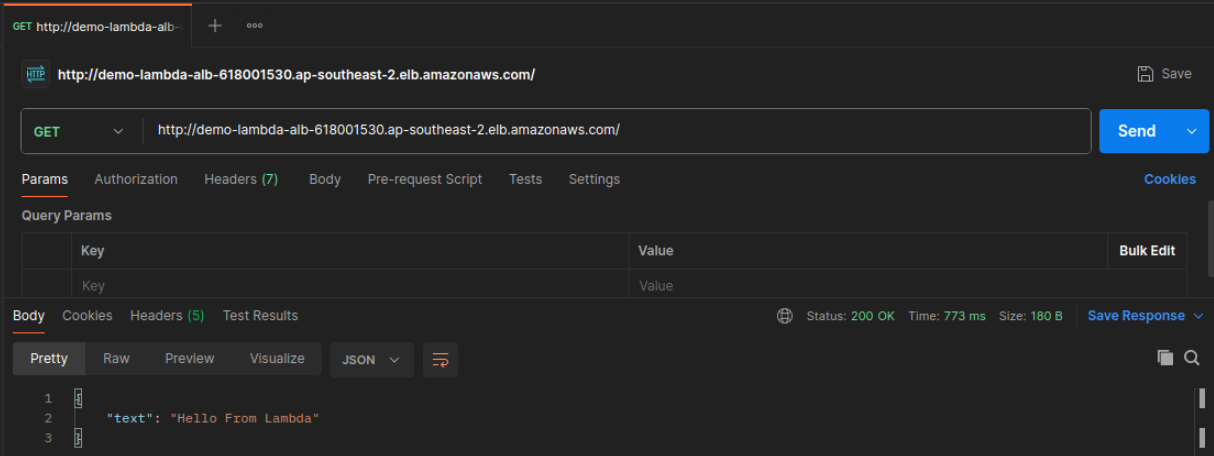
Hit Deploy to push the code package updates live down into the microVM runtime. Now, when you paste the ALB's raw DNS string address into your browser window, the load balancer translates the returned dictionary natively and displays a clean, formatted JSON block ready for the client to consume:
🔒 Behind the Scenes: The Security Handshake
When you registered your Lambda function into that target group layout, the platform automatically updated permissions behind the scenes so the load balancer could execute the code.
If you click into your function configuration's Permissions tab and scroll down to the Resource-based policy statements block, you'll see an explicit permission manifest rule attached automatically:
{
  "Version": "2012-10-17",
  "Id": "default",
  "Statement": [
    {
      "Sid": "AWS-ALB_Invoke-targetgroup-demo-tg-lambda-0e2341822fa18405",
      "Effect": "Allow",
      "Principal": {
        "Service": "elasticloadbalancing.amazonaws.com"
      },
      "Action": "lambda:InvokeFunction",
      "Resource": "arn:aws:lambda:ap-southeast-2:747554530150:function:lambda-alb",
      "Condition": {
        "ArnLike": {
          "AWS:SourceArn": "arn:aws:elasticloadbalancing:ap-southeast-2:747554530150:targetgroup/demo-tg-lambda/0e2341822fa18405"
        }
      }
    }
  ]
}
This ensures that only that specific target group's routing node is authorized to execute the lambda:InvokeFunction API handshake wrapper against your function runtime, blocking external unauthorized actors completely!
📊 Operational Telemetry Checklist Reminder
- Inspecting Raw Events: Click your function's Monitor tab and jump into the CloudWatch Log Streams. Because we injected the
console.debug(event);execution line, you can drill into the log payload to inspect exactly how the ALB serializes client information (like their User-Agent, cookies, paths, and HTTP query strings) into a standard JSON string payload block.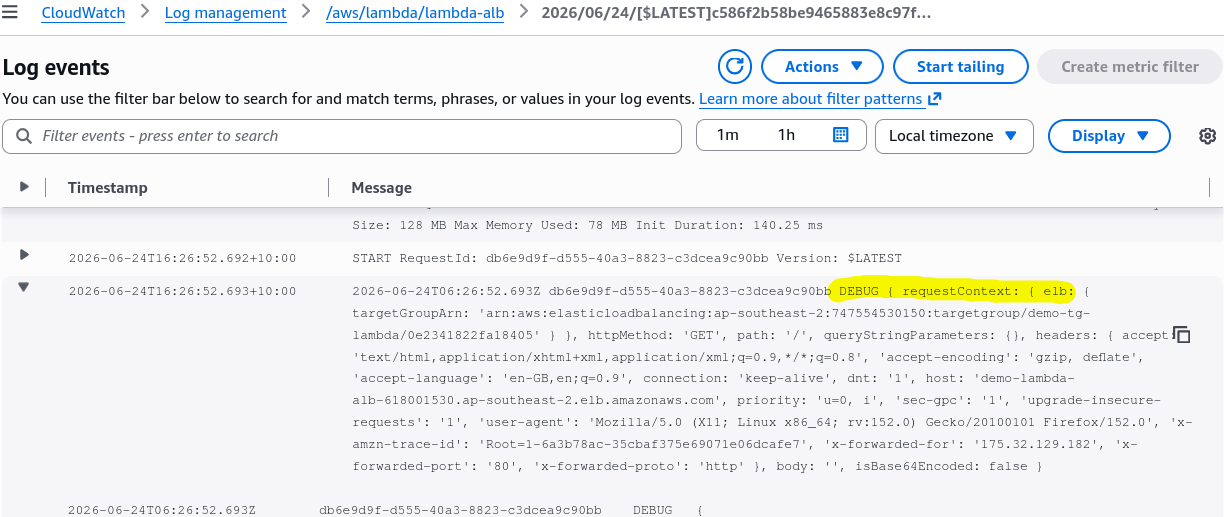
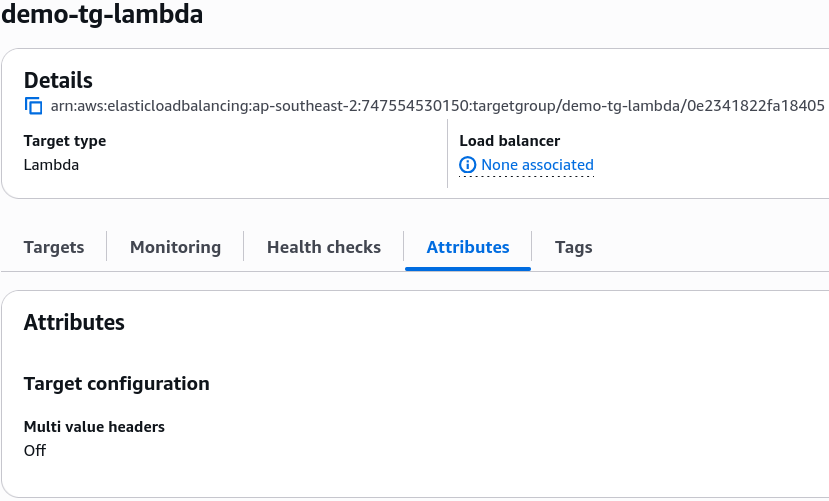
- Target Group Attributes: Remember, toggling Multi-Value Headers inside your Target Group attributes alters the request structure completely. When turned off, duplicate query metrics are overwritten and truncated; when turned on, they wrap into a structural array layout inside your log files, chief!
🧹 Cleaning Up Your Sandbox Space
To ensure no stray lingering resources run wild against your active training budget thresholds:
- Go to the Load Balancer Console, select
demo-Lambda-alb, and click Delete. - Go to Target Groups and erase the associated
demo-tg-lambdalayout block natively.