Lambda Destinations Hands On
One of the slickest features of the modern AWS Lambda Console UI is that when you wire up a Destination via the console, AWS automatically updates your IAM execution role behind the scenes with the required policy variables (like sqs:SendMessage). This keeps you moving fast without manually jumping back and forth into IAM.
🛠️ Step-by-Step Lambda Destinations Hands On
1. Provisioning the Downstream Storage Queues
-
Step 1: Create the Success Channel Container
- Jump into the Amazon SQS Console ──► click Create queue.
- Select a standard queue layout, name it
s3-success, and hit create.
-
Step 2: Create the Failure Triage Container
- Click Create queue a second time.
- Select a standard queue, name it
s3-failure, and hit create.
2. Linking the Infrastructure Destinations Map
-
Step 3: Bind the Failure Route
- Open your
Lambda-S3function ──► navigate to the Configuration tab ──► select Destinations. - Click Add destination ──► Source type: Asynchronous invocation ──► Condition: On failure.
- Destination type: SQS queue ──► Destination target:
S3-failure. Click Save.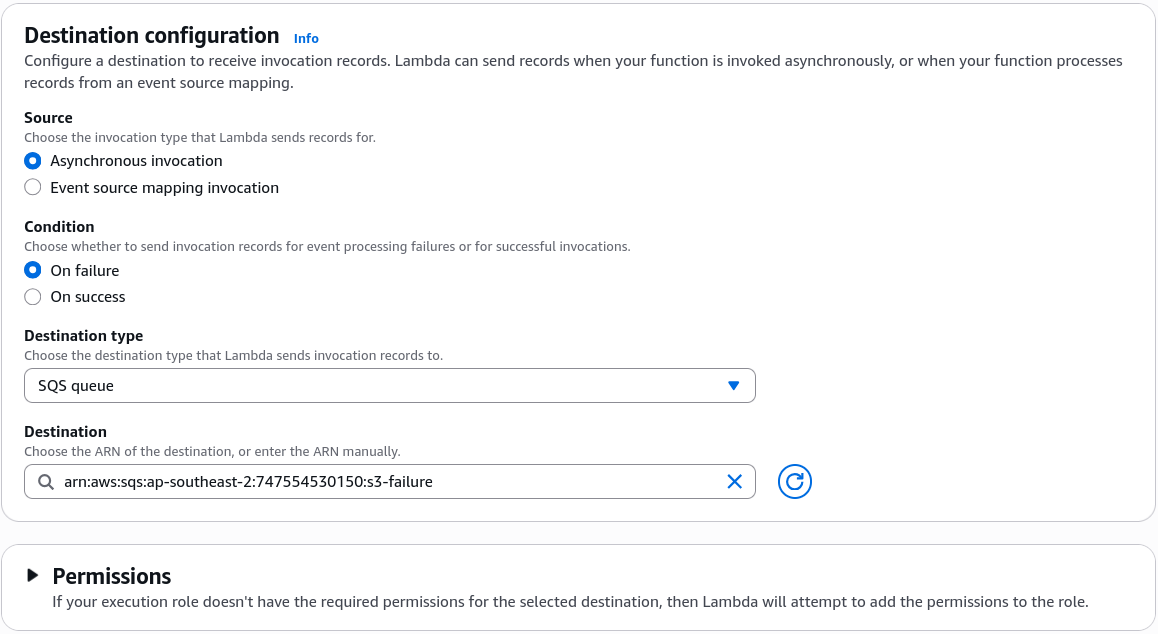
- Open your
-
Step 4: Bind the Success Route
-
Click Add destination again ──► Source type: Asynchronous invocation ──► Condition: On success.
-
Destination type: SQS queue ──► Destination target:
S3-success. Click Save. -
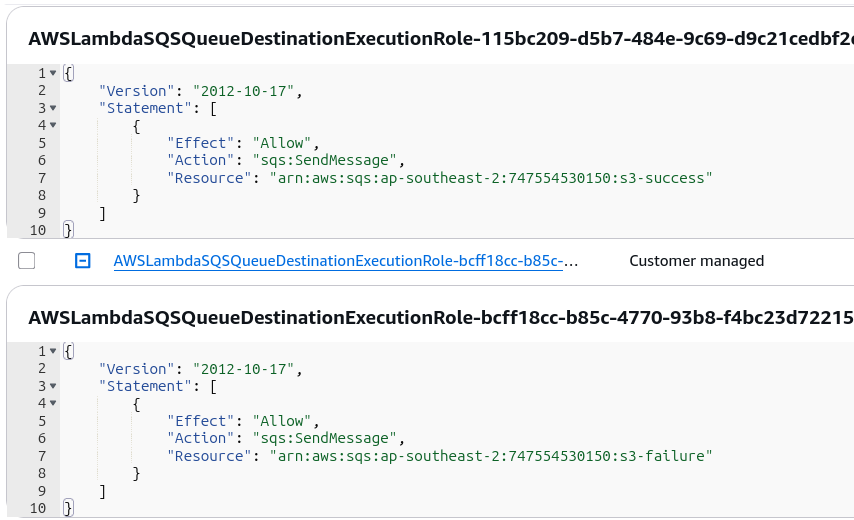
Behind-the-Scenes Check: If you jump out to your IAM console, you'll see a policy named
AmazonLambdaMSKExecutionRoleor a custom inline block auto-appended with targeted permissions pointing directly to both your queue ARNs!
📥 Verification & Live Trace Payload Analysis
To test both pathways, we'll alter our Python handler behavior and drop new object mutations straight into our S3 integration bucket:
🟢 Test Case 1: Pure Success Route (beach.jpg)
- The Action: Ensure your Lambda function is set to return clean without crashes, then upload
beach.jpginto S3. - The Result: Head to the SQS Dashboard. Your
S3-successqueue instantly catches 1 message available. - The Telemetry Envelope: When you poll the message inside your queue, notice how insanely loaded the metadata is compared to a classic DLQ. It bundles everything into a single layout map:
{
  "version": "1.0",
  "timestamp": "2026-06-25T10:57:39.305Z",
  "requestContext": {
    "requestId": "288b9d30-f5a7-46cf-9c5f-5d4652a65d86",
    "functionArn": "arn:aws:lambda:ap-southeast-2:747554530150:function:Lambda-S3:$LATEST",
    "condition": "Success",
    "approximateInvokeCount": 1
  },
  "requestPayload": {
    "Records": [
      {
        "eventVersion": "2.4",
        "eventSource": "aws:s3",
        "awsRegion": "ap-southeast-2",
        "eventTime": "2026-06-25T10:57:37.839Z",
        "eventName": "ObjectCreated:Put",
        "userIdentity": { "principalId": "AWS:AIDA24DNY4NTLSCBFI4WZ" },
        "requestParameters": { "sourceIPAddress": "175.32.129.182" },
        "responseElements": {
          "x-amz-request-id": "GZ2Z2Z8N59HDNTW0",
          "x-amz-id-2": "6Wt0nI1VZ8n5dpWH1uUzC1U5fc75PHG+jfLQEKdf5CgMFMZDRpUrAgAYoUR2SPS2L6F26MbM7MqdYKk3ZynFttJ9MN5ItOIwIfZ+uUcTHbk="
        },
        "s3": {
          "s3SchemaVersion": "1.0",
          "configurationId": "invoke-Lambda",
          "bucket": {
            "name": "demo-s3-event-rendy",
            "ownerIdentity": { "principalId": "A18QSH59Y8EC17" },
            "arn": "arn:aws:s3:::demo-s3-event-rendy"
          },
          "object": {
            "key": "beach.jpg",
            "size": 87853,
            "eTag": "1c6defc638f71abd065d8dd2f450b207",
            "sequencer": "006A3D09A1C9B02D97"
          }
        }
      }
    ]
  },
  "responseContext": { "statusCode": 200, "executedVersion": "$LATEST" },
  "responsePayload": { "statusCode": 200, "body": "\"Hello from Lambda!\"" }
}
❌ Test Case 2: The Poison Pill Retry Loop (index.html)
- The Action: Go to your code editor panel, comment out your return map, and append this exception-throwing line::
throw new Error('Error Occurred Bro!');
- Deploy the code updates and drop
index.htmlstraight into your S3 bucket lanes. - The Retry Engine Interception: If you refresh your SQS console page immediately, the failure message will not show up right away, chief! Because this is an asynchronous invocation model, the background Lambda engine forces the message through its strict 3-strike execution timeline:
- The Forensic Failure Payload: Once 3 minutes elapse and retries exhaust, look inside the body of your
S3-failuremessage queue item. It explicitly notes"condition": "RetriesExhausted", captures an"approximateInvokeCount": 3, and injects the rawstackTraceerror strings ("errorMessage": "Error Occurred Bro!") straight into the message object, completely saving you from hunting for errors inside CloudWatch, bro!
Exam Tips
- The Console Test Button Trap: This is a classic exam favorite. If you click the "Test" button inside the Lambda console UI to check your success/failure destinations, the destinations will never fire.
Why? Because clicking "Test" executes a Synchronous Invocation (RequestResponse). Destinations only trigger for Asynchronous Invocations (Event) or stream-based Event Source Mappings! To test a destination live, you must trigger it via the real external service (like S3) or issue an explicitaws lambda invoke --invocation-type EventCLI call.