Lambda External Dependencies - Hands On
Stephane's lab beautifully knits together every single thread of local asset packaging, CLI delivery mechanics, programmatic X-Ray tracing instrumentation, and IAM security triage. Watching those service nodes map out inside the X-Ray console after fixing the S3 IAM gaps is pure cloud engineering validation.
🛠️ Step-by-Step CLI Dependency Deployment Hands On
1. Ingesting Dependencies Natively (AWS CloudShell)
-
Step 1: Provision the Working Namespace
- Boot up AWS CloudShell from your top console navigation bar.
- Initialize an isolated folder and drop a text-editor tool right inside your environment wrapper:
mkdir Lambda && cd Lambdasudo yum install -y nanonano index.js
-
Step 2: Code the Instrumented Handler File
-
Paste the Node.js SDK V2 tracking module snippet directly into
index.js. Notice how we wrap the entire default AWS SDK module inside an X-Ray Capture Method to intercept downstream HTTP calls:// index.mjs - Modular AWS SDK v3 + X-Ray Middleware Patternimport { S3Client, ListBucketsCommand } from '@aws-sdk/client-s3';import AWSXRay from 'aws-xray-sdk-core';// 1. Initialize the base modular S3 Client wrapperconst baseS3Client = new S3Client({});// 👑 The Modern Magic Hook: Instrument the specific client instance via the X-Ray SDK middlewareconst s3Client = AWSXRay.captureAWSv3Client(baseS3Client);export const handler = async (event) => {try {// 2. Instantiate the isolated, tree-shakable command bundleconst command = new ListBucketsCommand({});// 3. Execute the payload down the wireconst data = await s3Client.send(command);return {statusCode: 200,body: JSON.stringify({message: 'Buckets gathered with SDK v3',buckets: data.Buckets,}),};} catch (err) {return {statusCode: err.$metadata?.httpStatusCode || 500,body: JSON.stringify({ error: err.message }),};}};
-
-
Step 3: Ingest the Package Modules
- Execute
npm installdirectly inside your flat project directory root:
npm install @aws-sdk/client-s3 aws-xray-sdk-core- The File Audit Check: Run a local directory scan (
ls -l). You will see an activenode_modules/folder containing the X-Ray binary trees alongside your flatindex.jsfile.
- Execute
2. Packaging the Archive and Executing CLI Provisioning
-
Step 4: Compress into a Flat ZIP Archive
- Zip your code and modules together. Make sure you run the compression hook right from the inner root directory path so your assets aren't nested inside an unneeded parent envelope:
chmod -R 755 .zip -r functions.zip . -
Step 5: Direct API Pipeline Deployment
- Fetch your newly provisioned Lambda IAM Execution Role ARN from your security dashboard and fire the
create-functionCLI command block:
aws lambda create-function \--function-name lambda-xray-with-dependencies \--runtime nodejs24.x \--handler index.handler \--zip-file fileb://functions.zip \--role arn:aws:iam::111122223333:role/demo-lambda-with-dependencies - Fetch your newly provisioned Lambda IAM Execution Role ARN from your security dashboard and fire the
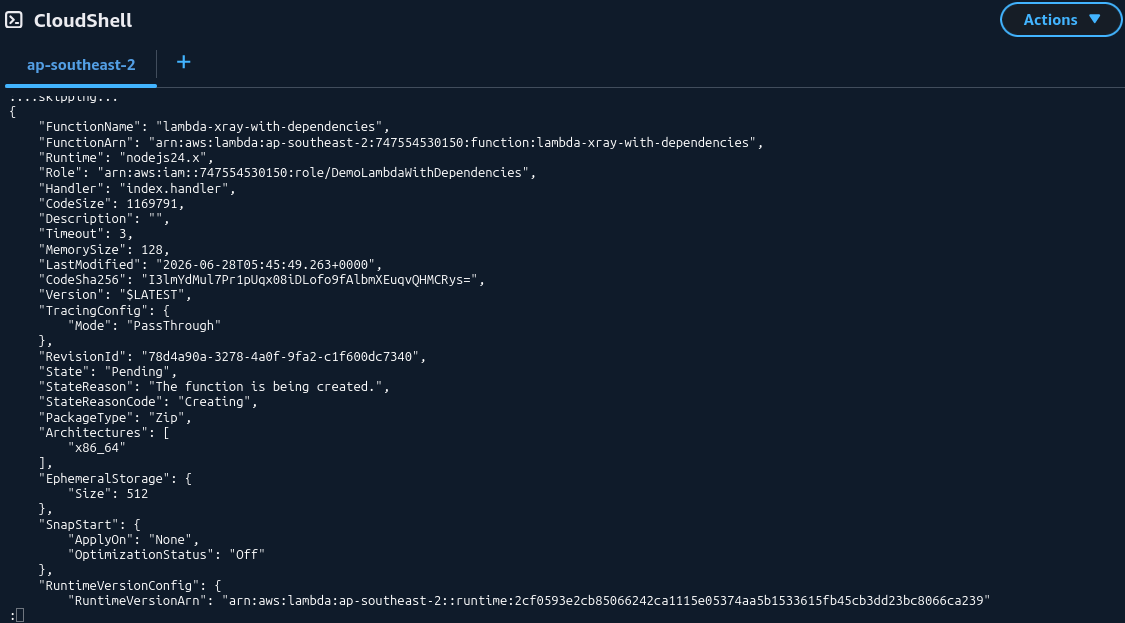
🔍 3. Post-Deployment Security & Observability Triage
Once the script pushes successfully, running an initial test trigger drops a hard execution error due to missing IAM clearance. Here is the exact two-step triage playbook to resolve it:

🔒 Gate A: Fixing the Identity Authorization Gap
- Go to your Lambda function's Configuration -> Permissions panel and hop into the IAM Role dashboard.
- Under Attach policies, seek out and add
AmazonS3ReadOnlyAccess. This updates your function’s outbound clearance, authorizing it to execute the downstreams3:ListBucketsaction.
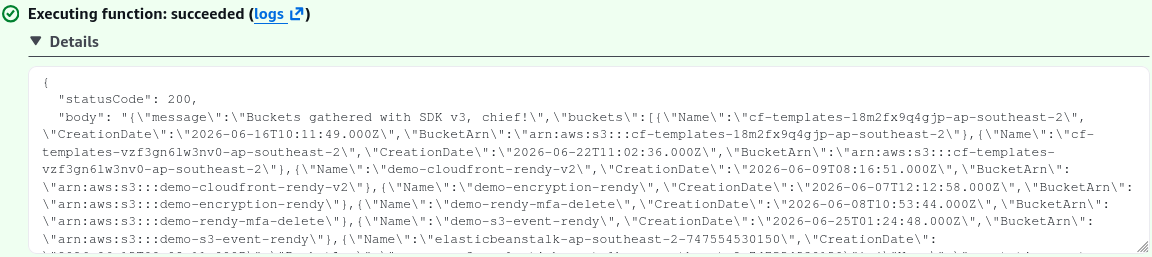
🕸️ Gate B: Activating the Infrastructure Tracking Daemon
- Navigate to Configuration -> Monitoring and organization tools, click Edit, and toggle Enhanced monitoring via AWS X-Ray to Enabled.
- Re-fire your console Test trigger. The function instantly shifts to a green success block, fetching your global bucket listings flawlessly!

Exam Tips
- The Binary Protocol Prefix Rule: When deploying zip payloads via the AWS CLI using the
--zip-fileflag, never pass the file path raw! You must prefix the argument string withfileb://(e.g.,fileb://functions.zip). Thebinstructs the AWS CLI processor to parse the asset as raw binary data stream bytes instead of trying to read it as a standard text string.