Lambda Function URL
Lambda Function URLs are an absolute game-changer when you want to bypass the complexity (and extra cost) of spinning up an API Gateway or an Application Load Balancer just to expose a single HTTP endpoint! 🌐⚡
If you’re building simple webhooks, form handlers, single-page app backends, or microservices that just need a clean public HTTPS address out of the box, Function URLs give you a dedicated endpoint that supports both IPv4 and IPv6 right away.
Key Takeaways
An AWS Lambda Function URL is a built-in HTTPS endpoint dedicated to a specific Lambda function or alias. Operating strictly over the public internet, Function URLs support simple configuration levers for Cross-Origin Resource Sharing (CORS) and offer two distinct authentication pathways: public anonymous access (AuthType: NONE) or cryptographically signed requests (AuthType: AWS_IAM) managed via resource-based and identity-based policies.
🌐 The Core Network & Deployment Boundaries
When you switch on a Function URL, the AWS control plane generates a permanent, unique string endpoint that follows this strict structural signature:
https://<url-id>.lambda-url.<region>.on.aws/
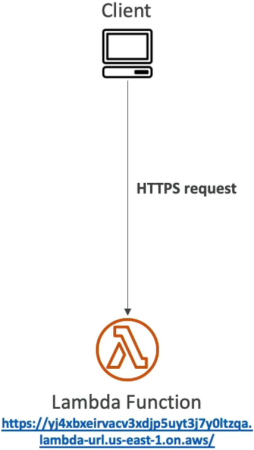
🔒 Operational Rules to Memorize:
- Public Internet Only 📡: Function URLs live on the public web. You cannot route traffic to them inside an isolated VPC private subnet line without jumping through the internet. If you require absolute private network containment, you must use a private VPC Endpoint hooked to an API Gateway instead.
- Target Mapping Realities: You can bind a Function URL straight to the volatile
$LATESTbranch or map it down to a specific Function Alias (likeprodordev). However, you cannot assign a Function URL to a raw, hardcoded version number (like:1or:2)! - Scale and Throttling Control: Function URLs don't carry native rate-limiting knobs like API Gateway usage plans do. If you want to clamp down on a runaway client or protect a downstream database from an influx of requests, you must enforce a Reserved Concurrency ceiling limit directly on the function itself to throttle the incoming invocation stream!
🛡️ Managing Access: The Two Auth Types
When configuring the URL's security framework, you must select one of two primary AuthType values:
🟢 Path A: AuthType NONE (Public Anonymous Access)
This opens the doors wide to the entire internet, making it ideal for public webhooks or open asset endpoints.
- The Resource-Based Policy Requirement: For this to execute, your function's underlying resource-based policy must explicitly grant public invocation rights using wildcard signatures:
{
  "Version": "2012-10-17",
  "Statement": [
    {
      "Sid": "AllowPublicURLInvocation",
      "Effect": "Allow",
      "Principal": "*",
      "Action": "lambda:InvokeFunctionUrl",
      "Resource": "arn:aws:lambda:us-east-1:123456789012:function:my-public-worker",
      "Condition": {
        "StringEquals": { "lambda:FunctionUrlAuthType": "NONE" }
      }
    }
  ]
}
🔐 Path B: AuthType AWS_IAM (Secured Identity Access)
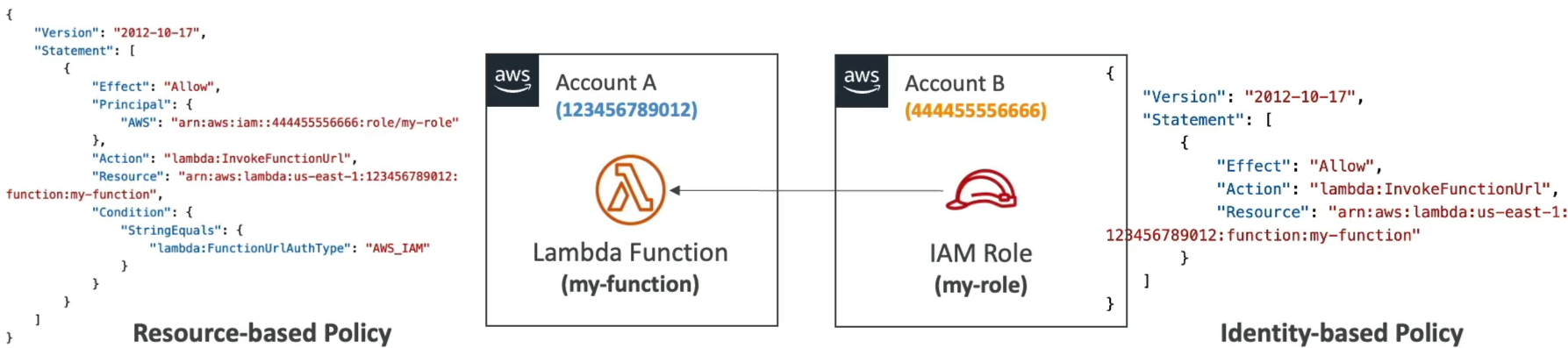
This setting locks down your endpoint. Every incoming request must be cryptographically signed using AWS Signature Version 4 (SigV4) protocols. The platform evaluates your permissions using standard S3-style verification mechanics:
- Same-Account Invocations: Requests clear the gate if either the caller's Identity-Based Policy OR the function's Resource-Based Policy explicitly allows the
lambda:InvokeFunctionUrlaction. - Cross-Account Invocations (Account A & B Handshake) 🤝: This requires an explicit two-way policy match to succeed:
- Account A (The Owner): The function's Resource-Based Policy must list Account B's explicit IAM Role ARN as the trusted
Principal. - Account B (The Caller): The calling client's Identity-Based Policy must explicitly allow
lambda:InvokeFunctionUrltargeting Account A's unique function resource ARN.
- Account A (The Owner): The function's Resource-Based Policy must list Account B's explicit IAM Role ARN as the trusted
🔏 Cross-Origin Resource Sharing (CORS)
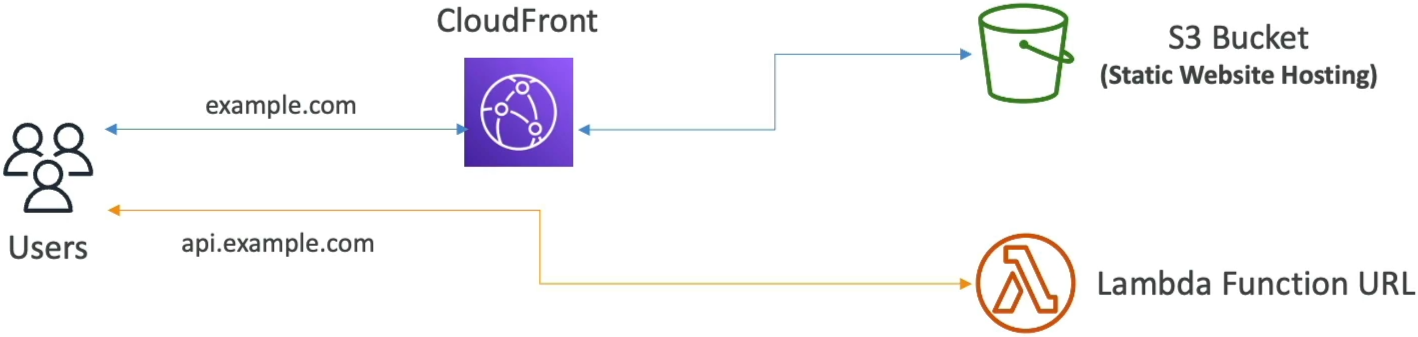
If your frontend web application is hosted inside an Amazon S3 static bucket fronted by CloudFront at https://example.com, and your backend code is running on a Lambda Function URL at https://api.example.com, the browser's native security engine will block the JavaScript fetch requests due to same-origin security policies!
To fix this, you don't need to inject custom header strings manually inside your runtime code file. You simply toggle the CORS configuration block directly on the Function URL configuration wrapper:
- Allowed Origins: Set to
https://example.com(or*for broad access). - Allowed Methods: Explicitly whitelist the incoming request verbs (e.g.,
GET,POST,OPTIONS). - Allowed Headers: Include core headers like
Content-TypeandAuthorizationto let pre-flight pre-check loops pass successfully, chief!
Exam Tips
- The Cross-Account Authorization Denial: If an exam prompt states that a developer set up a cross-account microservice using
AuthType: AWS_IAMon a Function URL in Account A, and despite adding Account B's role to the function's resource policy, the client application keeps dropping anHTTP 403 Forbiddenerror—look straight for the identity gap. The calling role inside Account B is missing an Identity-Based Policy authorizing it to point outward and invoke the external URL ARN! - The Feature Selection Trade-Off: If a question forces you to choose between API Gateway and a Function URL for a new serverless app, look at the required features. If the app needs request validation, custom API keys, built-in cognito authorizers, or native caching tiers, choose API Gateway. If the prompt explicitly emphasizes low cost, zero management overhead, large file payloads, or super simple single-endpoint access, choose a Lambda Function URL every single time!