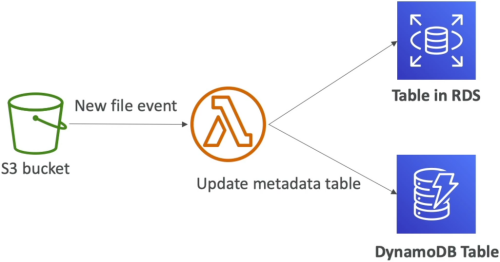
Lambda & S3 Event Notifications
Amazon S3 Event Notifications allow developers to trigger automated workflows whenever a specific mutation occurs inside an object storage bucket (such as ObjectCreated, ObjectRemoved, or ObjectRestore). S3 natively handles these event dispatches Asynchronously, dropping the event payload directly into Lambda's managed background event queue. To optimize performance and prevent infinite execution loops, workflows can be scoped using granular Prefix (folder path) and Suffix (file extension) rule matching filters.
Key Takeaways
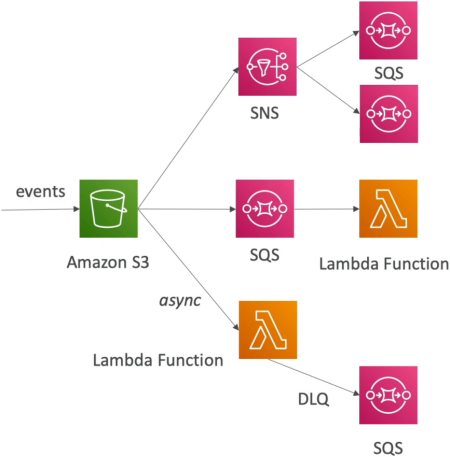
The 3 Native Routing Topologies
When an event fires inside S3, you aren't forced to throw it straight at a compute core. S3 natively supports exactly three architectural target destinations, chief:
- Route 1: Direct Async Lambda Invocation (Our Focus)
- S3 fires a notification payload directly down to your Lambda function. Because this is an Asynchronous Invocation, Lambda handles the 3-strike retry engine, and you can attach an SQS DLQ or Lambda Destination to catch poison pills.
- Route 2: Fan-Out Broadcast (S3 ──► SNS ──► Multiple SQS/Lambda)
- Essential if multiple distinct engineering teams or applications need to react to the exact same file upload simultaneously (e.g., Team A processes raw metrics while Team B updates a security audit ledger).
- Route 3: The Persistent Buffer Queue (S3 ──► SQS ──► Lambda)
- Used when you want an explicit structural architectural bulkhead. SQS acts as a durable shock absorber, storing messages safely until your Lambda function has the concurrency capacity to poll and clear them out.
⚠️ The Documentation "Fine Print" & Architectural Traps
AWS loves building exam trick questions out of these obscure edge cases. Lock these down right now:
- The Parallel Overwrite Race Condition: If an S3 bucket does not have Bucket Versioning enabled, and two separate web clients upload/overwrite the exact same object filename at the precise same millisecond, S3 might only emit a single event notification payload instead of two. If your system requires absolute 100% telemetry tracking accuracy for every single file mutation, you must turn on S3 Bucket Versioning!
- The Infinite Recursion Loop (The Ultimate Budget Killer) 💀: Imagine your Lambda function triggers when an image lands in
my-bucket. Your code resizes the image and saves the output thumbnail right back into that exact same bucket. What happens?- The new thumbnail fires a new upload event ──► which triggers the Lambda function again ──► which creates a smaller thumbnail ──► which triggers a new event...
- Within minutes, your function executes millions of times in a recursive spiral, screaming through your budget constraints.
- The Fix: Always use separate buckets for your inputs and outputs, or apply strict Prefix/Suffix matching filters (e.g., only trigger if the file lands inside the
/uploads/prefix folder, and save outputs inside the/processed/prefix folder).
📊 Operational Telemetry Pipeline Notation
The execution latency loops and delivery states running inside managed reactive storage boundaries evaluate under these expressions:
Exam Tips
- Scoping the Trigger Rules: If an exam prompt states that a company only wants a Lambda function to fire when
.jpgor.pnggraphic assets are dropped into an S3 imagery bucket, look for the answer that configures S3 Event Notification Suffix Filters matching.jpgand.png. - Remediating Database Timeouts: If your asynchronous S3-to-Lambda pipeline starts throwing connection errors because too many files are hitting the bucket at once and overloading a downstream relational RDS database, look for the choice that inserts an SQS queue between S3 and Lambda to buffer the spikes and enforce controlled batch processing.