Lambda & S3 Event Notifications - Hands On
This hands-on lab reinforces how AWS utilizes Resource-Based Policies to authorize asynchronous push-model event streams like Amazon S3 notifications without requiring you to embed explicit execution credentials inside the storage layer itself.
🛠️ Step-by-Step S3 Reactive Ingestion Hands On
1. Provisioning the Code & Storage Buckets
-
Step 1: Bootstrap the Core Lambda Target
- Spin up a new function named
Lambda-S3utilizing the Node.js runtime environment.
- Spin up a new function named
-
Step 2: Create a Regionally Co-located Bucket
- Open the Amazon S3 Console ──► click Create bucket.
- Name the bucket (e.g.,
demo-s3-event-rendy). CRITICAL RULE: Ensure the S3 bucket is provisioned in the exact same AWS region as your Lambda function to prevent cross-region latency blocks and complex deployment mappings.
2. Configuring the Push Event Notification System
-
Step 3: Setup the S3 Event Blueprint
- Navigate to your newly created S3 bucket ──► click the Properties tab ──► scroll down to the Event notifications module.
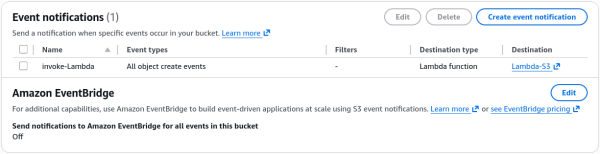
- Click Create event notification ──► Name it
invoke-Lambda. - Leave Prefix and Suffix blank to capture all file streams, or scope it down to target explicit folders.
- Under Event types, check the box for
All object create events(s3:ObjectCreated:*).
-
Step 4: Bind the Compute Target Route - Scroll down to the Destination panel, select Lambda function, choose your
Lambda-S3function from the dropdown, and hit Save changes.
3. Verification & Live Trace Analysis
Update your Lambda function code template to print the incoming data dictionary so you can inspect the serialization variables:
export const handler = async (event) => {
  console.log(JSON.stringify(event, null, 2));
  const response = {
    statusCode: 200,
    body: JSON.stringify('Hello from Lambda!'),
  };
  return response;
};
Hit Deploy. Head back to your S3 bucket, upload a sample photo file (e.g., coffee.jpg), and jump over to the Lambda function's Monitor -> View CloudWatch Logs panel.
📥 Deconstructing the Ingested S3 Event Schema Payload
When you drill into the newly populated CloudWatch log stream, you will find an explicit Records array containing the structural telemetry details emitted by the storage plane:
{
  "Records": [
    {
      "eventVersion": "2.4",
      "eventSource": "aws:s3",
      "awsRegion": "ap-southeast-2",
      "eventTime": "2026-06-25T01:32:15.252Z",
      "eventName": "ObjectCreated:Put",
      "userIdentity": {
        "principalId": "AWS:AIDA24DNY4NTLSCBFI4WZ"
      },
      "requestParameters": {
        "sourceIPAddress": "my-ip-address"
      },
      "responseElements": {
        "x-amz-request-id": "AXES3THZ66BAG331",
        "x-amz-id-2": "VhnsiPGFaT0nTbCQLkit2v8rXNXJOVrrESMP3o2Q4zU8YkK7v/bYP1F6hldKqdFtCfPK8OLZjLVMYOLTsAw8rU9uTgDx+3jZ"
      },
      "s3": {
        "s3SchemaVersion": "1.0",
        "configurationId": "invoke-Lambda",
        "bucket": {
          "name": "demo-s3-event-rendy",
          "ownerIdentity": {
            "principalId": "A18QSH59Y8EC17"
          },
          "arn": "arn:aws:s3:::demo-s3-event-rendy"
        },
        "object": {
          "key": "coffee.jpg",
          "size": 110985,
          "eTag": "b3b29d095d73d905171d1f5498e1e578",
          "sequencer": "006A3C851F365153ED"
        }
      }
    }
  ]
}
🧠 Core Schema Extraction Points for Developers:
eventSource&eventName: Identifies the telemetry provider (aws:s3) and the explicit action state code (ObjectCreated:Put) that kicked off the invocation loop.s3.bucket.name&s3.object.key: The exact path coordinates (demo-s3-event-rendyandcoffee.jpg). Your core code logic uses these variables to execute an upstreams3.get_object()call back to S3 to pull the file content chunks into memory for heavy processing.
📊 Operational Telemetry Pipeline Notation
The asynchronous event processing metrics across your decoupling limits map according to these clear expressions: