Lambda Event Source Mapping Hands On (SQS)
Stephane’s lab hits the absolute baseline execution flow for a queue-based Event Source Mapping (ESM). There is a super common exam trap hidden inside this configuration, especially regarding the exact IAM policy identity required to allow the internal Lambda poller loop to communicate with your queue layers.
Hands On
🛠️ Step-by-Step SQS Event Source Mapping Playbook
1. Provisioning the Core Assets
-
Step 1: Bootstrap the Consumer Code Hub
- Spin up a new function from scratch named
lambda-SQSusing the Node.js runtime environment.
- Spin up a new function from scratch named
-
Step 2: Initialize the Buffer Queue
- Go to the Amazon SQS Console ──► click Create queue.
- Keep it as a standard queue, name it
lambda-demo-SQS, scroll to the bottom, and hit Create queue.
2. ⚠️ The Ultimate Exam Permission Pitfall: Resolving the Trigger Wall
If you try to link your new queue to the Lambda function straight out of the box using the Add trigger button, the console will throw a hard permission wall blocking you Because Lambda handles the heavy lifting of running background long-polling API calls, your function's background security wrapper needs explicit clearance to fetch and delete data from your queue.

-
Step 3: Attach the Dedicated Managed Execution Profile
- Navigate to your function's Configuration -> Permissions tab and click your active Execution role link to jump into the IAM Console.
- Click Add permissions ──► Attach policies.
- Search for the highly precise AWS-managed policy named
AWSLambdaSQSQueueExecutionRole.- Why this policy? It packages the exact bare-minimum permission array needed for an ESM to safely interface with an SQS queue resource wrapper:
sqs:ReceiveMessage(To extract message payload arrays from the queue via long polling).sqs:DeleteMessage(To permanently evict and wipe the message after your code finishes executing flawlessly).sqs:GetQueueAttributes(To monitor the current health metrics of the queue).
- Why this policy? It packages the exact bare-minimum permission array needed for an ESM to safely interface with an SQS queue resource wrapper:
-
Step 4: Establish the ESM Trigger Link
- Head back to the Lambda console, hit Add trigger, select SQS, pick your
lambda-demo-SQSqueue ARN, set your target batch sizes, check Enable trigger, and click Add. With the IAM policy active, it saves successfully!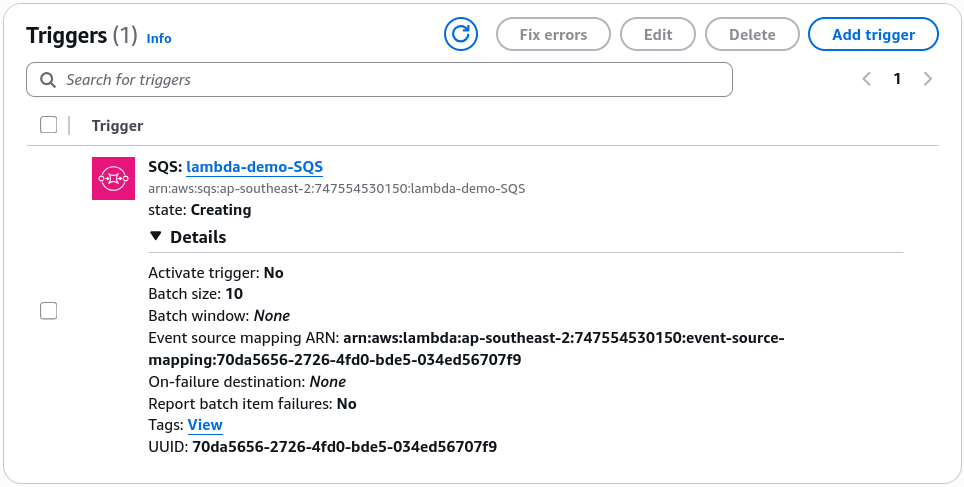
- Head back to the Lambda console, hit Add trigger, select SQS, pick your
📥 Deconstructing the Ingested SQS Batch Payload Schema
Once you edit your Node.js code to console.log(JSON.stringify(event, null, 2)), hit Deploy, and drop a test string like "hello world" (with a custom message attribute key foo: bar) into the SQS console's Send and receive messages block, the ESM will pull it and invoke your code.
When you drill into the newly populated CloudWatch log stream, you will find an explicit Records array containing the structural JSON envelope passed down by the pull engine, chief:
{
  "Records": [
    {
      "messageId": "ab0faaaa-268a-4856-8f17-ce82dbf0fd82",
      "receiptHandle": "AQEBXnRm7Yy9g4qM+Cf939MyqcohettSd/tNQE4Dk5k+WRNjQqeNsabWRBLf0B8YsCN1SIkzOJkihVRFXeDt5Ap+tN8+agpDV3IDfgFgHBzo5f1Wj62u5y2WUX2QzepszEVF4yGxB81EOXe4ErpXI+3lEQUgbTyWhblWUpB46+KfxSY2bw5vZ5d0g/kDycoIRKLAENaGKVxTBLPBl2zW0TAD6sEK/6Ut/QDU2JN7L7LcPf8/z8bkVNTx1enlqgFHIyjNPcIPj16UufDWXao8GV+Xt6H/saN6jUPl5B7NW6hycXIWFLt8WZe03N3xDdPSSWL3UOhY3PS9YCIc6ezP7befWENNw3u+kabkEnH55kETWE/6schNZZUlRq/qcFxkmFD464gBAek9FSe7Uo3gJYI5Og==",
      "body": "Hello World, Bro!",
      "attributes": {
        "ApproximateReceiveCount": "1",
        "SentTimestamp": "1782378729417",
        "SenderId": "AIDA24DNY4NTLSCBFI4WZ",
        "ApproximateFirstReceiveTimestamp": "1782378729425"
      },
      "messageAttributes": {
        "foo": {
          "stringValue": "bar",
          "stringListValues": [],
          "binaryListValues": [],
          "dataType": "String"
        }
      },
      "md5OfMessageAttributes": "d8062e30406ad939a86bacea477e5a26",
      "md5OfBody": "a67f40a35491bed375855d12773e367f",
      "eventSource": "aws:sqs",
      "eventSourceARN": "arn:aws:sqs:ap-southeast-2:747554530150:lambda-demo-SQS",
      "awsRegion": "ap-southeast-2"
    }
  ]
}
🧠 Core Schema Extraction Points for Developers:
Records(The Array Structure): Because the ESM can grab a batch of messages at once (based on your configuration values),event['Records']is always an array matrix. Even if the queue only had 1 message to give, your code must iterate through or grab the first index element (event['Records'][0]) to extract the contents.body&messageAttributes: Holds your raw workload string data ("hello world") and any custom metadata headers (foo: bar) passed through the messaging lanes.- Destructive Polling Invalidation: If you jump back into your SQS console panel right now, you'll see 0 Messages Available. Because your function returned a clean
StatusCode: 200success block, the Event Source Mapper automatically triggered a backgroundDeleteMessagecleanup command, ensuring that message is never seen by another consumer again!
📊 Stream vs. Queue Processing Reference Matrix
As Stephane outlined when checking the Kinesis dropdown triggers, the capabilities of an Event Source Mapper shift dramatically depending on the underlying data engine parameters:
| Performance Property | Queue ESM Engine (SQS) | Stream ESM Engine (Kinesis / DynamoDB) |
|---|---|---|
| Ingestion Behavior | Destructive. Messages are deleted from the queue explicitly upon a successful code return path. | Non-Destructive. Items stay inside the stream shards until their time-to-live retention window expires. |
| Processing Order | Non-ordered by default (Standard SQS). Moves to strict chronological order if you deploy SQS FIFO queues. | Strictly Ordered at the shard level natively. |
| Starting Positions | N/A (Always grabs whatever message is sitting at the current head of the queue pipeline). | Configurable! Can choose Latest, Earliest, or pick a precise historical Timestamp window to process. |
| Error Isolation | Bad messages roll back to the queue to trigger a standard SQS Redrive Policy / DLQ. | Freezes the shard loop completely by default! Requires Split Batch on Error or On-Failure Destinations to clear bottlenecks. |