Lambda Versions and Aliases - Hands On
Stephane’s hands-on run perfectly demonstrates how the AWS control plane handles the transition from highly volatile execution branches to immutable milestones, and then maps a dynamic routing layer over them.
🛠️ Step-by-Step Versioning & Alias Routing Hands On
1. Freezing the Milestones (The Immutable Snapshot)
-
Step 1: Bootstrap the Volatile Environment
-
Provision a function named
lambda-version-demo. -
Drop a basic string return block inside your handler, hit Deploy, and trigger a quick console mock test run:
export const handler = async (event) => {return 'This is version 1';};
-
-
Step 2: Cut Version 1
- Click the Versions sub-tab or the top Actions dropdown menu ──► hit Publish new version.
- Add a description note (e.g.,
Stable baseline iteration) and click Publish. - The Status Read: The console locks up the inline code panel and appends a clear
:1qualifier indicator token right onto your function name string header. The configuration state is now frozen forever.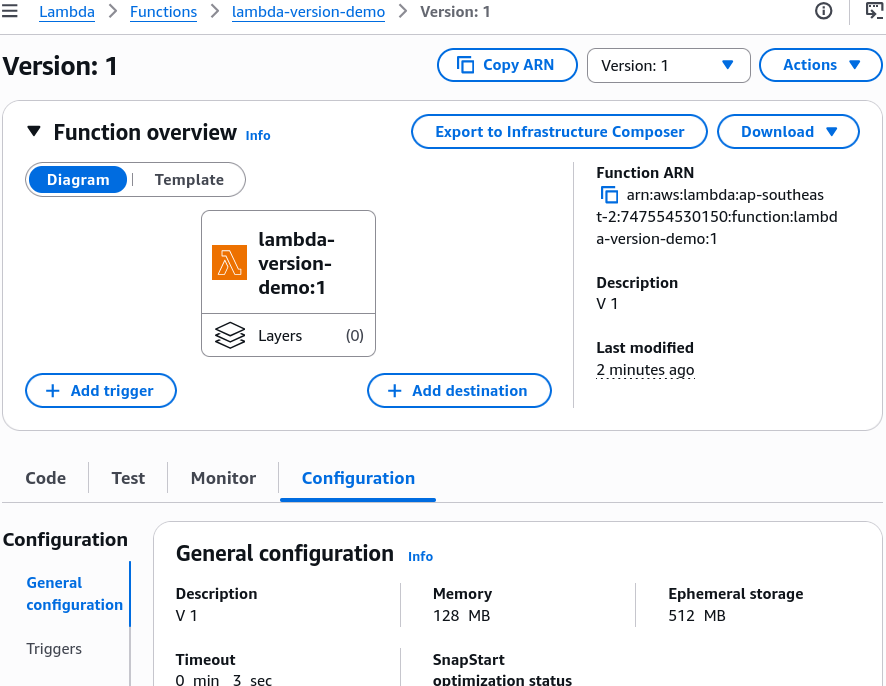
-
Step 3: Cut Version 2
-
Drop down the version selection filter panel and select
Qualifier:<your-function-name>(the only place where mutations are authorized). -
Swap out the payload string output to reflect your secondary code patch iteration:
export const handler = async (event) => {return 'This is version 2';}; -
Hit Deploy, click Actions -> Publish new version, tag it as your upgrade milestone, and publish to generate immutable
Version 2.
-
2. Setting Up the Structural Routing Layers (Aliases)
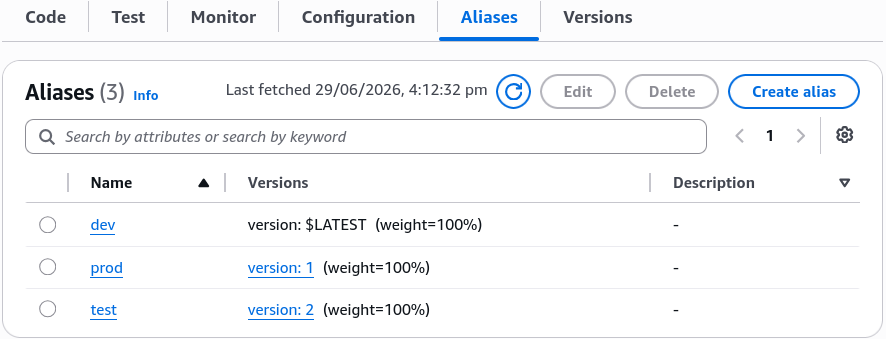
Now that you have isolated snapshots baking in the account background, switch to the Aliases sub-tab and provision your deployment targets:
- The
devAlias: Click Create alias ──► Name itdev──► Target the dropdown pointer directly to the volatile$LATESTbranch. (This lets your team keep pushing code live without breaking formal release versions!) - The
testAlias: Create a new alias namedtest──► Point the targeting selector to the newly publishedVersion 2. - The
prodAlias: Create your primary gate alias namedprod──► Point the initial target parameter down to the secure, bulletproofVersion 1.
3. Executing the Weighted Canary Split Lab
This is where the real architecture magic happens. Let's replicate Stephane's live traffic experiment:
-
Step 4: Shift the Weighted Proportions
- Open your
prodalias dashboard panel ──► click Edit. - Expand the Weighted alias routing configuration sub-drawer.
- Under Additional version, choose
2from the selector block. - Set the weight parameter box exactly to
50%(This signals the routing layer to enforce a clean 50% split balance between your old base and new candidate code streams!). Click Save.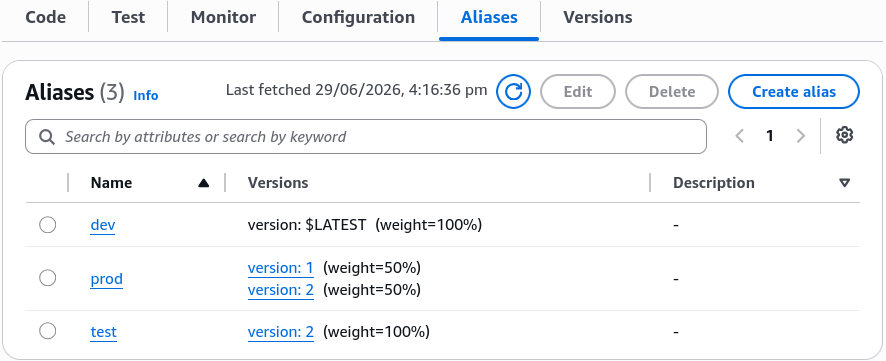
- Open your
-
Step 5: Blast the Invocation Engine
- Keep clicking the Test button back-to-back inside the
prodalias context view. - The Telemetry Alternation Loop: The execution return logs alternate beautifully on every hit:
- Click 1:
"This is version 2"(Lands on CanaryVersion 2) - Click 2:
"This is version 1"(Lands on StableVersion 1)
- Keep clicking the Test button back-to-back inside the
🔍 Completing the Promotion (The Zero-Downtime Cutover)
Once your tracking metrics show that Version 2 is holding up perfectly under traffic load with zero error spikes, go back to Aliases -> prod -> Edit:
- Flip the primary target version parameter directly from
1over to2. - Remove the additional weighted version row configuration block completely and click Save.
Exam Tips
- The Immutable Environment Variables Trap: Remember this for the exam scenario. If a function version is published, its environment variable strings (like database passwords or API keys) are locked down just as tightly as the source code files. If a database password changes in production, you cannot edit the variables on
Version 1. You must update them on$LATEST, publishVersion 2, and shift yourprodalias pointer over to the new version!