DynamoDB Basic APIs - Hands On
Stephane’s terminal console hands-on perfectly validates the operational boundaries of the database plane. Clicking through the UI actually fires off the exact low-level network API methods we just analyzed on paper.
🛠️ Step-by-Step Data Plane Execution Hands On
1. Ingesting and Mutating Items (PutItem vs. UpdateItem)
-
Step 1: Execute a
PutItemPayload Action- Head to your
UserPoststable items view ──► click Create item. - Input the composite parameters:
user_ID(PK):Alice456post_TS(SK):2026-07-01T09:00:00Z
- Head to your
-
Click Add new attribute -> String ──► Key:
content, Value:Alice blog -
Hit Save. Behind the scenes, the AWS SDK fires off a raw
PutItemAPI request. Since thePK + SKcombination is unique, a fresh item block is committed to the disk partition. -
Step 2: Execute an
UpdateItemMutation- Select Alice's newly created row ──► click Actions -> Edit item.
- Modify the
contentstring value to:Alice blog editedand hit Save. - The Internal Execution Delta: This triggers an
UpdateItemAPI call. The database plane doesn't overwrite the whole record; it updates only the specific target attribute string while leaving the core key signatures completely frozen.
2. Point Lookups vs. Scoped Group Range Sorting
-
Step 3: Trigger a
GetItemPoint Lookup- Click directly onto any individual item row listed inside the console data grid matrix. The console opens up the isolated JSON document viewer frame.
- The Platform Action: This initiates a point
GetItemAPI request targeting the exactPK + SKcompound key. It reads from a single partition location with maximum RCU efficiency.
-
Step 4: Scoping with a
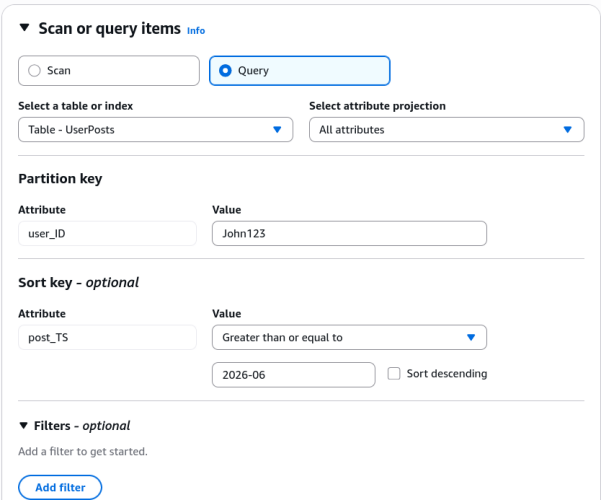
QueryOperation- Toggle your search mode dropdown from Scan over to Query.
- Input the exact match criteria for your Partition Key parameter:
user_ID = John123. Click Run. The console instantly isolates John's entries out of the global pool.
-
Step 5: Slicing the Chronological Sort Key Timeline
- Let's take advantage of the physical range layout on disk. Under the Sort Key condition options parameters dropdown, pick
Greater than or equal to (>=). - Input the timestamp string query window:
2026-07-01. Click Run. - The Sorted Output: If John has posts from June and July, the engine completely skips scanning the June records. It executes an optimized physical disk read strictly on the sub-segment matching the July time range.
- Let's take advantage of the physical range layout on disk. Under the Sort Key condition options parameters dropdown, pick
🚨 The Server-Side Filter Expression Trap
Pay close attention to what happens when you use a FilterExpression to search for words inside a non-key attribute (like checking if a content string contains the word "edited") in the console or via the SDK:
⛔ THE SERVER-SIDE FILTER EXHAUSTION LAW: When you append a filter condition targeting non-key fields, this filter does NOT execute deep inside the storage engine layout to save you money! DynamoDB still forces a full
Scanor wideQueryoperation across the disk partitions, consuming the full RCU bill for every single item read up to the 1 MB boundary. Once that 1 MB block is loaded, the DynamoDB Service Layer (on the AWS side) evaluates your filter and discards the non-matching rows before sending the data over the network. While this saves you network bandwidth, it is highly inefficient for large tables because you are still billed for reading the discarded data from the disk.
📊 Operational Telemetry Query Evaluation
The runtime item isolation pathways and RCU calculations executed during this dashboard session evaluate under these clear path workflows:
Exam Tips
- The Index Query Constraint: If an exam question presents a scenario where a frontend app needs to let users look up blog posts by typing keywords found inside the
contentbody text, and asks if you should use theQueryAPI on the base table—the answer is no You can only query against your designated Partition Key and Sort Key attributes. To unlock optimized lookups on non-key columns without resorting to high-cost Scans, you must build a Secondary Index.
Practice Test
Question: A development team is working on an AWS Lambda function that accesses DynamoDB. The Lambda function must do an upsert, that is, it must retrieve an item and update some of its attributes or create the item if it does not exist. Which of the following represents the solution with MINIMUM IAM permissions that can be used for the Lambda function to achieve this functionality?
-
dynamodb:UpdateItem,dynamodb:GetItem -
dynamodb:AddItem,dynamodb:GetItem -
dynamodb:GetRecords,dynamodb:PutItem,dynamodb:UpdateTable -
dynamodb:UpdateItem,dynamodb:GetItem,dynamodb:PutItem
Correct Answer
dynamodb:UpdateItem, dynamodb:GetItem.
Why? Because UpdateItem can be used to update an existing item or create a new item if it does not exist (upsert). You can also perform a conditional update on an existing item (insert a new attribute name-value pair if it doesn't exist, or replace an existing name-value pair if it has certain expected attribute values).