DynamoDB Indexes (GSI + LSI)
Implementing DynamoDB Secondary Indexes into your architecture is exactly how you smash past the strict NoSQL query boundaries and unlock high-speed lookups across completely different data dimensions, bro! 👑 dynamic indexing strategy is a heavy favorite on the DVA-C02 exam blueprint.
Key Takeaways
In your standard base table, you are completely locked down—you can only query by your specific Partition Key and optional Sort Key. If you want to find records matching any other non-key attribute field, the platform forces a high-cost, high-latency Scan.
To bypass this wall, DynamoDB offers two weapons: Local Secondary Indexes (LSIs) and Global Secondary Indexes (GSIs). Let's dissect their rules, structural differences, and the absolute #1 system failure trap for your master dev records.
🗺️ 1. The Core Split: LSI vs. GSI
🟢 Local Secondary Index (LSI) – Alternative Sort Key
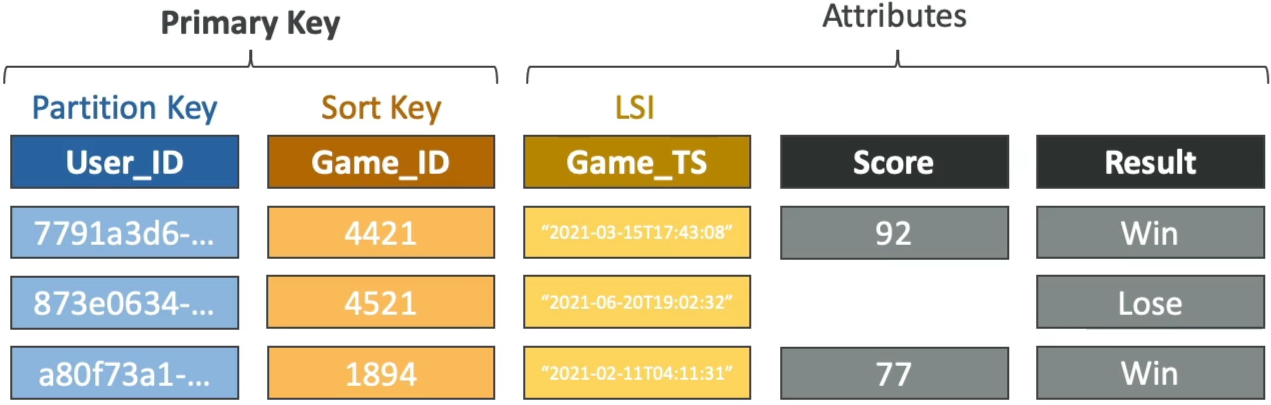
An LSI lets you create an alternative Sort Key for your data while keeping the exact same Partition Key as your main base table.
- The Creation Law ⚠️: LSIs MUST be defined at the exact millisecond of table creation! You cannot add, modify, or delete an LSI after the table is born. If you need a new one later, you have to spin up a completely brand-new table and migrate all your data.
- Capacity Sharing: LSIs share the exact same RCU and WCU throughput pool provisioned on the parent base table. There are no separate capacity settings to worry about.
- The Ceiling Limit: You are capped at a maximum of 5 LSIs per table.
🔀 Global Secondary Index (GSI) – Completely New Key Model
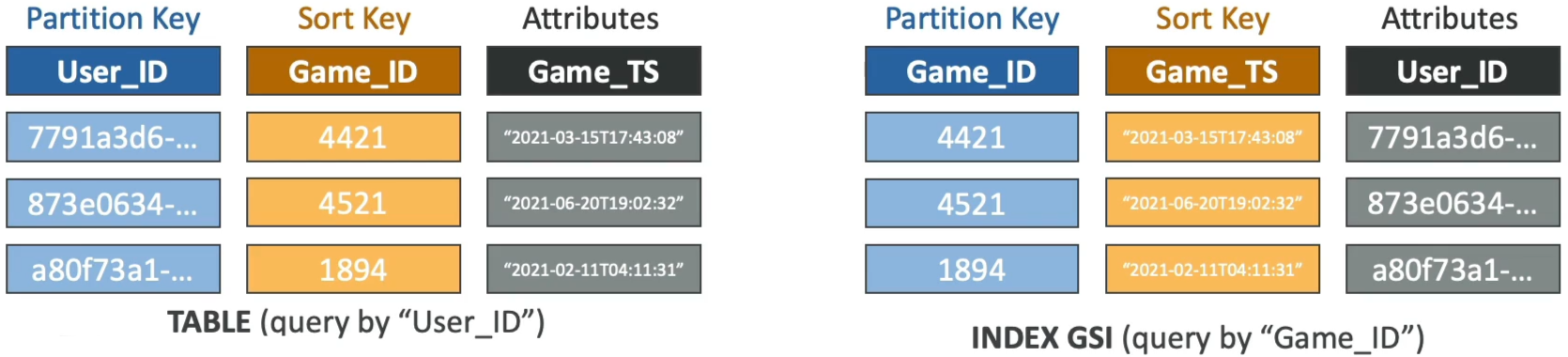
A GSI functions like a completely separate shadow table layout. It gives you a brand-new Partition Key AND an optional alternative Sort Key from the base table.
- The Elasticity Advantage 🚀: GSIs can be added, updated, or deleted at any time, even years after your table has been handling live production workloads!
- Capacity Isolation: Because a GSI operates like an independent storage index block, you must provision its own separate RCUs and WCUs (or let Auto Scaling track it natively).
- The Scale: You can provision up to 20 GSIs per table by default.
📊 Deep-Dive Sizing & Feature Matrix
| Architectural Vectors | Local Secondary Index (LSI) | Global Secondary Index (GSI) |
|---|---|---|
| Partition Key (Hash) | Must match the parent base table PK exactly. | Can be completely different from the base table PK |
| Sort Key (Range) | Must be a totally different attribute than the base table SK. | Can be any scalar attribute (String, Number, Binary). |
| Lifecycle Window | Table Creation Time Only (Immutable baseline). | Anytime (Dynamic post-creation attachment supported). |
| Throughput Cost Pool | Inherits and uses the base table's RCUs / WCUs. | Requires dedicated, independent RCU / WCU provisioning. |
| Consistency Scope | Supports both Eventually & Strongly Consistent Reads. | Strictly supports Eventually Consistent Reads only! |
🚨 The Ultimate GSI Throttling Backpressure Trap
This is an absolute milestone favorite DVA-C02 architecture question. Pay very close attention to how data updates travel down the wire:
When your application fires a PutItem or UpdateItem mutation against your base table, DynamoDB commits that write to the main partition drive first. Then, in the background, it asynchronously streams that change over to update your GSIs.
🚨 THE GSI BACKPRESSURE BACKFIRE:
[Client App] ──► Writes Item (Plenty of Base WCUs) ──► [Base Table Partition]
                                                               │
                                                 (Asynchronous Storage Sync)
                                                               ▼
[Client Request Dropped via 429 Throttle] ◄── Throttles ◄── [GSI Index Drive Pool (Exhausted WCUs!)]
⛔ THE GSI THROTTLING LAW: If your base table has a massive allocation of , but your attached GSI is under-provisioned and sitting at a tiny , a high-volume write wave will exhaust the GSI's capacity instantly.
The moment the GSI drive throttles, it forces a hard synchronous backpressure block onto the main base table partition drive! Even if your base table has 900 WCUs sitting perfectly idle, the entire system will start throwing hardProvisionedThroughputExceededExceptionfaults to the client application.
🛡️ The Remediation Strategy:
Always ensure your GSI write capacity limits match or exceed the write capacity parameters of the main parent table. Utilizing DynamoDB Auto Scaling or switching the architecture over to On-Demand Capacity Mode eliminates this risk gracefully!
💡 Attribute Projections
When you spin up an index, you don't have to copy every single column from the base table into the index storage pool. You define the Projection, chief:
KEYS_ONLY: Only copies the base primary keys and the new index keys. Keeps the storage footprint tiny and cheap.INCLUDE: You pass an explicit string array of specific attributes your frontend app needs to fetch frequently.ALL: Copies the entire base table item block. Maximum flexibility, but consumes the most storage space and burns through extra throughput units.
Exam Tips
- The Unexpected Base Table Throttling Scenario: If a scenario states: "A developer notices that an application starts dropping
ProvisionedThroughputExceededExceptionerrors when writing data, even though CloudWatch metrics show the base table's consumed WCUs are well below the provisioned thresholds." Look straight for the index gap: An attached Global Secondary Index (GSI) is under-provisioned and throttling, causing backpressure on the main table updates - The Post-Deployment Search Request: If an executive team requests a new query path to look up old order history by a user's
Email_Addressinstead of theirOrder_IDon an active, multi-terabyte production table—and you cannot afford any application downtime—the answer is to provision a Global Secondary Index (GSI) usingEmail_Addressas the new Partition Key, bro. (Choosing an LSI here would fail because you can't create them after the table is live!)