DynamoDB Optimistic Locking
In traditional relational databases, if two threads want to update the exact same row, the database forces a Pessimistic Lock (SELECT ... FOR UPDATE). It literally freezes that row on disk, forcing all other incoming threads to wait in a slow line until the first transaction finishes.
DynamoDB drops that heavy overhead completely. It assumes collisions are rare (optimistic) and lets everyone read freely. But when it's time to write, it uses Conditional Writes to ensure nobody overwrites anyone else's data.
Key Takeaways
🔁 The Anatomy of a Concurrent State Collision
To implement Optimistic Locking, you inject a dedicated numeric tracking attribute—typically named version—directly into your item schema.
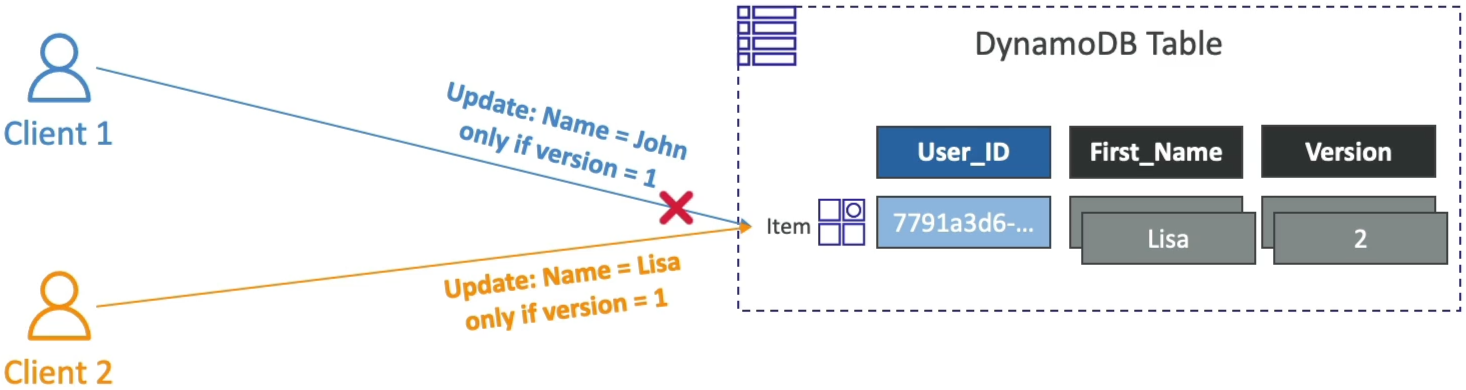
Let's look at the exact operational sequence when two distributed API clients try to modify the exact same user profile at the exact same millisecond:
🕒 The Baseline State:
A row sits inside your Users table partition drive:
{
  "user_id": "User_XYZ",
  "first_name": "Johnny",
  "version": 1
}
⚡ The Concurrent Race Condition Execution:
- The Shared Read: Both Client 1 and Client 2 execute a standard
GetItempoint lookup at the exact same time. Both clients receive the exact same payload:"first_name": "Johnny", "version": 1. - Client 1 Fire Loop: Client 1 wants to patch the name to
John. It fires anUpdateItemrequest backed by a strictConditionExpression:
aws dynamodb update-item \
    --table-name Users \
    --key '{"user_id": {"S": "User_XYZ"}}' \
    --update-expression "SET first_name = :new_name, version = :new_version"
    --condition-expression "version = :current_version" \
    --expression-attribute-values '{":new_name": {"S": "John"}, ":new_version": {"N": "2"}, ":current_version": {"N": "1"}}'
- The First Commit Wins: Client 1's network packet lands at the DynamoDB partition first. The database engine checks disk:
versionis indeed1. The condition passes! DynamoDB commits the write, flips the name toJohn, and bumps the version integer token up to2. - Client 2 Collision Crash 💥: A microsecond later, Client 2's network packet arrives. Client 2 wants to patch the name to
Lisa:
aws dynamodb update-item \
    --table-name Users \
    --key '{"user_id": {"S": "User_XYZ"}}' \
    --update-expression "SET first_name = :new_name, version = :new_version"
    --condition-expression "version = :current_version" \
    --expression-attribute-values '{":new_name": {"S": "Lisa"}, ":new_version": {"N": "2"}, ":current_version": {"N": "1"}}'
- The Hard Rejection: The DynamoDB engine checks the disk layer. The current database state shows
version = 2. Client 2's validation clause fails instantly! - The engine cancels the write before altering a single file bit and drops a hard
ConditionalCheckFailedExceptionback to Client 2, bro!
🛠️ The Application-Side Remediation Loop
When Client 2 catches that ConditionalCheckFailedException, its workflow shouldn't crash. Your backend application code simply executes a clean Three-Step Self-Healing Loop:
🚨 ConditionalCheckFailedException Intercepted!
   ├── Step A: Execute a fresh GetItem point lookup down the wire.
   ├── Step B: Inspect the new state ("first_name": "John", "version": 2).
   └── Step C: Re-apply business logic and re-fire the UpdateItem with version = 2.
Exam Tips
- The Overlapping Stock Update Scenario: If an exam prompt presents a scenario where a high-volume e-commerce application is dropping item inventory quantities during peak sales because multiple shoppers are checking out at the exact same instant, look for the architecture remedy: Implement Optimistic Locking using an
UpdateItemAPI call combined with aConditionExpressiontracking a version number attribute - The AWS SDK Automation Hack: In real production environments, you don't even have to write this version matching logic manually inside your JSON payloads, If you use the higher-level object mappers provided inside official libraries (like the DynamoDB Mapper class inside the AWS SDK), you can simply tag your version attribute with a
@DynamoDBVersionAttributedecorator. The SDK will automatically append the condition check expressions and handle the version bumping mechanics on every single mutation behind the scenes.