DynamoDB Streams - Hands On
Stephane’s hands-on lab lays out the exact pipeline mechanics for change-data-capture (CDC). When you modify an item, you don't manually fire off a separate notification line from your app code; you let the database engine safely emit a structured transactional record down the wire.
🛠️ Step-by-Step Stream and Lambda Integration Hands On
1. Activating the Streaming Pipe
-
Step 1: Enable the Ledger
- Jump into your
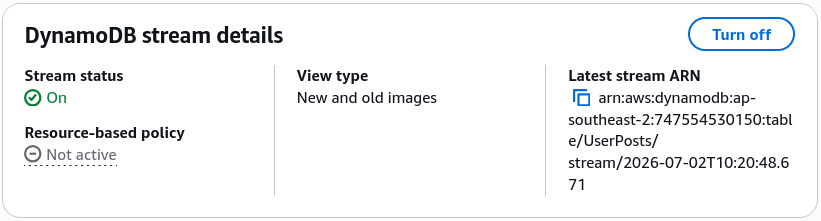
UserPoststable workspace dashboard ──► select the Exports and streams configuration tab. - Under the DynamoDB stream details panel section, click Turn on.
- Jump into your
-
Step 2: Maximize Image Visibility
-
Select New and old images to ensure your downstream consumers get full data context—both the past baseline state and the incoming patch mutations. Click Enable stream.
-
2. Wiring Up the Serverless Consumer (Lambda & Trigger ESM)
-
Step 3: Leverage a Blueprint Shell
- Head to the AWS Lambda console ──► click Create function ──► toggle Use a blueprint.
- Search for the official core scaffold:
Process updates made to a DDB table(pick either Node.js or Python). - Name your function:
Lambda-demo-dynamodb-stream. Keep the default setting to auto-generate a fresh execution role wrapper.
-
Step 4: Configure the Event Source Mapping (ESM)
-
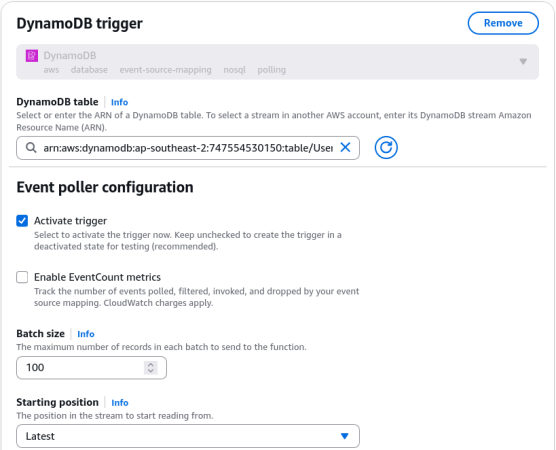
Scroll to the built-in trigger configuration block:
- DynamoDB table: Select
UserPostsfrom the dropdown list. - Batch size: Set it to
100(This dictates the maximum number of stream records the poller will pack into a single invocation flight). - Starting position: Select Latest (or Trim horizon if you want to scan existing unread items up to the 24-hour expiration ceiling). Click Create function.
- DynamoDB table: Select
-
-
Step 5: Inject Missing Stream IAM Rights (Triage) 🚨
- The console will throw an immediate access warning check banner because a basic Lambda execution role lacks rights to crawl database streams.
- Fix it fast: Navigate to Configuration -> Permissions ──► click the clickable IAM Role ARN string.
- Inside the IAM console drawer, hit Attach policies ──► search for and link the managed
AWSLambdaDynamoDBExecutionRolepolicy token. (This instantly whitelistsGetRecords,GetShardIterator,DescribeStream, andListStreams). - Head back to Lambda and flip your trigger check to active!
🔍 3. Live Telemetry Event Verification
Go back to your UserPosts table items view and run three quick data mutations to populate the stream shards:
- The
MODIFYAction: Edit John's second post text string to say:"Second post yay! edit". - The
INSERTAction: Duplicate Alice's row and commit a fresh post entry. - The
REMOVEAction: Select the duplicate Alice row item and delete it completely from disk.
Now, navigate to your Lambda function's Monitor tab ──► click View CloudWatch Logs ──► click into the latest active log stream record block. Look at how the engine prints out your payloads:
// Event Record Node 1: MODIFY
{
  "eventName": "MODIFY",
  "dynamodb": {
    "Keys": { "user_ID": {"S": "John123"}, "post_TS": {"S": "2026-06-30T11:30:00Z"} },
    "OldImage": { "content": {"S": "Second post yay!"} },
    "NewImage": { "content": {"S": "Second post yay! edit"} } // 👑 Both states provided!
  }
}

// Event Record Node 2: INSERT
{
  "eventName": "INSERT",
  "dynamodb": {
    "Keys": { "user_ID": {"S": "Alice456"}, "post_TS": {"S": "2026-07-02T09:00:00Z"} },
    "NewImage": { "content": {"S": "New Alice blog, bro!"} } // ❌ No OldImage exists for an insert!
  }
}

// Event Record Node 3: REMOVE
{
  "eventName": "REMOVE",
  "dynamodb": {
    "Keys": { "user_ID": {"S": "Alice456"}, "post_TS": {"S": "2026-07-01T09:00:00Z"} },
    "OldImage": { "content": {"S": "Alice blog edited"} } // ❌ No NewImage exists for a deletion!
  }
}
Exam Tips
- The Stream Record Duplication Realities: This is a crucial data processing constraint for the exam blueprint. While DynamoDB Streams guarantee that all item changes appear in the exact order they occurred on disk, the Lambda trigger loop enforces an "at-least-once" delivery mechanism, bro! This means if a network stutter occurs between the ESM poller and your function execution container, the same batch of mutations might get passed into your code a second time. To safeguard your system from processing double webhooks or corrupting downstream aggregations, always design your consumer Lambda functions to be completely idempotent! Track an internal unique transaction identifier (like a cryptographic hash of the record keys and timestamps) inside a tracking log to ignore any identical incoming replays gracefully!