DynamoDB WCU & RCU - Throughput
In your professional career, you've likely seen systems fall over because someone threw a high-traffic workload at a database layer without thinking about the underlying storage engine's physical limits. DynamoDB handles this using Partitions, but to protect those partitions from throttling, you must master the math of throughput allocation.
Key Takeaways
Before running computations, you have to choose how AWS bills you for performance:
- Provisioned Capacity Mode (Cost-Optimized Baseline): You explicitly define your maximum sustained scale thresholds via Write Capacity Units (WCUs) and Read Capacity Units (RCUs). You are invoiced flat hourly rates for these allocations regardless of actual usage traffic. Best for predictable, steady workloads.
- On-Demand Capacity Mode (Zero-Management Elasticity): The platform handles all capacity scaling dynamically with zero upfront provisioning. You are billed directly per transaction based on Write Request Units (WRUs) and Read Request Units (RRUs).
- ⚠️ The Expense Trap: On-Demand is roughly more expensive per request than provisioned mode! It's fantastic for highly unpredictable, spiky, or completely unknown new workloads, but a terrible choice for high-volume, steady-state production lines.
- The Flipping Gate: You can switch a live table between Provisioned and On-Demand tracking states once every 24 hours.
🧮 The Write Capacity Unit (WCU) Master Formula
🛑 The Rule of the Upper Boundary Ceiling:
DynamoDB never processes fractional values when evaluating file dimensions. Every item size calculation MUST be rounded UP to the nearest whole kilobyte before applying multipliers, bro!
🏢 Example Problem Space:
- The Task Scenario: Your application needs to ingest 120 items per minute, and each isolated item footprint measures exactly 4.5 KB.
- Step A: Standardize the Chronological Cadence:
- Step B: Apply the Upper Ceiling Rounding Rule:
- Step C: Compute the Final Output Allocation:
🧮 The Read Capacity Unit (RCU) Master Formula
🛑 The Rule of the 4 KB Extraction Envelope:
Just like WCUs, you must round item footprints UP—but this time, you round up to the nearest multiple of 4 KB, chief!
🏢 Example Problem Space:
- The Task Scenario: Your application handles 16 requests per second, each fetching an item size of 10 KB. Your project requirements mandate Eventually Consistent Reads.
- Step A: Apply the 4 KB Envelope Rounding Rule:
- Step B: Compute the Raw Request Ingestion Baseline:
- Step C: Factor the Consistency Multiplier Split:
🚨 Distributed Partitions & The Anatomy of Throttling
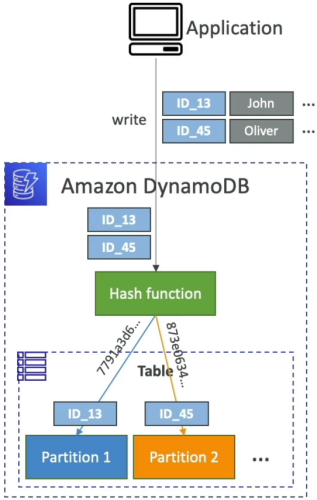
When you provision throughput capacity, DynamoDB does not allocate those units to a single monolithic engine. Instead, it divides your total throughput evenly across all the underlying physical storage partitions in the background. When you provision and globally across your parent table resource, DynamoDB does not pool those limits onto a single monolithic engine. It divides your throughput parameters completely evenly across all your underlying background physical storage partitions.
- The Allocation Fragmentation Reality: If your massive data pool spans 10 discrete physical storage partition drives in the background, each partition drive receives exactly:
- The Production Crash Hook: If a million frontend clients blast requests targeting the exact same partition key (e.g., retrieving a trending product item), 100% of that traffic hits a single physical partition drive. Even if your global table dashboard shows 90% of your provisioned capacity is sitting idle, that single partition will exhaust its local allocation ceiling instantly, throwing a hard
ProvisionedThroughputExceededExceptioncrash code.
Exam Tips
- The Exponential Backoff Remedy: If a scenario states that an application is encountering intermediate, short-lived
ProvisionedThroughputExceededExceptionbursts during peak morning hours, don't rush to pay for more throughput capacity right away. Look for the software remedy: Implement an Exponential Backoff and Jitter Retry Strategy within the calling client application code wrapper. (This is natively handled automatically out of the box by official AWS SDK configurations!) - The Read Acceleration Strategy: If your application is dropping read throttling faults because a celebrity item is being accessed millions of times a minute, look straight for DynamoDB Accelerator (DAX). DAX acts as a fully managed, in-memory caching sidecar that intercepts read requests before they ever touch your database table partitions, completely wiping out read throttling issues!