API Gateway CORS
CORS (Cross-Origin Resource Sharing) is the absolute number one browser-security hurdle that will completely lock down your frontend application and throw ugly red console blocks if you don't configure your edge perimeters right.
The entire concept of CORS sits strictly inside the web browser engine (like Chrome, Firefox, or Safari). It’s a core security guardrail designed to stop a malicious script hosted on a sketchy domain from hijacking your session tokens and making unauthorized background api hits against a completely different target domain.
Key Takeaways
A browser considers an API request to be "Cross-Origin" the exact microsecond any of these three identity elements change between the hosting origin and the target endpoint:
- The Domain Name (e.g., your site lives on
my-app.com, but hitsapi.com). - The Subdomain Suffix (e.g., your site lives on
www.my-app.com, but hitsapi.my-app.com). - The Network Port (e.g., local setup on
localhost:3000trying to hitlocalhost:8080).
🔄 The Pre-flight OPTIONS Handshake
When your frontend JavaScript tries to fire a non-trivial mutation payload (like a POST or PUT request with custom tracking headers), the web browser automatically halts the main request, steps in as a gatekeeper, and sends a sneaky OPTIONS pre-flight check over the wire first.
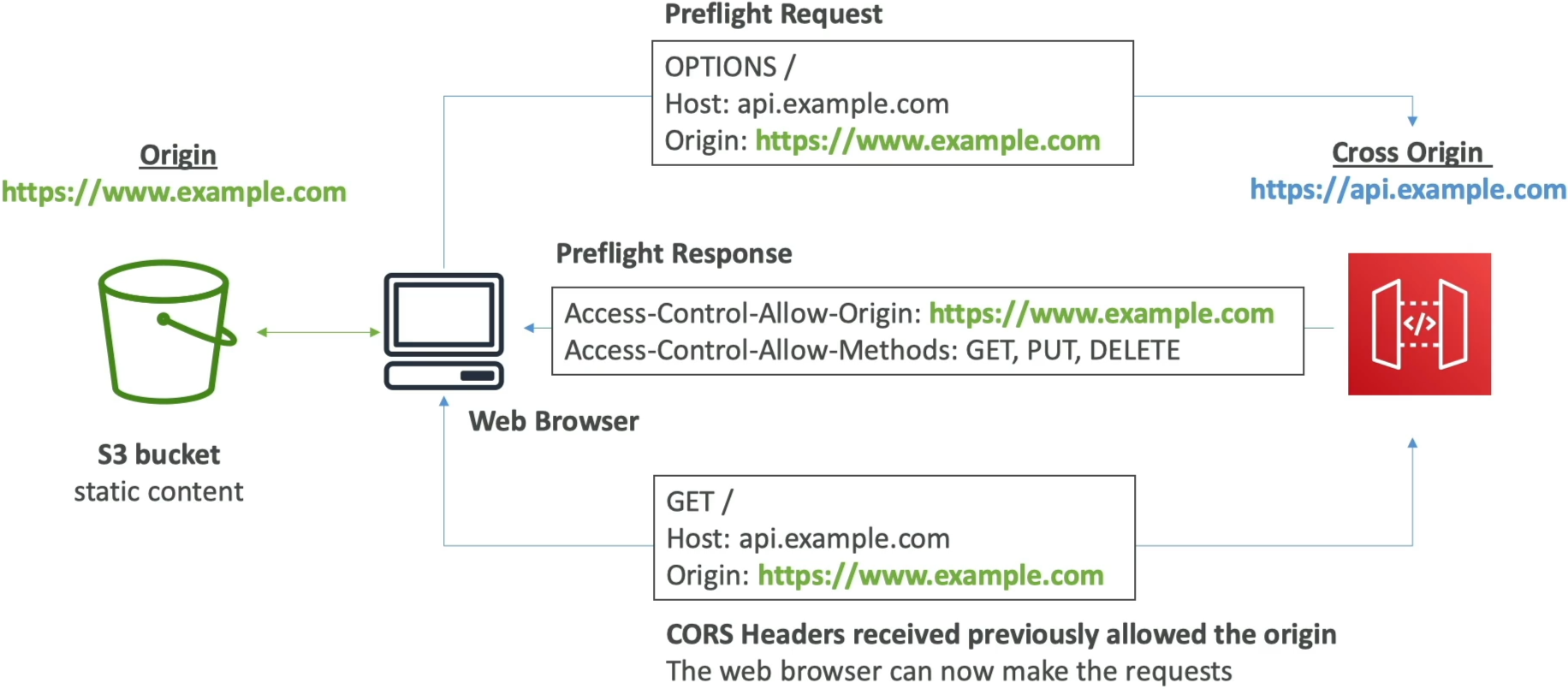
🌐 THE BROWSER CORS FLIGHT PATH:
   ├── 1. Browser ──► OPTIONS Pre-flight Request ──► API Gateway
   ├── 2. API Gateway ◄── Returns 200 OK + CORS Headers ◄── (Pre-flight Approval)
   └── 3. Browser ──► Fires Actual POST/GET Request ──► API Gateway Execution Pipeline
For this pre-flight pass to succeed, API Gateway must intercept that OPTIONS check right at the edge and instantly mirror back a set of strict CORS Authorization Headers, bro:
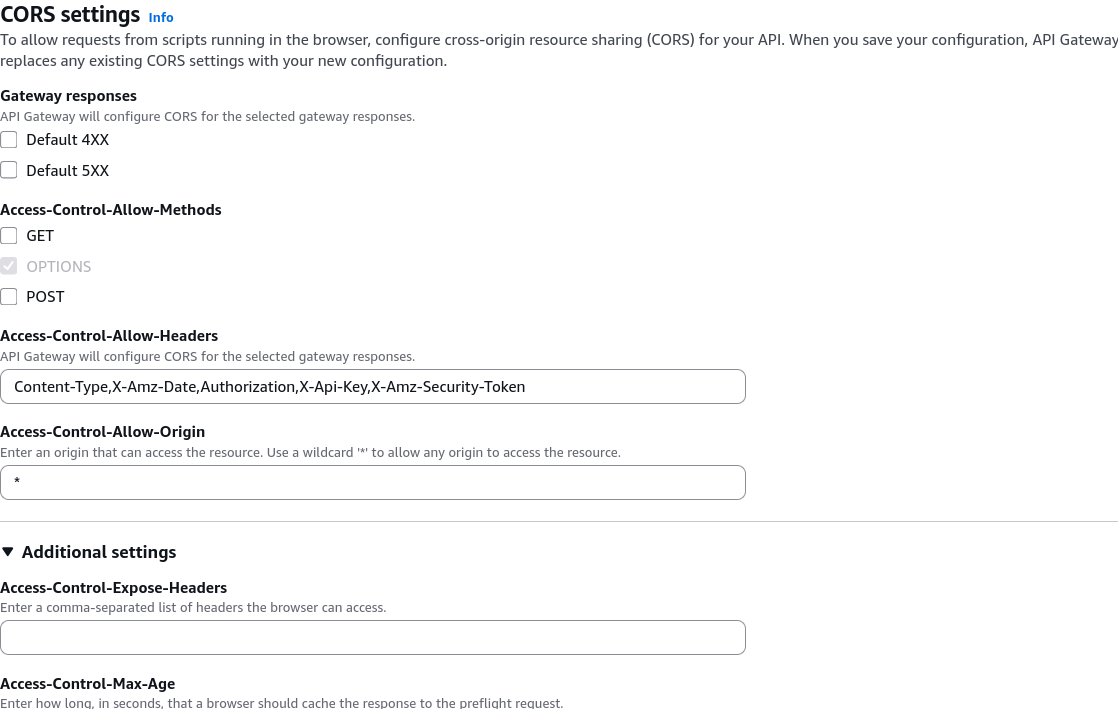
Access-Control-Allow-Origin: Explicitly whitelists the specific origin URLs allowed to read the data (e.g.,[https://www.my-app.com](https://www.my-app.com)). Production Tip: Avoid using wildcard*in production, chief! It leaves your endpoints vulnerable to any site scraping your data pools.Access-Control-Allow-Methods: Whitelists the HTTP verbs allowed (e.g.,GET, POST, OPTIONS).Access-Control-Allow-Headers: Whitelists custom header strings your frontend code is trying to inject (likeContent-Type,Authorization, orx-api-key).
🛠️ The Two Validation Paths: Console Triage
When setting up your backend paths inside API Gateway, how you handle CORS depends completely on your integration layout:
🎛️ Path A: The Native Console Route (Mock Integration)
If you select a resource path inside the API Gateway workspace dashboard and click the "Enable CORS" utility toggle button, the management plane automatically spins up a dedicated OPTIONS method for you, bro. Under the hood, this routes straight to a native MOCK Integration type, which intercepts the browser's pre-flight check and reflects the correct Access-Control-Allow-* header arrays instantly back down the wire—without invocation costs or hitting your backend Lambda logic at all!
⚠️ Path B: The Lambda Proxy Integration Trap!
This is an absolute favorite, high-priority debugging question on the exam blueprint.
If you are running in Lambda Proxy Integration mode, the console's "Enable CORS" toggle button will only configure the OPTIONS pre-flight method. But the moment the browser passes the pre-flight check and fires the actual main request (like your GET /houses or POST /orders), the backend Lambda function becomes 100% solely responsible for returning the CORS headers
export const handler = async (event) => {
  const response = {
    statusCode: 200,
    headers: {
      'Access-Control-Allow-Origin': 'https://www.my-app.com',
      'Access-Control-Allow-Methods': 'GET, POST, OPTIONS',
      'Access-Control-Allow-Headers': 'Content-Type, Authorization, x-api-key',
    },
    body: JSON.stringify({ message: 'Hello World!' }),
  };
  return response;
};
If your backend code doesn't explicitly pack those exact Access-Control-Allow-Origin fields inside its output dictionary payload, the browser engine will violently intercept the data packet, dump a red console log error, and block your frontend code from reading the response body, even though the Lambda function executed perfectly in the cloud!
Exam Tips
- The S3-to-API Browser Block Scenario: If an exam prompt introduces a static website hosted securely inside an Amazon S3 bucket (
my-bucket.s3-website.com), and says the site's JavaScript functions are crashing with hard cross-origin header missing blocks whenever they try to ping a public API Gateway REST endpoint—look straight for the resolution fix: Enable CORS directly on the target API Gateway resource paths, ensure an OPTIONS method is provisioned, and make sure the allowed origin parameters match your S3 website URL pool. - The Ghost Lambda Proxy CORS Fault ⚠️: If a question describes a developer who enabled CORS via the API Gateway console dashboard, confirmed the pre-flight checks are returning a clean
200, but notices that the main frontend application calls are still failing with cross-origin access blocks—inspect the integration style. If it specifies Lambda Proxy mode, the correct answer is straight-up: The developer must update the backend Lambda function's return dictionary payload to explicitly return theAccess-Control-Allow-Originheaders inside the output headers block