API Gateway Mapping Templates Hands On
Seeing that raw JSON payload get completely sliced up and restructured on its way back to the client browser is exactly where the absolute power of an edge middleware engine clicks into place.
Stephane’s lab gives you a clean-room look at what happens when you strip away proxy mode. Instead of forcing your backend Lambda code to handle every single UI formatting whim, you let the Integration Response Mapping Template act as a dedicated transformer right at the front perimeter.
🛠️ Step-by-Step Custom Integration & Response Transformation Hands On
1. Provisioning the Non-Proxy Endpoint
- Step 1: Mount the Custom Route
- In your API Gateway workspace, spin up a fresh resource path named
/mapping──► add aGETmethod. - The Non-Proxy Toggle ⚠️: Select Lambda function as your integration type, but leave the Lambda Proxy Integration checkbox unchecked, chief!
- Paste the ARN for your newly authored Node.js handler function
api-gateway-mapping-get. Click save and confirm the IAM invocation handshake.
index.mjsexport const handler = async (event) => {const response = {message: 'Hello World from Sydney',};return response;}; - In your API Gateway workspace, spin up a fresh resource path named
2. Crafting the Edge Transformation Matrix
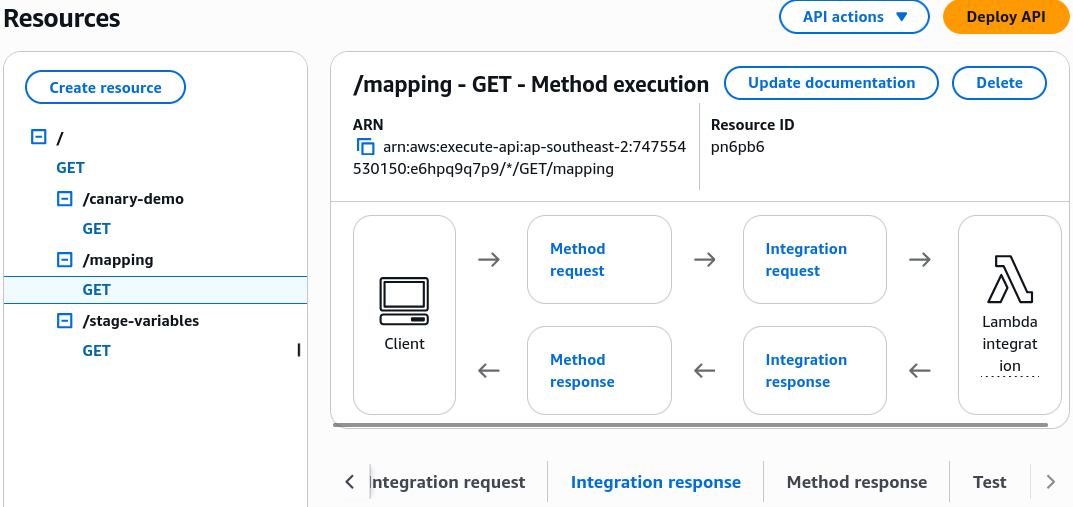
-
Step 2: Access the Outbound Gateway Junction
- Click into your
/mappingGET method dashboard ──► navigate straight to the Integration Response configuration card. - Expand the settings panel ──► scroll down to the Mapping Templates block ──► click Add mapping template.
- Set the strict Content-Type header filter target to:
application/json
- Click into your
-
Step 3: Inject the VTL Structural Script
- Paste your custom Velocity Template Language (VTL) schema block into the template editor window:
VTL Response Morphing Engine{"my_static_key": "my_injected_value","renamed_key": "$input.json('$.message')"}- Click Save to bake the script straight into the edge routing engine.
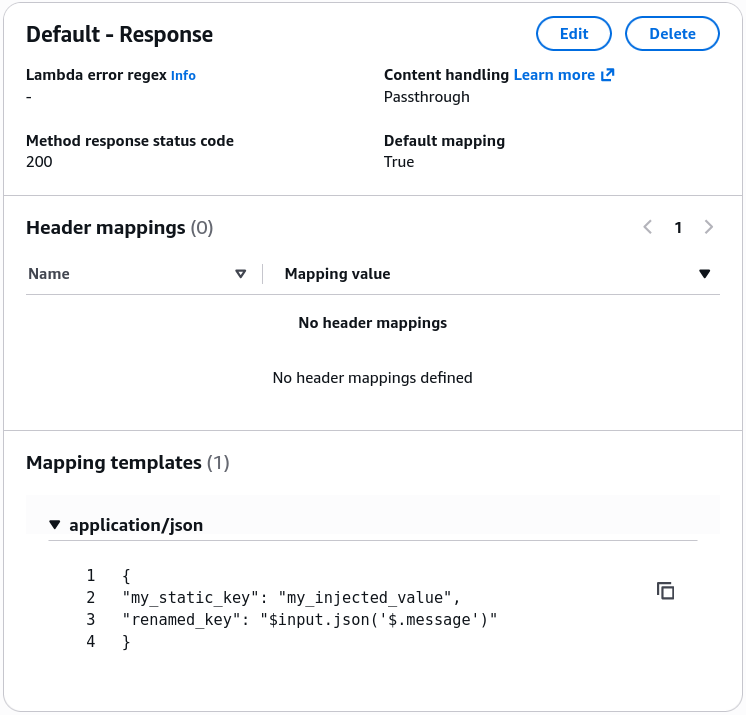
🧮 The Multi-Tier Payload Mutation Flow
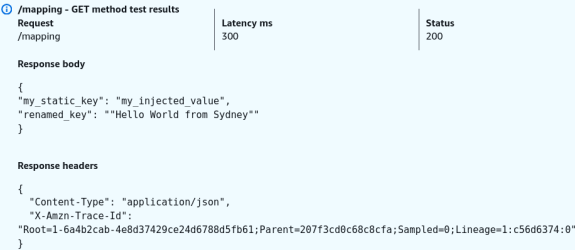
Look at how beautifully the data maps and morphs across the network hops during your live console execution test, bro:
Let's look at the actual data values at each checkpoint:
📦 Checkpoint 1: What Lambda Returns
Because we are not running in proxy mode, your Node.js code doesn't need to wrap things inside an explicit status or header envelope. It just spits out a naked, flat JSON document object:
{
  "message": "Hello World from Sydney"
}
⚙️ Checkpoint 2: The Interception & Mapping
API Gateway catches that exact object string. The VTL script fires up, drops the completely fresh static key "my_static_key", reaches into the incoming payload using the JSONPath extractor tool ($input.json('$.message')), and grabs strictly the text string "Hello World from Sydney".
📥 Checkpoint 3: What the Client Browser Actually Sees
The original "message" key is completely scrubbed from existence, and the browser displays the freshly minted payload block:
{
  "my_static_key": "my_injected_value",
  "renamed_key": "Hello World from Sydney"
}
Exam Tips
- The Schema Scrubbing / Compliance Scenario: If an exam prompt describes a scenario where an internal core banking database returns full employee profile objects containing high-risk, sensitive keys (like
social_security_numberorhome_address), and mandates that a public partner API must only expose the public fields without rewriting the underlying backend database queries—look straight for Non-Proxy API Gateway Integrations backed by an Integration Response Mapping Template to filter and whitelist the JSON keys server-side - The Custom Syntax Horizon: Don't stress about memorizing heavy VTL bracket syntax like
$input.path()or$input.json()for the exam day. The blueprint only expects you to know what the tool is and when to apply it. If a scenario asks how to map custom headers or convert JSON data over to XML formats natively, you choose Mapping Templates inside a custom integration step, every single time!