API Gateway Open API - Hands On
Seeing an entire microservice layout spin up dynamically from a single blueprint file is where the true power of automation locks in, bro! 👑📄
Stephane’s quick tour highlights exactly why OpenAPI isn't just documentation—it’s an architectural rocket booster. With a simple text file import, you get clean, standardized endpoints, while the single-click Export and SDK Generation dashboards give your client-side development teams the exact tools they need to connect to your cloud with zero guesswork.
🛠️ The Bidirectional OpenAPI Spec Hands On
When managing APIs in a production ecosystem, you move fluidly between the design plane and the active runtime infrastructure. Here is how you run the plays:
1. The Ingestion Flight (Importing Code-to-Infrastructure) 📥
Instead of manually wiring up resources in the AWS UI, you hand your raw design spec straight to the platform parser.
- The Setup Sequence: Console → Create API → click Import.
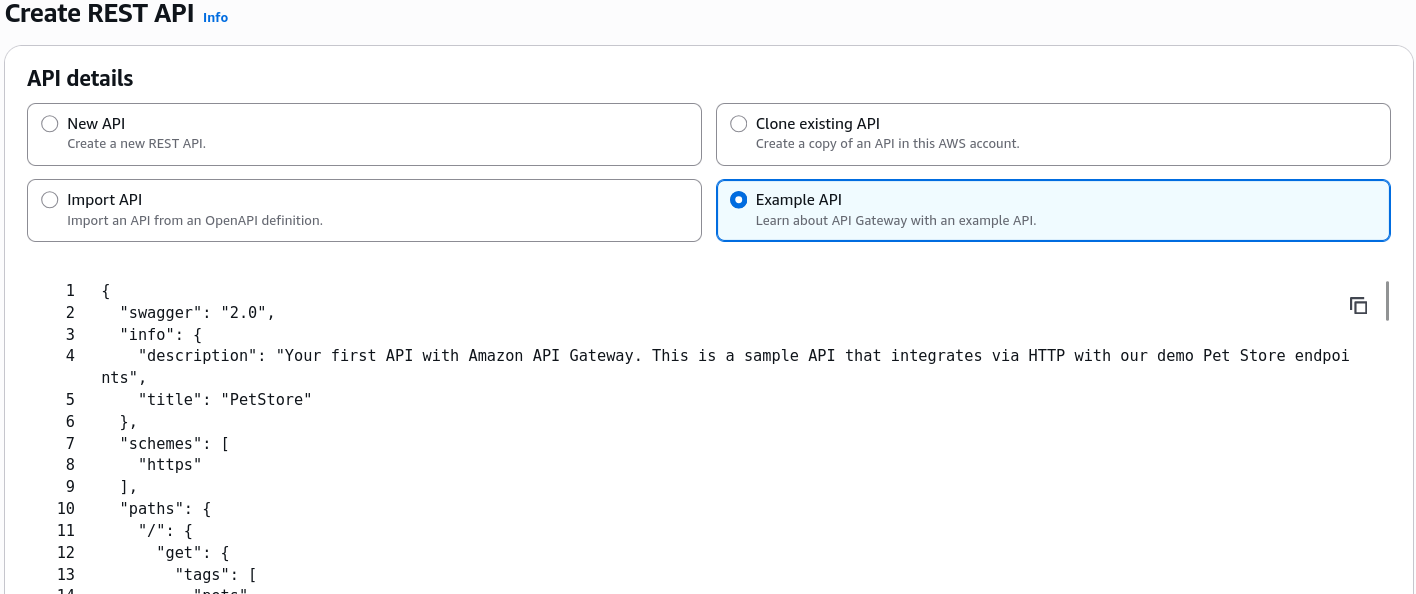
- What Happens Under the Hood: When you click that Example API option, API Gateway reads a template outlining the classic Swagger Petstore. The parser instantly loops through the document paths, spins up the
/petsand/pets/{petId}resource nodes, attaches theGETandPOSTHTTP verbs, and links up mock response payloads instantly.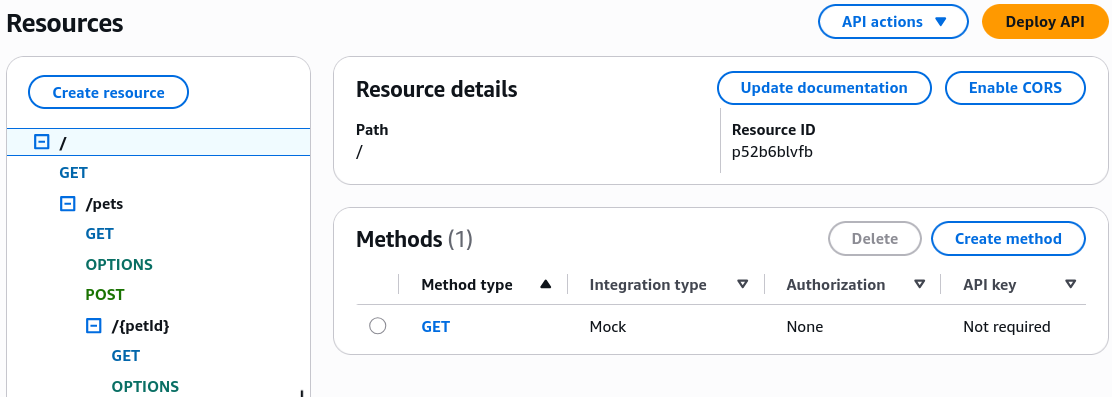
2. The Extraction Pass (Exporting Infrastructure-to-Code) 🖨️
If you created a beautiful set of endpoints inside the AWS Console or via AWS CDK, and your full-stack frontend engineers need to know the exact data contract shapes, you extract the blueprint directly from your active runtime environment.
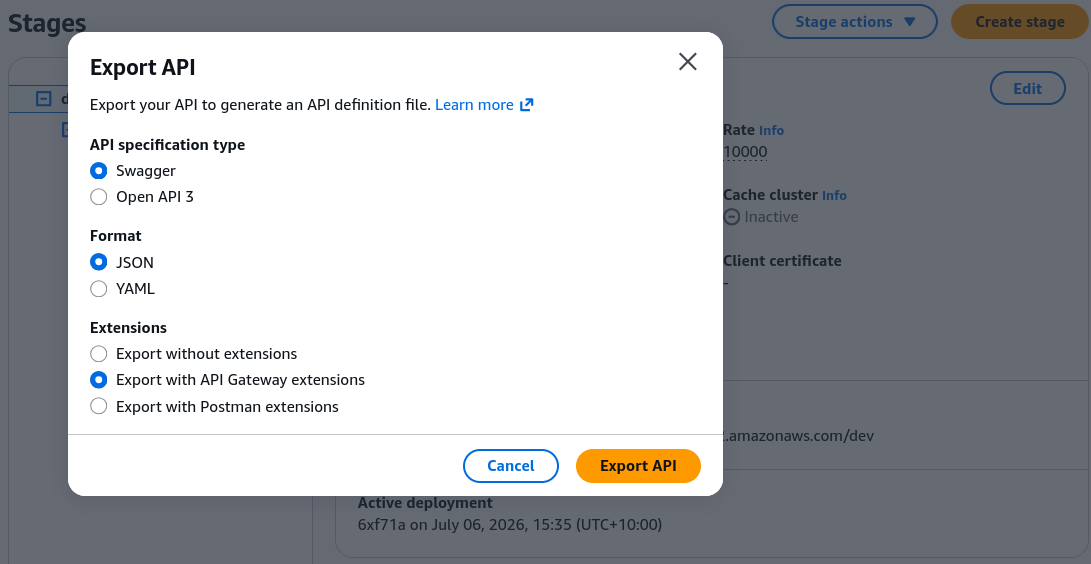
- The Setup Sequence: Open your API Gateway → click the Stages dashboard → select your active deployment stage (e.g.,
prod) → click the Export configuration sub-tab. - The Blueprint Flavor Options Matrix:
| Export Parameter Configuration | Technical Selection Choices | Production Impact & Behavior |
|---|---|---|
| Specification Format Version | OpenAPI 3.0 / Swagger 2.0 | Standardizes the schema structure to ensure compatibility with modern external testing tools |
| Data Serialization | YAML / JSON | Choose YAML for clean, human-readable Git history diffs, or JSON for programmatic script parsing. |
| AWS Extensions Wrapper | With / Without Extensions | With Extensions: Includes custom x-amazon-apigateway-* metadata tags (perfect for cloning your exact infrastructure setup into a separate AWS account, bro). Without Extensions: Strips all AWS-specific tags, leaving a completely pure REST spec file ready to share with public external third-party developers! |
⚡ 3. Single-Click Client SDK Generation
Once your API spec is baked and deployed to a stage, you can bridge the gap between your cloud-native infrastructure and your client-side applications instantly using the SDK Generation engine.
Instead of your mobile or frontend engineers wasting hours writing boilerplate fetch() or Axios network calls, handling serialization, or manually typing out error handshakes, you select your client target runtime layer from the dashboard pane:
- Supported Core Clients: JavaScript/TypeScript, Android Java, iOS (Swift/Objective-C), Ruby, Java, and more.
When you click Generate SDK, API Gateway reads your stage's configuration schema and bundles a fully functional, compiled, strongly typed client-side code package down into a .zip asset file.
Your frontend engineers drop that library straight into their codebase. To make an API call down to your AWS Lambda backend, they just execute a single, clean native method run, chief:
apigClient
  .petsPost({}, petPayloadBody)
  .then((response) => console.log('Pet logged cleanly'))
  .catch((error) => console.error('Collision on the network wire.'));
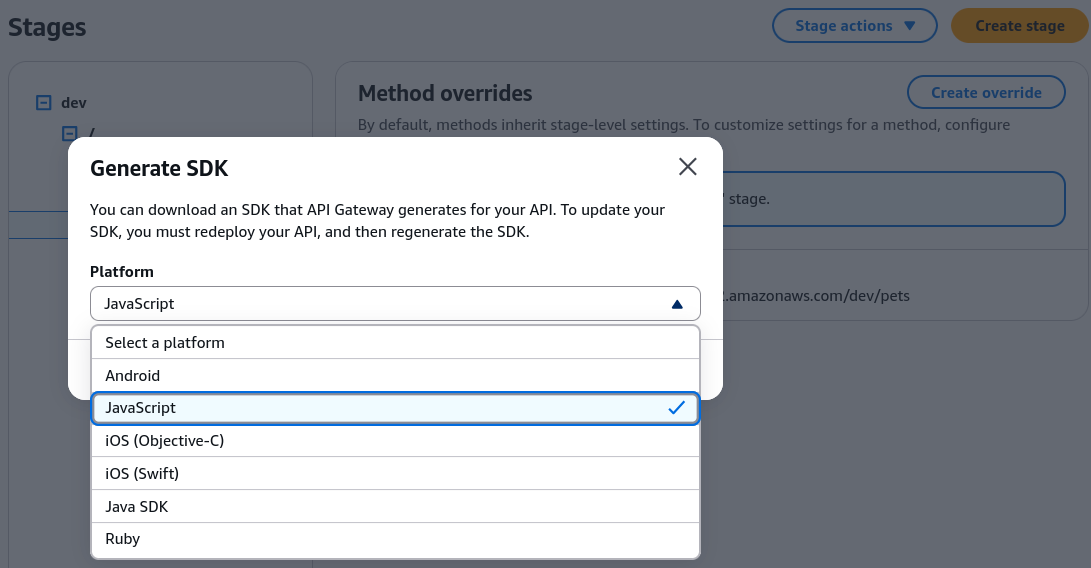 Sample SDK Output for JavaScript
Exam Tips
- The Developer Onboarding Bottleneck: If an exam prompt presents a scenario where an external, third-party frontend development vendor needs to build a custom application that consumes your internal serverless microservices, and demands the fastest way to share your API schema parameters without giving them access to your AWS architecture configs—the absolute correct answer is to export your API Gateway stage as an OpenAPI 3.0 spec file WITHOUT AWS extensions, allowing them to spin up an automated client SDK wrapper instantly
- Cross-Account Spec Replicas: If a DevOps prompt asks for the most efficient way to replicate an intricate API Gateway layout from a
developmentAWS account into a highly isolatedproductionAWS account—look for the strategy that selects Exporting the API with AWS Extensions from the dev stage, and executing an Import API action inside the production space