CodeBuild Overview
Tapping into AWS CodeBuild is how we completely throw out the legacy headaches of maintaining bloated, 24/7 dedicated Jenkins EC2 instances.
CodeBuild is a fully managed, serverless continuous integration engine. Instead of paying for idle compute servers while your developers are asleep, CodeBuild spins up highly isolated Docker containers on-demand the exact millisecond a build triggers, runs your heavy test scripts, outputs compiled zips or Docker images, and instantly terminates. You pay strictly by the exact compute minute.
Let’s break down CodeBuild’s core mechanics, step-by-step pipeline behaviors, and the precise anatomy of the buildspec.yml file that the DVA-C02 blueprint forces you to master.
Key Takeaways
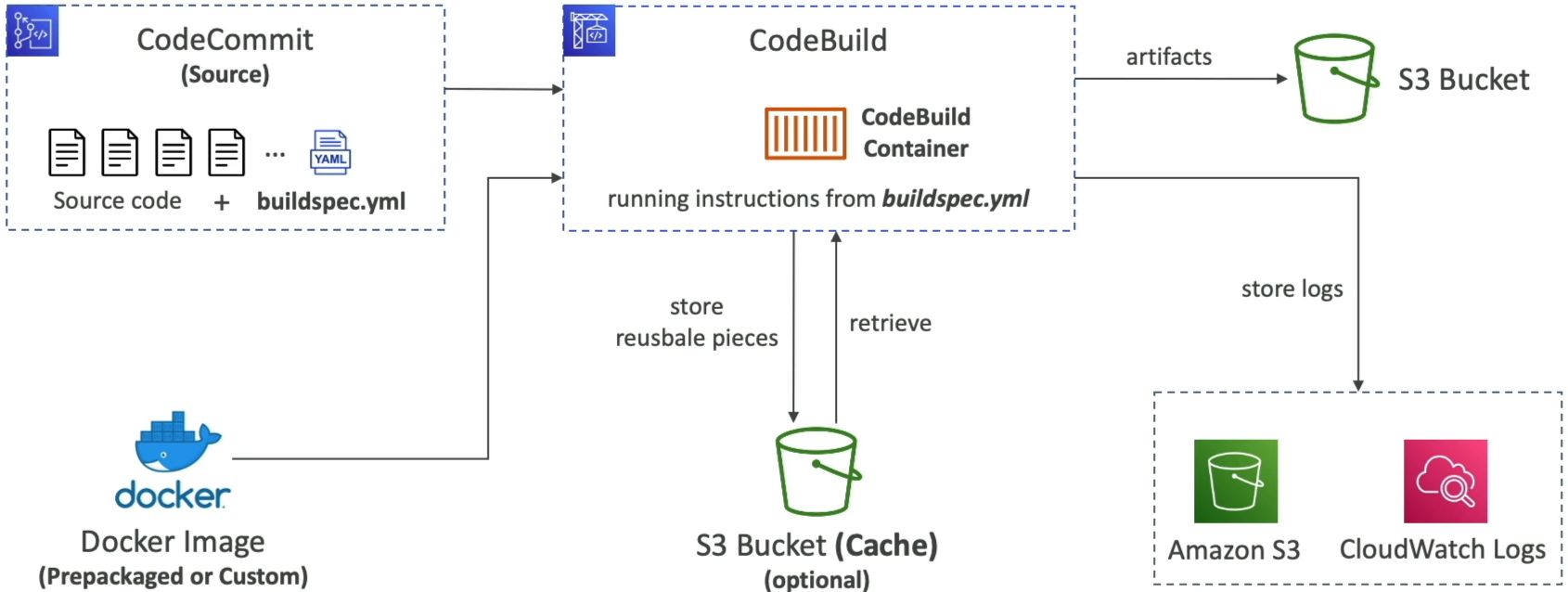
🏗️ The On-Demand Build Container Architecture
When a pipeline commands CodeBuild to execute, it handles the orchestration framework completely under the hood, bro:
- The Container Runtime: CodeBuild provisions a short-lived execution space backed by a Docker image. AWS maintains pre-configured, curated images containing standard runtimes (like Node.js, Python, Java, Go, Ruby, and .NET Core).
- The Custom Image Escape Hatch: If your application team requires a highly specific or obscure runtime environment (like legacy compilation libraries or a custom OS setup), you aren't blocked. You can supply your own Custom Docker Image hosted inside Amazon ECR, and CodeBuild will pull and execute your steps inside it natively.
📄 The Heart of the Engine: buildspec.yml
This is an absolute milestone target area on the exam. CodeBuild cannot run blind; it demands a single configuration file to dictate its step-by-step instructions.
The configuration file MUST be named exactly "buildspec.yml" and it MUST live explicitly at the absolute ROOT of your source code directory tree! If you place it inside a subdirectory, the build runner drops a hard initialization failure.
📋 Structural Breakdown of a Production Buildspec
version: 0.2

env:
  variables:
    NODE_ENV: 'production' # Plaintext variables, bro!
  parameter-store:
    DB_USER: '/prod/db/username' # Securely fetches strings from SSM Parameter Store
  secrets-manager:
    DB_PASS: 'production/credentials:password' # Dynamically extracts secrets from Secrets Manager

phases:
  install:
    runtime-versions:
      nodejs: 20 # Declares the managed runtime engine lane to spin up
    commands:
      - echo "Installing baseline dependencies..."
      - npm install
  pre_build:
    commands:
      - echo "Executing code linting checks..."
      - npm run lint
  build:
    commands:
      - echo "Executing primary unit test suites..."
      - npm test
      - npm run build
  post_build:
    commands:
      - echo "Baking complete, rolling up compiled artifacts..."
      - date

artifacts:
  files:
    - '**/*' # Instructs CodeBuild exactly which files to grab out of the container
  base-directory: 'dist' # Points to your compiled production asset directory

cache:
  paths:
    - 'node_modules/**/*' # Caches expensive dependencies in an S3 back-bucket to accelerate future builds!
🎛️ The Core Execution Phase Matrix
CodeBuild processes instructions through a strict, sequential timeline called Phases, chief. If a single command throws an error code inside any phase, the execution halts instantly and marks the build as FAILED.
envBlock 🔐: Maps environmental variables. Never hardcode plaintext passwords here, bro! Use the native hooks to pull secure tokens straight out of SSM Parameter Store or AWS Secrets Manager.install🛠️: Used to select your runtime engine version and execute global package installations (like runningnpm installor pip configurations).pre_build🔬: Fires right before compilation. Perfect for setting up database connections or running pre-flight code health linters.build🚀: The main arena. This is where your core compilation and heavy test frameworks run (npm test, Maven builds, or baking a Docker image).post_build📦: The final wrapping station. Used to bundle up variables or push tags.artifacts🖨️: Declares exactly which file trees should survive the container's destruction. CodePipeline catches this declaration block, zips up the target files, and ships them over to an Amazon S3 bucket to pass down to the deployment tier.
Exam Tips
- The Secret Leak Mitigation Scenario: If an exam prompt introduces a team that needs to pass an external database connection password down to a CodeBuild container, but demands a secure, audited architecture that completely avoids saving plaintext secrets in the Git repository—look straight for declaring the variable inside the
env/secrets-managerblock of thebuildspec.ymlfile, matching the IAM execution role with read permissions to Secrets Manager. - The Runaway Cache Acceleration Optimization: If a prompt describes a CodeBuild project that is completely functional but taking a massive amount of time on every single run because it has to fetch hundreds of megabytes of third-party dependencies from scratch over the open web—the answer is to implement a Local or Custom S3 Cache block inside the buildspec file to cache the project's dependency folder (like
node_modulesor.m2blocks) across sequential runs. - The Silent Webhook Alert Setup: If your DevOps team needs an automated alert system to ping a developer Slack room or email list the exact second a build phase fails—the solution is to configure an Amazon EventBridge Rule watching for
CodeBuild Build State Changewith a status ofFAILED, mapping the destination straight to an Amazon SNS topic.
Practice Test
Question 1: A developer in your company has configured a build using AWS CodeBuild. The build fails and the developer needs to quickly troubleshoot the issue to see which commands or settings located in the BuildSpec file are causing an issue.
Which approach will help them accomplish this?
- SSH into the CodeBuild Docker container
- Freeze the CodeBuild during its next execution
- Enable detailed monitoring
- Run AWS CodeBuild locally using CodeBuild Agent
Correct Answer
- SSH into the CodeBuild Docker container
- Explanation: It is not possible to SSH into the CodeBuild Docker container, that's why you should test and fix errors locally.
- Freeze the CodeBuild during its next execution
- Explanation: You cannot freeze the CodeBuild process but you can stop it.
- Enable detailed monitoring
- Explanation: Detailed monitoring is available for EC2 instances. You do not enable detailed monitoring for CodeBuild, though you can specify output logs to be captured via CloudTrail or CloudWatch Logs.
- Run AWS CodeBuild locally using CodeBuild Agent
- Explanation: AWS CodeBuild is a fully managed build service. With local build support for AWS CodeBuild, you can use the AWS CodeBuild agent to test and debug builds on a local machine.
By building an application on a local machine you can:
- Test the integrity and contents of a buildspec file locally.
- Test and build an application locally before committing.
- Identify and fix errors quickly from your local development environment.
- Explanation: AWS CodeBuild is a fully managed build service. With local build support for AWS CodeBuild, you can use the AWS CodeBuild agent to test and debug builds on a local machine.
By building an application on a local machine you can: