CodeDeploy for EC2 and ASG
Scaling CodeDeploy to handle an Amazon EC2 Auto Scaling Group (ASG) is where you transition from managing individual standalone boxes to orchestrating a highly available, self-healing elastic cloud fleet.
Key Takeaways
When you hook CodeDeploy right up to an ASG, you unlock massive automated leverage. Let’s deep dive into the mechanics of In-Place vs. Blue/Green deployments at this scale, look at how the Auto Scaling lifecycle handles fresh compute nodes, and expose a vital architectural rollback fact that the DVA-C02 examiners absolutely love to trick developers on.
🏗️ ASG Deployment Tracks: In-Place vs. Blue/Green
When your target group points to an active Auto Scaling Group, how your deployment maps across the cluster depends entirely on your risk posture:
🔄 Track A: In-Place Updates (The Resource Re-user)
CodeDeploy systematically marches across your existing running ASG instances using your configured speed settings (like HalfAtATime or OneAtATime). It knocks out an instance, tears down version 1, drops in version 2 via the local agent, runs validation hooks, and puts it back in service.
- The Elastic Win 🛡️: This is a major engineering win—if your ASG automatically spins up a brand-new EC2 instance mid-deployment (due to a sudden traffic surge or a metric scaling policy alarm), CodeDeploy automatically hooks right into the ASG lifecycle, intercepts the boot, and pushes your active deployment revision to that new box before it ever starts taking user traffic!
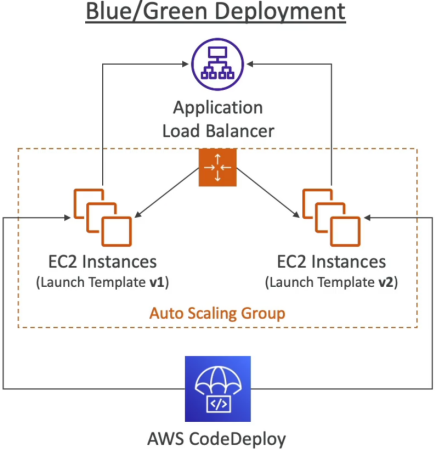
🟢 Track B: Blue/Green Updates (The Immutable Switch)
Instead of touching your live, functional production servers, CodeDeploy steps back and takes an immutable, zero-downtime approach:
- CodeDeploy reads your original ASG blueprint and automatically provisions a completely separate, duplicate green Auto Scaling group running your brand-new launch templates.
- CodeDeploy deploys version 2 right onto these fresh green nodes.
- The Elastic Load Balancer (ELB) begins a controlled traffic fall-over, gracefully redirecting active client loops away from the old blue target groups straight onto the green pool.
- The Cleanup Clock 🕒: You get to explicitly configure a standby timer threshold. You specify exactly how long the old blue ASG should stay alive in a muted state (letting you run quick sanity audits) before CodeDeploy commands the cloud to automatically terminate the old blue servers completely.
🚨 THE VITAL EXAM TRAP: Core Rollback Mechanics 🚨
This is a high-priority, guaranteed target area on the exam blueprint. Pay close attention to how CodeDeploy processes a system recovery.
You can configure CodeDeploy to trigger an automated rollback based on two distinct event types:
DEPLOYMENT_FAILURE: A script exits with an error code or a host fails health checks.DEPLOYMENT_STOP_ON_ALARM: A connected CloudWatch Alarm (like your HTTP5XXerror rate metric monitor) flashes bright red mid-deployment.
🚫 The Common Misconception:
Many developers falsely believe that when a rollback executes, CodeDeploy takes the broken instances and run some sort of stateful "system restore" or "git undo" mechanism to cleanly revert the local filesystem backwards in time. That is completely wrong
🛠️ The Real Cloud Execution Reality:
When an auto-rollback triggers, CodeDeploy treats it as a completely brand-new, independent Roll-Forward deployment of your last known good revision, bro!
💥 DEPLOYMENT CRASHES AT STEP 3 ──► CLOUDWATCH ALARM TURNS RED 🚨
                                         │
 ┌───────────────────────────────────────┴───────────────────────────────────────┐
 ▼ WHAT DEVELOPERS THINK HAPPENS:                                                ▼ WHAT ACTUALLY HAPPENS:
 🔄 "System Undo" the files backwards in time. (WRONG!)                        🚀 CodeDeploy schedules an entirely NEW, fresh deployment.
                                                                                 📦 It grabs the older, frozen V1 zip package from S3.
                                                                                 📥 It deploys it cleanly across the fleet as a fresh release!
CodeDeploy allocates a brand-new unique Deployment ID, fetches the older, frozen version 1 bundle zip file right back out of your Amazon S3 artifact bucket, and systematically executes a fresh installation across your instances to overwrite the broken state. It's a new rollout of a proven artifact.
Exam Tips
- The Automated Self-Healing ASG Strategy: If an exam prompt introduces an architecture running behind an ALB and an Auto Scaling Group, and demands that any newly launched automated scale-out instances must instantly match the exact application version currently serving production traffic without human intervention—ensure the ASG is directly bound as the environment target configuration inside your CodeDeploy Deployment Group settings.
- The Safe Canary Rollback Boundary: If a scenario presents a rule requiring that if a new code rollout triggers user-facing processing drops, the system must immediately abort and shift 100% of user traffic back to the safe state—the answer is to pair a CodeDeploy Blue/Green deployment configuration with a CloudWatch Alarm monitoring application error metrics, enabling the native Auto-Rollback checkmark inside the deployment group panel.