CodeDeploy Overview
CodeDeploy is the heavy-lifting automated release engine of the AWS CI/CD suite. It handles taking a compiled code bundle (or a fresh container specification) and cleanly distributing it across your infrastructure. Whether you are running classic EC2 instance pools, cutting-edge serverless Lambda endpoints, or modern Dockerized ECS containers, CodeDeploy tracks the health of your rollout and forces an automatic structural rollback the exact millisecond a system alarm starts flashing.
Key Takeaways
🏗️ The Deployment Frameworks & AppSpec Configuration
Just like CodeBuild can't move without a buildspec.yml file, CodeDeploy relies entirely on a dedicated configuration file that must live explicitly at the absolute root of your source tree:
The deployment configuration file MUST be named exactly "appspec.yml" (for EC2/On-Premises) or "appspec.yaml" (for Lambda/ECS) and sit at the root of your code directory, bro!
The way this file behaves depends completely on the target platform hosting your application layer:
🚀 THE THREE CODE-DEPLOY TARGET LANES:
   ├── 🏎️ 1. EC2 / On-Premise ──► Requires the CodeDeploy Agent + talks directly to an S3 Revision bucket.
   ├── 🧠 2. AWS Lambda ────────► Executes rapid, managed traffic-shifting under a dedicated function Alias.
   └── 🐳 3. Amazon ECS ────────► Swaps task definitions using an ALB traffic shift across two Target Groups.
🏎️ Lane A: EC2 & On-Premises Instances
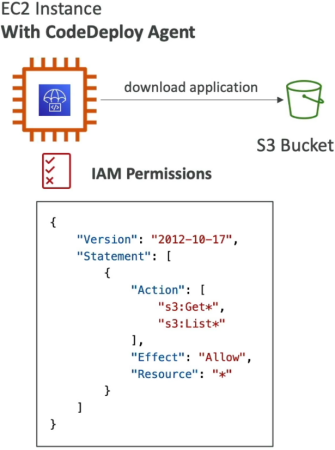
To deploy code to Virtual Machines, you must meet a strict prerequisite: every target server must have the background CodeDeploy Agent installed and running. You can automate this installation easily using AWS Systems Manager (SSM).
The EC2 instance profile must carry explicit IAM permissions to fetch raw zip archive files—known as an Application Revision—straight out of your pipeline's central Amazon S3 bucket.
🔀 In-Place vs. Blue/Green Styles
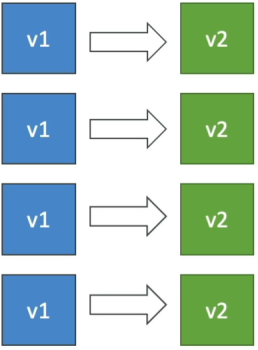
- In-Place Deployment: CodeDeploy uses the background agent to stop the app on your existing servers, overwrite the files, and restart the service.
- The Speed Settings: You choose your traffic impact:
AllAtOnce: Fast, but drops your entire cluster offline (Max downtime.).HalfAtAtTime: Upgrades exactly 50% of your fleet while the remaining 50% serves traffic.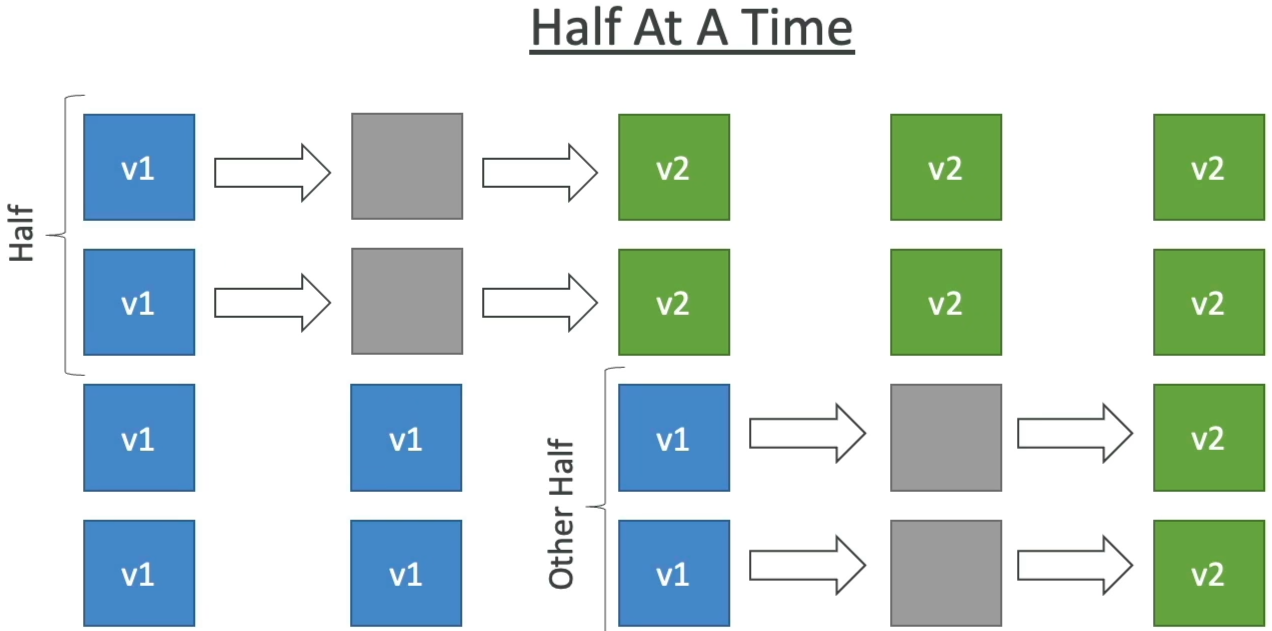
OneAtATime: High availability, updates servers sequentially, but takes the longest time.Custom: Define your own %.
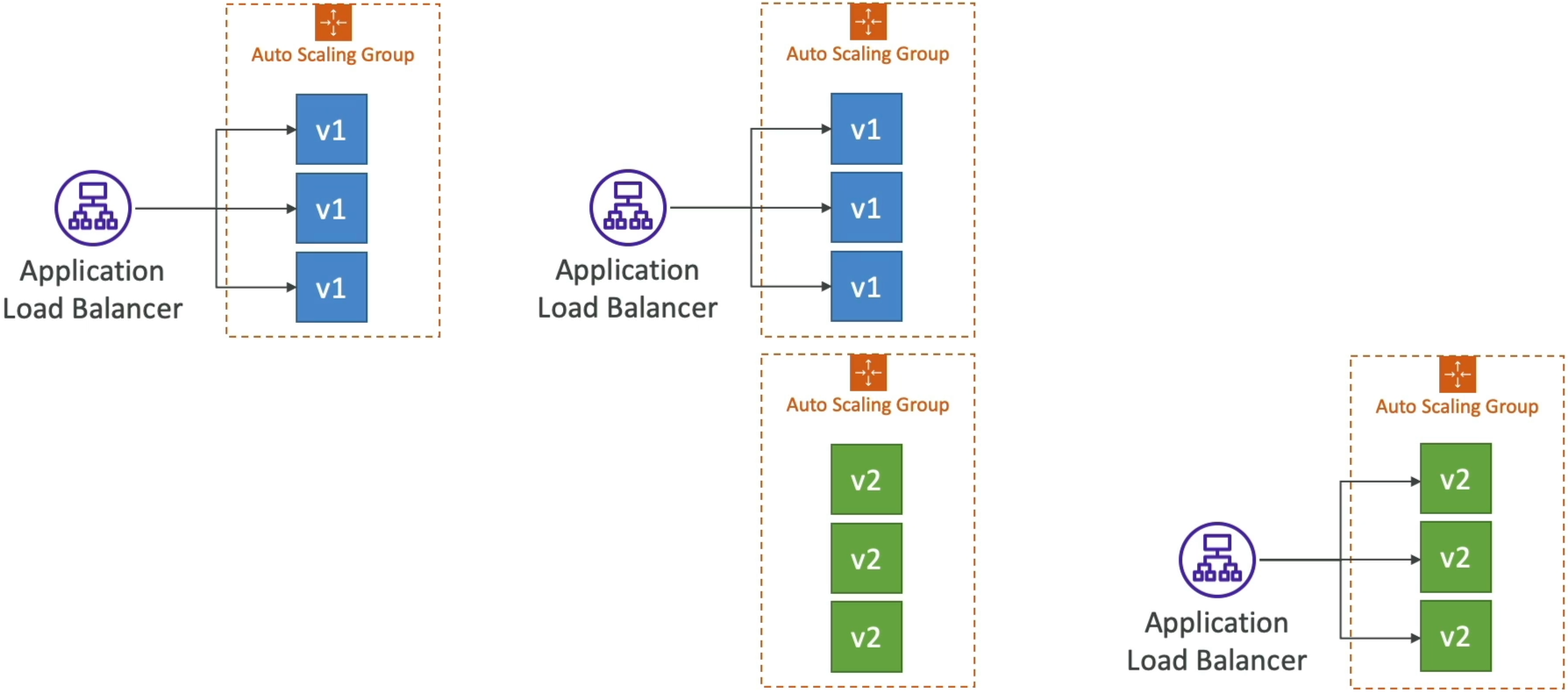
- Blue/Green Deployment: CodeDeploy or an Auto Scaling Group provisions an entirely brand-new duplicate fleet of servers running version 2 side-by-side with your original fleet. The Application Load Balancer shifts traffic to the new servers, and the old fleet gets torn down.
🧠 Lane B: AWS Lambda (Serverless Traffic Shifting)
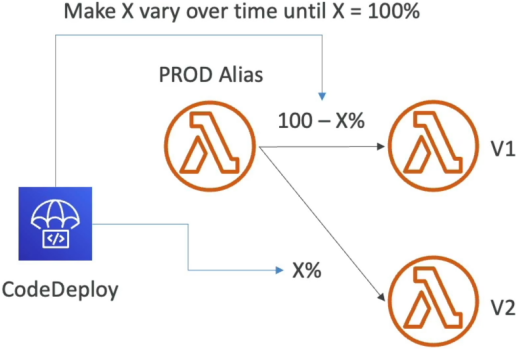
When dealing with serverless functions, CodeDeploy doesn't touch servers—it manages the atomic routing weights of an AWS Lambda Alias (like a pointer variable named PROD).
You can configure three precision traffic-shaping algorithms to safely move your users from version 1 over to version 2:
⏱️ SERVERLESS SHIFTING STRATEGIES:
   ├── 📈 Linear: Increases traffic by exact intervals over time (e.g., 10% every 3 minutes until 100%).
   ├── 🦜 Canary: Drops a tiny sample fraction (e.g., 10% traffic) onto version 2 for a test window (e.g., 5 minutes).
   │              If no errors fire, it slams the remaining 90% over all at once!
   └── ⚡ AllAtOnce: Instantly flips 100% of live production traffic onto your new code.
🐳 Lane C: Amazon ECS (Container Task Swapping)
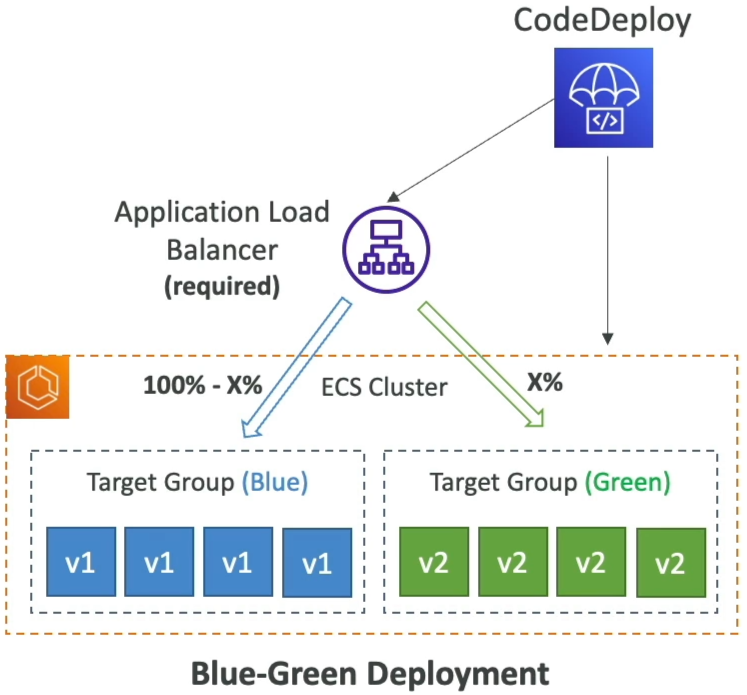
For Amazon ECS, CodeDeploy operates strictly in Blue/Green mode. It utilizes an Application Load Balancer fronting two completely independent backend Target Groups:
- Target Group 1 (Blue): Points to your active version 1 Docker containers.
- Target Group 2 (Green): Provisions your brand-new version 2 task definitions.
Once the green container fleet passes its baseline container health checks, CodeDeploy hooks into the ALB layer and initiates the exact same traffic-shifting algorithms used in the Lambda lane (Linear, Canary, or AllAtOnce) to smoothly transition network traffic from the blue group over to the green container group.
Exam Tips
- The Lambda Error Rollback Guardrail: If an exam prompt presents a team deploying a critical serverless backend, and demands a solution that automatically rolls back to version 1 if the new version 2 Lambda drops any runtime errors during its 10-minute traffic-shift window—look straight for coupling CodeDeploy Canary/Linear routing with a CloudWatch Alarm monitoring Lambda
Errors! You bind the alarm directly to the CodeDeploy deployment group settings, and it will violently abort and reverse the traffic routing if triggered - The Missing EC2 File Drift Trap: If a question describes an EC2 instance deployment that keeps freezing up or throwing a hard
Deployment Failedcode right at the start of a run—check the instance state. Ensure the background CodeDeploy Agent is actually running, and verify that the EC2 Instance IAM Role carries explicits3:GetObjectread permissions to grab the application revision package from the S3 deployment bucket.