CodePipeline Overview
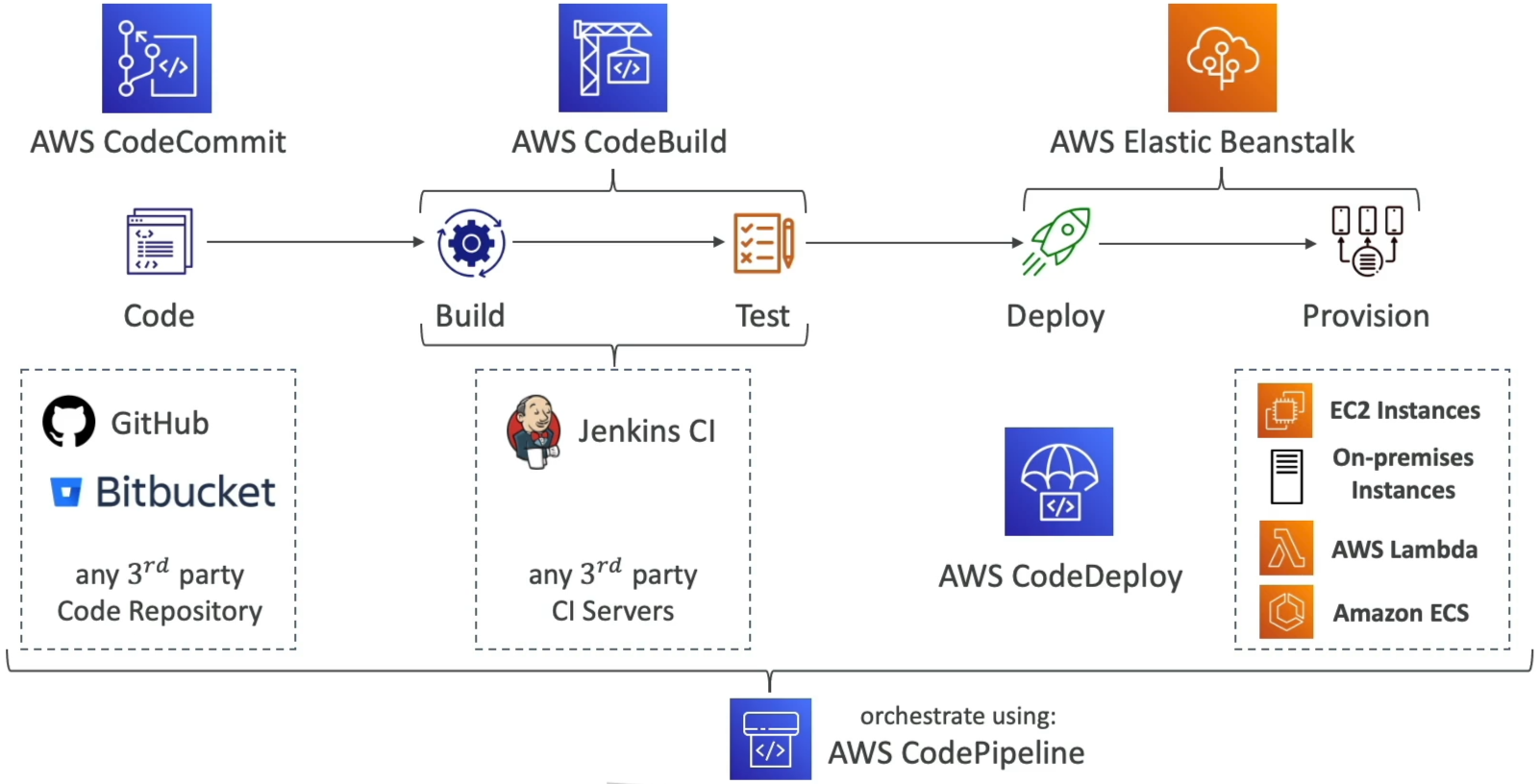
Welcome to the centralized nervous system of your DevOps strategy. AWS CodePipeline is the absolute master conductor that takes all your independent serverless tools—your source trees, compiler runtimes, and deployment targets—and strings them together into a flawless, automated delivery machine.
Instead of forcing your developers to manually pass files along, watch code runners, or type script hooks, CodePipeline visually maps out your release stages. It watches your repositories like a hawk, captures code state transitions, and seamlessly pushes data down the line with zero friction.
Key Takeaways
🏗️ The Stages & Actions Matrix
A pipeline is organized into structural blocks called Stages (e.g., Source, Build, Staging, Production). Inside each stage, you declare individual Actions that can run either Sequentially (one after another) or in Parallel (simultaneously to save pipeline execution time, bro).
You can pull from a wide array of native and third-party action blocks:
- Source: CodeCommit, Amazon S3, Amazon ECR, GitHub, or Bitbucket.
- Build & Test: AWS CodeBuild, Jenkins, Device Farm, or TeamCity.
- Deploy: AWS CodeDeploy, Elastic Beanstalk, AWS CloudFormation, Amazon ECS, or Amazon S3.
- Control Overrides 🛑: You can insert a Manual Approval Action right before your production stage. The pipeline halts completely, shoots an SNS email notification to your team lead, and waits for a physical click review before rolling the update out to your live users!
📦 Under the Hood: The Artifact Store Pipeline
This is an absolute milestone architectural concept for the exam. How do your pipeline steps pass code files to each other behind the scenes?
AWS CodeBuild and AWS CodeDeploy do not query CodeCommit or GitHub directly during a pipeline run. Instead, CodePipeline uses Amazon S3 as its centralized transient Artifact Store.
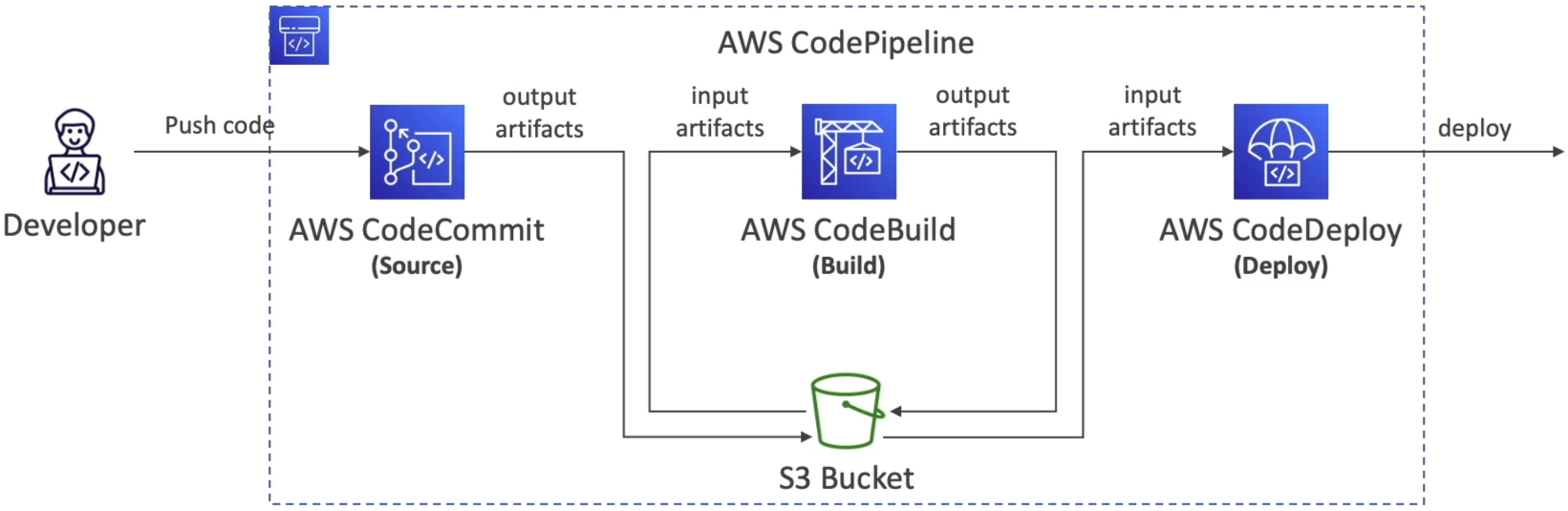
🔄 THE CODEPIPELINE DATA BUS MATRIX:
   ├── 📁 1. Developer pushes code ──► Hits CodeCommit Repo
   ├── 🎛️ 2. CodePipeline pulls zip ─► Drops it into S3 Bucket as an "Input Artifact"
   ├── 🔨 3. CodeBuild grabs zip ────► Compiles binaries inside container via S3 fetch
   └── 📦 4. CodeBuild outputs zip ──► Pushes compiled binary back to S3 as an "Output Artifact"
Every single step reads from the previous step's Input Artifact and writes to its own Output Artifact straight inside that dedicated, encrypted S3 bucket. If you delete that underlying artifact bucket, your entire pipeline immediately breaks.
🛠️ Pipeline Diagnostic & Troubleshooting Playbook
When your pipeline execution throws a red block or freezes up, the DVA-C02 blueprint expects you to know exactly which diagnostic tool to query:
🚨 Scenario A: Insufficient Permissions (The IAM Fix)
- The Bug: The pipeline throws a hard error stating it
Could not access the CodeCommit repositoryor fails to spin up a build step. - The Triage: Check the CodePipeline Service Role. CodePipeline needs explicit IAM permissions to list S3 bucket keys, call
sts:AssumeRoleacross separate builder tracks, and read repository states. If the service role is missing these blocks, execution drops instantly.
📊 Scenario B: Automated Failure Alerts (The EventBridge Fix)
- The Bug: Your engineering team wants to get an instant email alert or Slack ping the exact second a production deployment action enters a
FAILEDorCANCELLEDstate. - The Triage: You target CodePipeline state changes using Amazon EventBridge. You write a rule listening for
CodePipeline Pipeline Execution State Changeevents filtering onstatus: ["FAILED"], and map the target output straight to an Amazon SNS topic or AWS Chatbot terminal!
🔍 Scenario C: Auditing Blocked API Calls (The CloudTrail Fix)
- The Bug: Your pipeline is dropping security validation handshakes, and you need a granular audit log tracking exactly which API method block is throwing hidden access denials behind the scenes.
- The Triage: Pull up AWS CloudTrail. It maintains an immutable audit ledger of every single AWS API call executed by the CodePipeline service role, mapping out the exact IAM identity payload and failure signature blocks.
Exam Tips
- The Transient Storage Dependency: If a test question asks why a newly created pipeline is instantly crashing during its compilation stage, and states that an engineer cleared out some old, unmanaged storage assets earlier in the day—look straight for the S3 Artifact Bucket. If someone manually purges or modifies the permissions on the central S3 bucket assigned as the pipeline's artifact store, the data pipeline completely collapses.
- The Cross-Account Delivery Wall: If an enterprise scenario requires a pipeline hosted in a
DevAWS Account to deploy code straight to an S3 bucket or EC2 fleet hosted over in a completely separateProductionAWS Account—remember the security handshake: You must configure a Customer-Managed KMS Key to encrypt the pipeline artifacts, grant the Production account cross-account access to the Dev S3 artifact bucket, and let CodePipeline execute ansts:AssumeRolecall to use a deployment role inside the Production tier.
Practice Test
Question 1: An IT company leverages CodePipeline to automate its release pipelines. The development team wants to write a Lambda function that will send notifications for state changes within the pipeline.
As a Developer Associate, which steps would you suggest to associate the Lambda function with the event source?
- Use the CodePipeline console to set up a trigger for the Lambda function
- Set up an Amazon EventBridge rule that uses CodePipeline as an event source with the target as the Lambda function
- Set up an Amazon CloudWatch alarm that monitors status changes in Code Pipeline and triggers the Lambda function
- Use the Lambda console to configure a trigger that invokes the Lambda function with CodePipeline as the event source
Correct Answer
- Use the CodePipeline console to set up a trigger for the Lambda function
- Explanation: You cannot configure direct Lambda function triggers from within the CodePipeline console. CodePipeline emits state change events to Amazon EventBridge, where rules and targets are defined.
- Set up an Amazon EventBridge rule that uses CodePipeline as an event source with the target as the Lambda function
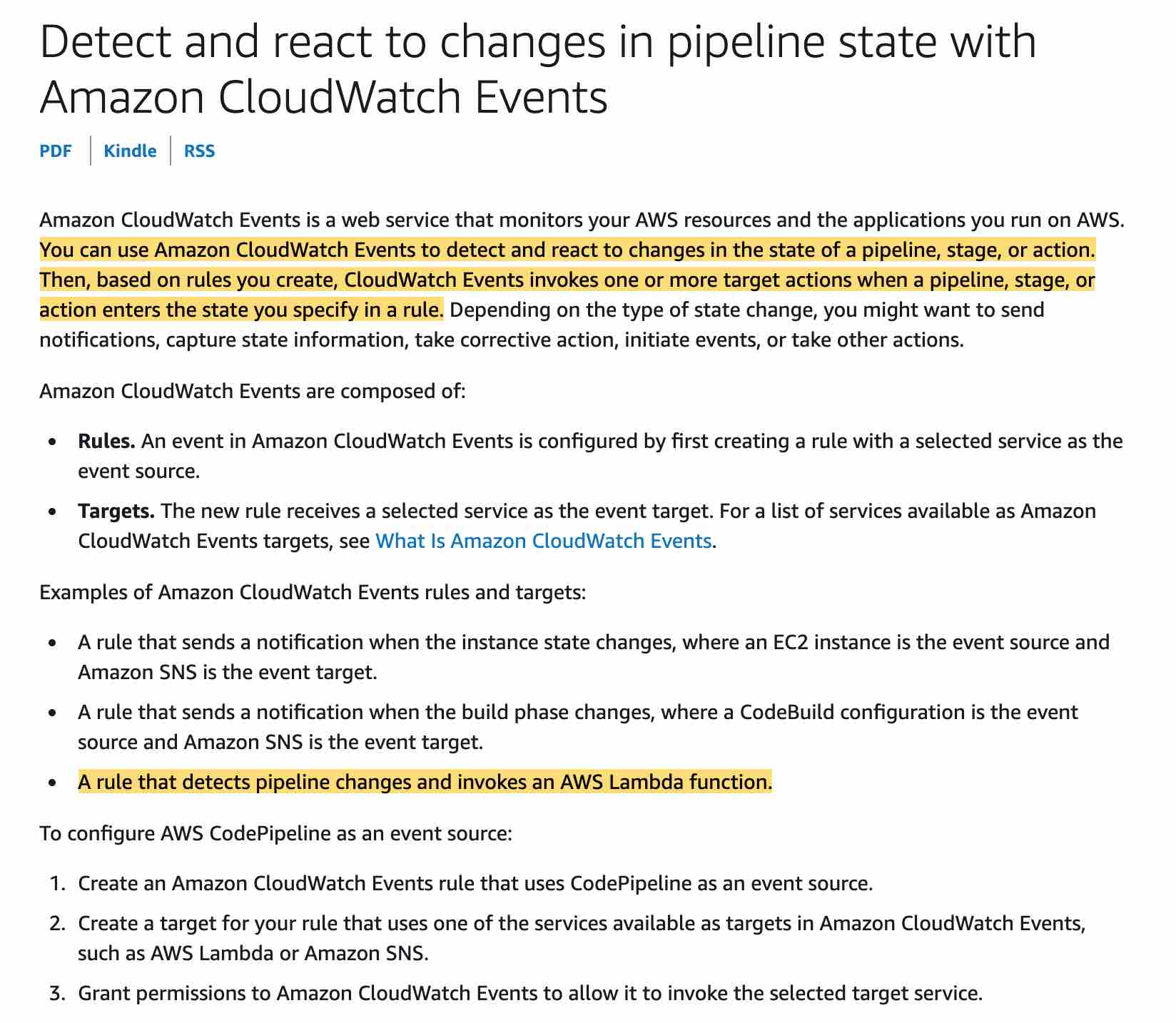
- Explanation: You can use Amazon EventBridge to detect and react to changes in the state of a pipeline, stage, or action. Then, based on rules you create, EventBridge invokes one or more target actions when a pipeline, stage, or action enters the state you specify in a rule. For the given use-case, you can set up a rule that detects pipeline changes and invokes an AWS Lambda function.
- Explanation: You can use Amazon EventBridge to detect and react to changes in the state of a pipeline, stage, or action. Then, based on rules you create, EventBridge invokes one or more target actions when a pipeline, stage, or action enters the state you specify in a rule. For the given use-case, you can set up a rule that detects pipeline changes and invokes an AWS Lambda function.
- Set up an Amazon CloudWatch alarm that monitors status changes in Code Pipeline and triggers the Lambda function
- Explanation: CloudWatch Alarms evaluate metric thresholds (such as CPU utilization or error counts) rather than matching specific event-based state transition JSON payloads. Real-time pipeline state detection requires an EventBridge rule.
- Use the Lambda console to configure a trigger that invokes the Lambda function with CodePipeline as the event source
- Explanation: CodePipeline is not a direct event source supported natively inside the AWS Lambda console trigger configuration. You must route CodePipeline state changes through Amazon EventBridge.