SAM Overview
Introducing AWS SAM (Serverless Application Model) is where we stop treating serverless infrastructure like a chaotic, multi-hundred-line CloudFormation chore and start packaging apps.
Key Takeaways
SAM is an open-source framework designed specifically for developing, testing, and deploying serverless architectures. It lets you write clean, dense YAML templates using high-level abstractions, which the AWS cloud engine automatically expands into massive, fully fleshed-out AWS CloudFormation blueprints behind the scenes.
🏗️ The Shorthand Architecture
Every valid SAM template is a CloudFormation file at its core, but it kicks off with a mandatory compiler header macro declaration right at line one, bro:
This header tells CloudFormation: "Yo, intercept this file and parse my SAM constructs before building the stack!" You get three powerful serverless primitive shortcuts that eliminate massive blocks of standard boilerplate JSON/YAML:
AWS::Serverless::Function🧠: Provisions an AWS Lambda function, establishes its execution runtime, handles environment variable mapping, and natively generates the entire underlying IAM execution role automatically!AWS::Serverless::Api🛰️: Establishes full Amazon API Gateway REST/HTTP endpoints with clean path routing filters.AWS::Serverless::SimpleTable📊: Provisions a highly optimized, scalable Amazon DynamoDB table focused strictly on single primary-key index schemas with zero configuration noise.
🚀 The Serverless Deployment Pipeline
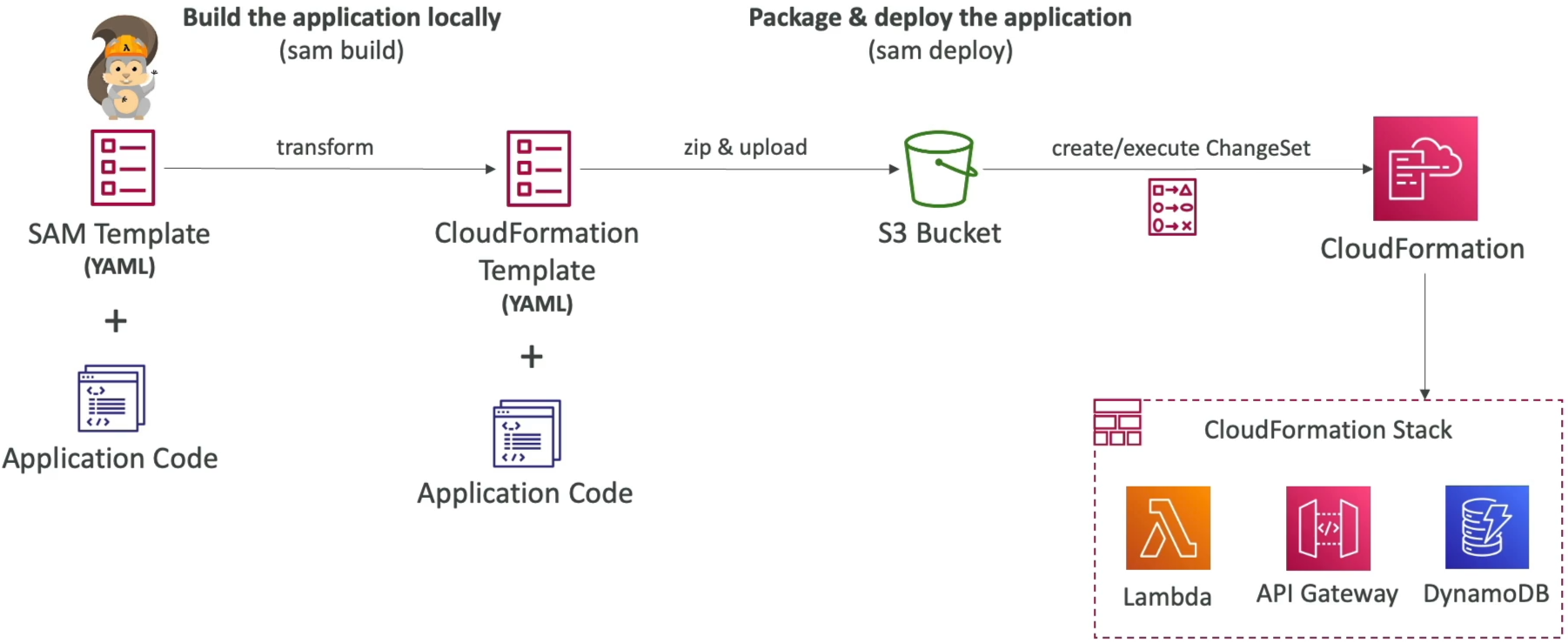
When you are ready to ship your code up to the cloud, the SAM CLI streamlines your operations into a high-velocity execution pipeline:
🛠️ THE AWS SAM LAUNCH RAMP:
   ├── 🔨 1. sam build   ──► Validates code, resolves npm/pip/Maven dependencies, creates localized build trees.
   └── 🚀 2. sam deploy  ──► Automatically zips artifacts, uploads them to an S3 bucket, executes a ChangeSet!
sam build🔨: Code analysis stage. It pulls your template, inspects your code manifests (likepackage.jsonorrequirements.txt), down-selects your dependencies, and stages the compiled artifacts inside a hidden local.aws-sam/environment tree.sam deploy🚀: The production launcher. Architectural Fact: In modern versions of the CLI,sam deployimplicitly executes the historicalsam packagecommand under the hood! It automatically zips up your local source binaries, pushes the zip blobs into a target Amazon S3 artifact bucket, swaps your template's local file paths with secure public S3 URI pointers, and fires a CloudFormation ChangeSet execution loop to safely transition your live cloud infrastructure.
🏎️ Development at Ludicrous Speed: SAM Accelerate
If you're writing code loops and testing them interactively, waiting several minutes for a full CloudFormation stack update change set to process every time you edit a single line of a Lambda function is an absolute momentum killer. SAM Accelerate completely vaporizes that latency.
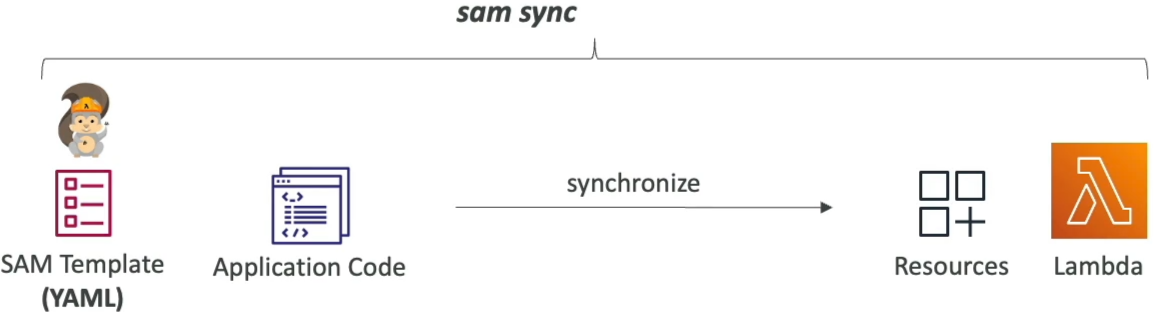
By executing a specialized background daemon script in your local dev terminal:
SAM hooks straight into your working directory and monitors your local codebase for file updates in real time.
⚡ The Bypassing Logic Matrix:
- Code-Only Changes (Fast Path) 🧠: If you modify the internal JavaScript, Python, or Go logic inside your Lambda function code file without changing your YAML infrastructure properties,
sam sync --watchcompletely bypasses CloudFormation entirely. It hits the direct AWS Lambda Service API (UpdateFunctionCode) over the wire, hot-swapping your code payload directly into the live cloud environment in fractions of a second! - Infrastructure Changes (Standard Path) 🏗️: If you go into your template and alter an active property (like shifting memory dimensions or appending a fresh DynamoDB table component), the watch engine catches the structural change and automatically invokes a standard CloudFormation update loop in the background to safely keep your environment synced.
Examples
sam sync(no options) → Synchronize code and infrastructure.sam sync --code→ Synchronize code changes without updating infrastructure (bypass CloudFormation, update in seconds).sam sync --code --resource AWS::Serverless::Function→ Synchronize only all Lambda functions and their dependencies, ignoring other resources like DynamoDB tables or API Gateway endpoints.sam sync --code --resource-id HelloWorldLambdaFunction→ Synchronize only the single Lambda function with the logical IDHelloWorldLambdaFunctionin your template.sam sync --watch→ Monitor for file changes and automatically synchronize when changes are detected. If change includes configuration, it usessam sync, otherwise it usessam sync --code.
Exam Tips
- The Velocity vs. Latency Optimization: If an exam scenario introduces a developer who is actively testing a serverless application consisting of dozens of connected Lambda functions, and complains that running
sam deployafter every minor bug fix is killing their velocity—look straight for the answer recommendingsam sync --watch(SAM Accelerate) to hot-swap internal code code-bases directly via the Lambda service APIs, bypassing slow CloudFormation stack updates - The Syntax Verification Catch: Always keep an eye out for code snippet identification questions. If a question asks how to ensure an infrastructure file is interpreted cleanly as a Serverless Application template rather than a standard legacy CloudFormation script, the undisputed marker is checking for the presence of the
Transform: AWS::Serverless-2016-10-31macro statement right at the header top line!