Cognito Identity Pools
Bridging the gap between external digital identities and raw AWS computing resources means stepping out of user directories and plunging straight into Amazon Cognito Identity Pools (Federated Identities).
Stephane drops some major truth bombs here. The naming convention is an absolute mind-meld trap because User Pools and Identity Pools do completely different architectural jobs, yet live under the exact same Cognito branding umbrella.
Key Takeaways
Let's explore the role mapping engines and the Row-Level Security / Variable Mappings.
🏗️ The Core Architecture Loop: Token for Access Keys Exchange
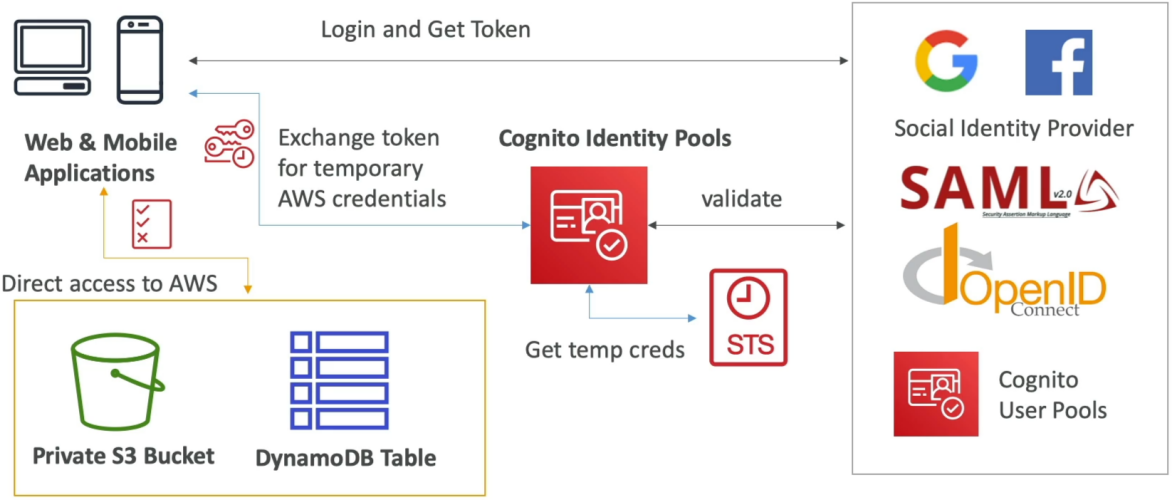
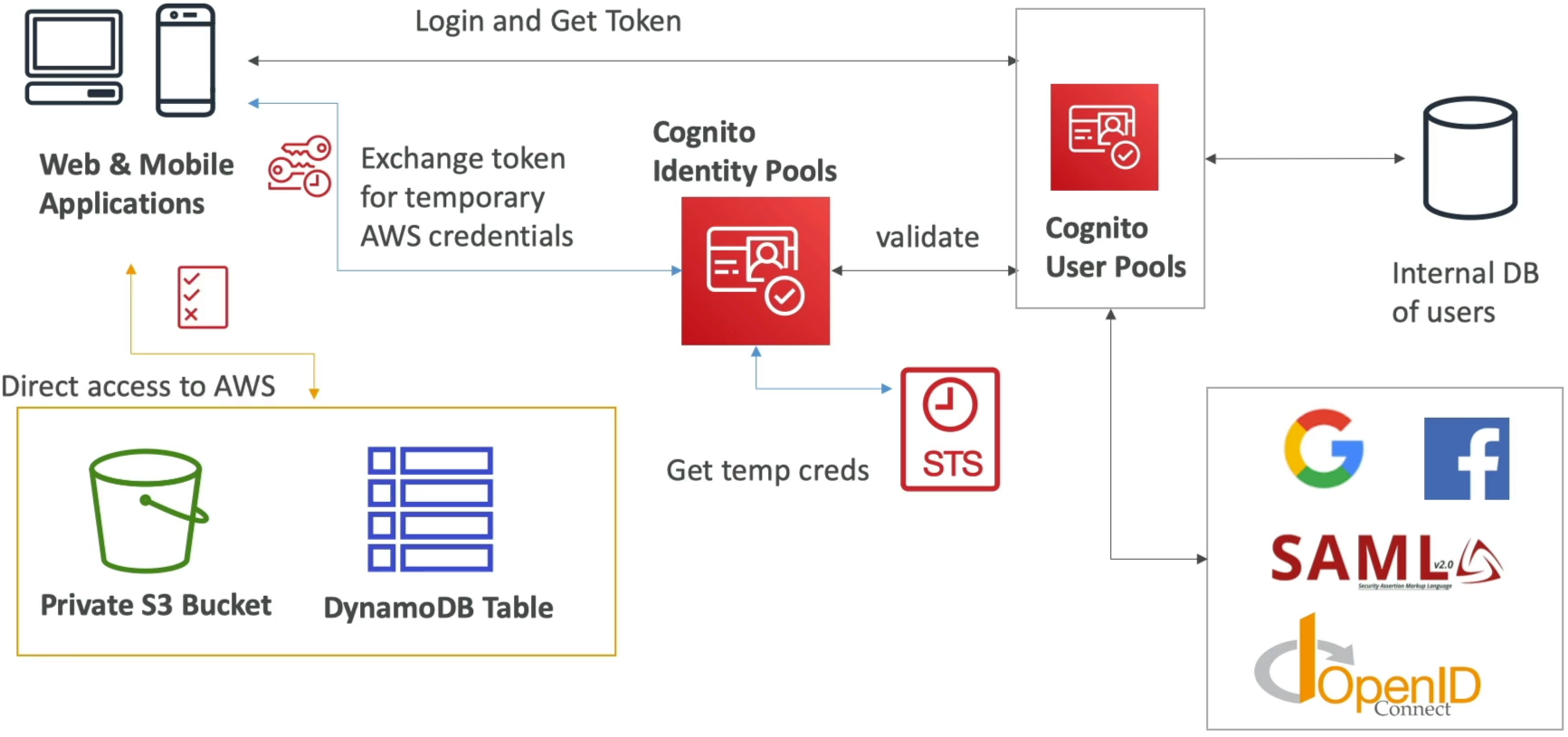
The mission-critical purpose of an Identity Pool is Authorization. It doesn't hold passwords or maintain a user registration database. Its entire job in the cloud is to act as a secure transaction broker:
🌎 MOBILE/SPA CLIENT ──► 1. Authenticates ──► 🔑 IDENTITY PROVIDER (CUP, Google, OIDC, SAML)
     │                                           │
     │◄───────────────── 2. Returns JWT Token ───┘
     │
     ├── 3. Presents JWT ────────────────────► 🪪 COGNITO IDENTITY POOLS
     │                                           │
     │                                           ├── 4. Vets token validity with Provider
     │                                           ├── 5. Invokes AWS STS: AssumeRoleWithWebIdentity 🚀
     │                                           └── 6. Dispenses short-lived IAM Credentials 🔑
     │
     │◄── 7. Returns Access Key/Secret/Session ──┘
     │
     └── 8. Direct API Call (via SDK) ───────► 📦 AWS RESOURCES (Private S3 Bucket / DynamoDB)
- The Identity Identification Gate: The client application first authenticates against a trusted external Identity Provider (IdP). This can be your own internal Cognito User Pool, public social logins (Google, Facebook, Amazon, Apple), standard enterprise SAML/OIDC systems, or even your own custom backend developer-authenticated server!
- The Token Handshake: The provider passes back an identity token (like a JWT or SAML assertion).
- The STS Cross-Over 🚀: The client hands that token straight to the Identity Pool. The pool verifies the token's cryptographic integrity, maps it to a unique tracking identity string, and runs a backchannel call to the AWS Security Token Service (STS) using the core API method
AssumeRoleWithWebIdentity. - Direct Cloud Access 🖨️: STS dispenses short-lived, temporary AWS IAM credentials (an Access Key ID, Secret Access Key, and Session Token) back to the app client. The client can now drop these keys directly into the AWS SDK to read or write files to S3 or run queries against DynamoDB completely bypassing your custom backend application servers.
🎛️ The Guest Factor: Unauthenticated Identities
Identity Pools have a unique superpower: they natively allow Guest Access.
Inside the provider dashboard configuration settings, you can toggle the flag Enable access to unauthenticated identities to true.
- The Architectural Play: This partitions your pool into two distinct, dedicated IAM role tracks: one for Authenticated Users and one for Unauthenticated Guests.
- The Practical Use Case: Perfect if a new mobile app needs to allow anonymous guest users to dynamically stream performance data up into an S3 bucket or read a shared database list before they ever fill out a sign-up sheet or type a password.
🔒 Granular Isolation: Policy Variables & Row-Level Security
How do you prevent millions of authenticated public users from reading each other's private data if they are all sharing the exact same baseline IAM role? This is the absolute peak validation track on the certification blueprint
You don't need to provision millions of separate IAM roles. Instead, you inject specialized IAM Policy Variables straight into a single master policy document to achieve absolute runtime isolation based on their resolved Cognito user tracking string.
📂 S3 Prefix Isolation (Folder-Level Control)
By dropping the variable string ${cognito-identity.amazonaws.com:sub} right inside the resource ARN card, IAM dynamically resolves that variable to the user's specific Identity ID at the exact second they make a call, chief:
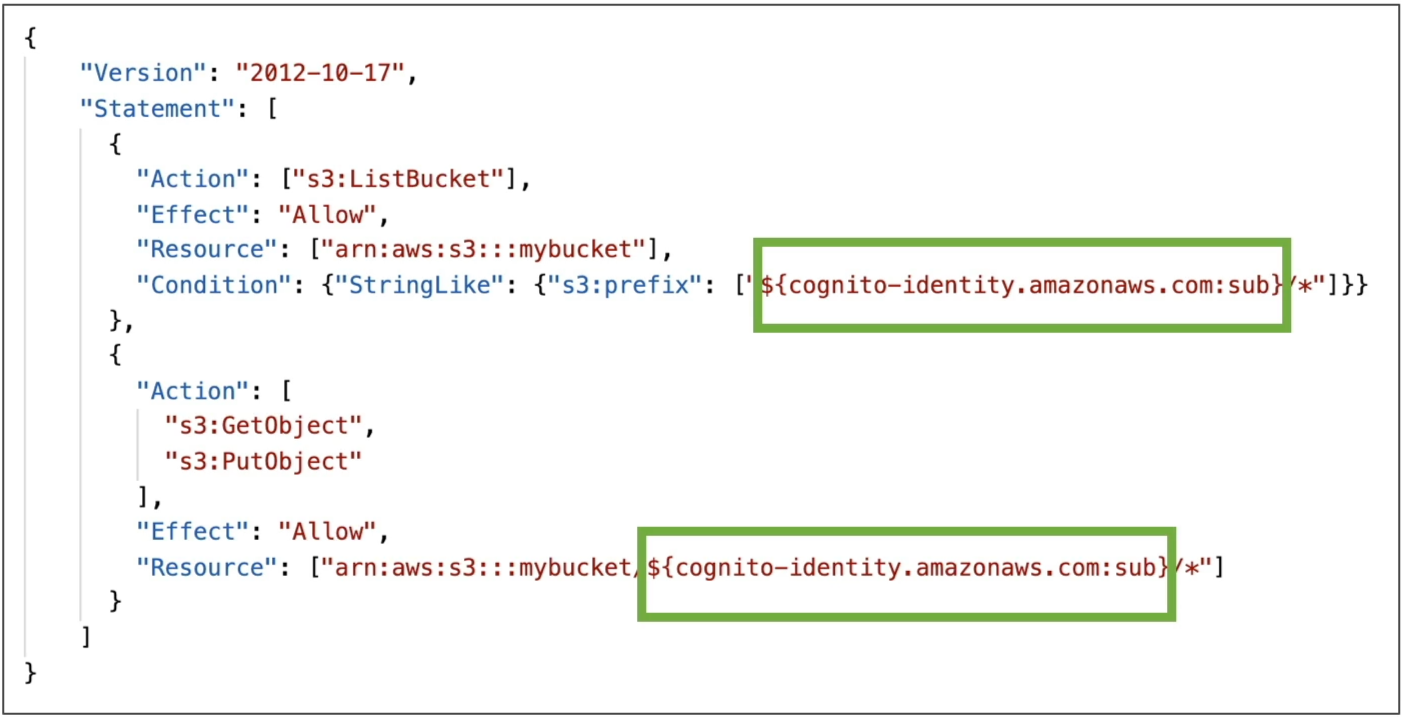
- The Result: User A (
us-east-1:aaaa-bbbb) can effortlessly upload and download files inside the bucket folder matching their ID, but if they attempt to modify a path matching User B's folder (us-east-1:cccc-dddd), the IAM evaluation engine drops a hard, ironclad Access Denied block on the spot.
📊 DynamoDB Row-Level Security (Fine-Grained Data Segments)
You can lock down exact data row interactions inside a shared Amazon DynamoDB table by binding a strict conditional filter targeting the primary partition index key using the dynamodb:LeadingKeys parameter:
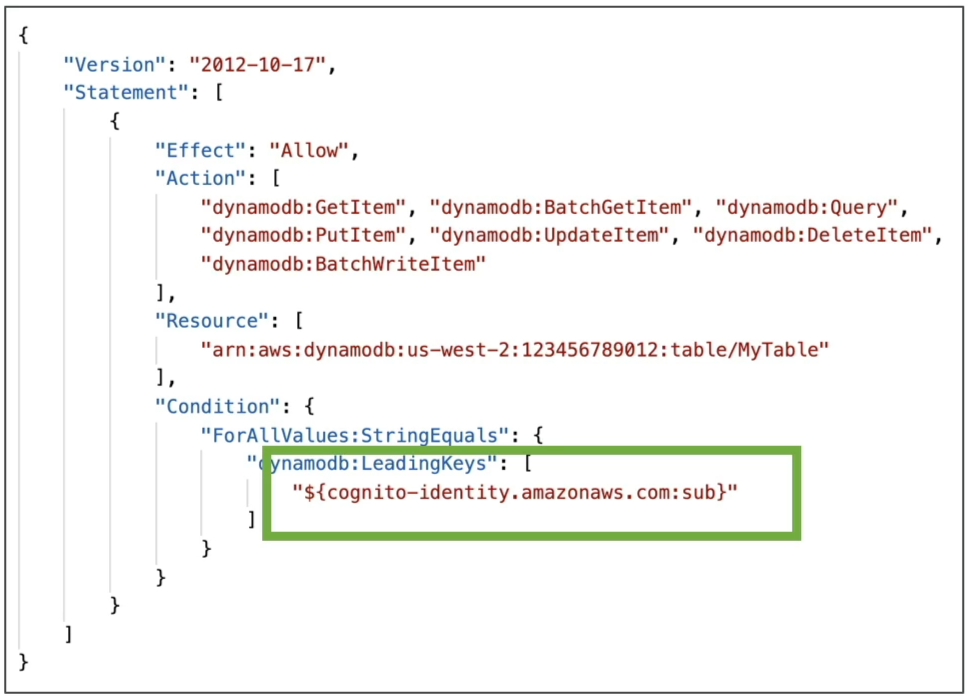
- The Result: This creates absolute row-level data segregation. A user can execute queries or updates on the table only if the primary partition key of the row precisely matches their specific tracking identity string parameter!
Exam Tips
- The STS API Identification Blueprint: If a multi-choice exam prompt asks you to identify the exact low-level cryptographic token exchange API call invoked behind the scenes when a public social login token is traded for temporary AWS credentials—look straight for
AssumeRoleWithWebIdentity. Do not chooseAssumeRoleorGetSessionToken. - The Mobile User Storage Direct Bypass: If a scenario presents an architecture group launching a mobile photo journal app, and they want to reduce compute loads by letting users upload image files directly to an Amazon S3 bucket without routing data through an intermediate ECS container tier—choose the option that deploys a Cognito Identity Pool hooked to a Cognito User Pool, leveraging the
${cognito-identity.amazonaws.com:sub}variable inside the authenticated IAM policy to securely isolate user storage folders.
Practice Scenario
Question 1: A developer wants to integrate user-specific file upload and download features in an application that uses both Amazon Cognito user pools and Cognito identity pools for secure access with Amazon S3. The developer also wants to ensure that only authorized users can access their own files and that the files are securely saved and retrieved. The files are 5 KB to 500 MB in size.
What do you recommend as the most efficient solution?
- Use CloudFront Lambda@Edge to validate that the given file is uploaded to S3 and downloaded from S3 only by the authorized user
- Use S3 Event Notifications to trigger a Lambda function that validates that the given file is uploaded and downloaded only by the authorized user
- Integrate Amazon API Gateway with a Lambda function that validates that the given file is uploaded to S3 and downloaded from S3 only by the authorized user
- Leverage an IAM policy with the Amazon Cognito identity prefix to allow users access to just their own objects in Amazon S3
Correct Answer
- Use CloudFront Lambda@Edge to validate that the given file is uploaded to S3 and downloaded from S3 only by the authorized user
- Explanation: This option assumes that the solution comprises a CloudFront distribution. This introduces inefficiency in the solution, as one needs to pay for CloudFront/Lambda@Edge and adds unnecessary hops in the data flow for both uploads and downloads.
- Use S3 Event Notifications to trigger a Lambda function that validates that the given file is uploaded and downloaded only by the authorized user
- Explanation: While it is certainly possible to build this solution, however, it is not the most optimal solution as it does not prevent an invalid upload of a file into another user's designated folder. So this option is incorrect.
- Integrate Amazon API Gateway with a Lambda function that validates that the given file is uploaded to S3 and downloaded from S3 only by the authorized user
- Explanation: Again, it is certainly possible to build this solution, however, it is not the most optimal solution as it does not prevent an invalid upload of a file into another user's designated folder. So this option is incorrect.
- Leverage an IAM policy with the Amazon Cognito identity prefix to allow users access to just their own objects in Amazon S3
- Explanation: Amazon Cognito identity pools (federated identities) enable you to create unique identities for your users and federate them with identity providers. With an identity pool, you can obtain temporary, limited-privilege AWS credentials to access other AWS services. Amazon Cognito identity pools support the following identity providers:
Public providers: Login with Amazon (identity pools), Facebook (identity pools), Google (identity pools), Sign in with Apple (identity pools).
Amazon Cognito user pools
OpenID Connect providers (identity pools)
SAML identity providers (identity pools)
Developer authenticated identities (identity pools)
You can create an identity-based policy that allows Amazon Cognito users to access objects in a specific S3 bucket. This policy allows access only to objects with a name that includes Cognito, the name of the application, and the federated user's ID, represented by the
${cognito-identity.amazonaws.com:sub}variable.
- Explanation: Amazon Cognito identity pools (federated identities) enable you to create unique identities for your users and federate them with identity providers. With an identity pool, you can obtain temporary, limited-privilege AWS credentials to access other AWS services. Amazon Cognito identity pools support the following identity providers:
Public providers: Login with Amazon (identity pools), Facebook (identity pools), Google (identity pools), Sign in with Apple (identity pools).
Amazon Cognito user pools
OpenID Connect providers (identity pools)
SAML identity providers (identity pools)
Developer authenticated identities (identity pools)
You can create an identity-based policy that allows Amazon Cognito users to access objects in a specific S3 bucket. This policy allows access only to objects with a name that includes Cognito, the name of the application, and the federated user's ID, represented by the