AWS Amplify
AWS Amplify is basically the absolute king of rapid full-stack app prototyping and deployment. 🏎️💨
If you want a mental model for the exam, think of AWS Amplify as the Elastic Beanstalk for mobile and web applications. Instead of manually stitching together S3 buckets, Cognito user pools, AppSync GraphQL schemas, and CloudFront CDNs using thousands of lines of CloudFormation, Amplify acts as a unified abstraction layer that spins up and wires all those backend services together in minutes!
Key Takeaways
Let's dissect the core toolchain, CLI workflows, and testing pipelines you need to master for your DVA-C02.
🧰 The Four Pillar Components
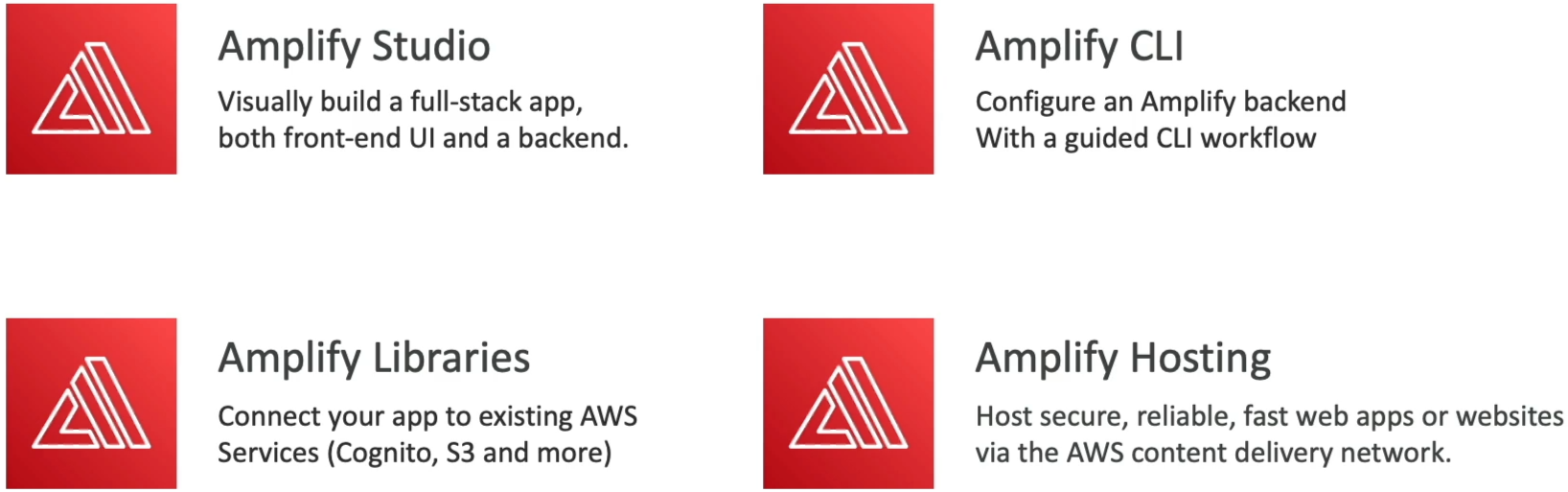
Amplify splits its operational landscape into four distinct tools, chief:
- Amplify Studio / Code Gen 🎨: A visual workspace interface where you can visually design your full-stack backend models, generate front-end React/Vue component code, and map UI elements straight to your data models.
- Amplify CLI 🛠️: The command-line powerhouse. You run
amplify initin your terminal to initialize a fresh project wrapper right inside your local repository.
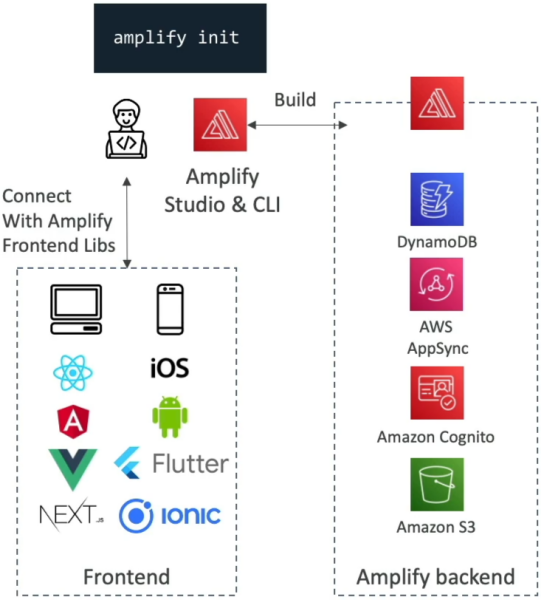
- Amplify Libraries 📚: Pre-built client SDK packages available for React, Vue, Angular, Next.js, iOS, Android, and Flutter. They make connecting your frontend code to Cognito or S3 as simple as calling a single JavaScript function!
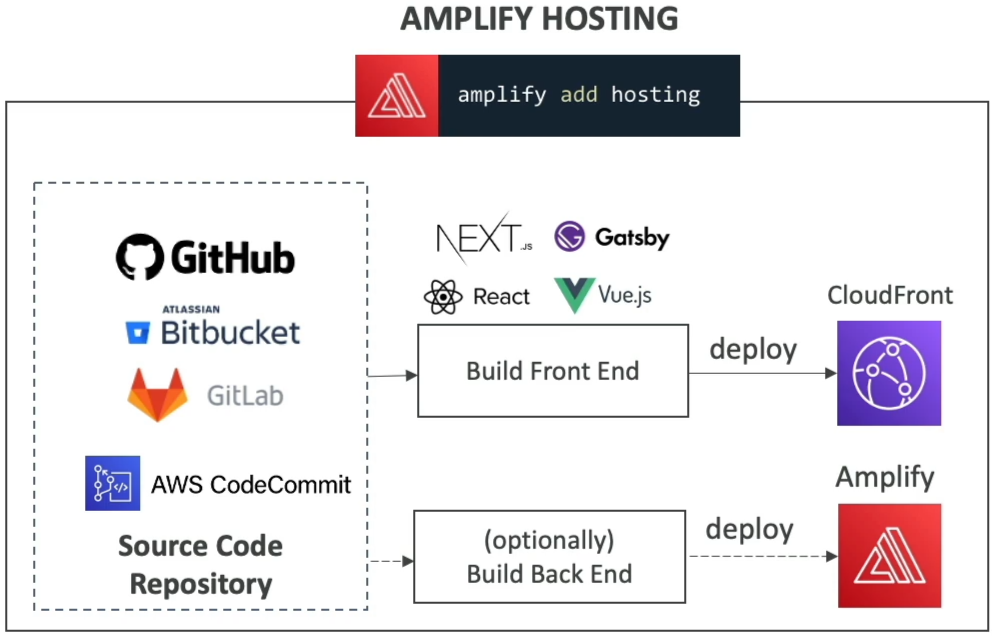
- Amplify Hosting 🌐: A fully managed, continuous integration and deployment (CI/CD) hosting engine (competing directly with services like Vercel or Netlify). It pulls code directly from GitHub, Bitbucket, GitLab, or AWS CodeCommit, builds your static/SSR assets, and serves them over CloudFront.
⚡ High-Frequency CLI Blueprint Commands
When building out features, you use intuitive terminal commands to instantly provision heavy AWS backend infrastructure:
🛠️ AMPLIFY CLI COMMAND MATRIX:
   ├── 🔑 amplify add auth    ──► Provisions Amazon Cognito (MFA, Social Logins, Self-Signup).
   ├── 📊 amplify add api     ──► Provisions AWS AppSync (GraphQL) + Amazon DynamoDB (DataStore).
   ├── 📁 amplify add storage ──► Provisions Amazon S3 buckets for user file uploads.
   └── 🌐 amplify add hosting ──► Connects repo for automated Git-based CI/CD hosting pipelines!
The Offline DataStore Power: When you execute amplify add api, Amplify configures Amplify DataStore. Powered by AppSync and DynamoDB, it gives mobile and web apps local-first offline reading/writing capabilities, automatically syncing data and resolving conflicts behind the scenes the exact millisecond the user's phone regains cellular network!
🧪 CI/CD & The Testing Matrix (Build-Time vs. End-to-End)
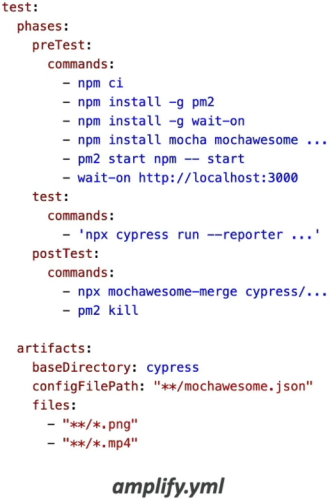
This is a massive validation track on the DVA-C02 exam. When you deploy via Amplify Hosting, your pipeline execution rules are defined directly inside your repository's amplify.yml build specification file.
Amplify explicitly segregates testing into two distinct phases:
📦 AMPLIFY BUILD PIPELINE (amplify.yml)
   ├── 1. BUILD PHASE   ──► Runs Unit Tests (Tests individual code functions in isolation)
   ├── 2. DEPLOY PHASE  ──► Spins up application instance / previews
   └── 3. TEST PHASE    ──► Runs End-to-End (E2E) Tests via CYPRESS Framework 🌲

🌲 The Cypress E2E Integration Rule
Inside the test phase block of amplify.yml, Amplify natively integrates with the Cypress testing framework.
- Why Cypress? Cypress simulates a real web browser headless instance. It programmatically opens your newly deployed application URL, clicks buttons, fills out forms, tests user sign-in flows, and validates usability.
- Visual Reporting: Amplify generates a comprehensive UI test report (using tools like Mochawesome) directly inside the console build logs, allowing developers to catch UI regressions before the code promotes to live production traffic!
Exam Tips
- The Rapid Full-Stack Web App Trap: If an exam prompt describes a developer who needs to rapidly build a mobile app with user authentication (Cognito), file storage (S3), and a real-time database API (AppSync + DynamoDB) without manually writing backend CloudFormation infrastructure templates—always select AWS Amplify as the top choice.
- The E2E Testing Framework Question: If a scenario asks how to run automated, headless end-to-end browser tests against a front-end application right after the build phase completes inside the Amplify Hosting pipeline—look straight for configuring Cypress testing inside the
amplify.ymlbuildspec file.