Step Functions - Error Handling Hands On
We'll be tracking raw runtime exceptions cascading through real cloud architectures live, this is exactly how you master highly resilient, fault-tolerant infrastructure. 🏎️🔮 Stephane’s hands-on lab drops a perfect blueprint showing how Step Functions cleanly acts as a central air-traffic controller for application crashes.
Hands On
🪚 1. Deploying the Intentionally Broken Compute Node (AWS Lambda)
- The Blueprint Selection: Jump into the AWS Lambda Console ──► hit Create function ──► toggle Use a blueprint ──► filter search for
Throw a custom error──► hit configure. - Initialize Identity: Name the target script asset
MyLambdaFunctionThatFailsand let the engine spin up a default baseline IAM execution role. - The Initial Test Code Block: The template code snippet looks a bit old-school to me, so let's swap it out with a modern ES6 class-based error thrower:
index.mjs
class CustomError extends Error {
  constructor(message) {
    super(message);
    this.name = 'CustomError';
  }
}

export const handler = async (event) => {
  throw new CustomError('This is a custom error!');
};
- Verify the Crash Line: Deploy the handler code, create a generic test event, and hit Test. The console returns a hard runtime exception detailing a
CustomErrorsignature with a full stack trace. Copy that unique Lambda function ARN.
🎛️ 2. Assembling the Multi-Tier Resiliency Matrix (AWS Step Functions)
- The Workspace Ingress: Head over to the AWS Step Functions Console ──► hit Create state machine ──► select Blank template ──► name it like
MyStateMachineErrorHandling. - Drop the ASL Blueprint Matrix: Shift over to the Code tab layout and paste in your Amazon States Language JSON logic template.
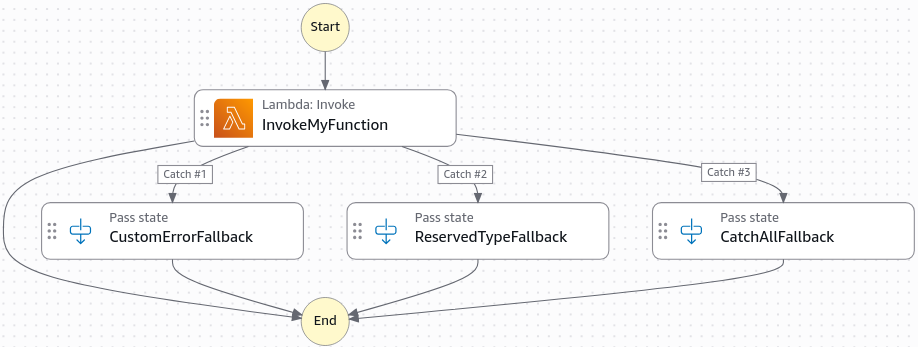
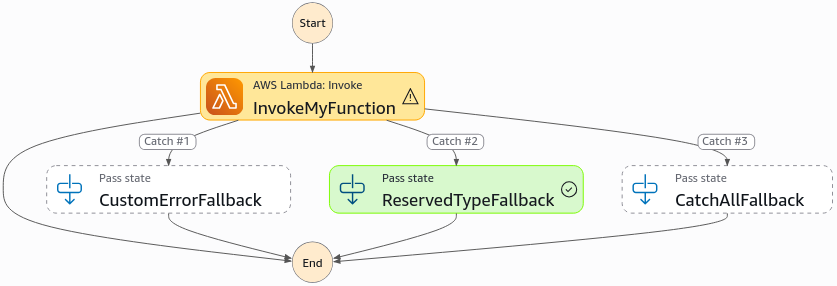
- You should see a visual representation of the state machine with three distinct
Catchblocks and three separateRetryblocks, each with its own unique exponential backoff configuration.
- Wire up the Target: Paste your unique Lambda function ARN straight into the
"Resource"string parameter inside theTaskconfiguration block. - The Multi-Route Error Layout Rules:
- Tier 1 (
CustomError): Configured with a rapidIntervalSeconds: 1delay,MaxAttempts: 2, and an exponentialBackoffRate: 2.0. If all retries are exhausted, a dedicatedCatchblock shunts the payload straight to theCustomErrorFallbacknode path. - Tier 2 (
States.TaskFailed): Configured for generic application faults with a much more deliberateIntervalSeconds: 30retry delay pattern. If this tier hits its maximum attempt ceiling, aCatchrule routes traffic straight into theReservedTypeFallbackstate path. - Tier 3 (
States.ALL): The final security blanket catch-all firewall routing directly into a genericCatchAllFallbackterminal step.
- Tier 1 (
🧪 3. Executing the Operational Chaos Rounds
🔀 Scenario Track A: The Rapid Retry Loop (CustomError)
- Fire Start Execution on the state machine while passing an empty input JSON map.
- The Audit Trail: Open the visual Event History tab live. You can explicitly watch the sequence of events over a fraction of a second: Lambda Started ──► Lambda Failed (
CustomError) ──► Task Retry Scheduled ──► Lambda Started (Attempt 2) ──► Lambda Failed.
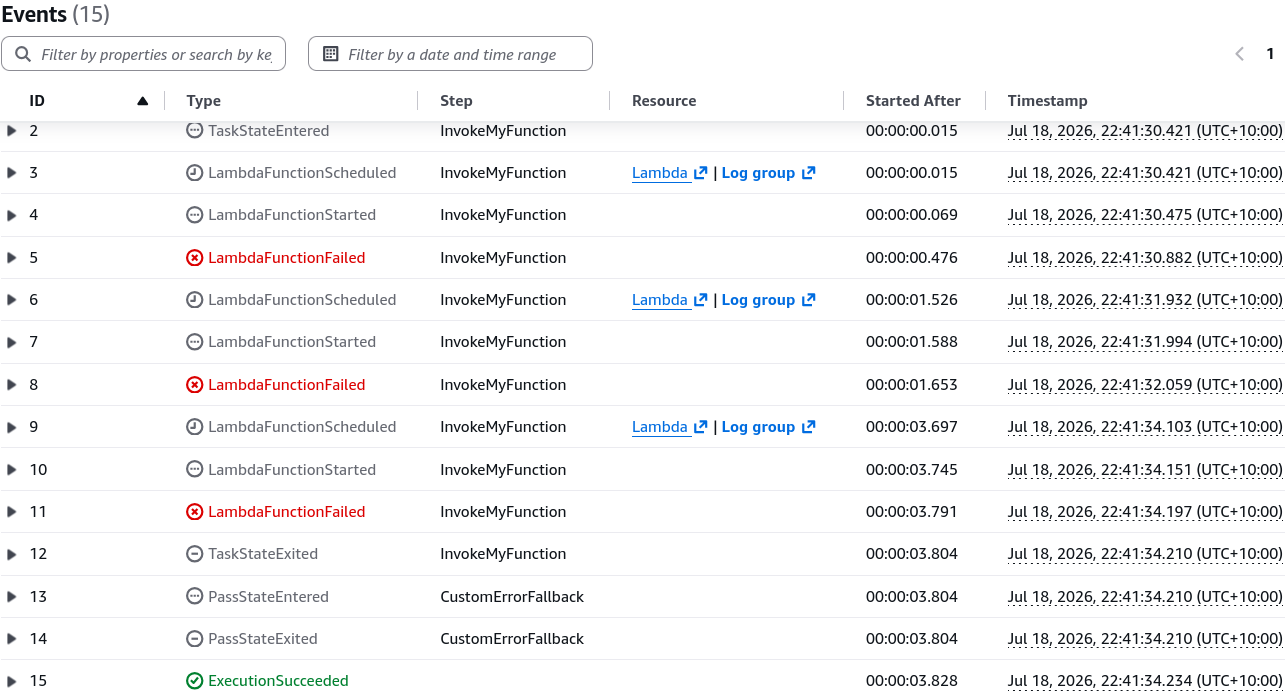
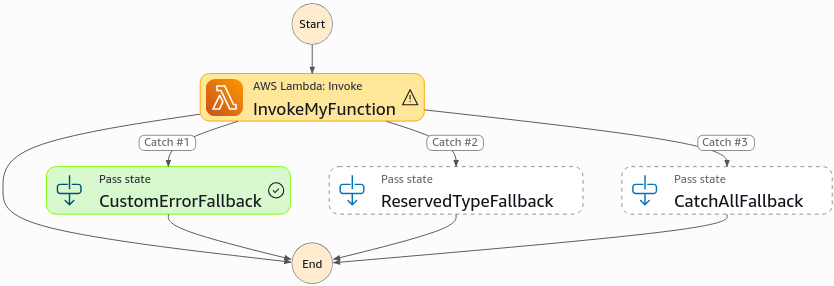
- The Final Output: The retries burn out immediately due to the tight 1-second interval profile. The engine intercepts the terminal exit code, matches the
CustomErrorcatcher token, routes the stream instantly down the right-hand corridor into theCustomErrorFallbacknode, and finishes with a clean Green (Succeeded) banner status.
⏳ Scenario Track B: The Slow-Mo Exponential Delay Loop (Different Error)
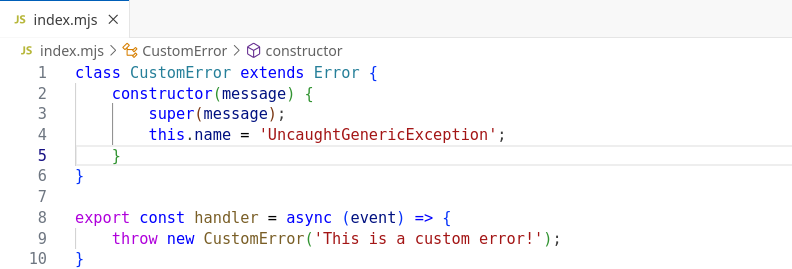
- Head back into your AWS Lambda Console code editor. Shift the thrown error class identity string name inside your script from
"CustomError"over to a generic identifier like"UncaughtGenericException"and hit Deploy.
- Return to Step Functions and trigger a brand-new execution run down the line.
- The Visual Audit delta: The state machine catches the crash, but it bypasses Tier 1 entirely because the error token doesn't match
CustomError, chief! It drops straight into the Tier 2States.TaskFailedmatrix. - The Exponential Math in Action:
- Failure 1: The engine logs the crash, halts the pipeline, and enters a holding pattern for exactly .
- Failure 2: It attempts a retry, crashes again, multiplies the interval by the backoff rate (), and sits completely silent for an extended before trying a third time!
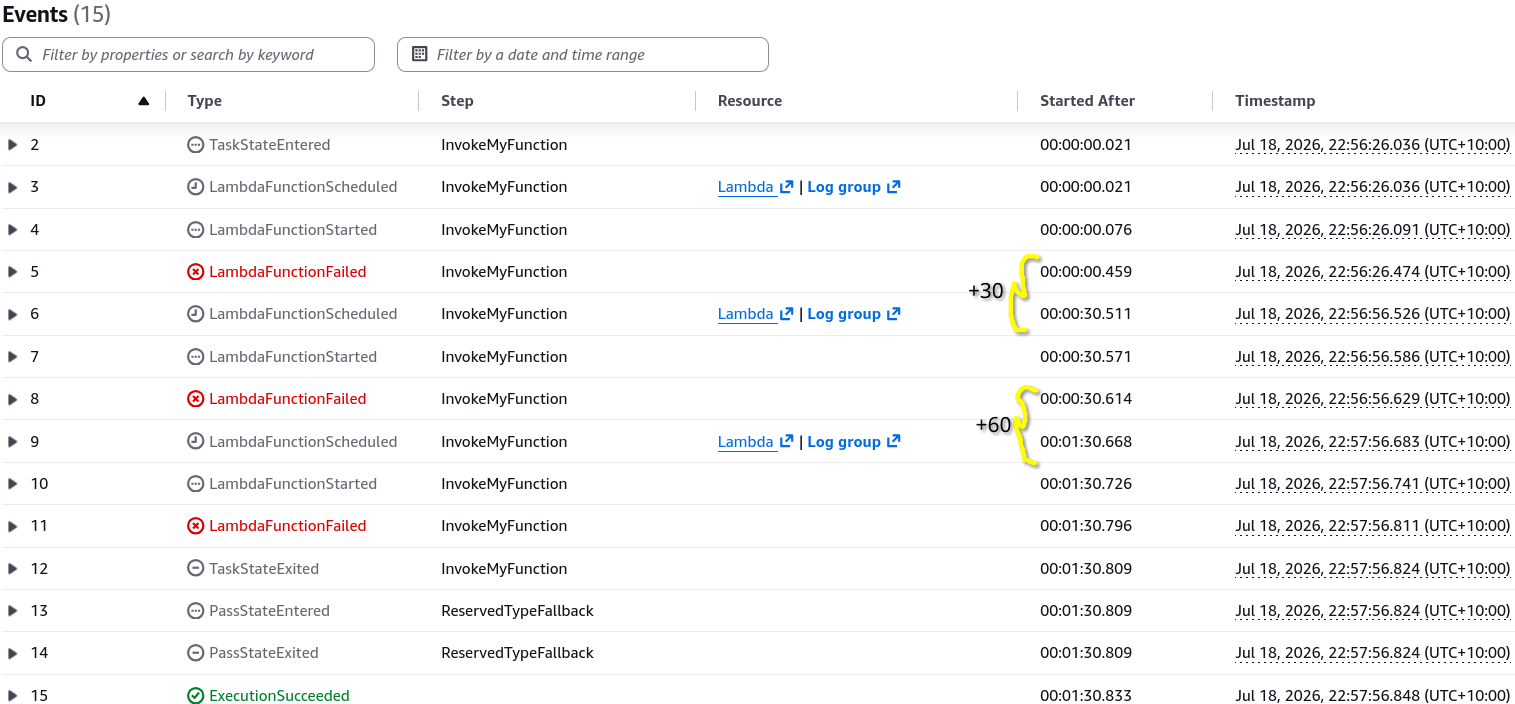
- The Route Shift: Once the prolonged retry strategy is completely exhausted, the secondary catcher grabs the payload and gracefully shifts execution down the middle highway corridor into the
ReservedTypeFallbackstep to cleanly secure the workflow.
Exam Tips
- The Interval Math Challenge 🧮: Keep the exponential calculation loop sharp for scenario word problems. If a question states a task has
IntervalSeconds: 10,BackoffRate: 2.0, and fails three consecutive times—know that the third wait duration parameter will land exactly at (), bro!