Step Functions - Invoke Lambda - Hands On
Stephane’s walk-through drops an elite blueprint on state manipulation. Instead of forcing your computing layer to handle routing conditions, you let Lambda act strictly as a data-processing engine, while the Choice State audits the string payloads to enforce your dynamic system rules automatically.
Hands On
Using an AWS Lambda function in logical routing flow of your state machine is a powerful way to build modular and scalable serverless applications. The Step Functions blueprint is designed to invoke a Lambda function, pass in a payload, and then evaluate the output to determine the next step in the workflow.
🏗️ 1. Authoring the Backend Compute Engine (AWS Lambda)
- Create the Compute Node: Open up your AWS Lambda console ──► hit Create function (Author from scratch).
- Configure Identity Tags: Name the runtime component explicitly
HelloFunctionand select the latest Node.js runtime profile down the line. - Deploy the Execution Handler Code (
index.mjs): Replace the boilerplate script block with a dynamic string interpolator:
index.mjs
export const handler = async (event) => {
  const targetUser = event.who || 'Stranger';
  return `Hello, ${targetUser}!`;
};
- Compile and Test the Ingress: Hit Deploy ──► configure a mock test event block passing JSON data like
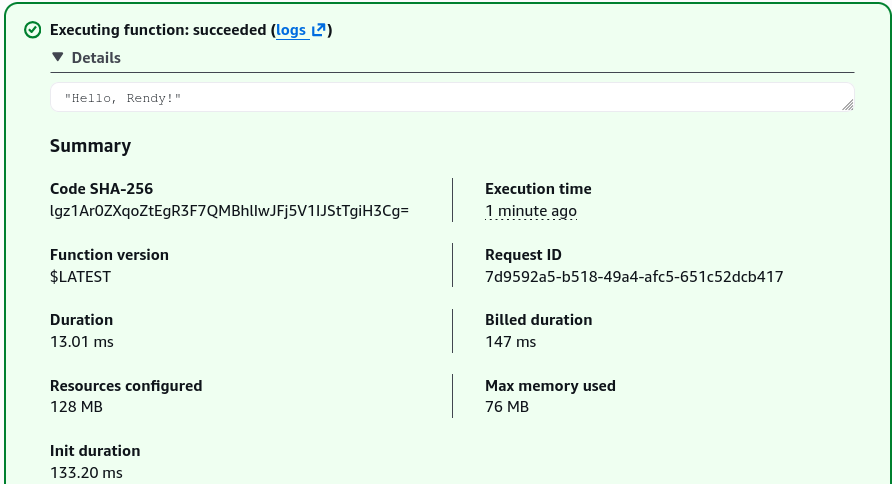
{"who": "Rendy"}──► hit Test. The console successfully returns"Hello, Rendy!". Copy your unique Function ARN string from the top right panel.
🎛️ 2. Assembling the Orchestration Logic (AWS Step Functions)
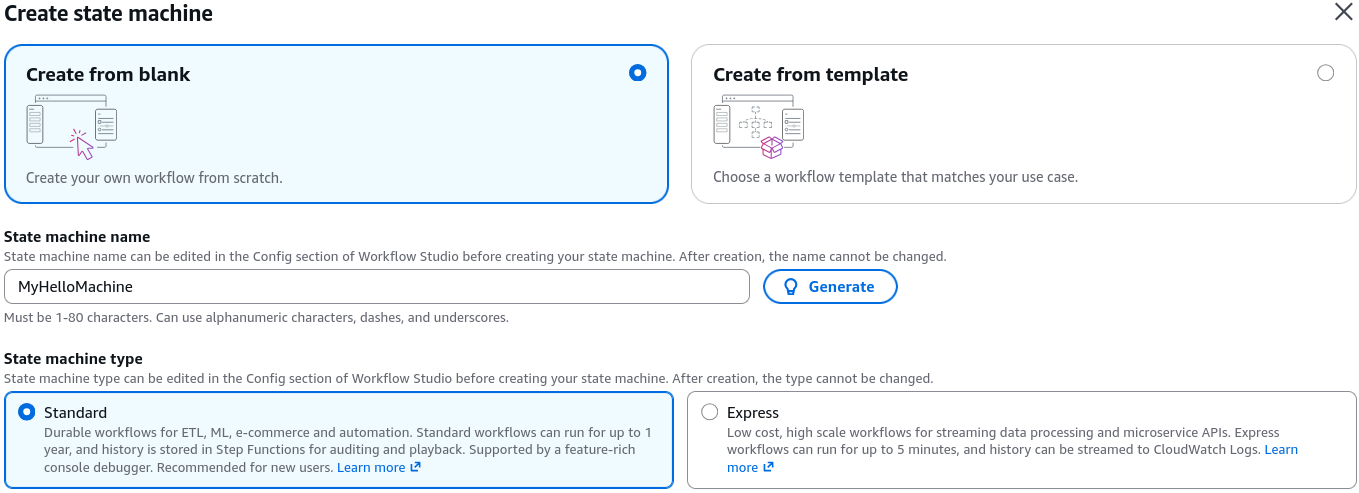
- Spawn a Blank Workspace: Jump over to the AWS Step Functions console ──► hit Create state machine ──► select Blank template.
- Inject the Master ASL Blueprint: Flip the visual toggle over to the Code view pane and paste in your production Amazon States Language (ASL) JSON definition framework:
{
  "Comment": "A Hello World example of the Amazon States Language using Pass states",
  "StartAt": "Lambda Invoke",
  "States": {
    "Lambda Invoke": {
      "Type": "Task",
      "Resource": "arn:aws:states:::lambda:invoke",
      "OutputPath": "$.Payload",
      "Parameters": {
        "Payload.$": "$",
        "FunctionName": "<ENTER FUNCTION NAME HERE>"
      },
      "Retry": [
        {
          "ErrorEquals": [
            "Lambda.ServiceException",
            "Lambda.AWSLambdaException",
            "Lambda.SdkClientException",
            "Lambda.TooManyRequestsException"
          ],
          "IntervalSeconds": 1,
          "MaxAttempts": 3,
          "BackoffRate": 2
        }
      ],
      "Next": "Choice State"
    },
    "Choice State": {
      "Type": "Choice",
      "Choices": [
        {
          "Variable": "$",
          "StringMatches": "*Rendy*",
          "Next": "Is Student"
        }
      ],
      "Default": "Not Student"
    },
    "Is Student": {
      "Type": "Pass",
      "Result": "Yeah!",
      "End": true
    },
    "Not Student": {
      "Type": "Fail",
      "Error": "ErrorCode",
      "Cause": "Rendy the student wasn't found in the output of the Lambda Function"
    }
  }
}
- Wire up the Function Asset: Replace the
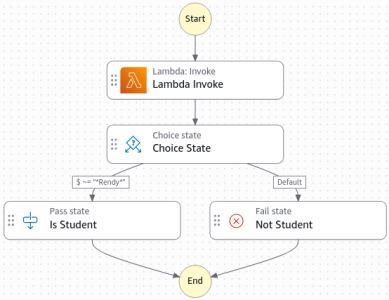
YOUR_LAMBDA_FUNCTION_ARN_HEREplaceholder string with the live Lambda ARN you copied earlier. Hit the Design view tab to visually verify your routing branches are mapped cleanly.
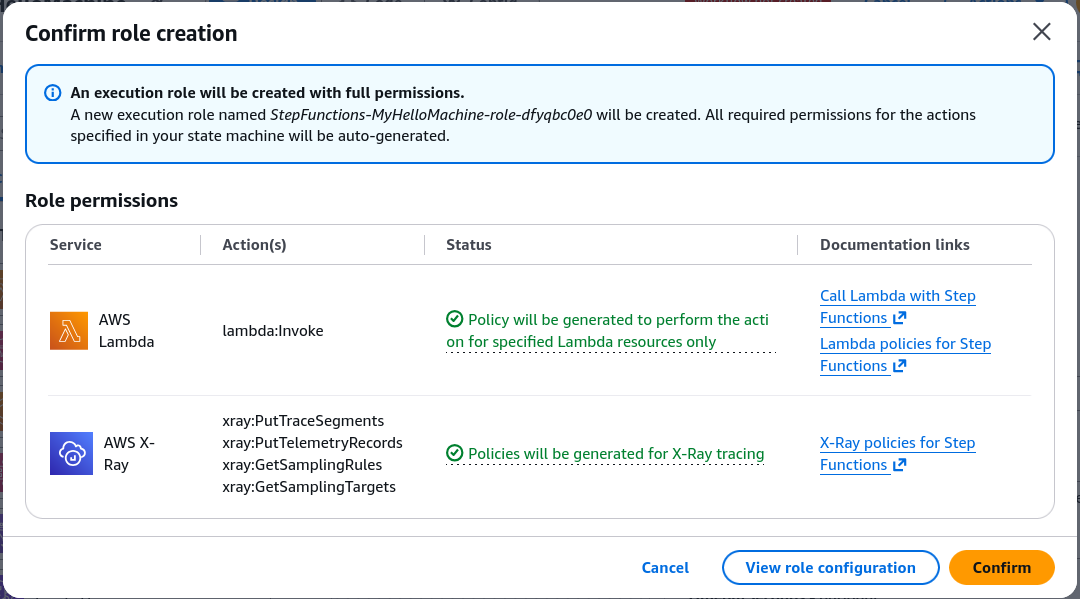
- Confirm Automatic IAM Generation: Hit Create. The console automatically recognizes that your state machine needs to execute a downstream Lambda function, so it auto-generates a secure IAM Execution Role carrying perfect
lambda:InvokeFunctionpermissions out-of-the-box, saving you a massive pile of security configuration noise.
🧪 3. Running the Operational Test Rounds
🟢 Run Track A: The Verified Corridor (The Stephane Rule)
- Hit the Start Execution command button.
- Pass a custom entry JSON dictionary payload matching your structural key expectations:
{ "who": "Rendy Saputra" }
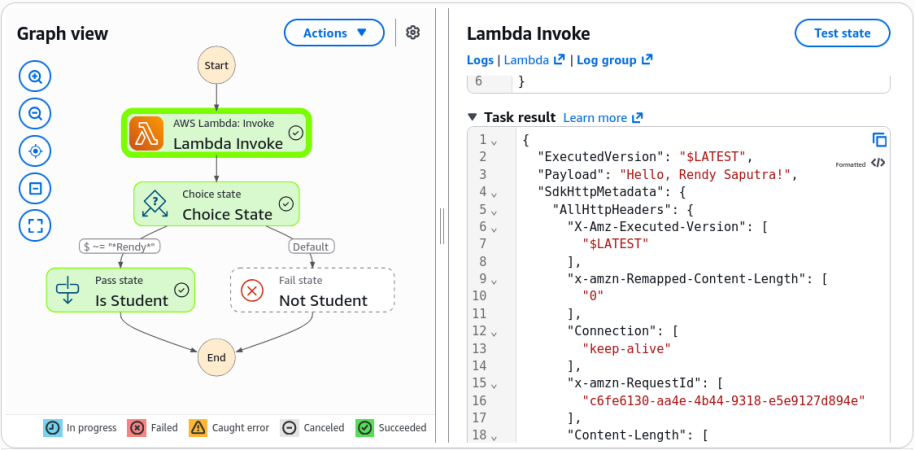
- The Execution Reality: The workflow engine fires the processing task! The Lambda stage successfully executes, passes back
"Hello, Rendy Saputra!", and the Choice State instantly matches the wild-card string value. The right-side corridor lights up a clean Green (Success), landing perfectly inside the "Is Student" pass stage, chief!
🔴 Run Track B: The Auto-Healing Fail Corridor (The John Doe Rule)
- Hit Start Execution a second time from the top bar.
- This time, alter the input target payload parameters entirely:
{ "who": "John Doe" }
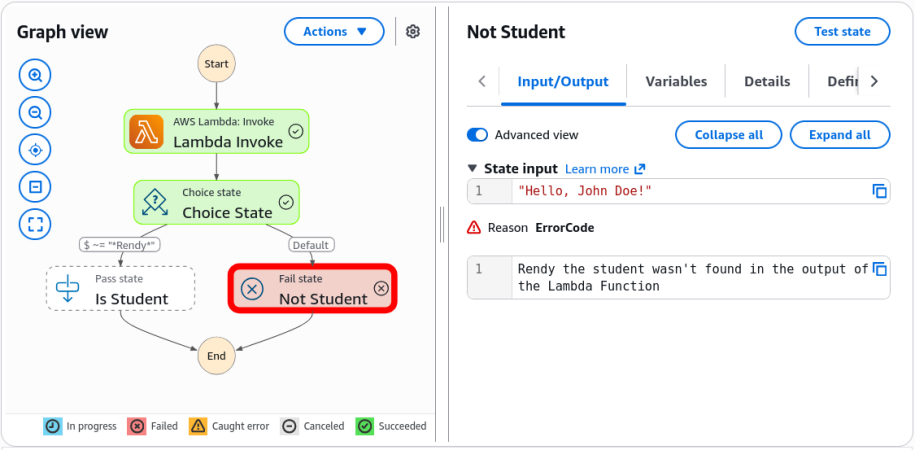
- The Visual Audit: The machine tracks the data delta live. The Lambda task returns
"Hello, John Doe!". The choice evaluator finds zero match for the keyword, bypasses the pass branch completely, and drops the routing path straight down into the Red (Failed) node execution state. The Event History panel shows the exact payload that failed the match.
Exam Tips
- The Payload Syntax Match (
.$): Look closely at the parameters map parameter in the ASL layout:"who.$": "$.who". Remember for scenario code questions that appending.$to a key name explicitly commands Step Functions to treat the value string as a dynamic JSONPath search selector If you drop the.$marker, the machine will pass the literal string text"$.who"down to your Lambda function instead of extracting the real data value parameter.