AWS Directory Services
Bridging your local enterprise user directory straight into your AWS cloud infrastructure is how you unlock smooth Single Sign-On (SSO) and domain joins for your Windows EC2 fleets. 🏎️🏢
When you need an Active Directory (AD) presence inside your AWS VPC layout, you don't have to manually stand up and patch EC2 instances running Windows Server. AWS Directory Service handles the heavy lifting as a fully managed service suite.
Key Takeaways
Let's explore the three core Active Directory flavors, their precise architecture patterns, and the exact decision criteria you need to master for your DVA-C02 notes.
                               ┌────────────────────────────────────────────────────────┐
                               │               AWS DIRECTORY SERVICE                    │
                               └───────────────────────────┬────────────────────────────┘
                                                           │
             ┌─────────────────────────────────────────────┼─────────────────────────────────────────────┐
             ▼                                             ▼                                             ▼
🏢 AWS Managed Microsoft AD                     🌉 AD Connector                                🎈 Simple AD
  • Actual MS Active Directory                    • Pure Gateway Proxy                           • Samba 4 AD-compatible
  • Standalone or Hybrid                          • No cloud user directory                      • Standalone only
  • Supports Trust Relationships                  • Proxies auth to On-Prem AD                   • NO On-Prem AD connection
  • Supports MFA                                  • Supports MFA                                 • NO MFA / Trust relationships
🏢 AWS Managed Microsoft AD (The Full Enterprise Option)
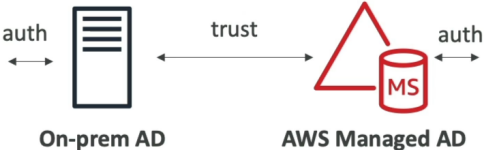
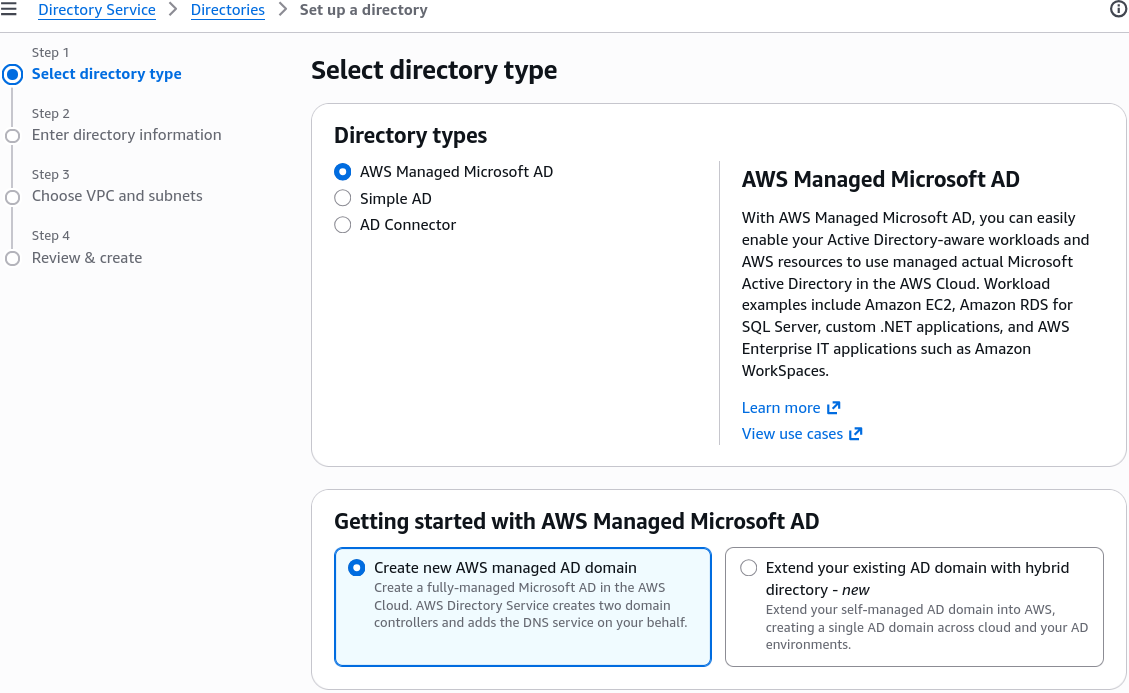
This is a real, fully managed Microsoft Active Directory running actual Windows Server domain controllers directly inside AWS infrastructure.
- Core Architecture: AWS provisions two domain controllers across multiple Availability Zones (AZs) for high availability. AWS handles daily backups, software updates, and domain controller monitoring.
- Hybrid Trust Relationships 🤝: You can create an Active Directory Forest Trust (one-way or two-way) between your AWS Managed Microsoft AD and your local On-Premise Active Directory. This allows your on-prem employees to log in to AWS resources (like WorkSpaces or AWS Management Console) using their existing corporate passwords without replicating sensitive credential hashes!
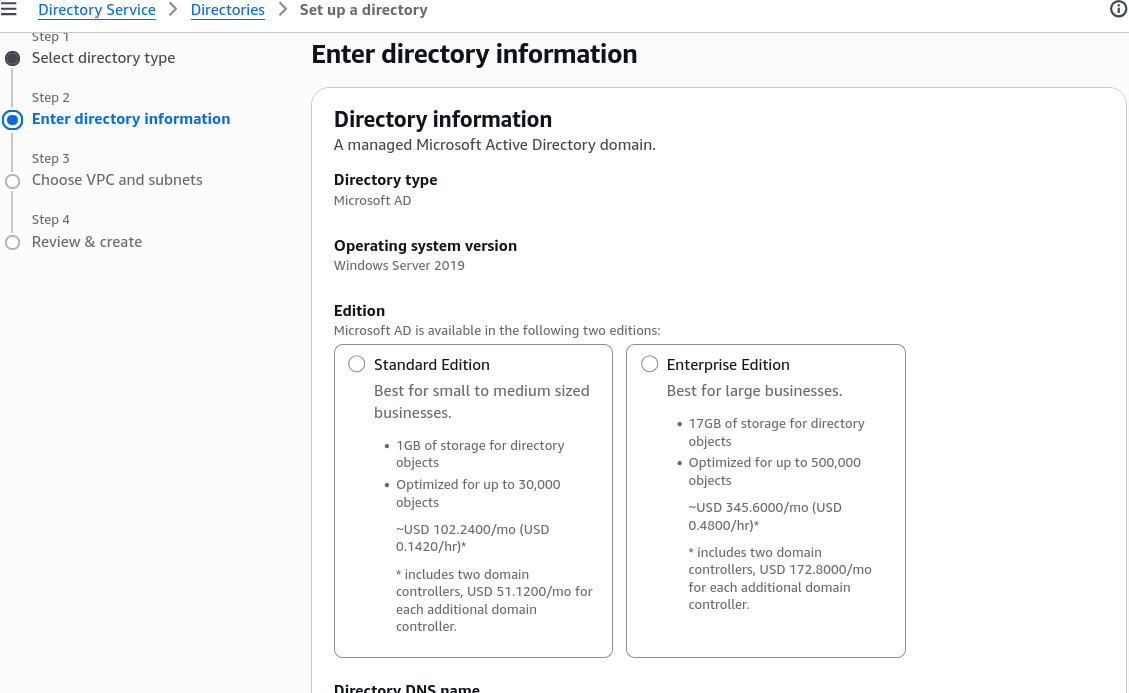
- Key Features: Supports Multi-Factor Authentication (MFA) via RADIUS, schema extensions, and comes in two sizing tiers: Standard (up to 30,000 objects) and Enterprise (up to 500,000 objects).
🌉 AD Connector (The Redirect Proxy Gateway)
If you already have a massive, highly optimized Microsoft Active Directory running in your corporate data center, and you DO NOT want to store or sync user directory data inside the AWS cloud, AD Connector is your go-to play.
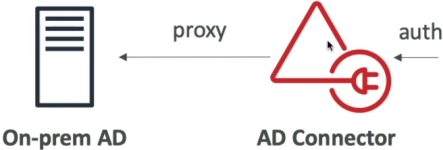
- Core Architecture: AD Connector is NOT a directory itself. It is a lightweight, highly available redirect proxy.
- How It Works: When a user or EC2 instance attempts to log in via AWS, AD Connector catches the auth request and proxies the Kerberos / LDAP validation directly back to your On-Premise Active Directory domain controllers via Direct Connect or an AWS Site-to-Site VPN!
- Key Features: Zero data synchronization or cloud user caching. Supports MFA integration (via RADIUS) and comes in two sizes: Small (up to 500 users) and Large (up to 5,000 users).
🎈 Simple AD (The Lightweight Standalone Option)
If you don't have an existing on-premise Active Directory and just need a lightweight, low-cost directory engine inside AWS to join Windows EC2 instances to a domain or manage basic user accounts, Simple AD is the play.
- Core Architecture: Powered by a managed Samba 4 engine (Active Directory compatible).
- Key Limitations 🚨:
- CANNOT join or establish trust relationships with an On-Premise Active Directory!
- CANNOT integrate with MFA.
- Does not support advanced AD features like dynamic schema extensions or PowerShell remoting.
- Sizing Tiers: Comes in Small (up to 500 users/objects) and Large (up to 5,000 users/objects).

📊 Summary Comparison Matrix
| Feature / Metric | 🏢 AWS Managed Microsoft AD | 🌉 AD Connector | 🎈 Simple AD |
|---|---|---|---|
| Underlying Engine | Actual Microsoft AD (Windows Server) | Gateway Proxy | Samba 4 (AD Compatible) |
| Directory Data Stored in AWS? | Yes | No (Redirects to On-Prem) | Yes |
| On-Premise Trust Relationship? | Yes (Forest / Domain Trusts) | N/A (Direct Proxy) | No |
| Supports MFA? | Yes (via RADIUS) | Yes (via RADIUS) | No |
| Best For... | Hybrid corporate setups, actual Windows AD features | Proxying existing on-prem users to AWS | Cheap, standalone Linux/Windows domain joins |
Screenshots
Exam Tips
- The Zero-Cloud-Directory Proxy Scenario 🚨: If an exam prompt states an organization wants to allow on-premise users to access AWS applications using their existing Active Directory credentials, but strict security compliance forbids storing or caching user credentials inside the AWS cloud—look straight for AD Connector.
- The Hybrid Trust Requirement: If a prompt asks for an Active Directory setup that can host local cloud users while simultaneously allowing federated corporate users from an on-premise domain via a formal forest trust—choose AWS Managed Microsoft AD.
- The Cheap Standalone Directory: If a scenario asks for a low-cost directory solution for a cloud-only app that does not have an on-premise Active Directory and does not require MFA—select Simple AD!