STS Overview
AWS Security Token Service (STS) is the undisputed core engine of temporary access control across the entire cloud. 🛡️
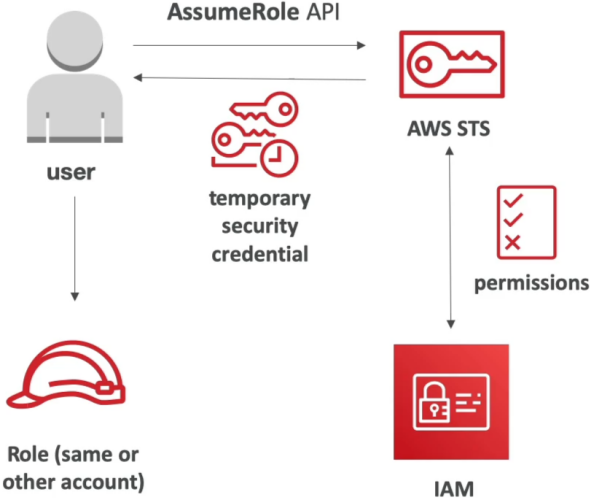
Whenever a user, script, container, or cross-account deployment needs to touch an AWS resource without embedding static, risky IAM access keys inside source code, STS is the service issuing the short-lived credentials.
Key Takeaways
Let’s check the core API methods, session durations, cross-account handshakes, and the high-stakes MFA Policy condition checks you need to know for the DVA-C02 exam.
🧰 The Core STS API Command Matrix
While STS has a vast set of operations, the exam tests four foundational API actions:
| STS API Action | Target Primary Use Case | Key Execution Details |
|---|---|---|
AssumeRole 🪪 | Cross-account access, EC2/Lambda execution roles, local developer CLI switches. | Returns temporary key/secret/session token. Session duration: 15 min up to 12 hours (configurable on the role). |
GetSessionToken 🔐 | Programmatic access forcing Multi-Factor Authentication (MFA). | Designed for IAM users using hardware/virtual MFA tokens. Default session: 12 hours (up to 36 hours). |
GetCallerIdentity 🔍 | "Who am I?" debugging / environment validation. | Returns the Account ID, User/Role ARN, and unique UserId string making the call. Requires zero permissions! |
DecodeAuthorizationMessage 🔓 | Unpacking encrypted AccessDenied error payloads. | Decodes base64 error messages output by AWS CLI/SDK calls to reveal the failing IAM evaluation condition. |
Legacy Exam Note: API calls like AssumeRoleWithWebIdentity and AssumeRoleWithSAML exist for external federated logins, but for web/mobile apps, AWS explicitly recommends routing through Amazon Cognito Identity Pools instead!
🌉 Cross-Account Access (The AssumeRole Pattern)
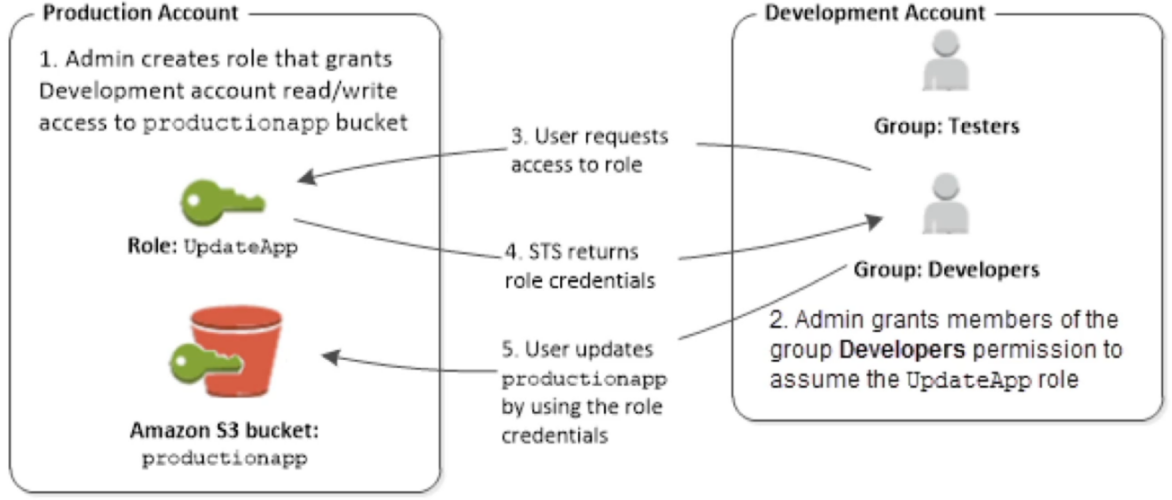
When Account A needs to access resources inside Account B (e.g., a CI/CD runner in Account A deploying code into an S3 bucket in Account B), never pass long-term access keys across the boundary!
📦 ACCOUNT A (Trusting Principal)             🏛️ ACCOUNT B (Resource Owner)
   │                                              │
   ├── 1. Fires sts:AssumeRole ──────────────────►│ 2. Checks IAM Role Trust Policy
   │                                              │    (Does Account B trust Account A?)
   │◄── 3. Returns Temporary AWS Credentials ─────┤
   │                                              │
   └── 4. Calls s3:PutObject using STS Keys ─────►📦 Targets S3 Bucket in Account B
🚨 The Dual-Trust Condition Requirement:
Cross-account access FAILS unless permissions are explicitly granted on BOTH sides:
- Account B (Target): The IAM Role’s Trust Policy must list Account A as a trusted Principal allowed to execute
sts:AssumeRole. - Account A (Source): The IAM User/Role identity policy in Account A must explicitly grant the
sts:AssumeRolepermission targeting Account B's Role ARN!
🔐 Enforcing Programmatic MFA via GetSessionToken
This is a top-tier DVA-C02 validation checkpoint. If an IAM policy demands MFA to perform high-risk API operations (like terminating an EC2 instance), passing standard user access keys won't cut it.
Step 1: The Strict IAM Policy Condition
An administrator attaches a policy enforcing the explicit context condition key:
{
  "Effect": "Allow",
  "Action": ["ec2:StopInstances", "ec2:TerminateInstances"],
  "Resource": "*",
  "Condition": {
    "Bool": {
      "aws:MultiFactorAuthPresent": "true"
    }
  }
}
Step 2: Requesting Temporary MFA Keys via CLI/SDK
The user cannot run aws ec2 stop-instances directly using long-term credentials because aws:MultiFactorAuthPresent evaluates to false. Instead, they call GetSessionToken passing their hardware/virtual MFA device details:
aws sts get-session-token \
    --serial-number "arn:aws:iam::123456789012:mfa/rendy" \
    --token-code "654321" \
    --duration-seconds 3600
Step 3: Trading the Triple-Key Response
STS validates the 6-digit code against the MFA serial number and returns a short-lived credential set containing three elements:
AccessKeyIdSecretAccessKeySessionToken
The developer sets these three environment variables inside their terminal SDK. Because these temporary keys were issued via an MFA verification loop, aws:MultiFactorAuthPresent now evaluates to true, instantly unlocking the ec2:StopInstances API action!
Exam Tips
- The Decryption Error Scenario: If a scenario presents a developer getting a long, encrypted string error message when an API call fails with
AccessDenied, and asks how to read the underlying policy failure—select using theaws sts decode-authorization-messageCLI command. - The Identity Debugging Command: If a deployment script inside an EC2 instance needs to dynamically inspect its own assumed IAM Role ARN and Account ID to set up dynamic S3 paths—look straight for invoking
sts:GetCallerIdentity! - The MFA Enforced API Execution: If a multi-choice question asks how a developer can programmatically execute API operations protected by an
aws:MultiFactorAuthPresent: truecondition—target the answer that callssts:GetSessionTokenwith--serial-numberand--token-code, and configures the resultingSessionTokenalongside the access keys!