CloudFormation - Secrets Manager & SSM Integration
Using CloudFormation Dynamic References to inject SSM Parameters or Secrets Manager secrets directly into IaC templates is how you stop hardcoding sensitive credentials into your code repositories forever. 🏎️🔒
Instead of manually passing secrets or creating custom Lambda backed custom resources, CloudFormation dynamically resolves external parameters at stack deployment time.
Key Takeaways
Let's go over the dynamic reference syntax, the parameter pattern differences, and the two major RDS/Secrets Manager architecture patterns for you to master DVA-C02 exam scenarios.
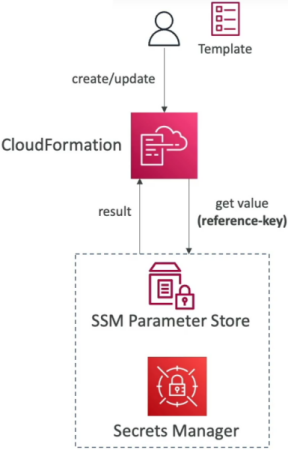
⚡ The Dynamic Reference Resolution Syntax
All dynamic references in CloudFormation use the standard {{resolve:service-name:reference-key}} pattern. CloudFormation resolves these values only during stack create, update, or delete operations.
                               ┌────────────────────────────────────────────────────────┐
                               │           DYNAMIC REFERENCES IN CLOUDFORMATION          │
                               └───────────────────────────┬────────────────────────────┘
                                                           │
             ┌─────────────────────────────────────────────┼─────────────────────────────────────────────┐
             ▼                                             ▼                                             ▼
📄 `ssm`                                        🔐 `ssm-secure`                               🔑 `secretsmanager`
  • Plaintext SSM parameters                     • KMS-encrypted SSM parameters                • AWS Secrets Manager Secrets
  • Syntax:                                      • Syntax:                                      • Syntax:
    `{{resolve:ssm:path:version}}`                 `{{resolve:ssm-secure:path:version}}`          `{{resolve:secretsmanager:secret-id:SecretString:json-key}}`
🛠️ Dynamic Reference Examples
A. Plaintext SSM Parameter (ssm)
Used for plain string configuration data (e.g., retrieving a golden AL2023 AMI ID or S3 Access Control settings):
Resources:
  MyEC2Instance:
    Type: AWS::EC2::Instance
    Properties:
      ImageId: '{{resolve:ssm:/my-app/dev/golden-ami-id:1}}'
B. Encrypted SSM Parameter (ssm-secure)
Used for sensitive data stored in Parameter Store as a SecureString. CloudFormation accesses the value via KMS and injects it into supported resource properties without exposing the actual plaintext value in stack outputs or logs:
Resources:
  IAMUser:
    Type: AWS::IAM::User
    Properties:
      UserName: 'MyAdminUser'
      LoginProfile:
        Password: '{{resolve:ssm-secure:/my-app/dev/db-password:1}}'
C. AWS Secrets Manager (secretsmanager)
Used to retrieve secrets stored as JSON key-value pairs or plaintext strings inside Secrets Manager:
Resources:
  MyRDSInstance:
    Type: AWS::RDS::DBInstance
    Properties:
      DBName: MyRDSInstance
      MasterUsername: '{{resolve:secretsmanager:MyRDSSecret:SecretString:username}}'
      MasterUserPassword: '{{resolve:secretsmanager:MyRDSSecret:SecretString:password}}'
🏗️ CloudFormation & RDS Secrets: Two Architecture Patterns
When managing an RDS or Aurora database alongside Secrets Manager inside CloudFormation, you have two primary deployment patterns:
🔹 Pattern 1: RDS Native Secret Management (ManageMasterUserPassword)
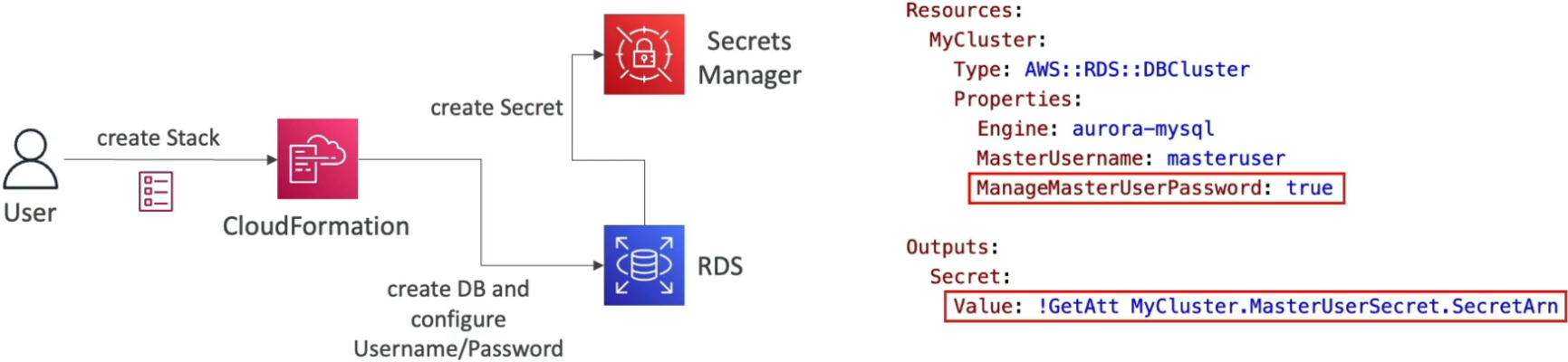
- How it works: You set
ManageMasterUserPassword: trueon yourAWS::RDS::DBClusterorAWS::RDS::DBInstanceresource. - The Power: Amazon RDS automatically creates and manages the secret inside Secrets Manager on your behalf, including automated password rotation!
- Retrieving the Secret ARN: To pass the generated secret ARN to other resources (like a Lambda function), use
Fn::GetAtton the DB resource:
Outputs:
  DatabaseSecretArn:
    Value: !GetAtt MyRDSCluster.MasterUserSecret.SecretArn
🔹 Pattern 2: Template-Managed Secret with Dynamic Reference & Attachment
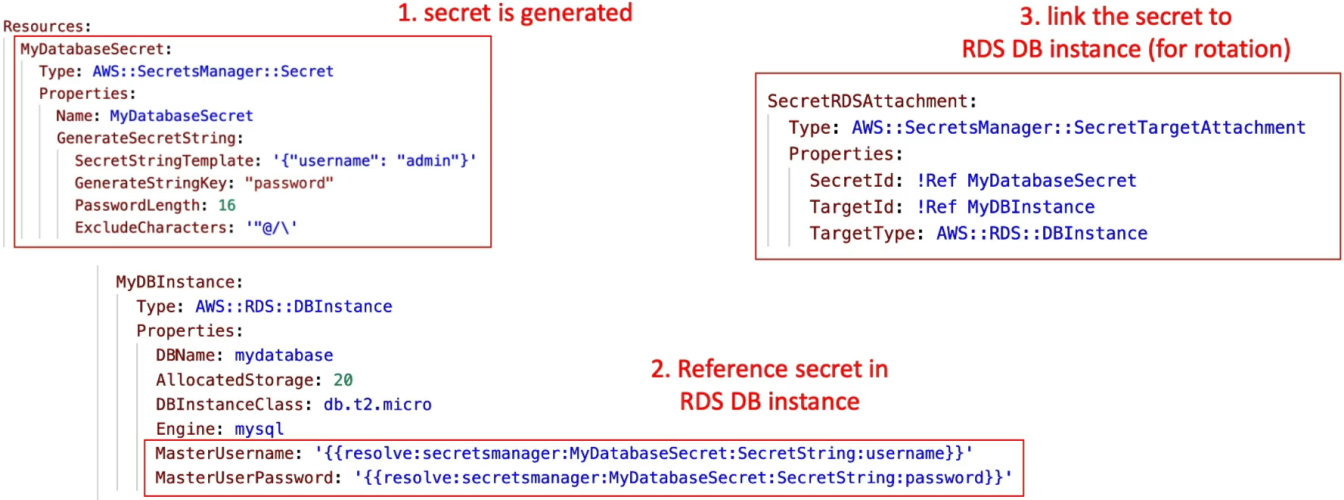
- How it works: You explicitly declare
AWS::SecretsManager::Secretin your template and useGenerateStringKeyto automatically generate a random password payload upon stack creation. - Database Reference: You inject the secret into your
AWS::RDS::DBInstanceusing dynamic references ({{resolve:secretsmanager:...}}). - The Rotation Link: You declare an
AWS::SecretsManager::SecretTargetAttachmentresource to explicitly bind the secret to the RDS instance so Secrets Manager can perform scheduled password updates!
Exam Tips
- The Secret Update Misconception 🚨: Updating the secret value inside Secrets Manager or Parameter Store does NOT automatically trigger a CloudFormation stack update! CloudFormation resolves dynamic references only when a stack operation (create or update) is executed on the template itself.
- RDS
ManageMasterUserPasswordShortcut: If a scenario asks for the simplest, lowest-maintenance way to provision an Aurora database in CloudFormation while ensuring full password rotation via Secrets Manager—select usingManageMasterUserPassword: trueand fetching theSecretArnviaFn::GetAtt!